We remain fully operational. Our teams are working around the clock to ensure your deliveries continue safely.

قم بتنزيل التطبيق


معلومات عنا
حقوق الطبع والنشر © 2024 Desertcart Holdings Limited
قم بتنزيل التطبيق
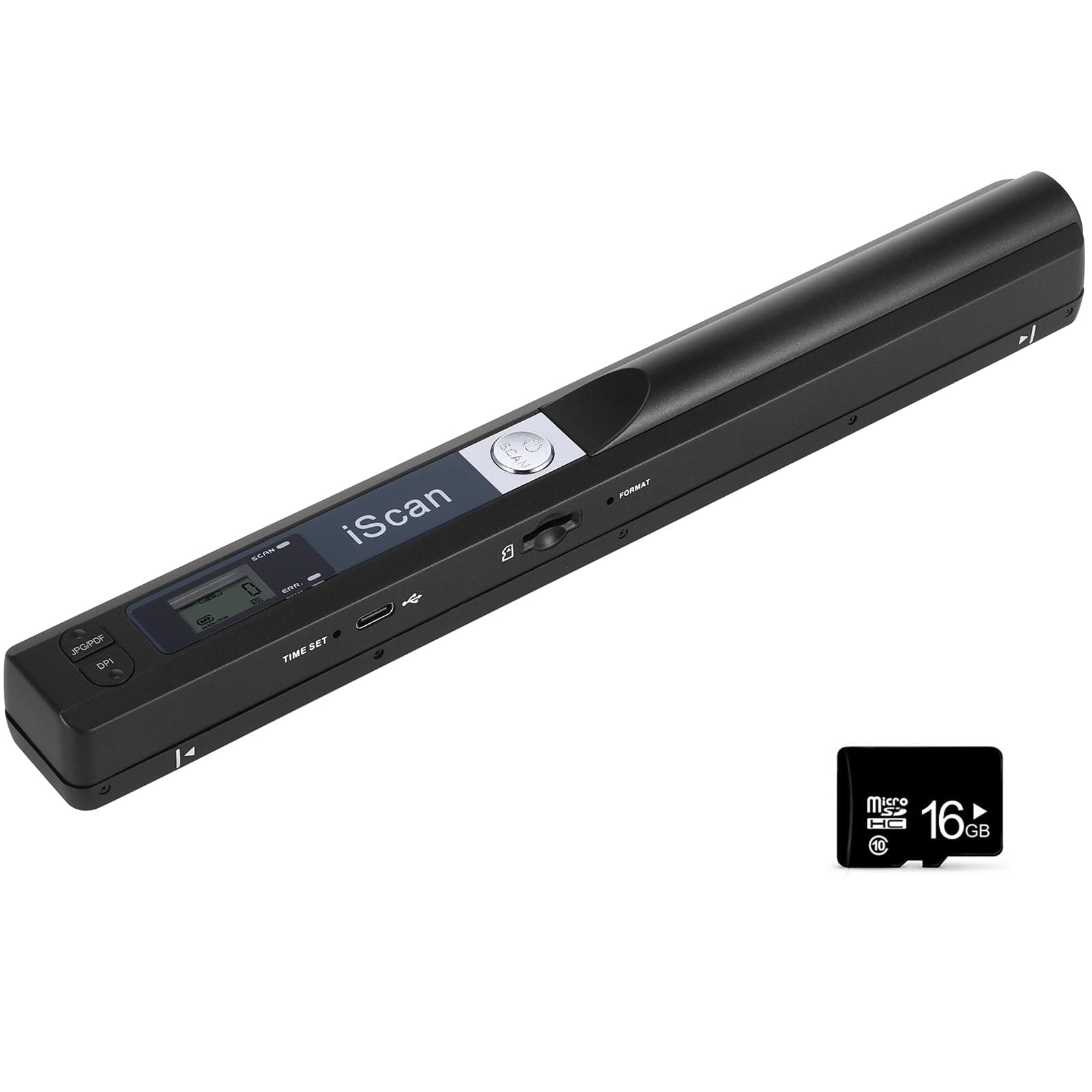
📄 Scan Smarter, Work Faster — Your Portable Office Essential
The AOZBZ Portable Document Scanner delivers professional-grade 900 DPI scans in a compact, handheld design. Compatible with Windows and Mac OS, it supports up to 32GB Micro SD storage and offers plug-and-play USB 2.0 connectivity. Perfect for professionals needing quick, high-quality scans of documents and photos in PDF or JPEG formats, it’s the ultimate tool for efficient, mobile document management.


| ASIN | B07PPKW2XD |
| Best Sellers Rank | 11,238 in Computers & Accessories ( See Top 100 in Computers & Accessories ) 8 in Document Scanners |
| Brand | AOZBZ |
| Brand Name | AOZBZ |
| Color Depth | 24 bits |
| Connectivity technology | USB |
| Country of Origin | China |
| Customer Reviews | 3.6 out of 5 stars 93 Reviews |
| Item Dimensions D x W x H | 2D x 25.5W x 2.5H centimetres |
| Item Weight | 80 Grams |
| Item weight | 80 Grams |
| Light Source Type | LED |
| Manufacturer | AOZBZ |
| Media Type | Paper, Photo |
| Minimum System Requirements | Windows XP/7/Vista/Mac OS 10.4 or later |
| Network Connectivity Technology | USB |
| Optical Sensor Technology | CIS |
| Paper Size | A4 |
| Product dimensions | 2D x 25.5W x 2.5H centimetres |
| Resolution | 900 |
| Scanner Type | Document, Photo |
| Scanner type | Document, Photo |
M**R
Does the job and this is how to set the date and time
Bought this to scan ancient documents and it makes the scanning easy and the quality is just what is required. It took me a while to work out how to set the time and date, so here is how to do it... 1. Turn the unit on by the long-press of the top silver button 2. Insert a paperclip into the Time hole on the side to click it once You now have 5 sections to complete, indicated by the number of the left.. 1=Year (so 1 25 for 2025) 2=Month (so 2 10 for October) 3=Day (so 3 15 for the 15th of selected month and year) 4=Hour (so 4 18 for 6pm) 5=Minutes (so 5 15 for 15 minutes past the hour) and you progress to each 'section' by pressing the silver button on top. When you've finished, use the paperclip in the time hole again.
M**.
Very useful addition to preserve quality book bindings
Purchased this hand held "Wand" scanner to reduce the rist of damaging book bindings when I need a copy of a page to work from to prevent the original from damage. I used to use a Fuji camera with a text option, but sadly the electronics failed - so use this in it's place as most of what I need is now in A4 format or smaller. The scanner has an advantage in that it has a choice of PDF or JPEG file format and each in 3 resolutions - so covers most thimgs. The enclosed instruction are minimal (still can't work out how to set the date!) but generally have found it easy to use. Remains to be seen how long lived/reliable it will be.
M**A
Don’t buy
Does not work. Err light on constantly. Old stock. Tried everything to make it work. Came with a small CD ROM disc LOL.
D**S
OK for document copying - useless for faithful photo scanning
The handheld scanner is small and convenient enough for portability, and works to an 'okay' standard if all you want to do is scan documents. The resolution is high enough for reading text by eye, but I did not get as far as testing with OCR, which I suspect may be affected by the main issue: it is almost impossible, by hand, to faithfully scan a photo, because a human cannot pass the scanner across a photo without variation to the angle and speed of the pass, consequently people and objects in scanned photos look as if they are reflected in a distorted mirror in a hall of mirrors at a funfair. I tried many times, but could not get an acceptable reproduction of a photo, which argues with the manufacturer's demonstration video in we are shown a user passing the scanner across photos in magazines at intermittant speed - quicly, slowly, even stopping half way through - but nonetheless able, it seemed, to upload a perfect result (as if from a flatbed scanner), a misleading representation. In real use, the hand-held scanner is simply not acceptable as a solution for photo scanning. Furthermore, the setup process for the scanner is problematic because (A) the functionality of the scanner is not as described in the instructions (for example, you are told to use a 'format' button, to format the memory card, but there is no such button, and the small LCD screen does not respond during setup as you are old it will) according to instructions which (B) are in a form of English translated from Chinese which is utter gibberish and absolutely impossible to understand or to follow, so that you have no option but to proceed by trial and error. I bought the hand-held scanner in the hope that I would not need a flatbed scanner but it proved only that there is no alternative to a flatbed scanner. Disappointed and unimpressed.
H**H
SD CARD
Love that it's a portable device but when I put the SD Card in, it keeps saying that it's full even after I check it on my mac and it's empty. Still haven't figured it out.
D**H
Excellent product, works perfectly
I needed a small scanner for scanning documents abroad. I don't have access to a flatbed scanner so this seemed perfect. It really is. You need to practice your scanning technique and I use a book or something else with a straight edge to guide be down the scan, but the results are excellent. I would recommend this to anyone.
J**S
Perfect potable scanner!!
Brilliant portable scanner that's easy to use. Set up was easy with good instructions. It scans as JPEG or PDF in B&W or colour. Also scans in 3 different DPI settings!
D**S
Moderate quality scanner
This item really isn't very good - OK for scanning print, but don't expect a high quality scan of an image or detailed line drawing.
ترست بايلوت
منذ يوم واحد
منذ أسبوعين