🔌 Power your productivity, anywhere, anytime.
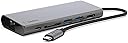
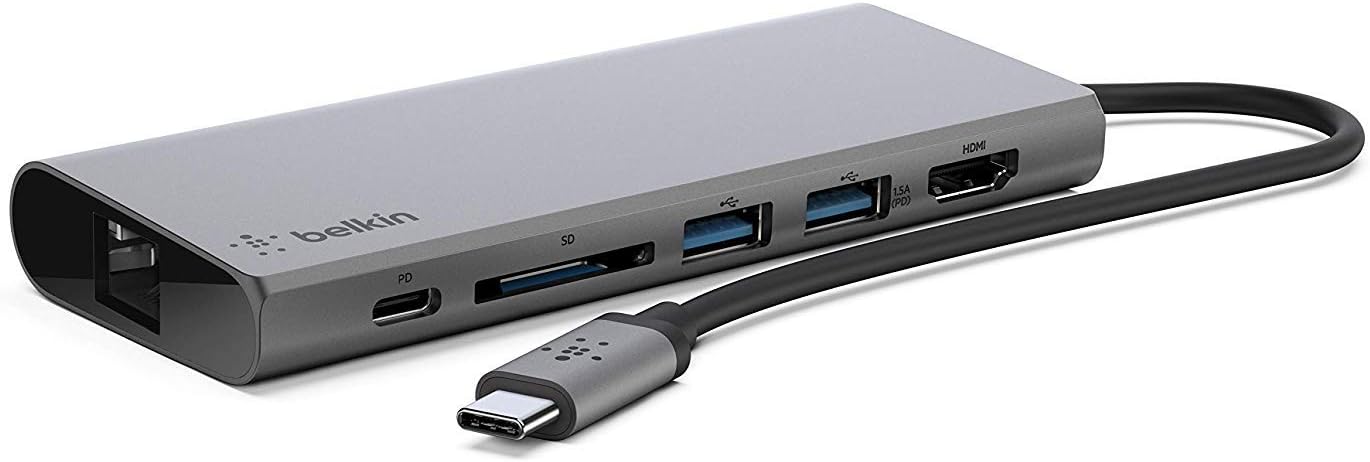
The Belkin USB-C Multimedia Hub is a compact, metal-encased docking station designed for USB-C laptops and tablets. It features six versatile ports including USB-A, USB-C, HDMI (4K 30Hz), 1Gbps Ethernet, and SD card slots, supporting up to 5Gbps data transfer speeds. With 60W pass-through charging, it ensures your device stays powered while expanding connectivity. Ideal for professionals seeking a reliable, portable all-in-one solution to create seamless workstations anywhere.


| ASIN | B07Q3HP6KQ |
| Additional Features | Fast Charging, Powered |
| Best Sellers Rank | #7,625 in Computers & Accessories ( See Top 100 in Computers & Accessories ) #605 in Laptop Docking Stations |
| Brand | Belkin |
| Built-In Media | 1 x Belkin USB-C Multimedia Hub |
| Compatible Devices | iPad Pro (12.9) 4th Gen iPad mini 6th Gen MacBook Pro 13 M1 (2020) MacBook Air 13 M1 (2020) Mac mini M1 (2020) |
| Customer Reviews | 4.5 out of 5 stars 3,435 Reviews |
| Data Transfer Rate | 5 Gigabits Per Second |
| Enclosure Material | Metal |
| Global Trade Identification Number | 00745883708673 |
| Hardware Interface | Ethernet |
| Item Dimensions L x W x H | 10.9"L x 1.95"W x 0.59"H |
| Item Height | 0.59 inches |
| Item Weight | 4.16 Ounces |
| Manufacturer | BELKIN COMPONENTS |
| Number of Ports | 6 |
| Operating System | Mac OS 9, Windows 10 |
| Total Usb Ports | 3 |
| UPC | 745883708673 |
| Unit Count | 1.0 Count |
| Warranty Description | 1 year manufacturer |
K**K
Wired vs Wireless connectivity firmware setting
Great piece of hardware – exactly what I’ve come to expect from Belkin products. Just a note on the power passthrough and wired network connection. I’m running Linux on a newer model Dell XPS laptop with two USB-C and no other ports. This keeps the laptop amazingly thin but necessitates a device like this for USB, wired network, external video, etc. I was having trouble getting a wired network connection with the device even with wireless disabled in the OS when I discovered a setting in the system firmware (on the laptop) to automatically disable wireless if a wired connection was detected. The wired connection worked great after that and since it is a firmware setting, some may experience the same issue on a Windows based PC. When transferring larger files between devices on my home network, the wired option is 4-5 times faster than even a solid 5ghz wireless connection on the same laptop. Also, when using the USB-C power pass-through, the firmware popped up to tell me I was using an underpowered device and that the system may not achieve peak performance (words to that effect). I’ve noticed no performance impact and the battery charges just fine. All ports on the device have worked just fine with no need to install drivers. Highly recommend.
R**R
ETHERNET PORT STOPPED WORKING!
Fine to start with, but after about 6 weeks, sometimes the ethernet seemed not to connect ... I would fiddle around, reboot in case it was the laptop, and it would start again. But now, after only 5 months, absolutely nothing! The ethernet cable lights go on when plugged in, but no connection actually happens. For diagnostics, I tried using an ethernet to usb adapter, and then route it through a usb port in the hub, but still not working. When I took this Belkin hub out of the equation, and just put the ethernet cable + adapter directly in to the laptop, ethernet works just fine. So it's not the ethernet cable nor the laptop's port. VERY disappointed, as Belkin was a pricier option, but I invested because it's vital to my work that my internet is strong and steady!
A**H
Worth the cost. Very SOLID. Not at all cheap!
I needed an HDMI port for my new monitor to plug into my Macbook Pro that could handle 4K and and upload photos from my CANON DSRL very quickly. I do film editing on the MAC. I really didn't want the Ethernet port but this one had the best ratings. I was hesitant to drop $100 on this but I'd just spent $1000 on the monitor so didn't wanna go cheap and undermine the monitor's strengths. When I opened up the package I was struck by how weighty this device is! You rarely feel anything like this anymore. Everything feels cheap and flimsy. Later I realized that this also works with my work Surface laptop. I didn't realize the USB Type C 3.1 was something both the MAC And SURFACE used. I also plan on using the monitor for work to help my neck/posture so this adapter will be used much more than planned. I highly recommend this.
A**R
Pretty good but…
Gets really hot and the USB ports are too close together for some plugs. Also, I couldn’t figure out what the USB-C port on the end is for. Except for that, the ports do all work
E**K
Suits it's purpose.
I've had mine since 2020. Mostly I use it to connect low power peripherals so I'm not plugging in an additional 60W. So the angle I take on this is how do the ports hold up? And so far so good. Even after 4 years of heavy use, everything is tight. I have not had a single problem and I can be a bit hard on my gear. I'm swapping out a lot of different low power usb devices and am having no problems.
V**R
AN ESSENTIAL PART OF OUR LIVESTREAM SYSTEM
At the church where I work and minister as Director of Music and Liturgy (see photo), I also oversee our parish’s sound and livestream systems. Our livestream system uses the Teradek Live:Air app on an iPad Pro, and this adapter is used to link the church’s internet router with the iPad. We had recently suffered through numerous disconnects during our Masses since we were running everything wirelessly by relying on our WiFi extenders — we knew something had to change. So, we invested in an additional Ethernet cable, as well as changed the setting on the master extender from “Router” to “Access Point.” Doing so, along with connecting the iPad to the Ethernet via this adapter, has made all the difference — no more disconnects whatsoever! We also still use the WiFi extenders for the additional cameras that are placed throughout the church. Highly recommended if you need a hardwire connection of your device to the internet!
U**L
HORRID CUSTOMER SERVICE
I got this product so I could work from home during the pandemic, as a mental health care provider. From the beginning, my video calls were being dropped. I spent dozens of hours trying to identify the problem, calling my internet provider, my video platform provider, and my laptop company. After none of them could identify the problem, we realized it was a defect in THIS UNIT. But, because it was after the 30 day return policy, they are refusing to replace it. I understand the policy, but I also expect a company to stand by its product, and replace defective units if discovered within a reasonable period. 30 days is not always adequate to discover a defect. I have asked repeatedly to have it replaced, and get the answer that they "cannot" replace it due to their policy. Let's be clear, they ALWAYS have the option to override a policy, so they are CHOOSING not to stand by their products. I'm going directly to Belkin now, but it should have been a simple Amazon seller replacement.
A**M
Good Product with a Solid Build
I purchase the Belkin dongle after my previous VAVA dongle's Ethernet adapter stop clasping the cable tightly to make a solid connection. The Belkin feel well built; more solid that the VAVA. It is both thicker and slightly heavier than the VAVA , but its size allows for a full Ethernet port without the retractable opening that broke on my previous device. After the frustration with the retractable Ethernet port, I am very glad to have this one as it does not have this potential failure point. After a few amateur tests, the USB and SD Card speeds are comparable to my old dongle as well. Good purchase.
ترست بايلوت
منذ أسبوع
منذ شهرين