Desertcart purchases this item on your behalf and handles shipping, customs, and support to KUWAIT.
🔐 Lock in convenience and control—because your home deserves smarter security.
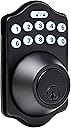
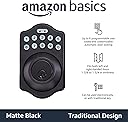
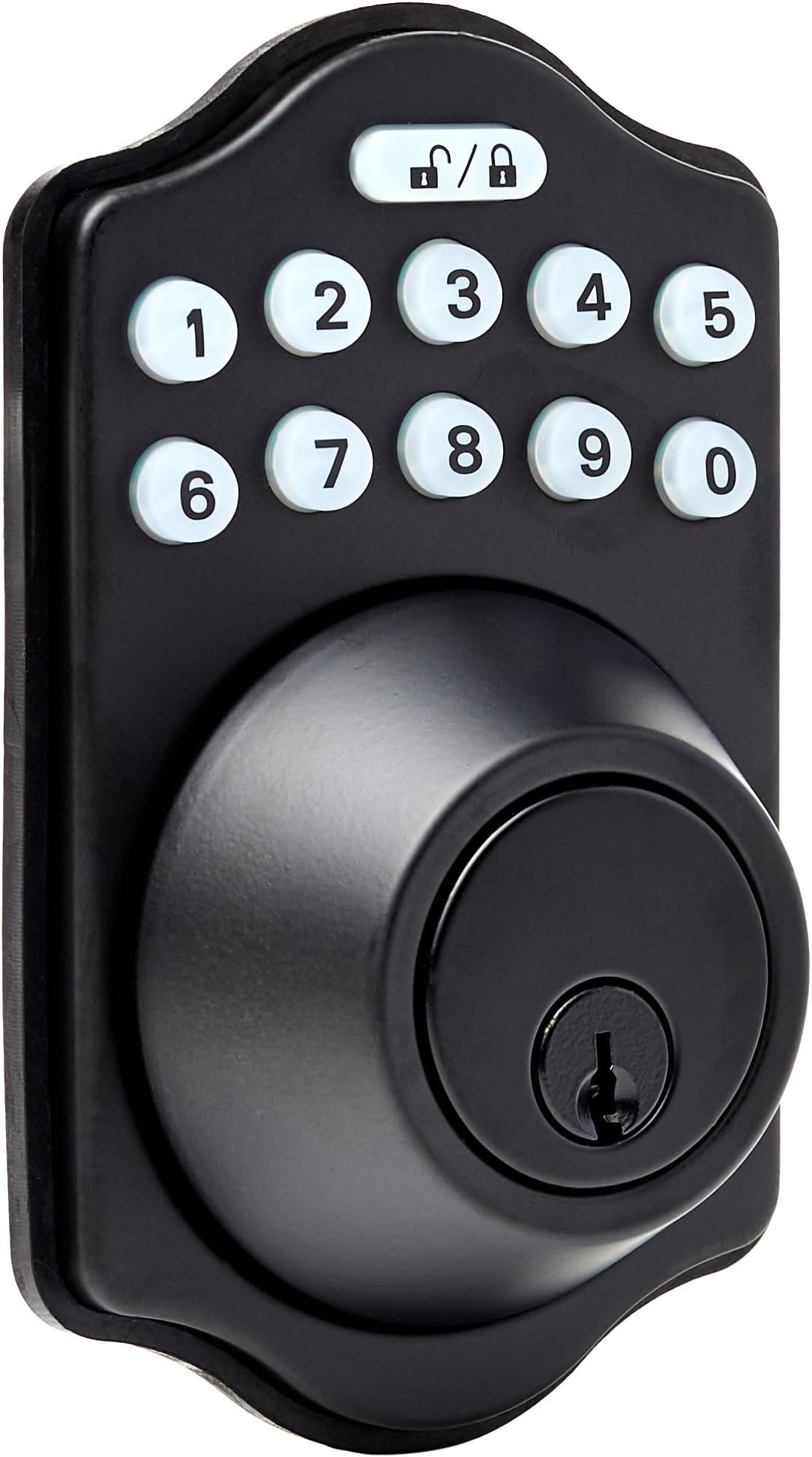
The Amazon Basics Electronic Keypad Deadbolt combines traditional design with modern technology, offering keyless touch-control entry, customizable user codes, and an automatic locking feature. Compatible with standard door sizes and finished in matte black, it provides versatile dual access options for enhanced residential or commercial security.


| ASIN | B07J4VLVPF |
| Additional Features | ['Keyless'] |
| Best Sellers Rank | #2,584 in Our Brands ( See Top 100 in Our Brands ) #45 in Deadbolts |
| Brand | Amazon Basics |
| Brand Name | Amazon Basics |
| Color | Matte Black |
| Control Method | Touch |
| Controller Type | Hand Control |
| Customer Reviews | 4.1 out of 5 stars 11,622 Reviews |
| Finish Types | Matte Black |
| Global Trade Identification Number | 00193598101164 |
| Included Components | screw pack, latch, strike and keys |
| Item Dimensions | 9.05 x 6.13 x 2.99 inches |
| Item Type Name | Traditional Electronic Keypad Deadbolt |
| Item Weight | 0.94 kg |
| Item dimensions L x W x H | 9.05 x 6.13 x 2.99 inches |
| Lock Type | Keypad |
| Manufacturer | Amazon |
| Manufacturer Part Number | PL14910 |
| Material | Metal |
| Material Type | Metal |
| Model Name | PL14910 |
| Model Number | PL14910 |
| Number of Items | 1 |
| Number of Pieces | 1 |
| Recommended Uses For Product | residential and commercial door security |
| Shape | Rectangular |
| Special Feature | ['Keyless'] |
| Style Name | Traditional |
| UPC | 193598101164 |
| Unit Count | 1 Count |
K**G
Good electronic deadbolt with a Kwikset cylinder
Got this to make it simpler to get in and out of the back door. I wanted a lock that used a Kwikset keyway so that I could re-key it to use the same key as all the other locks on our house. This has a cylinder that uses a KW1 key blank, so it fit the bill. The half of the lock on the inside of the door is enormous. Has to be to hold the 4xAA batteries and motor actuator, but it takes some getting used to after looking at an ordinary deadbolt for years. The keypad is quite thin. I've used other keypad locks that stood off the door far more than this one does. The listing pictures show a marked curve to the keypad, but it's much more subtle in person. This is a good looking lock. Pretty easy install. The Amazon bolt dropped into the hole where the old Kwikset bolt was without modification. Screw holes even lined up. It was a little tricky to mount the keypad and get it screwed on, but manageable. Everything lined up and went together easily. Took about 15 minutes. Since this lock does not use Bluetooth or Wi-Fi, adding the new codes is a bit contorted. You have to type programming codes into the keypad pretty quickly. If you take too long, it will reset, and you'll have to start over. Once I got it figured out, all went smoothly. If you somehow screw things up, there is a reset button in the battery compartment that puts it back to factory settings. Works great now that everything is set up. One touch to lock (I have auto lock turned off), and a code to open (same as programming - type it quickly or the lock will reset and you'll have to start over.) The lock operates smoothly and quietly. In fact, quieter than the old keyed deadbolt. Locking and unlocking from the inside is a simple twist of the knob, same as a keyed deadbolt. So far, I like the lock quite a bit. If it stands the test of time and keeps working, I'll consider it a success.
J**A
Installation is straightforward but there is a "gotcha".
We ordered this lock to replace a key deadbolt on our people access door for the garage. Installation was straightforward and all of the parts fit in the existing door cutouts. There was one "gotcha" though that caused me to have to take the lock apart after installation. The rectangular rod that extends from the key cylinder through the deadbolt to the electronic lock can spin 180 degrees. If you don't have it oriented correctly during installation, the installed lock won't work. In particular, you might not be able to remove the key when the door lock is open. The electronic lock won't work at all and you will get "3 beep" failures. This is all due to the fact that the rod was installed in the "locked" orientation when the deadbolt is in the "open" orientation or vice versa. Disassembling the lock and spinning the deadbolt solved the issue. This is probably not a feature of this lock but of all deadbolt cylinders. I just don't install very many of them.
P**F
If it was only easy to program it would deserve that 5th star!
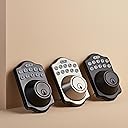
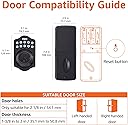
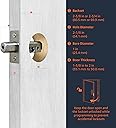
I recently purchased the Amazon Basics Traditional Electronic Keyless Keypad Deadbolt Door Lock, and I couldn't be more satisfied. The installation process was straightforward, requiring only a screwdriver and about 15 minutes of my time. The lock fits standard door preparations, accommodating door thicknesses of 1-3/8 to 1-3/4 inches, making it versatile for various door types . The only reason this does not get a 5th star is because the programming just doesn't seem to work right - I bought this same lock 7 years ago and it just died - I could never program that one and this one is no different. The lock's design is sleek and modern, and it comes in various finishes to match different door styles. I opted for the Brushed Nickel finish, which complements my home's aesthetic beautifully . In terms of performance, the lock operates smoothly and reliably. The keypad is responsive, and the motorized deadbolt engages securely every time. While some users have reported issues with battery life, I have not encountered any problems thus far . Overall, this lock offers excellent value for the price. It's a cost-effective solution for those seeking keyless entry without sacrificing quality or security. I highly recommend the Amazon Basics Traditional Electronic Keyless Keypad Deadbolt Door Lock to anyone in the market for a reliable and stylish keyless entry system.
S**M
Excellent keyless deadbolt
Item was exactly as advertised. Easily installed and worked perfectly. Highly recommended 👍
E**L
Amazon AI CS is s extremely deficient
I like this a lot until I was informed of by Amazon of a defect. I've followed the instructions provided by Amazon to correct this defect but unfortunately it failed multiple times. Now I'd either like a replacement that isn't defective or my money's back but Amazon CS AI can't comprehend my request nor provides an option. Real people would understand... I can't just remove the lock to my front door without a replacement on hand to replace. Great story to be spread about AI and this suppliers lacking in CS. AmaZon please respond with a legit resolution other than deleting my review. Much appreciated.
C**A
Decent quality for the price. Will buy more.
Been using it for a month now and it’s been working great. Installation was fairly easy. Programming is a little odd sometimes. Some entries have to be done with the deadbolt “locked/engaged” and others have to be done with it “unlocked” and it can be confusing to remember which is which. Other than that, the lock itself seems to be good quality.
J**C
LOVE this keyless entry lock
This is the 3rd one I have bought. I have one on all my doors. Easy to install and fit into my hole perfect. Easy to use and makes me feel more secure. I love having a keyless entry. Makes it so much easier then to have to look for the right key.
J**L
My instructions were garbage. See below…
If your instructions don’t work, it’s not you, it’s the wrong instructions and they’ll NEVER WORK. I worked on this simple lock for HOURS with no avail!!!! One of the reviews used instructions from Kwikset but lacked the part for deleting the factory programming code. Here’s the FULL INSTRUCTIONS: here’s how to run the door handing identification process on your AmazonBasics Electronic Deadbolt: On the keypad, enter the preset Programming Code (0000). Next, press the Unlock / Lock button. Press 0, then press the Unlock / Lock button. You’ll hear the motor of the lock run, then stop after a few seconds, indicating the door handing identification process is complete. So that’s all you need to do to teach the lock the orientation of your door (door handing identification). How to Change the Default/Existing Programming Code on Your AmazonBasics Electronic Deadbolt? So after performing the door handing identification, the next thing you want to do is change the default Programming Code. As you probably know, this lock comes with a 4-digit default Programming Code (0000), and you’ll need to change the default code to ensure security. To change the default/existing Programming Code on your AmazonBasics Electronic Deadbolt, follow the steps below: Enter the default Programming Code (0000) and press the Unlock / Lock button. If you’ve previously changed the Programming Code, enter your current Programming Code and press the Unlock / Lock button. Press key 4, and then press the Unlock / Lock button. Enter a new Programming Code (4 digits), then press the Unlock / Lock button. If the lock flashes green twice and beeps twice, it means the operation is successful. So the new Programming Code is now in effect, and you can use it to program other functions in the lock. Deleting the Default User Code Like the default Programming Code, the lock also comes with a default User Code (1234). Note that Programming Code differs from User Code. Programming Code is used to put the lock in programming mode, while the User Code is used to unlock the lock via the keypad. So you’ll need to delete the default User Code to prevent unauthorized access to your home. Here is how to delete the default User Code on your AmazonBasics Electronic Lock: Enter your Programming Code and then press the Unlock / Lock button. Press 2, then press the Unlock / Lock button. Enter the default User Code to be deleted (1234) and press the Unlock / Lock button. This will delete the default User Code. Note: You can use this method to delete any existing User Code on your lock, including the ones you created. You’ll only need to enter the code you want to delete in the last step—as you can see above. More so, you can delete all existing User Codes in your lock at once. Here’s how to do that: Enter your current Programming Code and press the Unlock / Lock button. Press key 3, and then press the Unlock / Lock button to complete the process. The lock will flash green twice, followed by two beeps, showing that all existing User Codes have been deleted. How to Add New User Codes on Your AmazonBasics Electronic Keypad Deadbolt? After deleting the default User Code, the next thing you want to do is create new User Codes. Note that you need to create User Codes to be able to unlock the lock via the keypad. So here’s how to add a new User Code: Enter your Programming Code and press the Unlock / Lock button. Press key 1, and press the Unlock / Lock button. Enter a new User Code (4 to 10-digit number) and press the Unlock / Lock button. The lock will flash green twice, followed by two beeps, showing that the new User Code is now in effect. Repeat the steps to add more User Codes. Note that the lock allows you to store only 10 User Codes at a time. If you’ve added up to 10 codes, you’ll need to delete one to add a new code. How to Disable/Enable All User Codes on Your AmazonBasics Electronic Deadbolt? If you don’t want anyone you shared User Codes with to unlock the lock, you can simply disable all the User Codes. That is, the lock can’t be unlocked with a User Code during this time. To disable all User Codes on your lock, follow the steps below: Enter your Programming Code and then press the Unlock / Lock button. Press key 8, then press the Unlock / Lock button. To enable all User Codes, repeat the steps above. How to Create a One-time User Code on Your AmazonBasics Electronic Deadbolt? A one-time User Code is used just once. That is, the code expires once it is used to unlock the lock. You can create a one-time User Code for a serviceman or any guest you just want to give one-time access to your home. That said, here’s how to create a one-time User Code: Enter your current Programming Code and press the Unlock / Unlock button. Press key 9, then press the Unlock / Lock button. Enter a one-time User Code (4 to 10 digits), then press the Unlock / Lock button. Enabling/Disabling Auto-Lock This AmazonBasics Electronic Deadbolt comes with the auto-lock feature that automatically locks the lock after a few seconds (when the door closes). However, this feature is disabled by default, and you need to enable it to get it working. Here’s how to enable auto-lock on your AmazonBasics Electronic Deadbolt: Enter your current Programming Code and press the Unlock / Lock button. Press key 5, then press the Unlock / Lock button. This will enable auto-lock in your lock. So the lock will lock automatically after 30 seconds of closing the door. To disable auto-lock, repeat the steps above. And if 30 seconds delay time is not okay for you, you can set it to your preferred delay time. Here’s how to do that: Enter your Programming Code and press the Unlock / Lock button. Press key 6, and then press the Unlock / Lock button. Enter delay time (10-99 seconds) and press the Unlock / Lock button. How to Factory Reset Your AmazonBasics Electronic Deadbolt? If you have some little issues with your lock, such as lost/forgotten Programming Code, you can reset the lock and then use the default Programming Code to reprogram it. Note that this action will permanently delete all your custom settings, meaning you have to start all over again to program the lock. That said, here’s to factory reset your AmazonBasics Electronic Keypad Deadbolt: Remove the battery cover to find the Reset button (a round button labeled “R”). Next, press and hold the button (for about 6 seconds) until you hear three beeps. The three long beeps show that the reset is successful. Next, perform the door handing identification to ensure optimal operation (see how to perform door handing identification above). You’re welcome. ;)
B**Y
7 years later and still works great!
Easy to install and use. We bought this in 2019 and have had no issues whatsoever, 7 years later and still going strong, no complaints!
A**R
Garantía de por vida
La mejor de todas
D**R
Good unit but instructions fail to tell you how to unlock
Important... Might be obvious to some people, but the USER CODE UC is the code you use to unlock the door, not the PC Programming Code. Despite being pretty easy to install, there's nothing in the instructions on how to actually lock/unlock the door, or which code is which. It kind of implies that each user gets a code, which might be the PC, but it isn't. So punch in the UC user code and then the lock button to unlock it. Then the lock button only to lock it (which is obvious enough). I'm writing this as there are a ton of versions of this type of lock out there and they are all a bit different, and as I said, it's not covered in the instructions. The other issue is you have to have it lined up nearly perfectly or it won't lock. If you're pulling the door handle while trying to lock it on our door, it will not lock, if you take your hand off it, it will, so the locking tolerance is pretty tight compared to others. Hope this helps.
N**S
La ame
Me encanta porque es fácil de usar y para personas como yo que pierden las llaves muy seguido es una opción excelente. Funciona muy bien, se instala fácil y el diseño quedo Perfecto con la chapa que tenia
K**A
Buenaza
La amé, fácil de instalar y programar
Trustpilot
2 weeks ago
1 day ago