We remain fully operational. Our teams are working around the clock to ensure your deliveries continue safely.

قم بتنزيل التطبيق


معلومات عنا
حقوق الطبع والنشر © 2024 Desertcart Holdings Limited
قم بتنزيل التطبيق
Buy anything from 5,000+ international stores. One checkout price. No surprise fees. Join 2M+ shoppers on Desertcart.
Desertcart purchases this item on your behalf and handles shipping, customs, and support to KUWAIT.
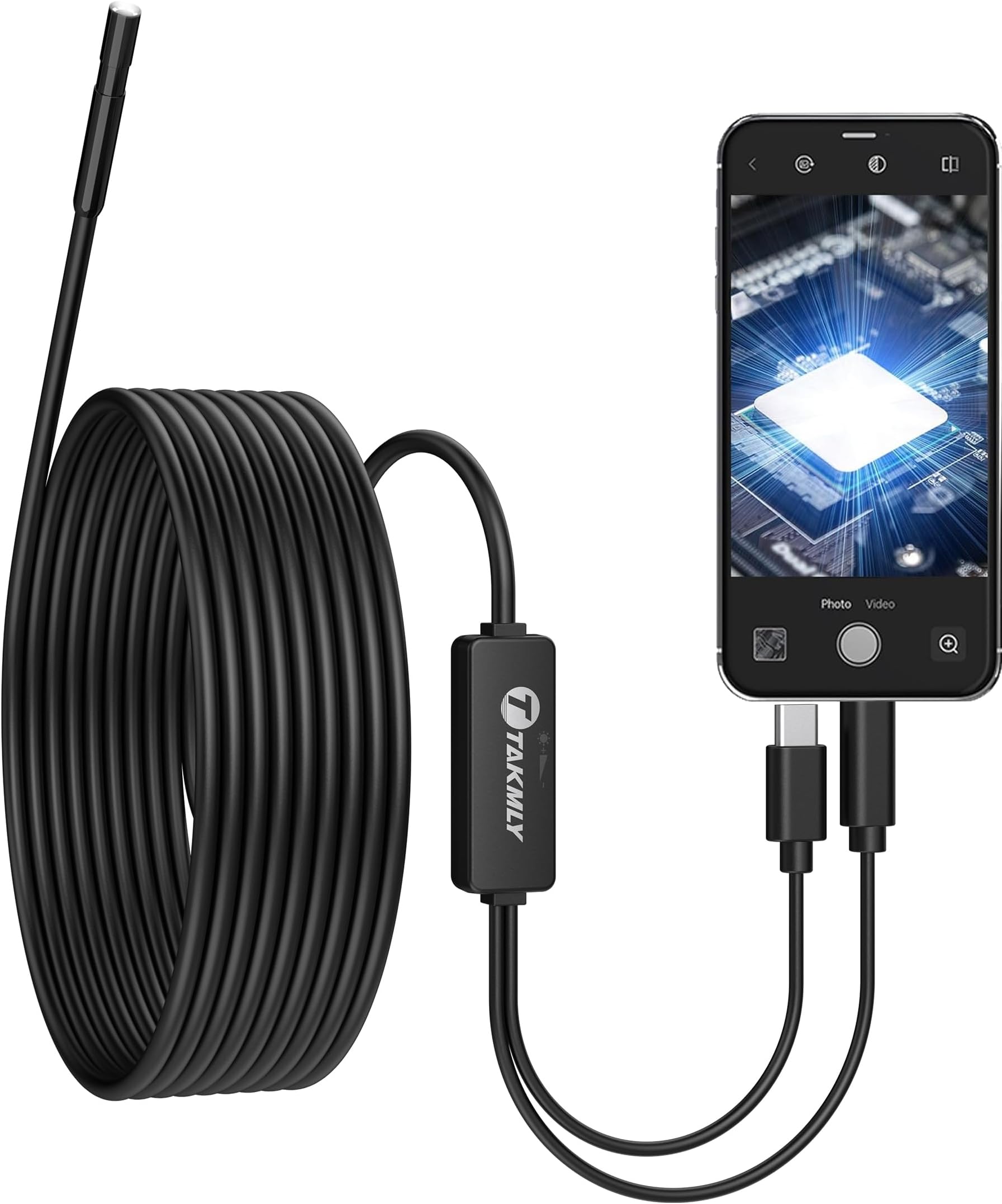
🔍 See the unseen, fix the impossible—your ultimate inspection sidekick!
The T TAKMLY 5.5mm Endoscope Borescope Inspection Camera delivers ultra-clear 2MP HD images with a 16.4-foot semi-rigid cable and 8 adjustable LED lights. Designed for professionals and DIYers alike, it plugs directly into iOS and Android smartphones for real-time viewing and recording. Its IP67 waterproof rating ensures reliable performance in wet and confined spaces, making it perfect for industrial, automotive, plumbing, and home maintenance inspections.




| ASIN | B07PBF6DX5 |
| Aperture Modes | F2.8-F5.6 |
| Aspect Ratio | 16:9 |
| Audio Recording | No |
| Autofocus | No |
| Best Sellers Rank | #56,027 in Industrial & Scientific ( See Top 100 in Industrial & Scientific ) #156 in Borescopes |
| Brand | T TAKMLY |
| Built-In Media | endoscope camera, accessories, user manual |
| Camera Flash | Built-In |
| Color | Black |
| Compatible Devices | Smartphone, iPad, iPhone |
| Connectivity Technology | USB, usb, type c |
| Customer Reviews | 4.0 4.0 out of 5 stars (10,378) |
| Effective Still Resolution | 720 Pixels |
| Exposure Control Type | Automatic |
| File Format | JPEG |
| Flash Modes Description | Automatic |
| Flash Type | Internal |
| Focal Length Description | 3.93 inches |
| Focus Type | Fixed Focus |
| Hardware Interface | USB 2.0, USB Type C |
| Has Self-Timer | No |
| ISO Range | 100-3200 |
| Item Weight | 0.18 Kilograms |
| Light Sensitivity | 100-3200 |
| Macro Focus Range | 1.2~3.93 inches |
| Manufacturer | T TAKMLY |
| Maximum Aperture | 5.6 f |
| Maximum Shutter Speed | 0.0001 seconds |
| Media Type | ProductImage |
| Minimum Shutter Speed | 0.0001 or faster |
| Model Name | 5.5-HD |
| Photo Sensor Resolution | 2.56 MP |
| Real Angle of View | 70 |
| Screen Size | 5.5 Millimeters |
| Sensor Type | CMOS |
| Shooting Modes | Manual |
| UPC | 713869882136 |
| Video Capture Format | MP4 |
| Video Capture Resolution | 1440p, 720p |
| Viewfinder Type | LCD screen |
| Warranty Description | 2 years |
| Water Resistance Level | Waterproof |
W**E
Good design for tight spots.
The endoscope at 5mm works well. I used it trying to locate a part that had fallen. The light it produces and adjustability is good. The flexibility is just right. Not too limp and not too stiff. The only negative comment is the focal point distance. Everything goes blurry very fast as the probe gets closer. Check to make sure that you can accept the focal point of this endoscope before buying. The diameter and length of the camera section end is important. Both are very acceptable for my use.
B**H
Worked for espresso machine
This came is handy when I descaled the boiler in my espresso machine. You obviously can't really see inside of a boiler so I purchased this to get a look inside, since descaling is a big and dangerous job on these expensive machines, you don't want to descale if you don't have to. This camera showed me I absolutely needed to, and I got some really good before and after shots along with being able to see if you got all the descale solution out of the boiler. It was hard to find an app but they do have some on Google Play that are compatible. It's length is over 15 feet, it's easy to use, functions like a champ, and gives you great quality pictures like you see I posted. There is no battery and just hooked into my Samsung Galaxy S21 Ultra. Definitely recommend!
C**M
Saved me a huge plumbers bill
tldr; helped us fish something out of our toilet and saved us 10x what we paid for this. The review: this was the cheapest mobile endoscope I could find that looked like it would work. We have older iPhones so it was nice that it doesn’t need an adapter. The probe was waterproof and easily bendable to fit around a kink in the plumbing. Except for the mirror, the accessories seem fairly useless, but I don’t care about that. The glass on the end of the probe got scuffed on our first use but it doesn’t seem to affect the picture quality. Unfortunately, this device uses some weird proprietary protocol instead of being a normal USB camera so it can only be used with the app they provide. The app is the usual Chinese junk but it didn’t crash while I was using it, so it did the job. I’m 100% satisfied with its performance for what I paid. The story: Our 2 year old had flushed… something down our toilet and we had no idea what. It was clogged for several days. I bought a toilet auger and whatever was down there actually broke the auger. We thought we might have to take the toilet off or call a plumber, but I convinced my wife to let me try fishing it out with the help of a camera. This little guy showed me that he had flushed a plastic bottle that had gotten jammed in the first bend of the trap. I was able to use a combination of things I had around the house to unstick it and then siphoned the water out of the toilet bowl until the bottle dropped out. It took a couple hours but that beats a huge plumber’s bill! I’ve also used it to look around the inside of musical instruments where it’s impossible to get a mirror and the stiff cable makes it easy to put it exactly where it’s needed and get a clear, bright image.
A**.
Pay to see? I don't think so.
I had used this a few times to find a leak inside a wall. The next time (and why I came straight to Amazon to write this review) I need (currently, as I type this) to get to a bolt in a hard-to-see location inside my car. Then I get a notification that the camera will work with a "premium" whatever. Why didn't the initial purchase provide me the rights to use this for all time? I'm pretty sure there was nothing upfront about this in the product description (unless I missed it). But that's unfortunate. The camera itself was okay. A bit of lines in the image makes the quality seem questionable. If it was actually usable and just that issue it'd have 3 or 4 star rating. They nailed it for the 1 star with the pay-to-use clause. I doubt I can even return it after having it for so long. It only needed to be used in very rare or special cases. Then after so long "Oh. looks like you need to pay us money to use the thing you already paid for." I thought I was buying a camera to get into tight spaces, not the privilege to use it. It probably has spyware anyway.
G**R
Basic Borescope/Endoscope - "Just Works" in Ubuntu Linux 22.04
I plugged it in, then opened VLC and used the menu option to open a capture device. This was super easy for me since my Ubuntu 22.04 media center has no other v4l2 devices attached. If you use it with a laptop, open VLC before plugging in the camera and find out what your internal camera /dev/video* device(s) are ahead of time. Opening the capture device immediately shows a 640x480 image of medium/low quality. It sends the image in MJPEG format, so don't go expecting amazing imagery. ffplay also works, as does Cheese. lsusb identified this as: Bus 001 Device 009: ID 13d3:784b IMC Networks XHC Camera Although they say you can get higher resolutions, I'm not seeing that listed in the v4l2-ctl output. Only 640x480 is listed, unless I'm missing something. But for less than $20 this gives you a camera that is good for close-up images of small items as the focus seems to be better if what you're looking at is within 2-4 inches of the camera. Further out, it starts to get fuzzier. I have not tried this in low light situations yet. My particular need is to see inside a wall, so I will be testing the lights in there. I am not expecting much as the LEDs are bright white, but I suspect they aren't bright enough to light more than a few inches away. Overall, I expect this is mainly designed to look at small things closely, The 16.4 ft. cable is nice and firm and easily bent into whatever shape you need. Not having used it much yet, I can't attest to its durability. I would guess that the conductor inside might break after being bent a few times too many. Since my need is short term, that isn't likely to matter. Hope this review helps some Linux based folks out there!
T**L
This borescope worked well for me when connected to older Nexus (Android) tablet. I was able to look thru sparkplug hole inside engine cylinder. The camera has LED illumination, and the brightness can be changed. There is no focus control but image sharpness is good enough to see internal surfaces being investigated. Images can be easily saved. This tool is well worth the price.
M**Y
Works great with my iphone
Y**T
The Seesi USB Endoscope seemed with good build but after trying it for the first time it didn't work. Plugged it in MacOS and Windows as described on their website, and used the apps mentioned with no success. The Endoscope lights are ON when plugged, but the camera seems not being detected by the MacOS/WIndows. The guidance between Amazon and their website and the instructions within the package are somewhat inconsistent and misleading. In the package instructions they say it works on iOS, but on their website and Amazon product description they say iOS is not supported. Also conflicting suggestion on which app to use on Andriod.
S**L
The video quality is pretty decent considering how inexpensive this was. Followed the instructions and downloaded OTG View for Android. Plugged the camera into my phone with the USB-C adapter and picture popped up right away. It lost a star because the attachments don't stay on well. The collar is too loose and made of hard plastic so it doesn't actually grip the camera housing. I had to use some painters tape to tape the collar and attachment to the camera to use it. Other than that, it's a great value compared to cameras that are usually 5x the price.
A**R
Because the manufacturers are selling a camera on the end of line, with an iPhone plug-in at the other end, you don't have to pay for an expensive monitor, as with so many other endosopic camera units. You download the App (takes 10 seconds) and view your images on your iPhone. Can adjust the intensity of the camera light, which is a nice touch. I am not lying when I say that this straightforward $20 device earned me a couple thousand bucks in the first week inspecting wood columns for rot in a condo building.
ترست بايلوت
منذ شهر
منذ شهر