Buy anything from 5,000+ international stores. One checkout price. No surprise fees. Join 2M+ shoppers on Desertcart.
Desertcart purchases this item on your behalf and handles shipping, customs, and support to KUWAIT.
📺 Double the screens, zero compromise — mirror your world in stunning clarity!
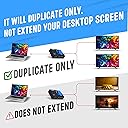
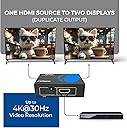
The OREI HDMI Splitter HD-102 is a USB-powered 1-in-2-out HDMI duplicator designed exclusively for mirroring a single HDMI source to two displays simultaneously. Supporting resolutions up to 4K@30Hz and 1080P@60Hz, it ensures crisp, lag-free video output. Its durable metal enclosure aids heat dissipation, while compatibility with HDMI 1.2 to 1.4 devices makes it ideal for TVs, projectors, and gaming consoles. Note: It does not support multi-monitor extension or HDCP bypass and requires HDMI cables under 30 feet for optimal performance.


| ASIN | B005HXFARS |
| Best Sellers Rank | #66 in Audio & Video Connectors & Adapters #115 in Computer Cable Adapters |
| Brand | OREI |
| Built-In Media | HDMI Splitter, USB Cable |
| Cable Type | HDMI |
| Color | Black |
| Compatible Devices | DVD Player, Projector, Television |
| Connector Type Used on Cable | HDMI |
| Customer Reviews | 4.4 4.4 out of 5 stars (15,449) |
| Global Trade Identification Number | 00850031132757, 00887470735768 |
| Item Weight | 7.1 Ounces |
| Manufacturer | Orei Products |
| Manufacturer Contact Information | [email protected] |
| Number of Ports | 2 |
| Packer Contact Information | [email protected] , 99250 12671 |
| UPC | 850031132757 |
| Unit Count | 1.0 Count |
| Warranty Description | 1 Year Warranty |
R**L
You don't need a fancy capture card, just get this!
I use this for a capture card setup, splitting the picture out from my Nintendo Switch to an external monitor and to my computer. My monitors don't have HDMI out so this is a cheap way to get a stream setup! The picture quality is great, and the connectivity is fine. It works as described, so what else can I say about it? The length of the AC adapter cable should be fine for most setups, but if you don't do much AV stuff it might be easy to not realize that this thing needs a power supply in order to work, so keep that in mind! It is made of a nice durable metal material so I'm not worried about it being knocked around sometimes.
J**N
HDMI. 1 in, 2 out
I have 2 tvs on one direct tv box. Using the rf controller I have one controller for each tv. Works great!!one tv upstairs and one downstairs. Usually just watching one on the tvs. Very convenient. Of course if both tvs were being watched at the same time they would both have to watch the same channel
O**E
Works Great!
Works great. Plug and play. Don't forget that 3rd HDMI cable between your device and the splitter. 🤦 Also, it needs power. It comes with a USB cable for this purpose. Played Assassin's Creed: Mirage on my XBOX One displayed on both my Sony TV and Dell Monitor with zero problems. No lag and crystal clear image on both outputs. Great product. Works as intended. Great price.
H**Y
Hey, these incidental gripes aside, it works!
I specifically sought one of these out to solve the failure of the HDMI port on my aging 50”plasma. And, as I exclusively use this as a large monitor for streaming content through my computer, without a solution to bring it this video signal would render it useless, a drop in picture quality was both expected, and acceptable. So, i was presently surprised to find this converter delivered a picture with no noticeable drop in quality from what the HDMI provided before it failed. So, why the four stars? Well for the money, I don’t have a lot of confidence in it lasting very long. and would plan on including it with a portable kit if any kind. The quality of the components used just isn’t there, to withstand multiple connect and disconnect activity. That no HDMI is cord included, is understandable, but having the ones they do provide be different lengths, when the expected run is the same distance for both, begs explanation. Even though the Power Supply to the unit has a bulky adapter. it still uses special connector, you have to keep track of, instead of doing us the favor of powering it via a universal USB. And failing this, at least make the one they do provide long enough to make it from the wall to your TV set. None of my gripes are deal breakers, though, and I’m happy, so far, as this works fine for my intended purpose. Hope this helps! Cheers!
B**L
You can extend your desktop TO this device, just not FROM it.
Worked like a champ. One thing that I did find confusing in the product description was the statement that it is "For TV Mirror Only - Not for Multi Monitors". It should be noted that both outputs mirror the input signal, however, if that input signal is for an extended desktop, both outputs will mirror that extended desktop which was exactly what I was looking for in the 1st place.
M**D
HDMI Splitter
Does exactly what I wanted. Very impressed with it. Definitely recommend.
J**Y
Rock solid compact splitter
OREI Splitter is a solid product. I’m writing this a little over a year later to report back. Video quality is great and the size makes it really easy to install in many applications.
W**N
Works as expected
Works great
J**N
Completely satisfied with this spliter using it with the ps3 to capture gameplay to bypass the HDCP. worth the money on this. highly recommend buying this one.
J**A
Works perfectly with a capture card to record PS3 or having live feed in windows of your PS3, the power supply cable is USB, I personally plugged it in the PS3 USB2.0 port and it seems to be sufficient for power I used nanotape to attach it directly to my capture card
G**O
Veio sem o "cabo de alimentação USB" anunciado, o restante está correto.
D**Y
Heavy, solid, well built, worked perfectly, 3 lights - perfection :) What more can be said. NOW, no-one has said HOW this works when connected to a PC... I purchased HD-102. It has 1 IN, and 2 OUT. My question was - if it's a laptop and I plug this into it... what happens? Well, it DOES extend BUT it ALSO ONLY CLONES. What do I mean by this? The built in monitor (or a PC) in the laptop is DISPLAY#1. The PORT on the side of the laptop is going to go to DISPLAY#2. This device will clone DISPLAY#2 to DISPLAY#3. So, you can have DISPLAY#1 and DISPLAY#2 extended BUT DISPLAY#3 will ALWAYS be a clone of DISPLAY#2. You can also have DISPLAY#1, DISPLAY#2, and DISPLAY#3 all the same by going into your OS and cloning DISPLAY#1 and DISPLAY#2 and then the box automatically clones whatever DISPLAY#2 is. :) It would have been nice if the description of this mentioned this as it would have saved me 45 min of trying to find out myself and never finding the answer because everything kept saying "it doesn't extend" BUT in my mind I was thinking... well, the PORT in the system are what determines how many you can extend to... if your computer has 2 ports for displays then you can get 2 displays extended or whatever and then use this box to clone DISPLAY#2. If your PC has a 3 port card, and you plug this in, you still only have 3 ports that can be extended or cloned BUT this device will clone whatever port you plug into it... into DISPLAY#4 IF you were using all 3 ports previously. Basically... it just clones whatever you plug into it. As for extending... this doesn't do that. It ONLY clones what you plug into it... if it's DISPLAY#1 it clones DISPLAY#1. If you plug DISPLAY#2 into it, it clones DISPLAY#2. etc... :) Overly wordy, but without pictures kinda hard to explain. But, this should cover all questions about how it works.
R**O
The product splits image and sound.
ترست بايلوت
منذ شهرين
منذ يوم واحد