We remain fully operational. Our teams are working around the clock to ensure your deliveries continue safely.

قم بتنزيل التطبيق


معلومات عنا
حقوق الطبع والنشر © 2024 Desertcart Holdings Limited
قم بتنزيل التطبيق


Buy anything from 5,000+ international stores. One checkout price. No surprise fees. Join 2M+ shoppers on Desertcart.
Desertcart purchases this item on your behalf and handles shipping, customs, and support to KUWAIT.
🚗 Upgrade your drive, keep your control—effortless integration for the savvy driver!
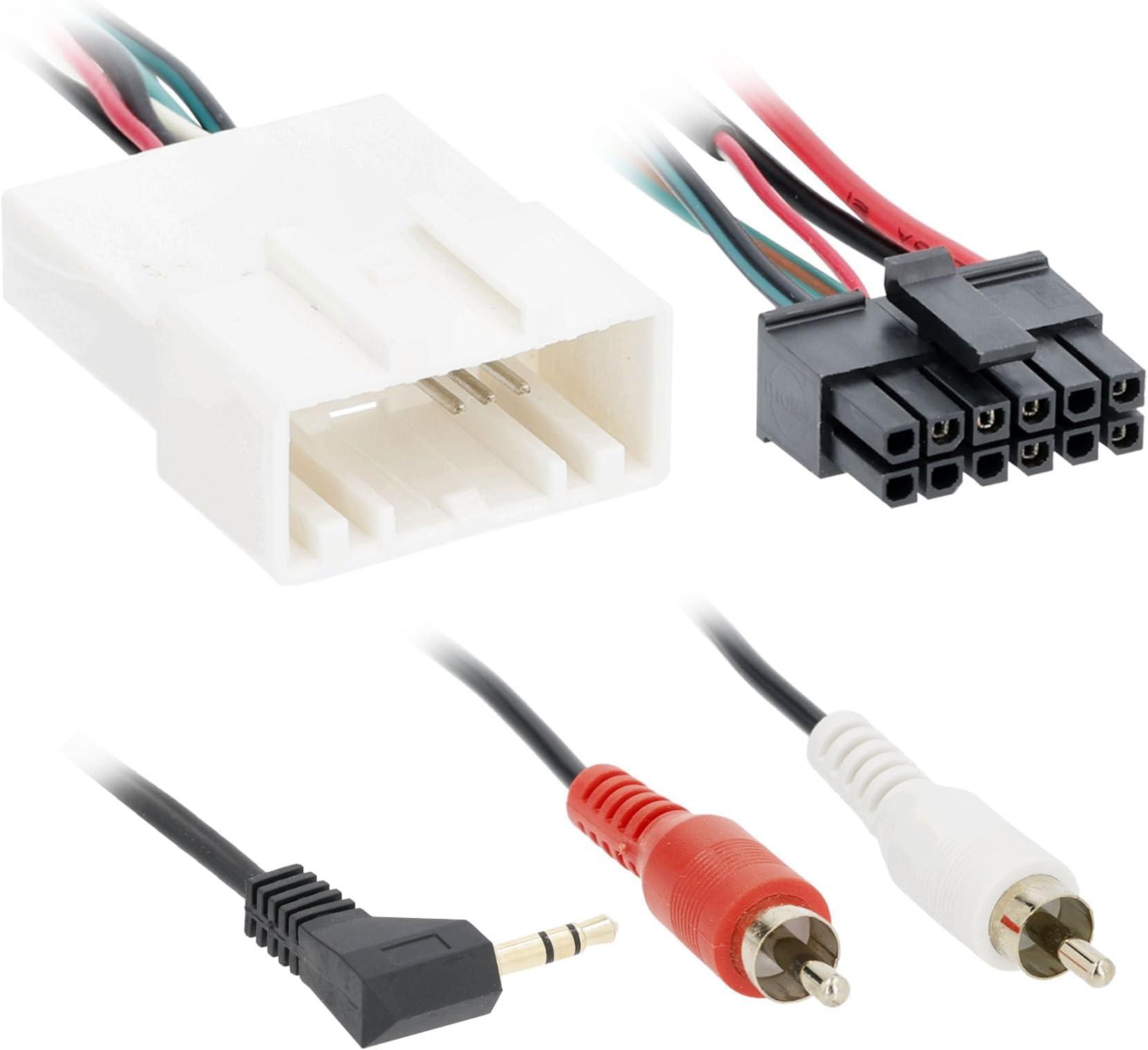
The Metra 70-8114 Steering Wheel Control Wire Harness is engineered for 2003 and newer Toyota, Scion, and Lexus vehicles with 20-pin connectors. It preserves factory steering wheel controls and the 3.5mm jack functionality via included RCA cables, requiring an aftermarket radio with AUX-In and the separately sold ASWC-1 interface. This harness offers a plug-and-play solution backed by expert tech support, ensuring a flawless upgrade experience without splicing or guesswork.

| ASIN | B0064J4LOM |
| Best Sellers Rank | 1,060 in Car Wiring Harnesses |
| Department | unisex-adult |
| Item model number | 70-8114 |
| Manufacturer | Metra Electronics |
| Product Dimensions | 20.32 x 11.43 x 1.27 cm; 13.61 g |
O**.
I installed this on a 2007 Toyota Solara, with a Pioneer head unit. This is a great product, but you must also purchase and install the Metra ASWC-1 steering wheel control interface to make this work. I connected the wires from the white connector to the car stereo wires, and in most cases it was a simple color match, but make sure to check your specific wiring diagrams. The white connector on this harness connects to the car's steering wheel connector (formerly on the factory radio). Don't worry about which plug it goes into, because Toyota has made all the connections to their car stereos different, so this will ONLY fit on the steering wheel connector. The male 3.5 mm plug then goes into your new car stereo's wired remote input jack, typically on the rear of your head unit. Next, here's a very important point that no other reviewer has provided, and when I called Metra, they actually gave me the wrong answer - if you connect this harness, you DON'T need to use the connectors/harness that comes with the ASWC-1. Once you connect the white connector of the 70-8114 to the car's steering wheel connector, and the 3.5 mm male plug to you car stereo, you then plug the black 12-pin connector (shown in the lower left of the picture) directly into the ASWC-1 (purchased separately). One connection/plug to the ASWC-1 and you're in!! In my case I then turned the car key to the accessory position, powered on the radio, watched the LEDs on the ASWC-1 go through their initialization, characterization, and setup, and within 15 sec or so I had the steering wheel controls working - volume, up/down channel, and mode select. Works perfectly! Another lesson learned in my case was that the power antenna cable from the stereo needed to be connected to the blue cable on the 70-8114 even though my Solara doesn't have a power antenna (antenna is in windshield), it turns out that the Solara has an antenna amplifier that needs to be switched on with the stereo. Once connected, the antenna (and FM reception) was as good or better than the OEM radio. I highly recommend this 70-8114 harness along with the ASWC-1 for Toyota vehicles, when replacing an OEM car stereo.
R**.
Was the perfect fit. Plugged right into the interface and into the vehicle harness.
M**Y
My wife has a Lexus GX470 Non Nav / Non Mark Levinson Sound system. I replaced the factory head unit (Pioneer) with the Binize 10.1 inch Android HU. I got the Metra TYTO-01 kit to connect the new HU to the factory wiring harness, but the steering wheel controls for the GX470 (and likely the Toyota 4-Runner) are on a separate 20 pin plug that goes to the factory HU. Thanks to another user's review here, I was able to connect the Android (which has a SW1 and SW2 Wire) to the factory harness. Here's an excerpt of how to do it from the other user's review: For the 6 wires on the white connector, 3 are of interest. Black wire = GND (connect to GND wire of the new headunit - this is steering wheel controls GND not the main GND - you still need to connect the main ground of the HU). Green/yellow = SW1 / KEY1, green/black = SW2 / KEY2. With this, was able to get the steering wheel controls working with a new Android HU, easy as can be. (End Review) From the Binize Android Head Unit, you go to the settings page and there is a button (scroll down) on the left side that says steering wheel settings. Go in there and you will see various settings (eg. Volume Up, Volume Down, FFWD, RWD, GPS, etc.). Select the desired function onscreen and then press the steering wheel control button that you want to perform that function. I programmed Vol + Vol- Next track, Previous Track, and for the mode button I selected GPS (for which I have Waze set as my default GPS Navigator). The steering wheel controls work great and my wife is thrilled!
C**Z
Do you have a basic Toyota Sienna Radio (non-JBL), steering wheel controls (SWC) and a 3.5mm Aux input. Are you upgrading the Stereo and want to keep your SWC and Aux input working? This is the harness adapter you need. On my install I did not use the Metra Steering Wheel Interface (SWI) with this harness. I instead purchased the PAC SWI-RC. I cut off the black Metra plug from this harness and soldered on the correct wires from the PAC interface With the PAC you can change the function of your SWC buttons to perform other tasks. My van only has 3 buttons on the steering wheel, some have 7. For example when programming the SWI I made the mode button control, voice activation. For Apple CarPlay this is Key! One touch Siri from the steering wheel. The other part of this harness is the Aux input, connect the RCA's directly onto your new Stereo, another adapter my be required, and Boom there you go. Seamless install with everything still working.
A**R
Cut up to work for my application but made it easier and cleaner than cutting up the factory vehicle wiring so it’s reversible and price was right. Steering wheel controls work great!
ترست بايلوت
منذ أسبوع
منذ 5 أيام