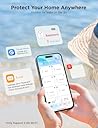




💧 Stay dry, stay ahead — the ultimate smart water guardian for your home!
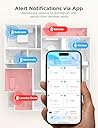
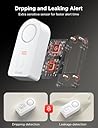
The Govee H5040 Gateway+ with H5054 sensors is a smart water leak detection system that connects up to 20 sensors via a dedicated WiFi gateway. It delivers instant app and email alerts, features a loud 100dB alarm with adjustable volume and mute, and allows sensor location naming for quick leak identification. Battery-powered and easy to install, it’s designed to protect your home with real-time, networked water monitoring.


| ASIN | B07QP153GT |
| Audible Noise | 100 db |
| Best Sellers Rank | #94,536 in Tools & Home Improvement ( See Top 100 in Tools & Home Improvement ) #74 in Water Detectors & Alarms |
| Brand | Govee |
| Color | White |
| Compatible Devices | Smartphone |
| Control Method | App |
| Customer Reviews | 4.3 out of 5 stars 2,646 Reviews |
| Item Dimensions L x W x H | 4.88"L x 3.66"W x 2.87"H |
| Manufacturer | Govee |
| Mfr Part Number | B5040105 |
| Model Number | H5040+H5054 |
| Mounting Type | Tabletop Mount |
| Number of Batteries | 2 AAA batteries required. (included) |
| Power Source | Battery Powered |
| Product Dimensions | 4.88"L x 3.66"W x 2.87"H |
| Sensor Technology | Contact Sensor |
| UPC | 741663591664 706597349828 |
O**R
Five stars and reasonable price
I bought main unit plus six sensors. Sensors can work alone (buzzer sound) or with main unit(mobile alarm and e-mail). Likes: Sensors working alone No annual contract 2 AAA batteries Dislikes: WiFi connection little tricky Sensor height not a problem for me but there are thinner devices It's been 27 months since I installed the first unit, I've bought a total of 12 units and 2 wi-fi gateways for two houses. Today I received a constant beeping alarm from the first unit, fortunately it was 11:00 am and I was awake. If developers are reading this, they may add a notification to the app, so that before the detectors start beeping, we can replace 2 AAA batteries before any interruption at night. Other than that, I can extremely happy with these sensors. I had a couple of false alarms while my wife was cleaning the bathrooms. I receive app alarm, sound alarm and an e-mail if there is a leak.
E**.
Please read my recommendation
I received the item and a box of five more sensors about an hour ago. I am professional at home construction, including the plumbing trade. Here's what I found. After setting up the first sensor to the internet, I proceeded to place that one under my kitchen sink. I looked under the sink with a flashlight and didn't notice anything on the bottom of the sink cabinet, so I slid the sensor to the back of the cabinet. On doing so, I felt a dampness on the palm of my hand as I placed the sensor. There was a film of water on the bottom of the cabinet. I waited to see if the sensor would go off, as it did when I tested it by wetting a finger and putting it across two of the terminals on the bottom of the sensor. Well, that film of water did not trip the sensor. Wondering why, I placed the sensor on a flat piece of plastic on my work bench and I could see there is a 1/16 inch or so of space between the sensor probes and the flat plastic sheet I put it on. That's the problem right there. A film of water on the bottom of a cabinet will not set the sensor off. The probes will not contact the water surface. Here's what I did. I removed the little rubber plugs from each of the four feet of the sensor. Use a sharp object. I placed the sensor on a piece of sand paper on a very flat surface. Rubbing down on the sand paper I sanded the plastic feet down to the same level of the metal probes under the sensor. Now the probes will touch the surface the sensor is resting on. I tried the sensor under the sink again and it immediately tripped the water alarm. A slow drip will not make a puddle of water in a cabinet. It will most likely coat the bottom of the cabinet as it's being absorbed into the wood or leaking out at the seems of the cabinet. Something about kitchen cabinets: The bottom of kitchen and bath cabinets is usually made of cheap particle board or some material equally water absorbent. A small drip will not form a puddle of water as you might think. The bottom of the cabinet will absorb a small water leak, like a very slow drip, for MONTHS. Probably until the bottom of the cabinet is ruined. You will be able to tell by the bottom of the cabinet sagging down. But here's what I do with my sink cabinets. I put a heavy bead of caulk around the edge of the inside of the cabinet where the bottom of the cabinet meets the sides. Then I apply two or three coats of varnish to the bottom of the cabinet (we're talking INSIDE the cabinet here). What this does is make the bottom of the cabinet somewhat water proof, enough that the cabinet material will not absorb a small leak. And a larger leak will run out the FRONT of the cabinet, rather than down the seams between the bottom and sides of the cabinet. And you will notice it before damage is done. Now, the Govee setup. I did find the setup a little confusing I'll admit. Especially when setting up to the internet. The app wanted me to connect my phone to the wifi of the gateway unit that comes with the sensor. I'm thinking, do I want to do that? And lose my home wifi on the phone? I ended up backing out of the setup. But going back into the app again, I found it was working. I pushed the buttons as directed and setup the 6 sensors I had without issue. As you do each one, and are looking for it in the app screen, pull down the screen to refresh it and you'll see the device you connected. I gave four stars because: The directions could be a little more precise with the wifi setup of the gateway. The sensor probes should be lowered to pick up any amount of water. Note: The first sensor I installed saved me a big headache had the dripping fitting decided to break sometime down the road. This one find paid for the sensors I put in today. An overall excellent product. Just sand down the feet. UPDATE: 6/29/21 - I had a sensor alarm in my bathroom vanity sink cabinet. I removed the stuff stored under the sink and didn’t see anything around the sensor. I moved the sensor and carefully felt the area with my fingers. With no visible water, the area felt slightly damp to the touch. I took a closer look at all the plumbing with a flashlight, and sure enough, one sink supply connection was the slightest bit wet. Maybe one drop per hour. My description above on how I modified the sensor probes to touch the surface (floor, etc.) had allowed the unit to alarm well before any water started to puddle and soak into the wood and ruin the cabinet. I highly recommend these water sensors and that you modify them as I suggested above.
A**R
Love everything - except directions
What we all love about good Chinese electronics is that they are inexpensive, well made, do the job, and really - that is why they won the manufacturing war after all. But America still has it when it comes to EXPLAINING stuff. So if you are lucky and everything got to link to your wifi right away and the sensor to link to the network - you won the lottery. But I bet many of us had experienced one form of hiccup or another. Mine? the app simply could not find ANY wifi network on my phone, although all were present. Customer service was prompt, video is lovely, both are totally scripted and useless. Ready to return - till I decided to just turn off all connections (Airplane mode) then turned on only wifi, then miracle happened and the app found the 2.4 network and all is well... Then comes the sensor connectivity - you just press both hub and sensor buttons for 3 seconds - nothing happens, rinse , repeat, go eat dinner - come back - everything is happily connected. Won the lottery! I am thinking of second job - writing directions for Americans for Chinese electronics products - wonderful products, BTW. I am buying more sensors - they work great! easy to use! (maybe start a paid customer service app?).
S**K
It works, be patient
The instructions are pretty weak. It took me several tries to get everything connected. The key is connecting your phone to 2.4 and then connecting your phone to the gateway and then connecting up your sensors. After that everything was great. The app works fine for me. Tested out a sensor and it sent an alert to my phone. Running the latest IOS.
K**E
Great sensor
Works great in my well pit. Instead of having to constantly check when it rains to make sure my sump pump is working I can just leave this sensor in the well pit and if my sump pump gets plugged this will alert me.
B**H
Very Unreliable, and horrible app
This product is VERY unreliable. After a lot of frustration following some pretty bad instructions, I was able to finally get this to work. I got the alarm to trigger by licking my finger and placing it across the leads. The alarm sounded, the app caused my phone to vibrate, and I received a notification email. I did this a few times and I was happy with how it worked. I then unplugged the gateway from my test location and moved it to my desired location. I waited for it to connect to WiFi and did my test again. The alarm sounded but it did NOT trigger the app alarm or the email notification. I tried several times using different sequences of turning plugging in/out the gateway, opening/closing the app, re-pairing the leak detector. Sometime it worked, but most of the time it didn't. I couldn't find any consistent way of getting it to work every time. Also, the app seems to be very out of sync with the gateway and the leak detector. When I unplugged the gateway, at times the app still said it was connected. And if I removed the batteries from the leak detector, the app still said it was connected with full battery. If anything is not connected, the app should tell you, but it doesn't, leading to a false sense of security. The app is also very confusing and has almost no documentation. I'm using this to detect hose and filter leaks for my 100 gallon aquarium. If there is a leak, I need to know right away so I can fix it, and I have no faith at all in this device. I will be returning. Spend the extra money and get one that works.
Z**Z
East to install; works with Alexa
Excellent : one of the easiest hub to pair with the water leak sensors. I paired 10 sensors with one hub, it was easy to do. I tested each sensor with water, all 3 locations, 2 probes at the bottom of the sensor, and one dripping probe on the top. All worked just fine. Every time I tested each sensor, got a push notification on the phone and as well as an email. There is a 90 seconds time out after the alert, meaning , that you won't get another alert for 90 seconds if you keep repeating the leak tests. I guess that is there to minimize the alerts and a smart way to do it. I renamed the sensors based on their location. No issues so far. I plan to test the system every month for next couple of months, just to monitor its performance. So far, no issues. Sensors are very loud. Even if the wifi stops working, sensors would still sound and are loud enough , and it can’t be ignored. I kept each sensor at the highest volume setting ( default), as this is one noise/sound/alert you don’t wanna ignore. It pairs with Alexa, enable “Govee Home” skill in Alexa or just go to any water sensor setting in the Govee app, and link Alexa with Govee. Then set up “ routines” in the Alexa app. Alexa would notify whenever there is an alert from Govee or any leak. Govee app also notifies via push notification and as well as send an email. Hope this helps. I plan to add more sensors, and I know some people have added more than 10 sensors on a one hub. But I would buy a new hub, as it’s cheap and I do not want to overload a hub by adding more than 10 sensors to it. And it’s also not recommended by Govee. The way I see it, why overload one hub by adding more than 10 sensors to it and compromise its functionality. Just add one more hub for more than 10 sensors and have a peace of mind that it would work when you really need it to be.
G**N
It works until it doesn't
I have a few govee products. All of them have worked fine until I purchased this set. For some reason it wouldn't link up to the wifi on set up. All other govee products have connected first try. This time it did not. After about 15 attempts I gave up. I purchased this a while ago and just got over to the location to install it recently. I am out of the return window so my advice is do not purchase until you are ready to install. I also sent a note to them for help but never received a response. I like govee products and have never had an issue until now.
M**G
Productazo!!!!
Resolvio todos mis problemas con fugas avisandome en tiempo real cualquier accidente
Trustpilot
4 days ago
1 month ago