
Buy anything from 5,000+ international stores. One checkout price. No surprise fees. Join 2M+ shoppers on Desertcart.
Desertcart purchases this item on your behalf and handles shipping, customs, and support to KUWAIT.
🕹️ Elevate your cockpit game—fly like a pro, feel the thrill!
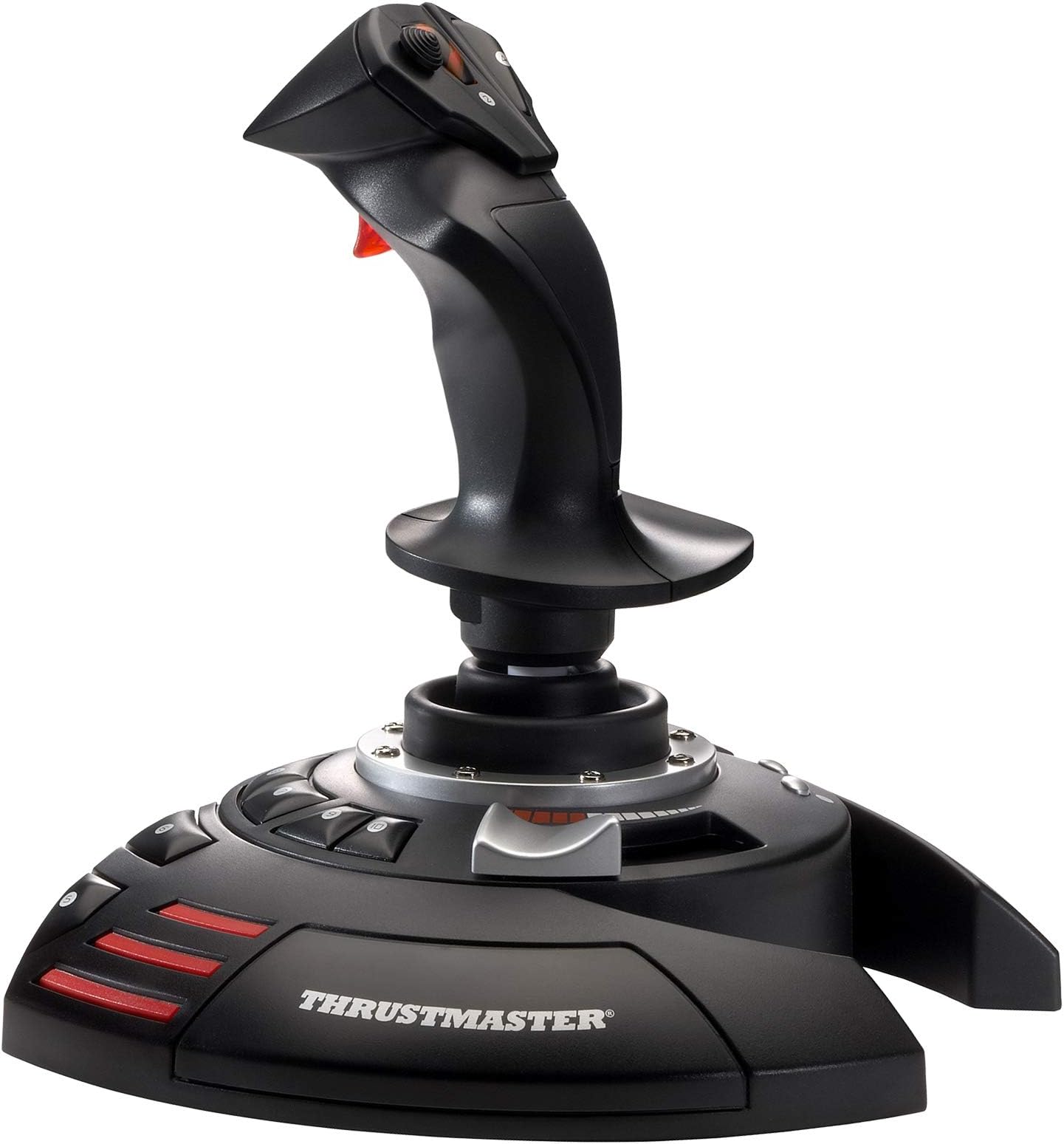
The Thrustmaster T-Flight Stick X is a USB plug-and-play joystick designed for Windows PC and PlayStation 3, featuring 12 programmable buttons, adjustable resistance, an ergonomic integrated throttle, and a weighted base for stability. Its rotating handle with a locking system offers precise rudder control, while exclusive mapping and preset buttons with internal memory enable personalized setups. Perfect for flight sim enthusiasts seeking professional-grade control without breaking the bank.


| ASIN | B000U1OOH4 |
| Additional Features | Programmable Buttons, Additional Axes, Integrated Throttle |
| Best Sellers Rank | #920 in Video Games ( See Top 100 in Video Games ) #5 in PC Game Flight Controls |
| Brand Name | Thrustmaster |
| Button Quantity | 12 |
| Color | Black |
| Compatible Devices | PlayStation 3, PC |
| Compatible Video Game Console Models | Sony PlayStation 3 CECH-4012C |
| Connectivity Technology | USB |
| Controller Type | Joystick |
| Customer Reviews | 4.2 4.2 out of 5 stars (2,495) |
| External Testing Certification | Não aplicável |
| Global Trade Identification Number | 00663296412461 |
| Hardware Platform | Desktop, Laptop |
| Included Components | Instructions manual & flightstick |
| Item Dimensions | 9.29 x 8.66 x 9.25 inches |
| Item Dimensions D x W x H | 8.66"D x 9.25"H |
| Item Part Number | 2960694 |
| Item Type Name | Flight Stick |
| Item Weight | 1188 Grams |
| Manufacturer | Thrustmaster |
| Manufacturer Part Number | 2960694 |
| Model Name | Thrustmaster T-Flight Stick X |
| Model Number | 2960694 |
| Package Quantity | 1 |
| Power Source | Battery Powered |
| UPC | 663296412461 |
| Warranty Description | one year |
D**E
Work perfectly
I upgraded my computer to a gaming computer so I could run MSFS 2020. Let me also mention I am running Windows 11. I tried using my older MS Sidewinder Flight Stick with the game but for some reason the aircraft were uncontrollable. I switched to an older Logitech flight stick I also had and even that was unusable. In the course of trying to figure out why the MS flight stick wasn't working it broke so I was forced to look for a new flight stick. I looked through all the flight sticks on Amazon and for some reason this one I seemed to like the most. I looked at reviews on the web and some people were saying this stick didn't work with Steam games and others were saying it didn't work with Windows 11. However all the other reviews were very positive. I figured for $40 it was worth taking a chance, if it didn't work at least I had a new flight stick I could use with MSFS X. When the stick arrived I plugged it into the USB port and Windows 11 recognized it immediately. I launched MSFS 2020 and went to the control options and the stick was there and the buttons were already pre-programmed. MSFS gives you the option to change the button settings but I left them as they were, it just took me a while to get use to them since it was a change from my Sidewinder stick. The first takeoff I tried was perfect and I flew to another local airport and landed perfectly. The flight stick worked perfectly and flawlessly. There is also a knob on the bottom the stick you can use to adjust the tension to your liking. On my computer this stick is compatible with Windows11 and Steam. The only con I have with this flight stick is the arrangement of the buttons. Some of them like the brake release, landing gear toggle and elevator trim kind of require an awkward reach to get to. While I can reassign them I like keeping them off the stick itself. I hope on the future Thrustmaster considers moving these buttons to a more ergonomic location on the base of the stick. All in all I give this flight stick a 10/10 and is an excellent value for the money.
J**Z
Perfect for a budget joystick, no need for more.
This joystick 🕹️ is awesome. It calibrates into FSX with no effort, immediately assigns the most important keys, FSX recognized it immediately. This is the perfect joystick 🕹️ for both, airplanes and helicopters, no need for more.
D**I
Reliable and easy to use flight stick with good value
The Thrustmaster T-Flight Stick X is a solid and reliable flight stick that works well for both beginners and casual flight sim players. Setup is easy, and the controls are responsive and intuitive. The stick feels comfortable to use, and the button layout makes flying straightforward. Build quality is good for the price, and while it’s lightweight, it doesn’t feel cheap. Accuracy is solid for most flight games, though it’s not meant to compete with high-end simulation gear. Overall, it’s a great value flight stick that performs well and is easy to use, but the simpler design keeps it from being a full 5 star product.
R**N
I Really Like this Item
I will try to be as honest as possible because I depend on other people's reviews and feel I want to help the best I can: Item arrived in good condition and as described. Appears to pretty much be plug n play. My PC recognized it immediately and fired it right up. For a person who is just needing a Joystick for fun gaming and not serious "I must have the best thing available" I think this joystick checks off all the boxes. I especially appreciate the built in Throttle and Rudder control, so no additional items are required. I really like the tension knob on the bottom, allowing me to adjust the joystick to fit my style. My last real joystick was a Microsoft Force-Feed Sidewinder, and I found this joystick to be very similar in size and feel. I think the larger base is awesome, for those times I might get excited when making a quick move. I Recommend. Good Luck.
W**E
Simply wonderful. Get one.
This arrived in perfect condition and installed by plugging it into the USB port. All games that I have that use a joystick recognize it. You can reprogram 12 buttons to anything you want. It is well built and I use a tempered glass plate about 20" x 20" for my keyboard; when I place the joystick on the glass, the feet are so well made that it does not move, as if stuck in place. There's even a dial underneath to tighten/losen the action of the stick. It totally works with serious flight programs and games as well; I even got out MW4 (oh!) and used it to test the stick out and I'm still playing it now, as it is so fun with this stick. Simply wonderful. Get one. [edit 3/3/15 by me] I have overlooked one issue for the Left-Handed user: button 3 is in an inaccessible place for a leftie; holding the joystick in your left hand with your index finger on the trigger, button 3 is up and to the right at the top of the stick, in front of button 4 - it is all but unreachable by a lefty. HOWEVER, it has 12 fully programmable buttons and you can store them within the stick! Sorry for not mentioning this button 3 issue before.
T**Y
No place for mounting screws
Nice to have the throttle control on the stick itself. It can be convenient. I’m absolutely sickened that I can’t mount it there’s nowhere to put mounting screws on the bottom. That’s like selling a car with no door handles.
M**N
Massive Dissappointment, STAY AWAY!!!
My imediate first impression was that Thrustmasters quality has gone downhill over the yrs. The first time I grasped the joystick the panel just below the hat switch and buttons could be felt moving like ti was a pressure sensitive button of sorts..but isnt. Again cheaply made and bad design IMO. Lets get into the stick itself...I have tried to use it on 4 flight games now and no matter what I do..there is a massive dead zone for all 3 axis on the joystick and it has pitch up drift that never goes away when the stick is left alone. Its impossible to fly anything when the joystick doesnt respond to input properly. I would have returned this immediately for a refund had I used it right away. Now Im stuck with it and dont recommend anyone buy this POS excuse for a joystick. i would give it 0 stars if i could.
M**W
Amazing joystick, very versatile
I absolutely love this joystick. It's extremely accurate, well built, versatile, and great looking. I've had this joystick for over a year and it's still working great. The roll and pitch axis do wonders in combat simulators and the yaw is very accurate and easy to control. The hat switch is also a nice addition and at the same time conveniently located. Pros: -Great design; sturdy and rigid -Palm and thumb rest -Accurate handling; great for combat sims -You can change the joystick's resistance -Ergonomic hand design for RIGHT-HANDED ONLY. Left-handed fliers beware, you can't hold this well with your left hand. -Good variety of buttons -Good upper and lower fire button (great for shooting lower and higher caliber armament separately) -Nice array of lower buttons -"Throttle" is easy to control with 50% click Cons: -Not for left-handed people (I'm right-handed but I know lefties will suffer if they use this) -"Throttle" not so accurate -Only 4 buttons on the stick itself. It would be nice to have 5 on the stick. Note: I use this for War Thunder and works fantastically. I've also tried on X-Plane and it works well too.
C**T
Very good,
Works well with my Flight Simulator.
C**N
Idéale pour Flight Simulator
Manette de très bonne qualité, installation et reconnaissance par le PC en 2 secondes. Il y a un mode "présélectionné" pour les boutons pour FSX, volets, train, spoilers, correspondent à des touches trés accessibles. Il y a un autre mode entièrement configurable par le joueur. La résistance du Joystick est réglable ce qui évite que l'avion tourne trop rapidement au sol on peut vraiment doser les rotations, top ! Piloter avec une manette ça change la vie sur FSX, on utilise plus du tout le clavier à part pour des commandes plus poussées, passerelles, etc....
G**O
Divertido e
Muito bom, reforçado, funciona e o mais importante é que meu neto se diverte, recomendo demais, Obrigado.
K**B
Bra känsla och stryktålig
Känns bra i handen, men fartreglaget är i minsta laget. För den som ska spela riktiga flygsimulatorer behövs något en något hetare modell, men för mig var den här perfekt.
E**.
Awesome flight stick!
This flight stick is very stylish, customizable and comfortable! I have the resistance set to the minimum so that changing directions is effortless, but it is capable of tightening for those who prefer to use more force to push the stick. This can be used for emulators and even PC games that don't support it, because you can use a free program called JoyToKey to convert the inputs into keyboard buttons. Keep in mind that this doesn't have to be used exclusively for flight games, It can be used for all kinds of games. Overall I'm very happy with this product and I highly recommend it!
Trustpilot
2 weeks ago
2 weeks ago