Buy anything from 5,000+ international stores. One checkout price. No surprise fees. Join 2M+ shoppers on Desertcart.
Desertcart purchases this item on your behalf and handles shipping, customs, and support to KUWAIT.
🔵 Glide through work and life with the mouse that moves as fast as you do!
The Microsoft Sculpt Touch Bluetooth Mouse combines innovative 4-way touch scrolling with BlueTrack technology for precise tracking on virtually any surface. Designed for comfort and portability, it offers wireless Bluetooth connectivity without a dongle, three customizable buttons, and up to 9 months of battery life—making it the ideal productivity companion for Windows PCs and tablets.
| ASIN | B008OEHPPM |
| Additional Features | Wireless |
| Antenna Location | Tablets |
| Are Batteries Included | Yes |
| Are Batteries Required | Yes |
| Battery Average Life | 9 months |
| Best Sellers Rank | #4,103 in Computer Mice |
| Brand | Microsoft |
| Button Quantity | 3 |
| Color | Storm Gray |
| Compatible Devices | Laptop |
| Connectivity Technology | Bluetooth, USB, Wireless |
| Customer Reviews | 3.9 out of 5 stars 499 Reviews |
| Enclosure Material | Plastic |
| Global Trade Identification Number | 00885370359251 |
| Hand Orientation | Left, Right |
| Hardware Platform | PC, Tablet |
| Item Weight | 4.8 ounces |
| Manufacturer | Microsoft |
| Mfr Part Number | 6PL-00003 |
| Model Name | 6PL-00003 |
| Model Number | 6PL-00003 |
| Movement Detection | Optical |
| Movement Detection Technology | Optical |
| Number of Batteries | 2 AA batteries required. (included) |
| Number of Buttons | 3 |
| Operating System | Windows 7, Windows 8 |
| Power Source | Battery Powered |
| Range | feet |
| Special Feature | Wireless |
| Style Name | Modern |
| UPC | 803982729316 163120433339 021113066271 088021331259 885370359251 168141475610 132017754598 045555992752 012304216650 172302699883 611231535416 |
C**S
no clue what others are complaining about ... this is a quality mouse at a bargain price
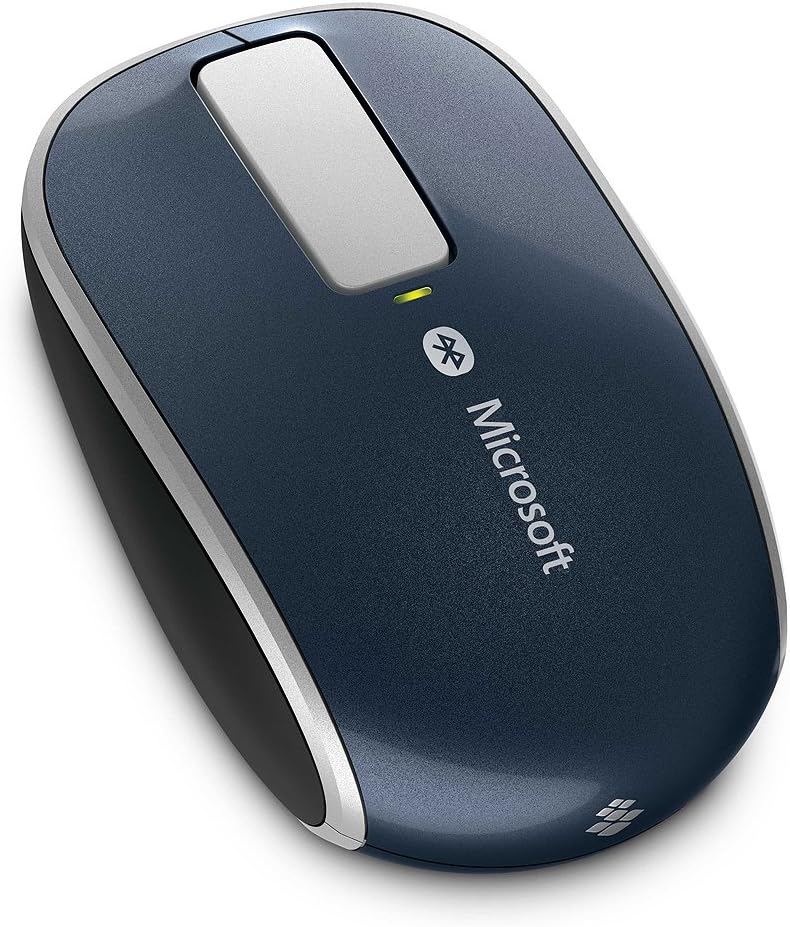
I was very hesitant to order this mouse I was purdy hesitant to order most any bluetooth mouse ... they all seem to be somewhat poorly rated I had a Logitech V470 from a few years back ... I woulda simply bought another one, but they're like $70 ... not sure if I paid that for the first one ... but I didn't wanna pay it, now clearly, bluetooth mice are commanding a premium price over their "wireless" counterparts ... but jeez! I received this mouse, the packaging was very good ... even came with two genuine duracell batteries the battery cover came open easily, and shut smartly upon putting in the batteries, the mouse immediately came to life, and was broadcasting to pair I turned on bluetooth on my HP Slate 7 Extreme, and it immediately found the new mouse (it did display as a mac address, but with a mouse icon next to it) ... and paired as quick as I tapped "pair" from then on, the mouse worked exactly as ya'd expect ... it's optical, so I was using it on the arm of my la-z-boy I also plugged my HP into the TV about 12ft away, and the mouse was working as though it was wired the shape is very rounded, and isometric ... so, vs a V470, it felt a bit awkward ... but, it's clearly a "solid"/quality piece of equipment it has no scroll wheel ... if ya rely heavily on a scroll wheel, I'd recommend ya avoid this mouse in its place, it has that metal strip (in the pic) ... ya flick your finger across it ... it'll make a clicking sound reflecting how fast ya flicked, and how fast it'll scroll for the bit I played with it, it seemed like there was two scrolling speeds ... way too slow ... and way too fast ... obviously, it takes some practice to develop a finer touch but, for minimal scrolling, it gets the job done ... and the new tech is kinda cool ... someone who's never used an actual scroll wheel (can't imagine) might not have any issues with this, at all on my HP, I tried left/right scrolling, and it worked fine ... same as vertical ... not sure how much use I'd get outta it ... but it worked I considered taking off a star for the scroll wheel ... except, what's in its place gets the job done, and at thirty-ish dollars, it's simply not appropriate to dock a star for a matter of personal taste I wouldn't normally review an item with so many reviews already (don't see the point) ... but, with all the new Windows tablets out there, and people tryin to use em in desktop mode, a bluetooth mouse can be a real life-saver ... and otherwise spending $70-ish is kinda painful ... particularly after buying a new $300+ tablet
F**6
Solid mouse if you need a bluetooth mouse
Pros Connected easily good feel in hand tracks well on most surfaces Cons- limited software (I'm using windows 7) touch bar not very sensitive (still useable though) heavy for its size Bottom line: If you want a simple Bluetooth mouse this one won't disappoint, but if you don't care about Bluetooth then I would go with something cheaper. I have been using this mouse for a little while now. It was fairly easy to set up, but I did change some settings on my Bluetooth card to ensue it would not turn itself off. I adjusted that setting on my laptop without trying it first, so it may have worked without doing that, but based on my experiences with other Bluetooth mice, I thought it was prudent. That aside this mouse does what it is supposed to quite well. I like the fact that I don't need a dongle to use this mouse and I can just turn it on and it works. This is a comfortable mouse to use and so far so good. It fits well in my hands (I have big hands) and still maintains a small form factor. The really isn't anything that is all that special about this mouse. The touch strip (which also can function as a button) works well enough, it lags a little when scrolling and thus does not work as well as a wheel, but it does work well enough. I would have only taken off half a star for this, but that isn't an option. The touch strip also vibrates as it scrolls, and you can adjust this in the software. I like it on in a low setting, but I could see how it would bother some. The other thing that I noticed is the weight, which is due to the fact it uses 2 AA batteries. It isn't heavy per say, just heavy compared to the other mobile mice I've used. The software is not the greatest, I don't need a ton of customization (I just adjusted the vibration of the touch strip) but it wasn't the best work Microsoft has done. As this mouse is aimed at windows 8 maybe it will be better there. The software didn't bother me much, but it might if you want a lot of customization in a mouse as it is clunky and I couldn't find a way to go back a screen if I wanted to, which might make the process of adding a lot of customization difficult. Overall I'm very happy with this mouse and would recommend it, but its a mouse, and there is nothing, other then the Bluetooth functionality that would differentiate this mouse for me from any of the other, cheaper mice by Microsoft or Logitech out there. The bottom line is if you want a Bluetooth mouse this one won't disappoint, but if you don't care about Bluetooth, then I would go with something cheaper.
A**2
Even more versatile, when you download the Microsoft SetPoint software
This mouse works great with my Asus Vivotab 8 windows tablet. Syncing was pretty easy, following the included instructions. An optional Windows update will show up after installing this mouse for the SetPoint software; I recommend you install it. The Setpoint software will allow you to customize buttons and the touch scroll pad. You can even change the intensity of the haptic feedback (vibration to simulate detented scrolling) on the touch scroll pad. Either way, this mouse is also pretty idiot proof. It goes into sleep mode to save the battery. When you move it again or press a button, it wakes up and reconnects immediately. There's a small light on top for the battery level: green for good, red for low battery. It fits comfortably in hand, and has rubberized sides for better handling. Just a great mouse for your bluetooth devices.
H**4
Not as good as other MS mice
I've owned nothing but Microsoft my entire life. Starting with the basic corded PS/2 ball mouse up to this bluetooth Sculpt mouse. I use this mouse exclusively with my Surface RT in order to rid myself of that dreadful dongle and free up my USB port. It paired quickly and has no issues reconnecting later when waking up from sleep mode or when I physically turn off the mouse. Overall, it's a pretty decent product. However, the body of the mouse is quite wide compared to other laptop mice. My other mouse is a Microsoft Wireless Mobile Mouse 3500 and THAT is the best mouse I've ever had. It's the perfect size and weight and everything works great. This Sculpt mouse feels just slightly too heavy and slightly too wide. My Mobile Mouse 3500 takes a single AA battery, and this Sculpt mouse takes 2, which explains the added weight. The touch strip is kinda odd. I have no real opinions one way or the other. It works as intended, but isn't changing the way I use my computer in any significant way. Aesthetically, it's very pleasing. The metallic blue color with silver trim looks very nice. Unfortunately, every electronic device on the planet is black or gloss white now, so it matches nothing that I own. Overall, I enjoy bluetooth connectivity and dislike the width and weight. I wouldn't pay full price for this thing. I bought it used for $12. I probably would've paid $20 for it, but certainly not the $50 price that MS is asking.
B**S
Gr8 mouse
i bought this mouse on the 5th of April got it today actually a little later than i had hoped mouse feels a little small possibly cuz I've been using a bigger mouse for about 3+ weeks before this came so just need to readjust ** mouse feels normal now readjustment period was short :D its a bit more compact the the Logitech anywhere mouse MX. setup was easy and the mouse tracks like its supposed to very accurately ++ the touch strip is cool not that i have gotten used to it it does have one or 2 faults one fault is it can sometimes not register you touches / swipes second fault is to me scrolling is not so smooth but that's because windows scrolls to the setting i have under mouse 6 lines ... MS could fix smoothness by a software update its not the mouse itself is software the good about scrolling is when the mouse registers touches and flicks its responsive which is about 90% of the time there are one or two moments where u may try to scroll and either u did not touch the touch strip or it failed to register your touch. the mouse vibrates when you are scrolling its a hap-tic feed back feature at first it felt fake but not that i've been using it for a few weeks it feels like a regular scroll wheel except when u do a flick then it feels fake since it keeps vibrating until you touch the strip or it stops lol. i would leave it @ default if u don't like it id recommend vibration level 1 its soft and you know you are scrolling the mouse fell of my pc once meaning it was not working like if it lost its paring i think it was windows 8 on my computer acting up so i repaired it to my system also there is lag when ever i have my phones near the mouse or it could be a laptop issue it happens in weird places and also the same places so i'm guessing it has interference in those places i get the issue ******* UPDATE ******* its windows 8 and the Intel drivers that caused the dropping off / lagging issue so an update should fix that not a mouse issue** other than the little quirks im 100% happy most if any issues can be fixed by turning off the mouse n back on tracking is excellent on par with my old Logitech anywhere mouse mx that the left click button stopped working on. it has rubber grips on the side so it wont slip and feels nice to hold ps i like the blue light :P ++ it came with batteries.
G**G
Not recommended for anyone who uses a mouse a lot
I have ordered this sleek looking mouse with much expectation. I have been using it for a couple days, and here are my thoughts. Pro: - The mouse is decently comfortable, a bit too small for my Asian hand, but I was aware of that. - It does work on pretty much any surface and does not need a mouse-pad on a white surface anymore. - The touch wheel works like charm Con: - I could say the touch wheel could be a little more wide horizontally, because it is still pretty hard to scroll horizontally on what is so small - Now this is a real deal breaker. This mouse frequently lags on receiving input. It means it stops moving, trigger clicks, or wheel scrolls. Imagine if you are playing a video game, and it stops at a critical moment... or if you are working with your mouse a lot and it frequently stops on you... I have spent a full day digging through Google, Microsoft support, Reddit and Quora to debug this issue and I have tried - configuring with device manager and disabling "bluetooth collaboration" and "pc can turn off bluetooth device" options, - reinstalling drivers (both wireless card and the mouse) - using different USB port on motherboard - separating shared bandwidth between wifi and bluetooth AND THE PROBLEM PERSISTS. So you can probably tell i am pretty geeky and i believe I know my rigs very well (i have min. $2,500 worth of custom pc i built myself and I overclock quite heavily) and I am giving up. At least, for now because I have so much work to do lately.
T**S
Very good bluetooth mouse - does take a bit to get used to
This is honestly one of the best Bluetooth mouse I have ever used. Granted there are many other better wireless mouse out there, but for Bluetooth variants, this is very much up there. This is my observation after using it for 3 days: What I like: Small, smooth action, tracks on all surfaces, virtually no moving parts, interesting tactile feedback on slide bar, excellent Bluetooth connectivity What I don't like: Heavy for its size, tactile feedback a bit too strong, metallic blue color doesn't match laptop, need to click on button to "wake" mouse after inactivity Another behavior of this mouse I find odd initially: when you scroll the mouse quickly, the mechanical tactile feedback will continue even after you lift your finger off the scroll bar, due to inertia scrolling. So if you scroll the page quickly and lift your finger off the mouse, the tactile feedback keeps on going and makes the "thump" sound all by itself, which is quite amusing... Overall I highly recommend this mouse, if you are looking for a Bluetooth on a Win 8 laptop/ultrabook.
B**H
Fatally flawed for anyone who uses middle click.
This mouse offers a reliable bluetooth connection and uses convenient batteries (and doesn't seem to drain them at an obscene rate). The touch strip, shared by the excellent MS Explorer Touch Mouse , works very well, and offers haptic feedback. Two things completely kill this mouse for me. First of all, I find it far less comfortable than the aforementioned Touch Mouse, or any other mouse I've owned in recent history. That will be personal, of course, but it just has a weird shape. It's small in footprint, but tall, and requires you to kind of grip in and pinch it. But the inexcusable flaw was mentioned here by another reviewer, and I failed to trust the severity of it. On both this mouse and the Explorer Touch, the touch strip is also a discrete middle button - it physically clicks down, which is great. On the Explorer Touch, this simply sends a middle click - also great. Middle click seems largely underused - it will open up a link in a new tab, it will close a tab, on Windows middle-clicking an icon in the task bar will spawn a new window, in many *nix environments middle click is used to paste, and so on... Middle click is very important. The Sculpt Touch inexplicably breaks the middle button into three indeterminate sections, only the middle of which sends a middle click signal. The top and bottom send page up and page down respectively, which is _absurd_ given that your finger is already on the part of the mouse designed for rapidly moving up and down the page! This is a huge, pointless step backward in functionality, and it's incredibly difficult to guess where the center/middle click region begins and ends. Because the finger rests forward, you have to actively seek out the middle of the strip, and it usually takes me click after click after click after click to actually get it to do what I want. Or, I should say it usually _took_ me that many clicks - I have since ditched this mouse and replaced it with a Logitech MX Master , a fine mouse indeed. I use the Explorer Touch at work where I don't have bluetooth, and it is a mouse I would readily recommend as well.
R**N
Microsoft mouse
Very fast delivery and with gift thanks for the seller. The mouse it self is good quality and you feel like it's premium but the only thing the touch scroll is noisy for me and not accurate . I give the seller 5 stars. For fast delivery and appreciation And the mouse 3 stars
A**C
It was used
I got this mouse thinking it was brand new, but it arrived as used. However, there are no issues other than the mouse "wheel" which is electric resistance induced, meaning it has no revolving mouse wheel. During continuous use you notice the mouse wheel doesn't perform that well. But the mouse works ok.
S**O
Excelente mouse.
Compacto, ligero, con tecnología de luz azul para cualquier superficie. Excelente opción para un mouse bluetooth
A**A
Mouse
esta bien, solo alguna veces se pierde la conexión por cuestión de segundos y resulta algo molesto. Por lo demás trabaja muy bien
S**S
It works
It is a mouse. It moves the pointer around the screen very well. Great all around mouse. If you need a mouse this one is as good as any.
Trustpilot
3 days ago
5 days ago