We remain fully operational. Our teams are working around the clock to ensure your deliveries continue safely.

قم بتنزيل التطبيق


معلومات عنا
حقوق الطبع والنشر © 2024 Desertcart Holdings Limited
قم بتنزيل التطبيق
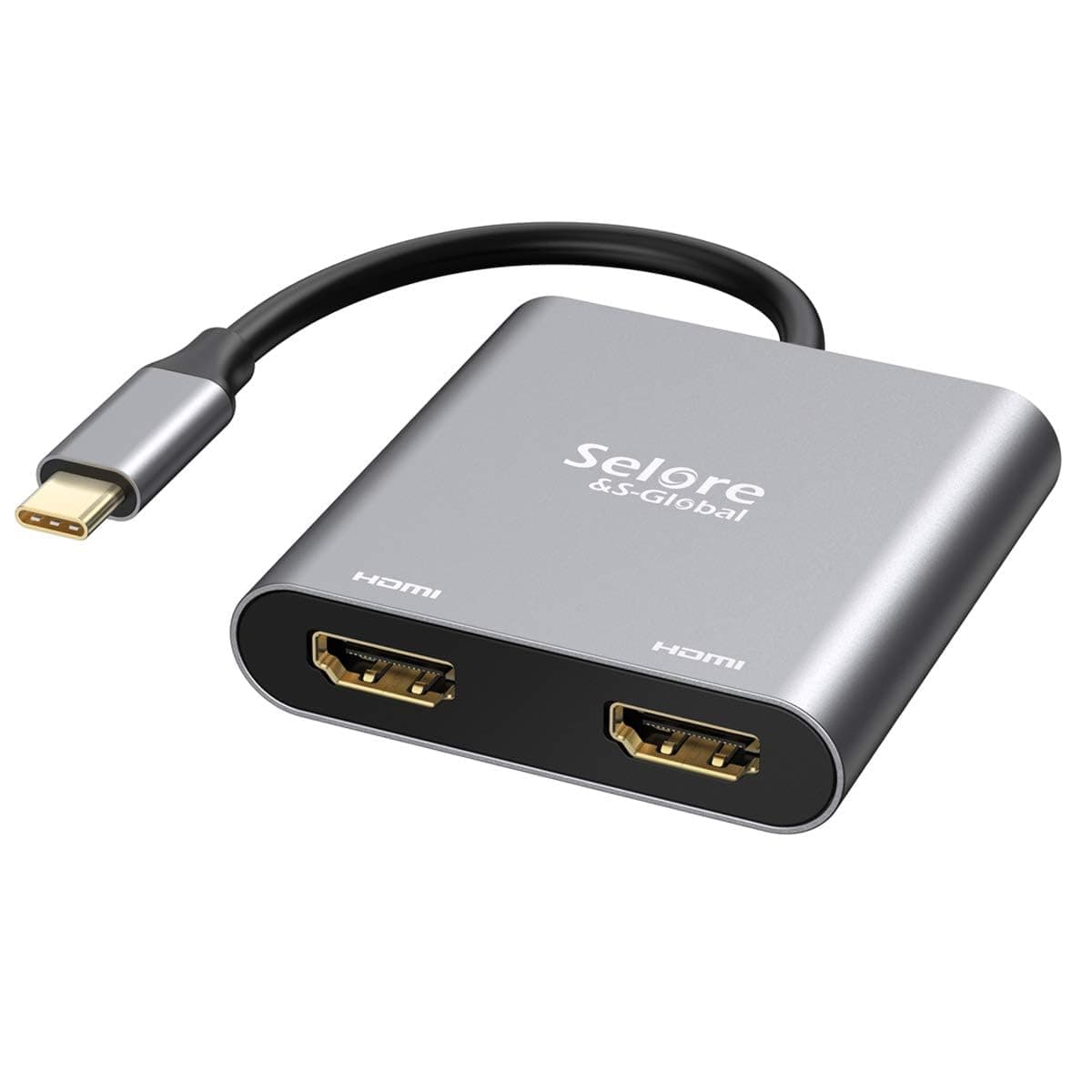
🚀 Double Your Screens, Double Your Impact!
The Selore&S-Global USB C to Dual HDMI Adapter transforms a single Thunderbolt 3/4/5 USB-C port into two 4K UHD HDMI outputs at 60Hz, enabling professionals to expand their digital workspace effortlessly. Compatible with a wide range of premium laptops including MacBook Pro/Air, Dell XPS, and Lenovo Yoga, this plug-and-play adapter delivers crisp, lag-free video for multitasking, gaming, and presentations. Its durable copper enclosure ensures longevity and heat dissipation, making it a reliable companion for the modern professional seeking seamless multi-monitor setups.


| ASIN | B07QKVY23Q |
| Additional Features | Plug and Play |
| Best Sellers Rank | #3,014 in Electronics ( See Top 100 in Electronics ) #42 in Laptop Docking Stations |
| Brand | Selore&S-Global |
| Color | Grey |
| Compatible Devices | MacBook/ MacBook Pro (2021/2020/2019/2018/2017/2016); Macbook Air 2018-2021;Mac mini 2018-2020;iPad Pro 2018,Dell XPS 9380/ XPS 13 9365/ XPS 15 2018;Dell Latitude E7370/ E7470/ E7480/ Dell Latitude 13 7000/ E7370L/ New XPS 15 i7;Lenovo Yoga 720-13IKB/Yoga 910; Yoga15 Thinkpad Ultrabook Pro; Thinkpad E590/ Thinkpad P72/ Lenovo C930; Microsoft Surface Book 2/ Surface Laptop 3; Surface Pro 7/ Surface Pro 8/ Surface Go; Galaxy Book Flex Alpha 2-in-1 13.3" QLED Touch-Screen Laptop; Galaxy Tab S5e/ Galaxy Tab S4; HP Spectre Laptop 13-af001TU/ Spectre x360 13t; Elitebook 840 G5 series/ Elitebook x360 1030 G3; Envy Geforce mx250/ Z book 15u G3 ASUS Zenbook UX330UA/ Zenbook Flip ux370u; Acer Aspire 5 2019; D17w3 Aspire c24-865; Samsung Galaxy S10+/ S10/ S9+/ S9/ S8+/ S8 Plus; Note 10/ 9/ 8 Compatible Devices MacBook/ MacBook Pro (2021/2020/2019/2018/2017/2016); Macbook Air 2018-2021;Mac mini 2018-2020;iPad Pro 2018,Dell XPS 9380/ XPS 13 9365/ XPS 15 2018;Dell Latitude E7370/ E7470/ E7480/ Dell Latitude 13 7000/ E7370L/ New XPS 15 i7;Lenovo Yoga 720-13IKB/Yoga 910; Yoga15 Thinkpad Ultrabook Pro; Thinkpad E590/ Thinkpad P72/ Lenovo C930; Microsoft Surface Book 2/ Surface Laptop 3; Surface Pro 7/ Surface Pro 8/ Surface Go; Galaxy Book Flex Alpha 2-in-1 13.3" QLED Touch-Screen Laptop; Galaxy Tab S5e/ Galaxy Tab S4; HP Spectre Laptop 13-af001TU/ Spectre x360 13t; Elitebook 840 G5 series/ Elitebook x360 1030 G3; Envy Geforce mx250/ Z book 15u G3 ASUS Zenbook UX330UA/ Zenbook Flip ux370u; Acer Aspire 5 2019; D17w3 Aspire c24-865; Samsung Galaxy S10+/ S10/ S9+/ S9/ S8+/ S8 Plus; Note 10/ 9/ 8 See more |
| Customer Reviews | 4.2 out of 5 stars 13,308 Reviews |
| Data Transfer Rate | 60 Hz |
| Enclosure Material | Copper |
| Hardware Interface | USB 3.0 |
| Item Dimensions L x W x H | 2.5"L x 2.4"W x 0.6"H |
| Item Weight | 2.4 Ounces |
| Manufacturer | Selore&S-Global |
| Mfr Part Number | UC703 |
| Model Number | SEUC0703 |
| Number of Ports | 2 |
| Operating System | Windows 10, macOS |
| Special Feature | Plug and Play |
| Total USB Ports | 2 |
| Total Usb Ports | 2 |
| UPC | 667581878611 |
| Unit Count | 1 Count |
| Warranty Description | At SELORE we offer 1-year defective product refund/replacement and friendly customer service。 |
M**N
Works incredibly good
For an "offbrand" device that I don't normally see on amazon, I'm incredibly impressed. It worked straight out of the box, it doesn't have any major delays that I can see however when first connecting three monitors there will be some refresh issues for the first 5 seconds but that does go away as far as I can tell. Doesn't require any external power which is a nice feature and I can confirm you can extend for three different monitors on windows 11. It doesn't state what the minimum specs are but it works fine on my displayport 1.4 usbc port with a total of 4 adapters between the splitter itself and the port on the laptop. It does get warm to the touch after some use but with some double sided tape holding it up on the bottom of my desk, that isn't personally a concern for me :)
P**0
Works great for a person that knows nothing about computers with room to grow
I purchased this because the new laptop I purchased doesn't have a lot of slots to do what I want to do. I wanted to use the HDMI port to connect another monitor but my laptop wouldn't let me do that. I tried DP and that didn't work what did work is I had to put the HDMI onto the laptop it's self and go to the monitor. I have a my Bose speakers connected to this and I have a keyboard and mouse on this. Every thing works great so far. I am not computer savvy but this helps a great deal. I have room to add things when I need to. I would buy this again it works for what I need and room for other things as I go. I may try to add my old web camera.
S**E
Works exactly as advertised
I'm a software developer, and I like to use three monitors. I tend to have each screen split with multiple windows so that everything I need is a glance away. For many years I have worked with a desktop, but noticed that recent laptops are starting to rival in power while costing 25% or less in electricity to run. My business laptop has DisplayPort and HDMI ports, but I really wanted that third monitor if I was going to switch. When looking up solutions, I learned that the laptop's USB-C port supported DP Alt Mode, and the laptop manual stated it should allow me to have up to two additional screens - perfect. I picked up this Selore adapter since the quality seemed decent, and I can confirm it feels like it should last for many years. Installation was plug-and-play, and as you can see in the photo all three monitors are fully functional. They are all set to 1920x1080@60hz, and all three look just as sharp and responsive as it did on my desktop. Very pleased, and I would definitely recommend this adapter to anyone looking for extra screens with a compatible laptop and OS. As a side note for more techy individuals: The desktop GPU was a GTX 1080, and the laptop GPU was a GTX 1660 Ti. I have successfully used the adapter with both Ubuntu 18.04 and Windows 10, though Windows provided a much smoother and more stable experience. I have not detected any difference in input and display response times between the USB-C connected monitor and the DisplayPort connected monitor.
F**Y
Worked great, for 2 months...
Hi, I am Updating the review once again. After leaving the last update, I was contacted by the seller, and they offered a full refund, which I was surprised yet pleased about. I can't give the product 5 stars since it did stop working after all, but the company made it right. Again, out of the box, it was great and did everything I hoped and as advertised. When it stopped, the seller made it right. All in all, I'm pleased with the result. In the meantime, I purchased a different version from another seller that I returned after 2 days because it kept "blinking" in and out. I guess maybe I'll give this one another try and hope it was just the luck of the draw on the one I received last time. If I do, I will once again update my experience here. With so many "interesting" reviews I thought I would share my experience. I order the product on 10/2/23 and it arrived the next morning. Based on some of the reviews, I thought it required downloading software and taking time to play with the adjustments, etc. For me, I pluged it into my old Razer laptop, still running Windows 10, and it worked. No software, no adjustments, nothing to do. The picture seems fine, but I hooked it to an older 1080p TV as my third display. I obviously can't speak to durability, or it dies after two weeks, but I have no reason to believe there will be an issue. It is the same quality level as other USB C connectors I have, which have lasted over a year at this point. If I run into performance issues in the future, I will update this review. UPDATE: I ran into performance issues. It was great for almost three months, then it just stopped working. I was using my laptop with two monitors as usual, and suddenly, the third monitor just went black. I checked all connections and they were secure, I switch HDMI cables and the third monitor worked but the 2nd did not. So it wasn't the cable or the monitor, it is definitely this adapter. It's a shame because it was great when it worked. I plan on buying something similar and will have better luck. These are too expensive to be considered throwaway like some other electronics these days. Great when it worked.
D**E
Seamless function, just plug in and go
I purchased this to run dual monitors off my work laptop. My work laptop is locked down by administrators and so no additional software can be installed. So, any HDMI adapter requiring a driver isn't an option. I had originally purchased the Giq 3.0 but had to return it for this specific issue. Side note, in this day and age, installing driver software manually is a pain in the *** and I wont do it. The Selore is great because it's a simple plug and go. Within 30 seconds out of the box I had it plugged in, monitors attached and was live. Also quite a bit cheaper than the Giq. And I didn't need to adjust the native windows settings to multiple displays, it automatically adjusted it. IDK if this is a feature or a fluke - but it was nice. Overall, been up and running with this for a while with no issues. Works well, strong recommend.
E**N
Broke in less than 2 weeks
Short version: I got this 2 weeks ago, and it completely broke within that time. I purchased this adapter because I need it for my work from home set up. At first I thought it was a bit pricey compared to other options, however the next best options would take 2 days longer to arrive so I said 'why not, it must be better quality anyway'. I was wrong. After going through a whole saga in terms of delivery it finally arrived. It worked just as it was suppose for the first week but recently I plugged my personal laptop in (which I had done many times before) and it did not work. I thought 'hmm, must be my laptop' so I restarted it. Still my laptop did not connect to my monitors. I then tried my laptop. Did not work. I then connected each of the HDMI cords from my monitors individually to my personal laptop and both worked. I then did every test possible to see if it was the adapter or something else that was not working cause should a simple thing which cost more than normal market price would not break within 2 weeks. Alas, this poor quality controlled device has done exactly that. Well, that's my experience with it. I'm impressed you read the long version. My recommendation is quite obvious.
B**N
Quality and performance is what I expected.
Quality and performance is what I expected.
M**K
Works occasionally
I own two Dell laptops. The first one connects relatively easily, but there are instances when it disconnects if I accidentally nudge the wires. On the other hand, connecting to the second laptop is a hassle. There were times when it wouldn’t even establish a connection. In summary, it performs okay with one of my laptops, but not with the other.
ترست بايلوت
منذ شهر
منذ يوم واحد