Buy anything from 5,000+ international stores. One checkout price. No surprise fees. Join 2M+ shoppers on Desertcart.
Desertcart purchases this item on your behalf and handles shipping, customs, and support to KUWAIT.
🖨️ Print smarter, work faster, stand out sharper.
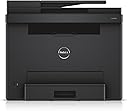
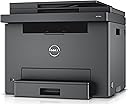
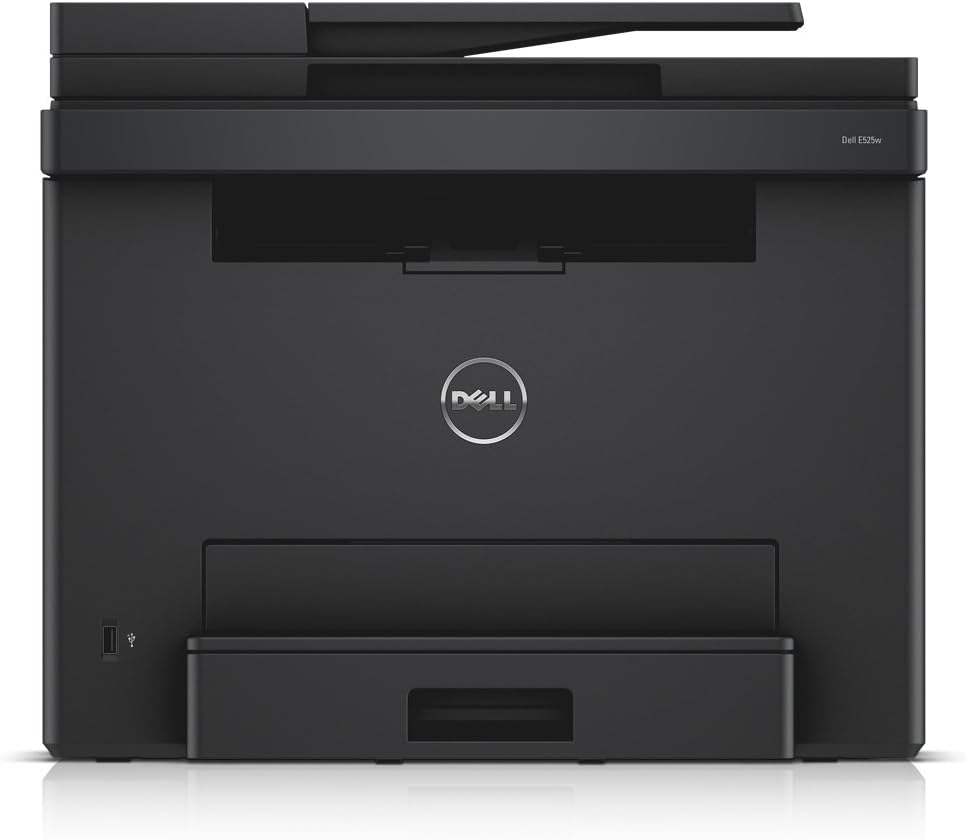
The Dell E525W is a wireless color laser multifunction printer designed for professionals who demand vibrant 600x600 dpi prints, fast 18 ppm speeds, and versatile media handling up to 11x17 inches. With cloud-ready connectivity and a compact design, it streamlines your office tasks from printing to scanning with ease.
| ASIN | B00YBZE1M8 |
| Additional Printer Functions | Copy |
| B&W Pages per Minute | 18 ppm |
| Best Sellers Rank | #373,034 in Office Products ( See Top 100 in Office Products ) #513 in Laser Computer Printers |
| Brand | Dell |
| Built-In Media | Printer |
| Color | Black |
| Color Depth | 24 bpp |
| Color Pages per Minute | 18 ppm |
| Compatible Devices | Laptops, PC, Smartphones |
| Connectivity Technology | Wireless |
| Control Method | Touch |
| Controller Type | Push Button |
| Customer Reviews | 3.7 out of 5 stars 933 Reviews |
| Display Type | LCD |
| Duplex | [POSSIBLE] |
| Global Trade Identification Number | 00884116164043, 05397063622863 |
| Hardware Interface | USB 2.0 |
| Ink Color | Black |
| Item Weight | 16.4 Kilograms |
| Manufacturer | Dell Printers |
| Maximum Copies Per Run | 18 pages_per_minute |
| Maximum Copy Resolution Black and White | 600 dpi |
| Maximum Copy Resolution Color | 600x600 dpi |
| Maximum Copy Speed Black and White | 18 ppm |
| Maximum Media Size | 11x17 inches |
| Maximum Print Resolution Black and White | 600 dpi |
| Maximum Sheet Capacity | 150 |
| Maximum print Resolution Color | 600 x 600 dpi |
| Model Name | E525W |
| Model Number | 210-AEHD |
| Model Series | 210 |
| Number of Drivers | 1 |
| Number of Trays | 2 |
| Other Special Features of the Product | Wireless |
| Paper Size | 210 millimeters |
| Print media | Paper (plain) |
| Printer Connectivity Type | Wireless |
| Printer Output Type | Color |
| Printer Type | Laser |
| Printing Technology | Laser |
| Processor Count | 1 |
| Resolution | 600 x 600 |
| Scanner Type | Sheetfed |
| Series Number | 210 |
| Special Feature | Wireless |
| Specific Uses For Product | Office |
| Total USB 2.0 Ports | 1 |
| Total Usb Ports | 1 |
| UPC | 884116164043 |
| Unit Count | 1.0 Count |
| Warranty Type | Limited Warranty |
| Wattage | 550 watts |
M**N
Extremely Happy!!!!
We previously had a Kodak ESP 7 All-In-One, with promises of cheap ink from Kodak, well Kodak raised their prices, and the ink would always be dried up every time I needed use the printer, the final straw was when the $60 head became clogged and the maintenance cleaning cycle drained my brand new color cartridge. So just to be able to print again I would've been out $100. I started look at Laser printers, researched this Dell E525W printer very heavily. To drive downtown this printer will be over $329.00 + tax. This printer also has a brand new model that will replace this printer, it's suggested retail is $580.00. I've read many, many reviews I always start with the one or two stars reviews look to see if there are any legitimate complaints or to know what the worst scenario of this product is. I'll have to say across the board, from amazon, Dell and around the web this printer gets solid reviews. The printer arrived all the way across the US earlier then Amazon promised, even tho the box looked like it did a tour in Vietnam, the printer was in perfect condition due to the great packaging. Took the printer out, after an extremely easy setup, printer does beautiful pictures. We don't print often, that's why an ink jet doesn't fit our lifestyle, but when we need to print it's usually for work, or some project for the kids school. A laser is very dependable, always there when you need it. I highly recommend this printer as an IT professional in the business for over 20 years, it's extremely nice. This printer doesn't do duplex, I don't like duplex anyway, so not a problem for me.
K**N
Pass this one by & go for another laser all-in-one color printer! This is a bulky, expensive-to-operate, trouble-ridden beast!
May 1, 2018 - UPDATE: I've had this printer for over a year now and am again lowering my rating to ONE STAR and am looking for a replacement printer! (Should've sent it back immediately!) This is probably the worst printer I've ever owned, laser or inkjet, and there have been many. What were a few minor annoyances in the beginning have turned into major headaches and the list keeps growing. Within just the last couple weeks, a new problem has deveoped that I've not been able to rectify.....it take literally MINUTES to begin printing! From what little I can deduce, it seems to be a problem with the collating feature. I can shut that off in the printer preferences, but it comes back on by itself, and the whole problem starts again, EVERY TIME I PRINT SOMETHING! Paper jams are more frequent than not, the paper drawer has to be SLAMMED repeatedly for the printer to detect that it's closed, every time you open the printer drawer, you must use the printer's control board and press multiple buttons in order to begin printing again. (Opening the drawer seems to cause loss of settings). Nothing about this machine is intuitive or user friendly, and the included instructions are totally worthless. It's big, heavy and clunky, goes through cartridges like a hungry monster, and they are very expensive, making for a high cost per sheet. Our home use is low, and I still can't stand it anymore and will be purchasing a new printer as soon as I decide which one. Having such a bad experience with this beast, I'm a bit gun shy about choosing another. One thing I know for sure, IT WILL NOT BE A DELL! Pass this one by and go for another laser all-in-one color printer. There are many affordable machines out there, and this one isn't even in the running as a good choice! July 3, 2017-UPDATE: I've had this printer for 5 months, now, and am downgrading my rating from 4 stars to 3 due to the fact that "somewhat finicky" is actually "very finicky". Frequent paper jams, difficult to recover from, even when cleared. Often takes removing and replacing paper tray AND the "back hatch" several times before the machine detects that the jam has been cleared. Also, whenever the paper drawer is opened and closed, it's necessary to rechoose options from the printer's counsel (paper size and type) to continue printer. It amounts to losing those basic settings, so to speak. Whatever causes these issues, whether machine or operator fault, it's not as user friendly as most of the printers I've had for home use and is THE MOST finicky and troublesome for paper jams as well as clearing jams. Knowing what I know after 5 months of use, I would NOT choose this printer again! Shop around some more, there are better options out there for the same or even less money. This is not the printer for someone looking for ease of use! ORIGINAL REVIEW: After using the scanner several times, including resizing photos, using the printer quite a lot and running several hundred pages through the copier, I like this machine overall, but it has its issues. The biggest one I've noticed so far is the printer's ability (or inability) to sense when the paper tray is in place. Whenever I fill the tray, or for whatever reason have to remove it, and then put it back in, the machine keeps telling me to put the paper tray in. I end up having to literally slam the tray in before the machine senses that it's in place. Also, if it runs out of paper in the middle of a print job, it jams more than 50% of the time, clearing the jam requires opening the back "hatch", which, of course, is on the back of the machine and not easy to get at. This thing is HEAVY, so anything that requires moving it around is a pain! The copies are clear and crisp, the speed is pretty good, although the warm-up is slow. I much prefer laser printers to ink jets for so many reasons, and a color laser printer was out of reach, price-wise, for most home users and small offices not so long ago. Getting one for just under $200 (including the shipping cost) is great, and I'm thrilled to finally be able to afford a color laser printer! For that reason, I figure I can put up with a few finicky issues on this machine as long as they don't get worse and repeatedly slamming in the paper tray doesn't end up breaking something.
W**.
This printer is awesome! Has worked very well for several months!! Died 11 months a 17 days Later
UPDATE: This printer has died with error 007-371 Code 1000000. Dell Tech Support told me write away that this is an internal hardware fault. At first they said it was out of warranty; is not by about 13 days. I sent them proof in the form a PDF of my Receipt from Amazon.com. The nice Filipino girl stated that she would use my receipt to update the warranty information then decide if it is a full device replacement or a parts replacement. Came out of the box in perfect condition. Setup was very easy. Had to figure out the paper tray. The instructions are pictures only; they leave far too much room for interpretation. I had to Google for the answer for getting 8.5x11 size paper in the paper tray. Works very well in my wireless network with all computers. (Download and install Dell drivers before telling PC to search for it.) My wife's Apple iPhone was able to print right away after I gave it the IP address. My Note 5 worked after I installed Dell Document HUB software. It found the printer and I was able to print to it. Seems OK. I will find out how this works in the long run. So? After over 6 months with this printer, I must say I'm impressed. It has been flawless so far. Very good print quality. This will work in every home and any small office.
C**N
This Dell is a steal!
Just got this, set it up and gave it a good workout this weekend. Very nice machine and an absolute steal for the money! Used a laser for my black and white printing for years and finally had a belly full of paying so much to support my voracious inkjet color printers. Color laser always seemed out of reach financially but this Dell put it back in reach at a very reasonable price and the quality of the prints is excellent. The scanner will output images in a number of file formats, which is a very big plus for me as a graphic artist, and the print output is quick and quiet. Granted, it is a large cube (about 18" each way) and a little heavy (about 35 lbs), but you want function out of a printer/scanner, not style. Setup for my desktop work station and my wife's laptop was very simple. Overall, I'd say Dell delivers! Oh, and a very MERRY CHRISTMAS to everyone out there. UPDATE: Been working this machine to death for the past six-plus months and am still very pleased with it. It doesn't use very much toner and still prints very nicely (I'm a retired graphics guy so I'm pretty fussy - okay, very fussy - about print quality). I've also scanned over 1,000 old photos on this machine the past few months and it's performed beautifully!
D**N
After having use this printer for about 10 months...
After having use this printer for about 10 months, here are the things I don't like about it and why I want to replace it with a different one: Paper handling is horrible: it routinely tries to tell me there is a paper jam, and when I pull out the cassette there is never any paper jam. It seems if you put a few sheets too many in the cassette, it cannot pull the sheet out and reports a paper jam. Also the paper does not sit squarely and firmly in the tray- therefore if you're printing something which requires precision placement of ink on paper for example on a form, it's going to print a little differently every time because the sheets do not pull from the tray with precision each she might be off to one side or the other by a tiny bit. Also the input tray cassette is very small I'm not sure how many sheets it supposed to hold but it seems to hold about 100 sheets. First page out is ridiculously slow for printing. Third to Last complaint: it seems impossible for it to print envelopes and there doesn't seem to be any way to print envelopes with this printer. Second to last complaint is the copy feeder does not work very well in fact it tends to pull more than one sheet at a time frequently. For example if you have a stack of 15 sheets in my pull the first 10 fine, and then it will try to pull the last five all through at once. Final complaint is it can't do double-sided copying. If you have a document with writing on both sides you're going to have to feed it through one time and then put that resulted in the input tray and then put the original through again except flipped upside down.
A**S
Excellent product but setup requires extra work.
This is a fantastic product for the price. I was fed up with inkjet printers because they would always clog and the ink would dry out due to infrequent use. Then you have to disassemble and clean the printer, buy more ink cartridges, print your 3 or 4 pages and repeat the process again. You do not have that issue with laser printers and toner cartridges are good for 2000 plus pages. With that being said this printer surprised me when we printed a photo. The quality of the picture was very good. Also the copier was just as good as the printer and simple to use. I did not do anything with the Fax so can't rate it one way or the other though I think it may be like the scanner with it's setup. Now lets get to the negative part of the review, the scanner and the reason why the product did not get a 5 star review. I could have gone lower on my rating but this really is an excellent device and was worth the headaches. The printer came with a setup disk so I made the assumption it would configure everything. That was not the case. It configured the printers wireless and installed the printer driver. I first tried to scan a document from the printer. I placed the document in the document feeder and went through the scan process. The document did not feed and it could not connect to the computer. I then attempted to scan without document feeder and had the same issue. So off to the web I go seeking answers. The solutions are out there but it requires translation to Windows 10 as there are no documents for Win 10. Below are the steps to set this up. First you need to create a new user account and password for use by the scanner. I used scanner and scanner for the user id and password. Next depends on whether you are the only user or there are multiple users on this PC. If you are the only user of this computer you can use the Scanned Documents folder under My Documents. If there are Multiple user you will need to create a Scanned Document folder at C:\ as this folder needs to be accessible to all users. Now you need to right click on the folder and go to sharing. In the empty box type everyone and click share and close. Now click on advanced sharing and click permissions and add the user account you created with Full control. Now open a web browser and enter the ip address of the printer. It will ask you for user id and password. It is admin and nothing for a password. Navigate to server address book and create an entry for your computer using the ip address of your computer and the name of the share that you created. The user name you created on your computer and the password. You can now scan and save documents to your computer. Now you need to go back to your computer and go to devices and printers. Right click on your printer and select scan profiles. There is a setting for documents that needs to be set to the document feeder. I wish I could be more specific but everything here is from memory and things may be slightly different such as wording.
C**M
Best money I have EVER spent!!!
I’m a small business owner, so I have owned A LOT of printers. Not big ones, just small All-In-One Inkjets. I hated them. All of them. Having a business, I was printing more than the average household. And I finally got sick and tired of paying $60-100 for ink 1-2 times a month. I was done. So I started looking for lasers. I researched every color all-in-one laser printer I could find for months. This one came up over and over and over. So I finally decided it was the one I wanted. My months of research paid off ten fold! I literally COULD NOT be happier with this printer. It does everything I need and want and the price was astounding! Seeing the price of some of the other laser printers during my research almost brought me to tears on numerous occasions. I was hesitant because I couldn’t actually believe this printer could be this great for this price but no, it REALLY is!! There is no hidden crap-show! And even the 1-3 star reviews, no clue what printer those people are using or maybe they just don’t know how to read an owner’s manual but I haven’t experienced ONE issue that’s been mentioned in any review. And I read them all, on multiple sites. The color quality is so bright and vivid and the black is super bold and full. It functions and prints crazy fast. Hardly takes any time at all to warm up from sleep. I didn’t have a single problem connecting to my WiFi. It’s big but I love the look of it for my office! And my INSANELY FAVORITE part that I just discovered, I have an iPhone that I do all my work emails from. I needed an invoice from the scanner to my iPhone to email. So I found the iOS app Dell Document Hub. OMG! I put the invoice on the flat bed and scanned it, FROM MY PHONE and then saved it to iBooks as a PDF. Technology is literally blowing my mind right now. If you’ve been trying to make up your mind for months like I was and you are a small business owner with small-average daily use, then stop thinking and buy this one. I promise you won’t be disappointed. No, I did not receive a discount or anything for my review from Dell or any third party seller and no, I don’t work for Dell or any third party seller. I really just love this printer and feel so proud of myself for doing my research!
K**E
Very good quality print but no duplex and ADF limited to 15 sheets
I been using this printer for 8 months and selected it because I wanted a color laser MF and it was highly rated by Consumer Reports. However, I missed the detail that it does not print double sided. Granted, I have a monochrome laser that prints double sided but feel my oversight each time I manually create double sided copies with it (or scan to USB stick to print on a duplex). The document feeder only fits 15 sheets, ouch. Perhaps there is a work around to scan documents that are more than 15 pages but I have not taken the time to figure that out yet. And gee, I assumed I'd be able to easily scan directly to a computer on the network and fiddled with it when initially installed but gave up and have not gone back to it. I scan to a USB stick and move them to computer. An extra step. I also find the printer a bit slow but I can forgive that for the nice quality of the black and color print. I have not printed on photo paper yet. Apparently, some of my issues are user related. There are more good points. The copy ID card functionality is handy. The printer itself is compact, looks nice, and is sturdy. The original toner cartridges lasted 8 months - I don't use it to print unless I need color but I use it fairly often for copies. I was in Staples the other day and some of the printers were huge (and ugly) and some had a cheap feel to them. I wanted to give this printer 4 stars but can't get past the 15 page document feeder, which tends to get paper jams with stacks that were previously stapled together unless you manually separate each page so that they don't stick together and cross your fingers. And final note: when are MF's going to be manufactured without FAX. FAX is an ancient form to transfer documents. This one appears to have scan to email but wonder how hard it is to set up.
C**S
SUper
Difficile à installer mais ça en vaut vraiment la peine. Qualité d'impression nette mais pas parfaite pour les photos. Le gros +++ les toners sont à prix extrêment abordable. Parfait pour un usage intensif Je recommande vivement
D**R
It was time to replace my older Dell laser printer ...
It was time to replace my older Dell laser printer and I needed a copier facility as well. Arrived promptly. Just what I needed the only drawback is the length of time it takes to warm up & get started - not the fastest.
D**T
Best laser printer for the price
Easy setup, great quality of b&w printings, and get good quality for color printings, even photos. I chose it after reading a review from a consumer association grading of laser printers, they were not wrong. No more pricy ink jet printers for me, EVER!
C**N
En mi opinión es cara
Imprime lindo y es inalámbrica, pero no acepta distintos grosores de papel. Si pones un papel que sea un poco más grueso, como la opalina, se atasca... En mi opinión, es un poco cara, para lo que puede hacer en la realidad.
T**S
Tolles Gerät!
Fazit: Für Heimandwendungen mehr als ausreichend, sehr schönes Druckbild, sehr gute Druckgeschwindigkeit und viele Funktionen für relativ wenig Geld, ABER leider SEHR teure Folgekosten, ein Tonersatz kostet aktuell fast 270€ (~120% der Anschaffungskosten!). Ich weiß gar nicht wie ich anfangen soll, ich war noch nie so hin und her gerissen zwischen 4 und 5 Sternen. Der Drucker sieht schick aus, die Klappen schließen alle recht gut, es klappert nichts und das Display lässt sich sehr gut ablesen. Was ich sehr gut finde, sind die Schnellwahltasten für z.B. den Faxversand. Auch das Menü kommt mir sehr vernünftig strukturiert und übersichtlich vor. Der "Startbildschirm" vom Drucker zeigt einem den Tonerfüllstand und die IP an, sehr hilfreich! Das Druckbild ist überraschend gut, da sollte man sich nicht von den angegebenen "nur 600x600 dpi" täuschen lassen, für Textdruck reicht das mehr als aus und für die meisten Fotodrucke im Heimbereich auch. Das Druckbild ist über die gesamte Seite einheitlich, es gibt keine "blasseren" Stellen oder ähnliches. Allgemein zaubert der Drucker recht schicke Ergebnisse, auch Fotos auf normalem Papier sind definitiv sehenswert! Die Druckgeschwindigkeit ist sehr gut, wenn er erstmal auf Touren ist, geht das Ratz-Fatz! Warnungen und Fehler sind mit einem gut hörbaren akustischen Ton untermalt, den hört man auch noch ein-zwei Räume weiter weg (sofern Türen geöffnet). :D Nun zu den negativen Punkten: Da gibt es erfreulicherweise gar nicht so viele. Einmal finde ich den Tonerpreis "noch" SEHR übertrieben und ich konnte bislang auch kein Toner-Kit entdecken, wo man vielleicht ein bisschen was spart. Aktuell kostet der Black-Toner 50-65€ und jede Farbe ca. 65-75€, bedeutet ein Satz kostet 270€, der Drucker kostet 220-240€. Wenn das Starterset die selbe Druckleistung hätte wie die nachgekauften, wäre man besser dran sich immer gleich einen neuen Drucker zu kaufen... das passt irgendwo nicht! Hoffentlich fällt das in den kommenden Wochen auf 120-150€ pro Satz! Dann hatte ich noch ein wenig ärger mit der Software. Ich mag es immer mir den aktuellsten Stand der Treiber/Software aus dem Netz zu laden und nicht die von der CD zu installieren, leider hat mich Dell dort ein bisschen verärgert. Es gibt aktuell im Downloadbereich für Windows10 nur einen Universal Printer Driver, dieser Treiber funktioniert zwar, ist allerdings NUR zum drucken, der Scanner lässt sich damit (zumindest habe ich keinen Weg gefunden) nicht überzeugen zu scannen. Lösung für das Dilemma war die Auswahl von Windows8.1 im Downloadbereich und damit die Möglichkeit die Dell Software Suite (damit lässt sich auch scannen!) runterladen zu können. Damit verlief die Installation relativ reibungslos; obwohl die Suche nach dem Drucker recht lange gedauert hat, gefühlte 5 Minuten - der Drucker ist über LAN und der Rechner über WLAN mit ~98% Sendeleistung angeschlossen - Ursache für dieses Phänomen konnte ich nicht ergründen, vielleicht ein Einzelfall. Im Großen und Ganzen ein solider Drucker mit schönen Druckergebnissen für den Heimbereich, wenn der Tonerpreis nun noch um ca. 50% fällt, kann ich dieses Multifunktionsgerät wärmstens empfehlen.
Trustpilot
4 days ago
5 days ago