⚡ Elevate your workspace: Power, speed, and clarity in one sleek dock!
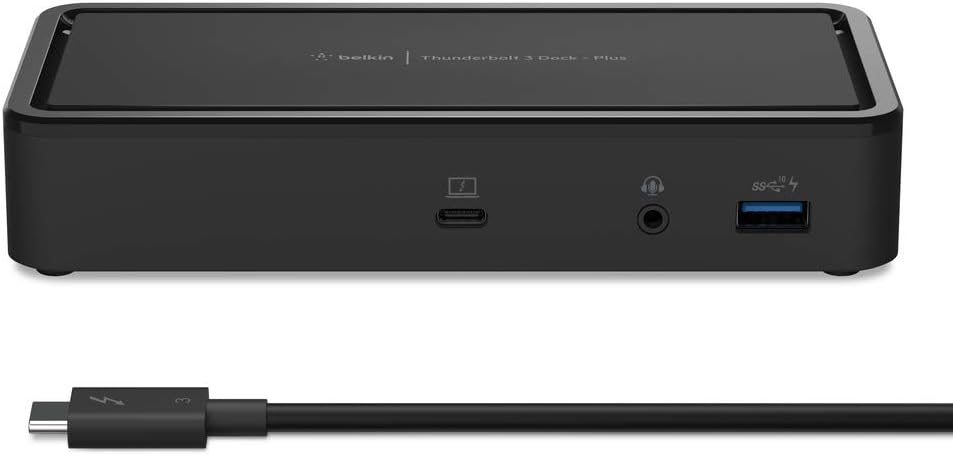
The Belkin Thunderbolt 3 Dock Plus is an 8-in-1 docking station designed for Mac and Windows laptops with Thunderbolt 3 or USB-C ports. It supports dual 4K monitors at 60Hz, delivers ultra-fast 40Gbps data transfer speeds, and provides up to 60W laptop charging via a 125W power supply. Featuring multiple USB-A and USB-C ports, Gigabit Ethernet, and audio connections, it consolidates your workspace into a single, compact hub with an included Thunderbolt 3 cable for versatile desk configurations.


| ASIN | B07Z2PF8FV |
| Best Sellers Rank | #6,886 in Computers & Accessories ( See Top 100 in Computers & Accessories ) #553 in Laptop Docking Stations |
| Brand | Belkin |
| Built-In Media | Thunderbolt 3 Dock Plus |
| Color | BLACK |
| Compatible Devices | Laptops with Thunderbolt 3 connectors |
| Customer Reviews | 3.7 out of 5 stars 171 Reviews |
| Global Trade Identification Number | 00745883785698 |
| Hardware Interface | DisplayPort, Ethernet, Thunderbolt, USB, USB Docking Station |
| Item Dimensions L x W x H | 6.5"L x 3"W x 1.2"H |
| Item Type Name | Thunderbolt 3 Dock Plus |
| Item Weight | 9.44 ounces |
| Manufacturer | Belkin |
| Number of Ports | 3 |
| Product Dimensions | 6.5"L x 3"W x 1.2"H |
| Total Number of HDMI Ports | 1 |
| Total USB Ports | 5 |
| Total Usb Ports | 5 |
| UPC | 745883785698 |
| Unit Count | 1.0 Count |
| Warranty Description | Limited manufacturer |
| Wattage | 60 watts |
S**G
Second displayport actually works with macos
The main issue everyone has is with the second display port. I am running an intel mbp. The issue is when the first monitor connects, mac os switches to 64hz refresh rate. The monitor still somehow works. But when I plugin the second monitor, and it also switches to 64hz, it doesn’t work. So I had to bring both monitors to 60hz in MacOS settings and everything is working now.
L**D
Frequently fails to pick up USB devices
Previous to this hub, I had a really cheap one. That one was more like an adapter, with a lot of ports. It worked fine, but I had to cobble it together with more adapters and it didn't have enough ports to support everything. So I decided to spring for the real deal, a proper TB3 hub that would support all of my devices. The good news is, it can drive almost all of those devices, when they can be found. I'm running two monitors, a keyboard, and a mouse off of it currently. The one device it wouldn't support was my webcam. That works fine off of the laptop, but has a flicker when used through this hub. The bad news is, and this is really a deal breaker, it often fails to detect usb devices (the keyboard and mouse) when I reconnect the computer to the dock (this sometimes happens after the computer goes to sleep as well). This makes me reluctant to disconnect the laptop when the dock is working, which defeats its purpose. Basically I wasted hundreds of dollars on this device. Do yourself a favor, keep looking.
C**N
Great Product, No Issues
So far this has exceeded my expectations. Read a lot of reviews, the majority being negative, but so far I have not had any issues. Super easy to plug in my Mac with one cable and it's good to go. The only downside is that I cannot use both Display Port outputs, but that is not this item's fault. I use a Macbook Pro M1 and it can only support 1 external display since it is not the Pro or Ultra chip. Definitely recommend this product, especially if it is on sale!
C**R
Works for my 13" MacBook Pro to dual DisplayPorts
I can't speak to the long-term reliability or other dock/adapter functionality beyond what I needed but, since I had a hard time deciphering what would work for my specific need based on reviews of this and other options, I can confirm that the Thunderbolt 3 Dock Plus works for extending a desktop to dual monitors via DisplayPorts, using one Thunderbolt cable output from my 2020 13" MacBook Pro, while providing 60W charging (and USB printing and ethernet internet). I now have the three independent screens back that I had on my old MacBook Pro with dual mini-DisplayPorts. It did mirror the display at first based on the sequence that I connected everything but once the monitors were both connected to the dock and I unplugged and then plugged back in the Thunderbolt cable to my MacBook, they showed up as independent desktops that could be arranged as usual in display preferences (I am only using 2x 1440p). Unplugging and plugging back in seems to required each time when waking back up from sleep to kick the desktops from mirrored to extended which is slightly annoying if you don't move your set-up but not a big deal. Not sure if this will vary by computer.
J**O
Wish I'd invested in this one sooner, prefer over the same smaller dock
I had the other, smaller Belkin Thunderbolt 3 Dock and it just crapped out after 2 years. This one is much better. Because it is a powered unit, the Mac has an easier time switching to the external display on the first try, the other non-powered unit would bounce back and forth between the laptop screen and the external display for quite a while if a lot of applications were running on the screen. This one seems to always work on the first try. Also has a lot more ports and the cable is replaceable. The smaller Belkin unit has a hardwired short cable that actually went bad, likely due to the tension on it.
M**L
Same display port issue as others, second hub after an exchange
Up front, Belkin was kind enough to just accept my original and send me a replacement of the same model within a very reasonable timeframe, so good on them. However, the real problem is the display port. The exact same port others have talked about (right one if looking from the front, left from the back). Not only does the port just not work at all, it causes my mouse point to sttuter whenever something is plugged in to it. That's on a 2019 MacBook Pro, 15". It's not the ports on my mac, those work fine if I have an HDMI to USB-C/Thunderbolt 3 adapter on either side (HDMI bus and display link emulation problems), no issues at all. Funny enough, the Thunderbolt port that I could plugin my simple HDMI to Thunderbolt 3 adapter doesn't work when plugged in, even though the HDMI bus isn't in use yet. I'm using two HDMI to display link cables. To test I did the following: Plugged in both monitors using the same display link cables, one works one doesn't, the one plugged in to the problem port Swapped the inputs, same issue Swapped the entire cable, same issue Unplugged one and tried one monitor with both cables on the working port, this works fine. Unplugged that monitor and cable from the working port and plugged in to the non working. Issue returns. Went through all possible combinations of cables and monitors, as well as ports on the 15" of which there are 4, and I ran in to the issue. That's a lot of cases. So, that said, this display link issue has not been fixed, and is a total deal breaker when one of the major selling points of this hub is dual 4k support, and just general dual display link support in general. Even with a single monitor, the issue happens. Belkin, so many people are talking about this issue, why hasn't it been resolved? There are enough 5 star reviews that I had faith in the product, as a lot of times 1 star reviews can be worded poorly and not go in to enough detail, so it just ends up sounding like disgruntled customers. I can say I totally agree with them. Again, this product NEEDS to be fixed before I'll consider it again, however I doubt that'll be true as I don't really have time to wait. I recommend this as a do not buy. Belkin, thank for you for support, however this is a dealbreaker for me.
S**O
Fair price, good performance
I bought this Thunderbolt 3 dock to plug into my company laptop as I was getting tired of the wiring mess every time I needed to travel or go into the office; it has exceeded my expectations, the low relative cost compared to other Thunderbolt 3 docks is a bonus.
K**.
It works, but not well
I recently got a Macbook Pro (2020 with Intel chip) for my new job, and I needed a dock so I could plug in my monitors. My old job's Macbook came with a dock so I searched for the same one since I never had issues with it, which apparently isn't available anymore (Belkin Thunderbolt 3 Express Dock HD). This one seemed the most similar port-wise so I went for it. For the money, not worth it. No dock is worth 250 bucks. I got mine used for $150, which was much more reasonable, but still far too expensive for a dock. All ports seem to work... except the audio in/out port. I plugged in my speakers and my laptop wouldn't recognize they were plugged in. So I plugged them directly into the Macbook, but that defeats the purpose of having a dock. Unhappy about that. USB works fine. I haven't had an issue with coming out of sleep mode (I'm also on 11.4 so maybe they fixed it). Also not pleased that the dock only has DisplayPort and no HDMI, so I had to buy extra adapters to work with my monitors. The design is just ok. Why is the thunderbolt port on the front? Having it on the front made the cable stick out really far, remedied with a 90 degree angle Thunderbolt adapter. Why is there no audio port on the back too? Docks should be as streamlined and unobtrusive as possible, in my opinion, and these two little things just don't fit that. Also, there is an awful extremely high pitched sound coming from it periodically. It'll stop for a full day, and then start up again for hours the next day. Also it only occurs when the Macbook is plugged into the dock, if it is making the sound and I unplug the cable from the Macbook it stops. It's extremely aggravating and honestly my right ear hurts from hearing the sound for just a few minutes (the dock is on the right side of my desk). I have only seen a few reviews that mention this so either I'm just young enough to hear it, or I have a faulty unit. All in all, it works, but there's so many downsides I'm starting to regret my decision to buy this one. At least I got it cheaper than usual...
ترست بايلوت
منذ 3 أسابيع
منذ أسبوعين