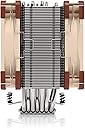
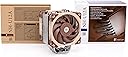
❄️ Cool like a pro, quiet like a whisper — the NH-U12A keeps your rig chill and your status high.
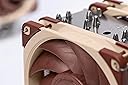
The Noctua NH-U12A is a premium 120mm CPU cooler engineered to deliver 140mm-class cooling performance through its 7 heatpipes and dual NF-A12x25 PWM fans. Designed for professional-grade compatibility, it fits most tower cases without blocking RAM or PCIe slots, making it ideal for high-end Intel and AMD builds. With ultra-quiet operation at just 22.6 dB, included NT-H1 thermal paste, and a robust SecuFirm2 mounting system, it offers effortless installation and reliable cooling backed by a 6-year warranty.


| ASIN | B07PN4RDW3 |
| Air Flow Capacity | 102.1 Cubic Meters Per Hour |
| Best Sellers Rank | #52 in Computer CPU Cooling Fans |
| Brand | Noctua |
| Brand Name | Noctua |
| Compatible Devices | Desktop |
| Cooling Method | Air |
| Customer Reviews | 4.8 out of 5 stars 3,671 Reviews |
| Global Trade Identification Number | 09010018000160 |
| Included Components | Body Room |
| Item Dimensions L x W x H | 4.92"L x 4.41"W x 6.22"H |
| Item Weight | 1220 Grams |
| Manufacturer | Noctua |
| Material Type | Copper (base and heat-pipes), aluminium (cooling fins), soldered joints & nickel plating |
| Maximum Rotational Speed | 2000 RPM |
| Noise Level | 22.6 Decibels |
| Power Connector Type | 4-Pin |
| Product Dimensions | 4.92"L x 4.41"W x 6.22"H |
| UPC | 841501100161 |
| Unit Count | 10.0 Count |
| Voltage | 12 Volts |
| Warranty Description | 6 year manufacturer’s warranty |
J**E
Fantastic Cooler, but Expensive. Extremely Quiet
Can't say enough good things about this cooler, with the one draw back being that it is very pricey. However, it does come with 2 of Noctua's new NF-12Ax25 fans which by themselves are $30 each. So the actual heatsink is only 1/3 the total price and is a consideration when looking at the cost/value proposition. Heatsink: The heatsink itself is very good. Has 7 heatpipes which is the most I've seen in a 120mm tower cooler. It also doesn't cover/block any of my ram slots (even on my mini-ITX board) with the fans mounted. My Coolermaster Hyper 212 EVO with the fan mounted would still cover the first ram slot, so I'm not sure how Noctua managed to pull this off as according to the specs the Noctua bare heatsink is 7-8mm wider than the Coolermaster. Mounting system is typical Noctua SecureFirm and fantastic. Fans: The 2 included fans are Noctua's new fans that took them 3 years to develop. There's never been so much hype on a fan than these, and you should read up on why it took so long to develop, it's an interesting article. What I can say after using them is that they are much quieter at a given RPM than my other high performance fans. I have to put my ear with in an inch or two to hear them under normal operation (about 50%-60% speed is where they normally running at) and they are barely audible at 100% when they spin up to full speed when I first turn on my PC. Note that the fans have pretty short power cables, and the heatsink does not include extension cables like you get if you purchase the fans separately. Performance: I am using one fan on the heatsink in a push configuration and the other fan as a case exhaust fan about one inch away from the heatsink. So it's similar to the intended push/pull configuration, but with a small gap between. Under 100% synthetic load my delidded i7 7700k runs in the high 50s low 60s degrees Celsius at ~1.3v vCore and ambient temp of 24C (75F). Under real word gaming load, the CPU was running at an average 48C with occasional short spikes into the 50s. All this in a very small, but well ventilated ~13L mini-itx case. This is fantastic performance and rivals bigger coolers like the Noctua D15 but is so much easier to fit in a small mini-itx case. Overall: I think the performance of this cooler is the best you can get at this size point. Compared to my Hyper 212 EVO, it performs better, is quieter under load, doesn't cover my RAM, and has a MUCH better mounting system. All this comes at a price, it's considerably more expensive than a Hyper 212 EVO. But in my opinion it's worth it if you aren't on an extremely tight budget. Noctua products are premium products, the best of the best, and the quality shows both in performance and ease of installation.
C**2
The Noctua legend lives on!
Best temperature control of any air CPU cooler I’ve ever purchased!💯 This replaced a prior Noctua cooler, the NH-D15S, which in its right was great too. But this one ships with faster & slimmer 120mm fans & able to clear many tall RAM kits (the NH-D15S was good for the latter too), and is quieter, even on Performance Mode with some MB’s. The fans runs in full mode to 2,000 rpm, but typically slows in Performance Mode (best option). This mode allows for great control depending upon load. BTW, these are better fans than the earlier, thicker model which it replaced, the airflow is superior in both speed & lower. The cooler itself, while single tower versus dual, does an excellent job, keeping a Ryzen 7 9700X in the middle 30’s to mid 50C range during normal usage. Gaming and other high intensive usage may mean higher temperatures, but not overwhelmingly so. Just be sure to check compatibility on the Noctua site. This model is standing with their top line coolers when it comes to getting the job done. One warning, make sure your case is deep enough. Mine was a mid tower model (NZXT H5, I believe), those with mini towers need to look at a different model. I’m happy, despite the price increase. Not much we can control about this. We either pay or go for lower quality, period. I’d rather pay for peace of mind.
E**A
Incredible cooling, but not really silent
(PLEASE SEE MY EDIT AT THE BOTTOM OF THE REVIEW) Like most, I decided on this particular Noctua model because it offers excellent cooling in a relatively small form factor. This is my first "proper" air cooler. Pros: - It *does* work, and amazingly well. My system consists of a Ryzen 5 3600, an MSI X570 Motherboard, 32GB of RAM, and some M.2 drives. With the stock AMD cooler, idle temperatures (just Chrome open) were 55 to 62 degrees, which was simply insane and unacceptable. With the Noctua, my system now idles at 35 degrees. Impressive! Heavy loads never exceeded 75 (this was running Cinebench... I never actually saw those temperatures again). Con: - This is a biog deal to me. The Noctua was supposed to be "silent", as per all the reviews I read everywhere. Not so. In fact, it is considerably louder than the stock AMD cooler, and the noise is very, very noticeable in a quiet room and inside my Corsair Carbide 600Q case, which is optimized for silence and includes lots of noise-dampening materials. I suffer from hyper-accusis and a silent system is a MUST, and I'm disappointed at this aspect. I may return the cooler if I am not able to live with the noise. And this is with the noise reduction adapter that Noctua includes in the box, which does really help, although by no means makes the cooler silent. Torn... Cooling-wise, it performs admirably and I think the price is justified when you consider all the accessories included. But if you are sensitive to noise like I am, and work in a quiet room, this is *not* a silent cooler. EDIT: I take the above "con" back. I did not realize this, but it seems the fans were essentially spinning at their full speed. This is why I felt they were not really as silent as I had hoped. It turns out there is a setting in the BIOS of my motherboard (and MSI X570 Godlike) that allows you to enable "Smart Fan" mode. I selected this option and the RPM's immediately dropped from about 1800 to about 500, and the noise was gone. Just like that, the Noctua was now almost literally inaudible from a distance of about 3 feet. I strongly recommend enabling this mode and/or using a similar setting if your hardware offers it. Even *after* this change, the Noctua still keeps everything nice and cool. Fan speeds alternate between 20% and 45% and using the Windows "Balanced Plan" the CPU stays at 40 / 42 degrees. Impressive!
R**R
Small efficient air cooler,easy to install
I have used an aio on my last 5 pc’s but this time i decided to use an air cooler for simplicity,and i am very pleased with the results,i loved no wiring and my pc actually stays much cooler,time will tell,the Noctua NHU12a is small and efficient and works well
M**A
Always go with Noctua
Great product. We’ve been using it for ages when building custom workstations. Quiet and durable. May be a bit expensive but it’s worth the money if what you’re building is a power station.
R**D
Cools a non-delidded Intel I9 PERFECTLY!
My computer CPU was reaching 100 degree C temps and subsequently ruined a 400 dollar motherboard and that was with water cooling. I am not sure if my water cooler was defective or what. I decide I did not want the complexity of another water cooler breakdown. So, I went with this device. I was confused about the types of thermal paste to use, some are goopy and thin and melt away and some are thick and still melt away with hot temps. So, I went with an, "Innovation Cooling Graphite Thermal Pad" (on Amazon). I was thinking it was a fail-safe approach. With those installed, my idle temps on a 12 core non delidded I9 are 'under' 40 degrees C and the temps rarely ever hits 60 degrees under load and that is only for moments and it goes back down usually. That is with rendering huge 3D scenes with tons of geometry. You cannot go wrong with this combo Noctua NH-U12A and the thermal pads. Just check the fins for dust every few months. This cooler solved a huge heat problem for me and I am glad I am not relying on a pump working right and/or possible air bubbles in a factory sealed system... I can just look in through the side of my case and see if the fans are still running. Runs quiet too! I recommend this cooler for a non-dellidded I9 cpu and whatever else it fits. It completely cleared my RAM and I have a large case with fans blowing in and sucking out. I thought it might be heavy on my motherboard but running as cool as it does it is not too heavy and the mounting system seems completely stable and solid. I do not plan to overclock my CPU... It is not worth possibly damaging a $1000.00 processor even if it does stay below critical temps.. Lots of RAM and dual (non overclocked) 1080ti graphics cards will provide me with the headroom I need while keeping things cool and stable on the processor end. The performance of this product far surpasses my expectations! Some complain about the look of this cooler but I prefer function over fashion. Buy it, (and the thermal pads) they are worth very single penny.
A**R
Huge improvement over wraith prism cooler
My stock cooler supplied with my Ryzen 7 2700x just wasn't cutting it anymore. I got fed up with the noise and limited it to 40% fan speed. That made my processor run a bit warm... but totally manageable (4.0ghz all core, approx 65-70C in gaming). This cooler dropped my cpu temps by a considerable margin. My idle temp dropped almost 12C and my gaming temps dropped around 10C. Again, my stock cooler was limited to the noise I found tolerable. The noctua fans are inaudible in comparison. Even at 100% fan speed, they are quiet enough to where I can hear my air purifier (on low) running in a different room 20 feet away. I started playing with OC settings after the install of the new cooler. I went from a 4.0ghz all core (8c/16t) to 4.225ghz (at 1.31 volt) all core. That is a 225mhz lift from my stock cooler and an overall 525mhz OC. For a 2700X.... that's impressive!!!! Wish I had purchased this cooler when I first built my pc. But, after using the stock cooler for 2 years, it makes me all the more appreciative of this cooler. Great quality. Install was a breeze (watched some youtube vids). OC potential is fantastic. Noise level is absolutely fantastic - my HDD makes more noise. Totally overkill for most users. You can fight me on this but I'm telling you - if you are not an extreme user, the cheaper NH-U12S single fan is more than enough. Even the 95mm cooler is good enough for most users. But, you get what you pay for. Quality parts. 6 year warranty. Color scheme screams "I care more about performance than looks."
W**1
Expensive, Cool, Quiet in that order. Quality cooler if you can afford it.
I recently upgraded my CPU from a Ryzen 5 2600X to a Ryzen 7 3800X. I knew I was moving up to a 105C processor but I thought I could get away with my Prism Spire Cooler because I am not gaming. This is a CAD workstation part time, otherwise general office use. The original AMD Spire cooler was keeping the machine between 60-80C most of the time but it did bump the 90C max limit a few times which was a little discouraging. I might have lived with it except for the fact that the fan was howling all day long and nearly driving me out of my mind. I began my search and decided upon the Noctua NH-U12A because of the low noise specifications. Let me be clear, I really didn't want to pay the high price for this cooler. In hindsight, I wish I had just stayed back with a 65W CPU, but I was already past that point and needed to deal with it. The Noctua cooler performs as well as the specifications indicated and it keeps my processor in the 29C Min - 33C Average - 60C Max temp range (according to HWiNFO64) after a full day of use under my toughest loads. This is a high quality cooler, I won't deny that. It does a great job cooling and it does it quietly averaging < 22dBA (barely audible) in my use with the case closed up. It will probably run louder for gamers who keep a constant load on their CPU's. The title to my review stands, it is expensive for a cooler but I would recommend this to anyone trying to cut down the office noise by a LOT! Make sure you have the space for it. I have a full size tower and it almost touches the side panel when I put it back on. It is large as you can see in my picture looking through the clear side panel of my PC.
ترست بايلوت
منذ أسبوعين
منذ أسبوعين