


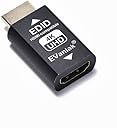


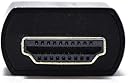
HDMI EDID
Product ID: 173733407
Details
- ColorE4K-1PC
- Compatible DevicesPC
- Connector TypeHDMI
- Item dimensions L x W x H1.6 x 0.8 x
- Specific Uses For ProductTV
🔗Seamless EDID emulation
🖥️4K UHD @ 60Hz support
🛡️Premium aluminum durability
Buy anything from 5,000+ international stores. One checkout price. No surprise fees. Join 2M+ shoppers on Desertcart.
Desertcart purchases this item on your behalf and handles shipping, customs, and support to KUWAIT.
🔌 Unlock flawless 4K connections—because your setup deserves zero compromises!
The EVanlak HDMI EDID Emulator Passthrough 3rd Generation is a premium aluminum adapter designed to eliminate display compatibility issues by emulating EDID signals. Supporting 4K@60Hz resolution, it ensures seamless plug-and-play connectivity across Mac Thunderbolt, AV receivers, and video splitters. Its robust build and universal compatibility make it an essential upgrade for professionals seeking flawless, high-definition video performance without manual configuration.


| ASIN | B07YMTMMH5 |
| Best Sellers Rank | #8,440 in Electronics ( See Top 100 in Electronics ) #1,375 in Home Cinema Cables |
| Brand | EVanlak |
| Color | HDMI EDID 4K-1P |
| Compatible Devices | PC |
| Connector Type | HDMI |
| Current Rating | 3 Amps |
| Customer Reviews | 4.2 out of 5 stars 1,229 Reviews |
| Finish | Aluminum |
| Input Voltage | 3.3 Volts |
| Item Dimensions | 1.6 x 0.8 x 0.5 inches |
| Item dimensions L x W x H | 1.6 x 0.8 x 0.5 inches |
| Manufacturer | Evanlak |
| Mfr Part Number | E4K-1PC |
| Model Number | E4K-1PC |
| Number of Items | 1 |
| Number of Ports | 1 |
| Package Quantity | 1 |
| Power Plug Type | No Plug |
| Smart Home Compatibility | Not Smart Home Compatible |
| Specific Uses For Product | TV |
| UPC | 752498099607 |
| Unit Count | 1.0 Count |
| Warranty Type | Limited |
K**R
Fixed EDID issues with the mClassic and my monitor.
I purchased this EDID emulator in hopes of fixing compatibility problems between the Marseille mClassic and my ViewSonic monitor, and it set them straight. A little background: the Marseille mClassic is a video scaler with post-processing effects for older to modern consoles, and it works rather well. However, Marseille chose to make the device as simple to use as possible, with no user configuration whatsoever. It's strictly plug and play, with the mClassic reading your display device's EDID table to configure and choose its output resolution. Well, I learned from this 'hands off' approach to configuration that not all TV and monitor EDID tables are created equally: my ViewSonic XG3220 monitor, while supporting basically any and every resolution up to 4K, doesn't have a proper EDID table to save its life. So the result was strange and limited functionality of the mClassic, with resolution outputs of 3820x1080 and poor handling of the aspect ratio of the resulting video. However, this little device cleared all of that right up. I connected it in-line to my monitor from the mClassic, and now the device is pumping out a standard 1920x1080p signal that the monitor likes just fine (even from the Retro mode/blue light operation, which was where I had most of the problems before). I'm still not getting the 1440p output the mClassic claims it's capable of handling, in spite of the fact that this EDID emulator supports 1440p in its table and my monitor is able to support that resolution, but I suspect that's the fault of Marseille's little device and not with this EDID emulator. So if you're having similar issues like I described with your mClassic, pick up this adapter and you'll be good to go!
L**0
Solved IPTV/ Led Lightbox issue
Solved a problem involving an old Samsung LCDTV and a no-name ledlightbox from aliexpress/china. The Led Lightbox would work perfectly in all tv's but not on samsung. An AI recommended using this HDMI adapter after the IPTV box, so tha the signal would be "cleansed" when going into the Led Lightbox. This solved the issue instantly. Thank you so much evanlak!
V**Z
Good quality
The evanlak is a very durable HDMI emulator. With constant hours of heat and exhaust fan on, it has never skipped a beat. I have never had a problem with connection no artifacts or anything. For the purpose I use it it serves me well and I'm sure it has a million of other uses for people. I recommend the adapter to anyone due to its durability and reliability good buy.
R**T
Didn't work
I have a game laptop that's pushing out 1080p. Normally everything works great with my external monitor (HDMI connected with 2.0 cables). I wanted to remote into my laptop as headless when my monitor was off. Remote connectivity with the dongle plugged worked great, however, when I power on my monitor I get nothing but a blank screen (my monitor keeps switching from signal to no signal trying to connect). I can accomplish my goal with a regular ghost adapter when the monitor is off, which defeats the point of this adapter. I was looking for a no touch solution where I didn't have to mess with unplugging cables.
K**M
Not forcing 4k
I bought this as I needed a phone to output 4K via an usb c to hdmi cable for the FilmicPro app to an encoder. The phone is capable of outputting 4k and works fine when used with an actual 4k monitor, but needs a 'trigger' for the setting to work with the encoder. Well, this adapter does not work for this purpose at all, it is NOT recognized as a 4k monitor whatsoever, just the standard 1080. Tried both direction just in case. Nope. Returning it.
D**0
Can now reliably connect "game mode" 4k@120hz but no HDR.
This product solved my HDMI handshake issues between my Samsung TV and PS5. At times my TV would not recognize the PS5 as powered on. In cases where I turned on the PS5 without powering on the TV, the PS5 would hang with the pulsing blue light, power itself off, and next boot post a software issue. Those problems stopped.
F**H
Hope this helps....
I hope this helps someone out. This product does seem to work. The issue I was having is as follows, I have a multi-monitor setup and wanted to also run a HDMI cable to a tv to occasional play sports type games. Everything seemed fine except that when the tv was off, at a seemingly random interval, my screens would zoom out, zoom back, and then flash for 30 seconds or so. Long story short it seems the PC was polling for other displays, running a RTX 3070 on win 11 although that shouldn't matter. There is apparently no way to disable this (easily) with consumer level graphics cards, so I read if a device can spoof the EDID that may do the trick and here I am. I'll be honest, I picked this one because is presented showed it presented a 4k@60 resolution and had the most reviews. It seems like the male end must be plugged into the source (into the gpu in my case, then the cable to the tv). It only does 4:2:0 color at 4k/60 if you are concerned about that, fine for a game of Madden. Anyways many of the reviews were to trick a console into seeing other resolutions, I wanted to put out there it seems to be working ok to trick a computer into seeing a constant connection to a TV that looks to put its HDMI ports to sleep after some time, disappearing from windows and disrupting your other work.
G**V
Solved Frustrating HDMI Handshake Issues
I was having frustrating HDMI eARC handshake issues between my Home theater Processor and Sony Master Series OLED and this EDID solved my issue. Now I have a perfect 100% handshake and can control my processor's volume and other features using my Sony remote! There is no degredation in sound or picture. My display is professionally calibrated and recognizes all content including Dolby Vision, HDR, and all Audio Codecs.
L**A
Nâ
O produto não funciona caso você queira usar eles para adaptar a entrada HDMI em um KVM, simplesmente mão funciona
R**N
SI TIENES DUDAS PREGUNTA.
que funciona.es ideal.SI TIENES DUDAS PREGUNTA.
G**N
120FPS on PS5
El dispositivo funciona desactivando HDCP primero. No tuve ningún problema. En mi caso mi monitor es un ASUS VG27AQ y aunque es 1440p puede recibir señal 4K. Para el play con el adaptador no tiene ningún problema en correr juegos a 120fps. Ya probé con Dirt5 y Rainbow Six. Sí baja la resolución pero es lo que debe de hacer, no es por limitante del adaptador ni porque tu display no sea HDMI 2.1. Simplemente es lo más que puede hacer el Play5. Aunque en el menú del Play siempre diga 4K, los juegos con high frame rate la cambian cuando ya estas dentro del juego. Eso sí... también se puede jugarlos a 4K y 60FPS.
A**R
Holds a steady input signal
Yeah awesome, works. I used this on a Voidlinux laptop on XFCE connected by a KVM. When switching to the laptop it NEVER used to work, but now it switches perfectly. It's important to put this adaptor on the MONITOR end of the cable, not the COMPUTER end...
B**N
MERCI ! J’ai pu régler mon problème lié à une Sonos Beam
Ce petit adapteur m’a sorti d’une situation impossible. J’ai acheté récemment une Sony Bravia x90j. Sont branchés dessus une Sonos Beam gen1 via HDMI ARC, un ordinateur Mac, une box tv orange et une PS5. Pour une raison encore un peu mystérieuse la télé après allumage ne recevait pas le signal HDMI du Mac. La seule chose à faire était de retirer et rebrancher le port HDMI (du Mac donc). Et bien grâce a cet adaptateur entre le Mac et la TV tout est réglé. Et en bonus j’ai le support du 120hz en 1080p. Je me suis vraiment pris la tête sur le problème et j’ai tout testé. Du câble HDMI hors de prix en passant par tout les réglages possibles et autres adaptateurs. Et c’est vraiment la seule solution fiable et 100% compatible que j’ai pu trouvé. L’autre solution consistait passer par la sortie fibre audio vers HDMI vers sonos. Mais auquel cas il faut passer la télécommande en IR pour que ça fonctionne avec Sonos, et en IR la télécommande ne marche plus avec la box orange… bref mon problème était peut être spécifique à mes appareils combinés mais l’adapteur m’a sauvé et peut être qu’il vous sauvera aussi …
Trustpilot
2 days ago
2 weeks ago