Desertcart purchases this item on your behalf and handles shipping, customs, and support to KUWAIT.
⌨️ Elevate your Surface Pro game — type smarter, work faster, stay ahead! 🚀
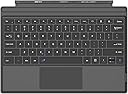
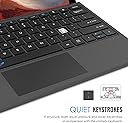
The Arteck Microsoft Surface Pro Type Cover is an ultra-slim, Bluetooth wireless keyboard with mechanical keys and a large built-in touchpad. Designed for Surface Pro models 3 through 7, it magnetically attaches for a laptop-like experience. Featuring a rechargeable battery with up to 50 hours of use per charge and functional media keys, it enhances productivity and portability for professionals and creatives on the go.


| ASIN | B083NZ77M2 |
| Additional Features | Magnetic, Rechargeable, Trackpad |
| Antenna Location | Business, Education, Everyday Use, Multimedia, Personal, Student |
| Best Sellers Rank | #178 in Tablet Keyboards |
| Brand | Arteck |
| Built-In Media | USB Cable |
| Button Quantity | 78 |
| Color | Black |
| Compatible Devices | Surface Pro 7/6/5/4/3 |
| Compatible Operating System Family | Windows |
| Compatible Tablet Computer Models | Microsoft Surface Pro 7 |
| Connectivity Technology | Bluetooth |
| Customer Reviews | 4.0 out of 5 stars 1,716 Reviews |
| EU Spare Part Availability Duration | 2 years |
| Enclosure Material | Plastic |
| External Testing Certification | Não aplicável |
| Hand Orientation | Ambidextrous |
| Keyboard Description | Surface Type Cover |
| Keyboard Layout | QWERTY |
| Manufacturer | Arteck |
| Mfr Part Number | HB187 |
| Minimum Required Operating System Version | Windows 10, Windows 11 |
| Model Name | Arteck Microsoft Surface Pro Type Cover |
| Model Number | HB187 |
| Number of Items | 1 |
| Number of Keys | 78 |
| Number of Packs | 1 |
| Number of Sections | 1 |
| Power Source | Battery Powered |
| Recommended Uses For Product | Business, Education, Everyday Use, Multimedia, Personal, Student |
| Series Number | 187 |
| Special Feature | Magnetic , Rechargeable, Trackpad |
| Style Name | Classic |
| Switch Type | Mechanical |
| Theme | Everyday Use |
| UPC | 741527408732 |
| Unit Count | 1 Count |
T**Z
Great Keyboard
The Arteck Keyboard is a fantastic accessory that greatly enhances the functionality of the Surface Pro lineup. As a proud owner of the Surface Pro tablet , I can confidently say that this keyboard is a must-have addition for anyone who uses their Surface device for work, creativity, or entertainment. Design and Build Quality: The keyboard is exceptionally well-built, featuring a sleek and slim design that seamlessly complements the Surface Pro's aesthetics. The attachment mechanism is robust yet easy to use, allowing the keyboard to securely snap onto the Surface Pro tablet. The Alcantara fabric material on the keyboard not only looks elegant but also provides a comfortable and luxurious feel to your fingertips. Typing Experience: Typing on the Arteck Keyboard is an absolute delight. The keys are well-spaced and have a satisfying travel distance, striking a perfect balance between comfort and efficiency. The tactile feedback is precise, making it easy to type for extended periods without experiencing fatigue. The keyboard layout is familiar and user-friendly, so transitioning from a traditional laptop keyboard is seamless. Functionality: One of the standout features of the Arteck Keyboard is its versatility. The keyboard acts as both a protective cover and a keyboard, which means you don't need to worry about carrying a separate case. The adjustable hinge lets you position the Surface Pro at various angles, enabling comfortable typing and sketching experiences. Additionally, the keyboard features shortcut keys that provide quick access to important functions like screen brightness, volume control, and more. Connectivity and Battery Life: Connecting the Artek Keyboard to the tablet is a breeze via Bluetooth, and the magnetic attachment. The keyboard must be charged via USB, but charging is a breeze and pretty quick. Once fully charged keyboard usually last a very long time. Conclusion: In summary, the Arteck Keyboard is an exceptional accessory that elevates the Surface Pro experience. Its impressive design, comfortable typing experience, and seamless integration with the tablet make it an indispensable tool for professionals, students, and creatives alike. While the keyboard might be a bit pricey, its quality and functionality more than justify the investment. If you own a Surface Pro device, the Arteck Keyboard is a must-buy that will undoubtedly enhance your daily computing tasks. Pros: Large touch pad Sleek and elegant design Comfortable and tactile typing experience Versatile hinge for adjustable viewing angles Seamless integration and connectivity with Surface Pro tablets Cons: Cost No backlight Overall, the Arteck Keyboard is a premium accessory that adds value to the Surface Pro lineup. It's a well-worth investment that enhances productivity and makes using the Surface Pro enjoyable.
M**B
Works! Surface Pro 3
After Microsoft broke my surface pro 3's ability to connect to my typecover (which 100% works with another surface pro 7 BTW) with a Windows security update that I can't remove unless I want to flash my bios (Thanks MS! You're a terrible company!) and not even acknowledge it, I was SOL. I didn't have the money to upgrade and I found out that all MS would offer to do is give me a refurb'd unit for ~$500. I was pissed until I found out that there was this entire market of typecover look-alikes that worked via bluetooth! This one is amazing. It's a little stiffer than my original typecover which is a good thing because it's a little more supportive. The keys respond perfectly. Connecting was easy although somewhat mysterious. The instructions are sparse on this one, and not all the functions are described in the "manual" that comes with it. The keys are a little louder than my old typecover's too, but I think they're on par with the new typecovers (my typecover was bought in 2014.) Battery life seems good although I haven't charged it down all the way yet. Overall I'd highly recommend it as a replacement! Very good product and a good price to boot.
A**R
Good bang for your buck
It's a good bang for your buck. I had to switch out my old keyboard and this came up to be a great replacement. I've had it for a couple months now, so I've noticed it's pros and cons. The batter life is amazing. I find myself only charging it probably like twice in a span of 2 weeks, sometimes twice in a month. A few cons is that it'll disconnect and ill have to manually put it back. And just a few moments ago it had stopped allowing me to type, but the mouse was working(though I don't know if it was just the keyboard being an issue since it went back to normal after a restart on both.) But overall its a decent keyboard.
M**R
Great company support
Revised review: After my negative review the company reached out to me. Very surprised to hear from them. They ended up sending me a new keyboard which now works as it should. I recommend this product but do advise that you check it out immediately to see if there are skipping issues. If so, reach out right away to the company. Previous review: This keyboard was easy to connect to computer with no issues. I read a review about the cursor skipping around while you are typing. It's true! The return window has closed for me; however, be aware of this issue. I don't type for work on my computer anymore but if you do I would pay attention. You will be constantly correcting and re-reading what you are typing. I have to be especially careful while typing in passwords. Cursor will jump to another location while I'm typing. Buyer beware!
P**I
(UPDATE) Yeah no screw this thing
UPDATE Yeah... Yeah, no, this thing just took twenty minutes straight to connect, flashing between connected and disconnected constantly, its little blue connection light never turning off. Get any other wireless keyboard, this one is trash. ORIGINAL It's satisfying to type on -- great feedback on the keys. The mousepad is incredibly sensitive, but nothing you can't get used to. Unfortunately it can't stay connected to save its life. Sometimes it'll sync up with Bluetooth just fine -- then, sometimes, it'll lie. Computer will show it as connected, but it just doesn't work. Reconnecting it is incredibly frustrating, as it'll show as connected, then disconnect. So you have to reconnect it again, and then it'll disconnect. Sometimes leaving it alone for 5-10 minutes lets it do its thing, but that's incredibly stupid.
C**G
Quit working at 2 months
You can see my original review below. I initially left a review of 1 star when 2 months after buying this thing it stopped working. To Arteck's credit they offered me a refund -- but first they sent a list of things to check. One of which was turning the Bluetooth back on (the Bluetooth somehow got turned off). For now I am keeping an eye on it, thinking that perhaps the Bluetooth transmitter shut down when the battery got too low and didn't automatically turn back on when it was charged. If it continues to work, and this is the only issue, I might be tempted to upgrade my rating to 4 stars. The keyboard's quality is not exceptional, but seems adequate. I'd really prefer to give it a rating somewhere between 3 and 4 starts. One thing to note is that it didn't really come with operating instructions (as so many tech items like this now-a-days do not). More on this below where it will be easier for you to ignore if you're not interested. Trying to turn the transmitter back on didn't even occur to me (it should have). The other side of the coin: it wouldn't take a genius to look at the keyboard and see that there is a blue function key with a Bluetooth symbol on the "C" key (also color blue) and figure out that this allows you to turn the Bluetooth on and off (it does). There is also a track pad symbol on the spacebar with a null symbol with it (also color blue) that allows you to turn the track pad on and off. Nice for when you are using a mouse or even typing and don't want to have your hand brush across the pad accidentally messing up what you are doing. The Arteck company seems to have two different websites I can find, both sporting the same logo. One is https://iarteck.com, which has no keyboards at all, but seems to sell charging cables, and I'm not sure what else because the site is so often down. The other is https://thearteck.com, which does sell wireless keyboards, but this particular model is not shown on the website. I can find no instructions/manuals on either site. And the only "Contact" function I can find is on thearteck.com -- the button takes you to the Amazon seller page where the only way I can find to contact them is by clicking on an item for sale, clicking on the "sold by" link in the right column, then clicking on the "ask a question" button at the top of the page. As a shortcut, here is the email they reached out to me from: [email protected]. If you contact them regarding a purchase, send them the Amazon order ID number in the email. Bottom line: For now it is working again (Bluetooth back on). If it disconnects I know how to reset it now. As stated before, not much in the way of instructions when I got it. If I act the glass-half-full part I might consider the idea that it was just my shipment that didn't get instructions. But it only takes being just a little more observant than I seem to be to notice how to work the basic functions anyway. Not the sturdiest keyboard, and the track pad isn't the most sensitive, but they both work and for A LOT less money than the original equipment replacement would be. I'll stick with this one. Assuming the keyboard continues to work, the only real complaint I think that I will have is that you have to connect a micro-usb cable up to it in order to charge (it came with one). It would be nice if the built-in connectors that charged the original keyboard could also charge this one -- but it seems that the only way to get that is to actually pay the crazy amounts of money for an actual Microsoft Surface keyboard. -- original review -- I bought this keyboard exactly two months ago. It stopped working yesterday. I could have returned it for a refund for up to 30 days. This thing managed to last 60 days before breaking down. I saw other reviews like this one, but thought for the price it was worth the risk. I'm not feeling that way so much now.
S**3
Works great
Works great. Connected via bluetooth to my surface pro 5 with no issues. Functions as it should. Quality product.
J**I
Great Quality
I purchased a replacement keyboard (OEM) once before, it was almost $250, this time based on the age I tried to use the on screen keyboard but that wasnt working. I looked at these that dont charge like the OEM but wasnt sure it was going to work, although when I saw this at the super special price I figured it was worth the gamble. To my surprise the fit an finish of this keyboard is actually nicer than the factory MS one, the keys are smooth and precise, it has a simple process to turn off the trackpad when needed. Charging was simple and even if the internal batteries at some point fail, the charging cable is small and goes right in the side of the surface pro and does not get in the way of anything. This item is amazing, they created a better than OEM at a tenth of the price, I think I grab a spare so I wont need to worry next time I spill on it or break it. Get off that fence and order one!
J**N
This is the keyboard Microsoft should have made.
Bought as a replacement for a years-old MS keyboard which came with the Surface. The minor downsides compared to the MS product: it's a little heavier, down to the battery I guess. The action feels a little more "clicky" and the plastic a little lower quality than the MS keyboard. To be clear though, this isn't a Fisher Price "My first keyboard" and it's nice to use. The Enter key is oblong and not an L-shape. And the fabric feels a little more synthetic than the MS one. These are all little deficiencies, though and without the advantage of the MS keyboard to compare against, don't think I'd have noticed. Downsides out of the way, the BT connection transforms the usability of the machine. I can place the screen on the other side of the desk, at the end of a desk sharing the screen, or on the tray table on a train or plane and work with the keyboard in my lap. I've dropped the kick-stand on the Surface into the magazine slot on a plane seat back and worked with the keyboard on the table, comfortable facing a screen at head height. The magnet is strong enough to hold the keyboard onto the Surface, with the keyboard dangling from the machine and battery life isn't an issue. It just makes using the Surface as a laptop an immensely more comfortable and enjoyable experience. Add to that the cost saving against the MS product and it's hard to make a case against this.
A**E
Rápido, perfeito.
otimo produto. Rápida entrega e ótima embalagem.
A**.
Hasta ahora buen producto
Hasta ahora a funcionado bien. Tengo como un mes con el teclado y todo va bien.
R**H
Its does not give feeling of Original Laptop.
I recently purchased this Surface keyboard from Amazon, but unfortunately, it does not match the quality of the original keyboard. There is no light indicator on the function keys, which makes it difficult to use. It requires pressing Function Key along with other key. The touchpad also does not provide the smooth and responsive feel of the original Surface laptop keyboard. Additionally, since this keyboard requires charging, it is difficult to determine the battery percentage, which is quite inconvenient. Overall, I regret buying this product. In my opinion, it is better to upgrade your old Surface device with an original keyboard rather than purchasing this alternative.
A**R
Affordable, & it works!
Very good product, I appreciate being able to afford the keyboard that works with the surface. My work gave me the tablet but no keyboard, so it was on my dime. Thank you
Trustpilot
2 weeks ago
2 days ago