Buy anything from 5,000+ international stores. One checkout price. No surprise fees. Join 2M+ shoppers on Desertcart.
Desertcart purchases this item on your behalf and handles shipping, customs, and support to KUWAIT.
🎯 Elevate your digital art game—because your ideas deserve precision and freedom.
The XPPen Deco Mini7 V2 is a sleek, portable drawing tablet featuring 16,384 levels of pressure sensitivity and a battery-free stylus with 60° tilt recognition. Designed for beginners and pros alike, it offers 8 customizable hotkeys and broad OS compatibility including Windows, Mac, Android, Chrome OS, and Linux. Its compact 7x4 inch active area and USB-C connectivity make it perfect for creative professionals and hobbyists who demand precision and mobility.


| ASIN | B08CDZ5NLX |
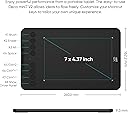
| Active Surface Area | 7 x 4 inch |
| Additional Features | 16,384 levels of pressure sensitivity, 60° Tilt Support, 8 Shortcut Key, OSU Support, Portable Design |
| Best Sellers Rank | #4 in Computer Graphics Tablets |
| Brand | XP-Pen |
| Built-In Media | 1 x Deco Mini7 V2 Drawing Tablet, 1 x Stylus, 1 x USB to USB-C Adapter, 1 x USB-C to USB-A Cable, 10 x Nibs |
| Color | Black |
| Compatible Devices | Desktop, Laptop, Smartphone, Tablet |
| Connectivity Technology | USB |
| Customer Reviews | 4.4 out of 5 stars 1,123 Reviews |
| Display Type | LCD |
| Item Dimensions L x W | 6.39"L x 10.24"W |
| Item Weight | 1.2 Pounds |
| Manufacturer | XP-PEN |
| Mfr Part Number | CRDeco mini7 |
| Model Name | Deco Mini7 V2 |
| Model Number | CRDeco mini7 |
| Native Resolution | 5080 LPI |
| Operating System | Windows 7 (or later), Mac OS X 10.10 (or later), Android 10.0 (or later), Harmony OS 2 (or later), Chrome OS 88 (or later), and Linux Operating System Windows 7 (or later), Mac OS X 10.10 (or later), Android 10.0 (or later), Harmony OS 2 (or later), Chrome OS 88 (or later), and Linux See more |
| Pressure Sensitivity | 8192 Levels |
| Screen Size | 7 Inches |
| Special Feature | 16,384 levels of pressure sensitivity, 60° Tilt Support, 8 Shortcut Key, OSU Support, Portable Design Special Feature 16,384 levels of pressure sensitivity, 60° Tilt Support, 8 Shortcut Key, OSU Support, Portable Design See more |
| Specific Uses For Product | Drawing, Gaming, Online Education |
| Target Audience | Student, Teacher |
| UPC | 796391004399 |
| Unit Count | 1.0 Count |
| Warranty Description | 12-month warranty |
Q**.
great for beginners and kids, good enough for higher levels
As of typing this review I've owned this drawing tablet for little over a year now, and hasn't failed me since. Its been used on both MacOS and Windows, gone through a variety of different drawing programs (FireAlpaca, Photoshop, Clip Studio Paint... and even games with drawing features like Jackbox), and been with me as I've improved my art skills. If you're a beginner or a hobbyist looking for a small, cheap drawing tablet, or even a parent with a kid who wants to try out digital art, this is the one for sure. I especially recommend it for parents with kids, this thing can really take a beating. However if you're a more advanced artist, this is good enough to use in a pinch but there's better ones on the market, even by XP-PEN. PROS: - Simple to use. You can adjust a variety of things in the driver program and even have the macro buttons change on a program basis - Great sensitivity. The tablet was always quick and responsive, and I never felt any lag over the full course of the year I had this - Buttons are nice and responsive. There's a nice click to them when you use it. CONS: - No tilt feature. The tablet is a bit limiting in this way, however it's not a massive deal-breaker in my opinion unless you've used tablets with tilt in the past and/or rely on that. I've been perfectly fine without tilt, but I can see this as a problem for some people - Driver program is a bit finicky at times, but still manageable. Once you get it working, it works. Last thing I'll mention is that only in the last month or so I started running into an issue where the button would sometimes send the input twice (i.e. I press the undo button once, but it undos two times). I have confirmed it's only an issue with the tablet, however this is most likely due to how often I used this tablet. This thing got really beat up but is still working perfectly fine!!!
J**C
Superb, budget-friendly drawing pad.
I am new to digital arts and tablets like this, so I don't have a lot to compare this to. However, I have been very pleased with mine. It is very responsive, works flawlessly, and I have had no issues at all. It seems built well, feels lightweight, and the small size makes super portable. It takes some getting used to to to draw while looking at your computer screen, but that eventually works okay too, once you get used to it. If you are in the market for a budget-friendly drawing pad, this will suit your needs perfectly. The pen works great too. I was annoyed at first because I kept accidentally clicking buttons on it while drawing, but after using for about a day, my fingers figured it out and this is no longer a problem. I like the wide grip, which makes it more comfortable to hold.
J**Y
Great Drawing Tablet
This drawing tablet is a solid for beginners and casual artists. The stylus feels smooth and responsive, and the high pressure sensitivity makes it easy to create detailed lines and shading. The setup is simple. The only small downside is that it may take a little time to get used to the drawing surface if you’re new, but overall it works great.
V**�
Great Buy!
The quality of the device feels premium. Response is excellent and the grip on the base to preventing shifting of the tablet while writing works like a charm. The pen also feels comfortable in the hands and the device driver makes customizing the buttons on both the tablet and pen possible. You are not only able to set custom tablet button functions for each application you use, but it works that way for the pen buttons as well. The pen on the tablet face feels natural and scratches are not noticeable. I would advise avoiding even a single drop of water or any fluids getting on it though (a pale water mark will be left). Finally, the active writing space is actually quite sufficient. I used to have a 10" tablet but switching to this 7" one feels exactly the same if not more comfortable since I don't have this massive unused space on which my hand rests.
T**R
Great for Beginners, Easy to Learn, Perfect for Newbies of Art with Graphics.
This was a gift from my wife. I'm an old school architect & artist. I have & do use a number of design/graphic art programs over the years. Its simply the fact that I've stick with refining my art through pencil, pens, papers, etc. Ive used the pandemic period to try newer art styles that I've never thought I could do. Always wanted to design and create my own graphic novel. So, I've been studying so many different artists and man of which have such an amazing style developed on their own. What I saw though was the ever increasing use of programs beyond Adobe InDesign, Photoshop, illustrator, etc. Such as procreate and Other ones. I've been talking about trying to get myself into this way of drawing my art. But I didn't want to jump into any specific device for various reasons. Well, my wife did some research and as she is much more experienced at using these types of programs due to her being a professional photographer. This was featured here in amazon, she surprised me. It has been easy to learn. Keep in mind, I'm at the very beginning of this type of sketching/drawing. We didn't waste money on something I'd not use. yes, there are other devices that can be ourxhaed . but I like this one. It is perfect for A newbie, the program is easy to learn and its features are very familiar because they are based on all the stuff I've used befoew. There is not much difference. The installation was easy (I use a Macbook) and I've not been disappointed so far. If you have a bidding artist or if you want to expand your artistic style, this is a good one to start with. It doesn't have a screen on it as others do, but you use the computer screen. it is lightweight and the pen that comes with it is perfect. Its well worth it.
R**W
It's a drawing tablet that does what it's supposed to...after much troubleshooting
Pros? It's average. Works with Chromebooks. Cons Honestly, I think the worst thing about it was the software. My past two drawing tablets were huions and they work like a charm, not to mention they were cheaper. The buttons on this device are really small, and the circular design makes it harder to press. Had they been shaped like rectangles, for instance, there would be more surface area to press the buttons. The real issue anyway, is that this tablet messed up the Bluetooth on my laptop. Which doesn't make sense at first, but let me explain. So you plug the tablet into the USB ports, right? Well, the USB ports on my laptop are connected to the Bluetooth receiver as well. One day, my Bluetooth went out completely, and when I went into the device manager, it said there was a faulty USB. I uninstalled the faulty USB and low and behold, after resetting it, it was fine again. But the issue persisted again when I used my laptop later. Then, the USB port was unable to detect my tablet when I plugged it in. I knew it wasn't the ports themselves because they were able to detect my mouse and keyboard, so I looked into it. It was indeed the tablet, every time I plugged it in, it would be detected as a faulty USB, and that made my laptop turn off the Bluetooth receiver completely. I spent several hours trying to diagnose the problem, I even uninstalled the Bluetooth driver on my laptop completely and reinstalled it, but still, it was giving me an issue. Then, I decided to uninstall the XP-pen software for this tablet and reinstall an older version of the same software, and finally, the tablet could be detected. So, I got the tablet working, but unfortunately, my Bluetooth is still screwed. I figured out a very inconvenient solution, now whenever I turn on my laptop I have to enter the troubleshooter and wait for it to turn on my Bluetooth radio. Then, and only then, can I use my Bluetooth devices. The actual tablet works fine and as expected. It's average, and honestly, the software to add shortcuts to the buttons is not the best. I only bought this tablet because it works with Chromebook, and it does. So, if you're using a Chromebook, that is really the only reason why I see you choosing this over something else in a similar price range by the likes of Huion. Plus, Huion gives you a pen stand on their H640P model, which is around the same size as this tablet and it's several dollars cheaper, and they usually have coupons too. The H640P model has two fewer shortcut buttons, but trust and believe they are so much better because of their shape design which makes them easier to press. The software for Huion is so much more intuitive too. That's my recommendation anyway. UPDATE I figured out an easier way to get my laptop to recognize the tablet without having to uninstall and reinstall the older version of the XP-pen software. I went into the device manager (just type it into the Windows search bar) and went up to the View tab. Then I checked off show hidden devices. Go down to universal serial bus devices at the bottom and when you click on it, it will say graphics tablet devices. Click on the Universal serial bus devices (directly above the graphics tablet device section), right-click, and scan for hardware changes. It should reload and be able to detect your drawing tablet. For some, simply unplugging and replugging your tablet may resolve this issue, but that wasn't the case for me so I resorted to this. Another thing I want to mention is that the surface of this tablet is ever so slightly textured. The texture is rough and honestly inconvenient. It took some time for me to get used to at first and now I hardly notice, but what I do notice is how it's ruining the tip of the pen. I get it, the rough texture is supposed to be similar to the drawing-on-paper experience, but realistically it's not and it's just wearing down the tip faster than necessary. I know that they give you extra tips, but I don't want to go through all of them super fast and have to buy more, it's inconvenient. Personally, I just don't think the textured surface is worth it.
Y**E
XPPen Updated Deco Mini7 V2
I’ve been testing out the XP-Pen Deco Mini v2 for a couple of days now, and I’m impressed with how much value it packs into such a compact tablet. Setup was straightforward, I was able to install the drivers quickly, and it worked smoothly on both my Windows laptop and my Android tablet. I also like that it comes with a USB-C adapter, which makes it versatile if you’re switching between different devices. The drawing surface is smooth with just enough texture to feel natural, almost like writing on paper. The pen itself doesn’t require charging (big plus), and it’s comfortable for long sessions. The pressure sensitivity is responsive — strokes vary naturally from light to heavy, which makes sketching and shading feel fluid. Even though this is a smaller tablet, the active area feels generous and accurate. It’s great for note-taking, editing, or sketching on the go without taking up much desk space. The shortcut keys on the side are customizable, which saves a lot of time when switching between tools in Photoshop or Clip Studio Paint. For its price, the Deco Mini7 v2 punches well above its weight. Ofcourse, its not super high end with a screen to mirror your computer or tablet therefore it has no brightness so i am unable to say anything about its color accuracy either. HOWEVER it’s portable, reliable, and beginner-friendly while still having enough features for more advanced digital art. I’d recommend it to students, hobbyists, or anyone looking for a lightweight tablet that doesn’t compromise on performance.
A**.
PERFECT! PERFECT! PERFECT!!!!!
If there is a king of drawing tablets it’s XP-Pen. I absolutely adore the Deco mini4. I need to be on the move whether it’s doing art or playing OSU this is this is the one. No one makes tablets this small and that’s what attracted me to this tablet. This is actually my second one, I originally picked up the 15th anniversary edition and was absolutely devastated when I had scratched off the paper feel (totally my fault). The buttons are fun and clicky and easily customizable, and something else that drew me in was the buttons on the stylus itself. The nibs are extremely thick and durable, unlike wacom nibs which are skinny and wear down so easily - I hadn’t needed to change the nib in months! I’m so happy that this style is still sold, since the driver is on the computer all I had to do was plug it in so it was extra easy! It’s extremely durable without having to sacrifice sensitivity or accuracy! It’s made of quality plastic and so is the pen. I love all the accessories, and even in the time between opening and retiring my old tablet I hadn’t even gotten through all of the nibs! It comes with a cord, USB-C and USB adapters so if this is your first tablet you’ve got all the things you need. If I could rate it this I’d give it a 10000/10
K**A
Muy bueno para principiantes
Yo nunca había dibujado en digital y tampoco tengo una computadora para hacerlo por lo que utilizo mi celular con la tableta. No tuve que configurar nada, todo funcionaba ya desde que la conecté. La presión funcionaba en los programas que tengo y todo es muy fácil de usar. El tamaño para usarlo en celular es muy cómodo y muy amigable para principiantes como yo. Sin duda lo recomiendo, la entrega también fue en tiempo y forma y en buenas condiciones.
U**X
Very helpful for students , amazing product
Worth the money
A**M
Well-rounded and small
This is my first drawing tablet, but I've found it ideal for my home situation, where I have no room for a larger tablet. The pen not needing batteries is convenient. The pen button further to the nib sometimes gets in the way, but that's my only complaint. It came with 10 spare nibs (not including the one that's already in the pen), as well as a USB 3.0 (or maybe 3.1) to USB C adapter, as well as a USB 3.0/3.1 to Micro USB adapter, which is thoughtful. It has six programmable buttons on the tablet itself, which is the perfect number for my needs. I have, from top-to-bottom: Save (CTRL+S), Redo (CTRL+Shift+Z), Undo (CTRL+Z), Zoom In (CTRL+Minus), Zoom Out (CTRL+Equal), Spacebar (for moving my view around). There's not much to say, as I'm overall satisfied. It doesn't have pen tilting senses (for some brushes in Krita) or a display, but it does have pressure sense and hover sense that only detects the pen, and not your hand. It's a wired tablet, not wireless. It's small, almost comparable to my large phone.
L**S
Muy contenta
Me ha gustado mucho más de lo que esperaba. Ningun problema para instalar en Mac si se siguen paso a paso las instrucciones. Pensaba que sería más pequeña, pero es suficientemente grande y perfecta con las dos pantallas que tengo instaladas. La calidad de los materiales me ha sorprendido gratamente. Viene perfectamente empaquetada, con un material de calidad. El trazo es muy sensible y va perfecto. Yo estoy muy sorprendida de la calidad por ese precio tan ajustado. Una gran compra. Veremos cómo se comporta con el paso del tiempo.
S**R
Lifesaver
I am a student and my computer doesn't have a touch screen. So this allows me to write digitally with my computer and works really well
Trustpilot
5 days ago
2 months ago