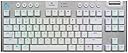
🎮 Elevate your game with wireless precision and style — the G915 TKL is the ultimate power move.
The Logitech G915 TKL is a premium tenkeyless wireless mechanical gaming keyboard featuring ultra-low 1 ms LIGHTSPEED wireless technology, up to 40 hours of battery life, and fully customizable per-key RGB lighting with LIGHTSYNC. Its low-profile GL mechanical switches deliver fast, tactile feedback in a sleek, durable aircraft-grade aluminum chassis. Designed for pro gamers and multitaskers alike, it offers seamless switching between Bluetooth and USB wireless modes with automatic key mapping for PC and Mac, plus dedicated media controls and a precision volume wheel for effortless control.


| ASIN | B085RP54BT |
| Additional Features | Battery Indicator, Compact Keyboard, Customizable Backlighting, LIGHTSYNC, Low-Profile Key, USB Charging |
| Antenna Location | Gaming |
| Best Sellers Rank | #2,914 in Video Games ( See Top 100 in Video Games ) #71 in Mac Gaming Keyboards #251 in PC Gaming Keyboards |
| Brand | Logitech G |
| Built-In Media | USB Cable |
| Button Quantity | 19 |
| Color | White |
| Compatible Devices | Gaming Console |
| Connectivity Technology | Bluetooth, USB |
| Customer Reviews | 4.4 out of 5 stars 5,581 Reviews |
| Enclosure Material | Aluminum |
| External Testing Certification | ANATEL: 56361803229; 93951903229; |
| Global Trade Identification Number | 00097855157737 |
| Hand Orientation | Ambidextrous |
| Item Dimensions L x W x H | 14.48"L x 5.9"W x 0.87"H |
| Item Type Name | Wireless Gaming Keyboard |
| Item Weight | 150 Grams |
| Keyboard Backlighting Color Support | RGB |
| Keyboard Description | Gaming |
| Keyboard Layout | QWERTY |
| Manufacturer | Logitech |
| Model Name | G915 Tenkeyless |
| Model Number | 920-009660 |
| Number of Keys | 90 |
| Number of Sections | 8 |
| Power Source | Battery Powered |
| Recommended Uses For Product | Gaming |
| Series Number | 915 |
| Special Feature | Battery Indicator, Compact Keyboard, Customizable Backlighting, LIGHTSYNC, Low-Profile Key, USB Charging Special Feature Battery Indicator, Compact Keyboard, Customizable Backlighting, LIGHTSYNC, Low-Profile Key, USB Charging See more |
| Style Name | G915 TKL |
| Switch Type | Clicky |
| Theme | gaming |
| Total USB 2.0 Ports | 1 |
| UPC | 097855157737 |
| Unit Count | 1.0 Count |
| Warranty Description | 2 Year Limited Hardware Warranty |
J**.
Great keyboard with a great typing experience.
I bought this keyboard at the recommendation of a friend that has the ten key version. I prefer the TKL layout to save space on my desk. I really like the formfactor of this keyboard. The low profile of the housing and the keyswitches is very sleek and looks great. The switches themselves are great to type on and the shorter throw is easy to adapt to from Cherry MX. The Wireless receiver took no setup to work and plugging in to charge the battery was a sinch. I also love the volume roller on this keyboard. It has enough friction to not freewheel but you know how much you're turning it up or down. I haven't synced this keyboard up via Bluetooth to anything yet. I imagine the bluetooth experience is also solid. The battery seems to last a reasonable amount of time. I prefer to leave the keyboard plugged in to keep the backlight active as I often game in the dark. Logitech's game mode is also a great way to suppress certain keys that you won't use while in a game (Looking at you Windows key!) I also tend to turn off Capslock in game mode as well. The RGB effects are not too bright but provide a splash of color to a gaming setup. There's four brightness levels accessible with a nice dedicated button. If you prefer, the keyboard can be set to single color, though I'm a sucker for RGB effects. I put this keyboard up there with my other custom mechanical keyboards at a similar pricepoint in terms of quality. Logitech didn't disappoint.
S**N
Better than the reviews lead me to believe
I was skeptical about buying this keyboard based on the reviews I saw. I took a chance and am happy that I did. I wanted a TKL, wireless, USB/Bluetooth keyboard that is good for typing/work and gaming, has the Home/End/Pg Up/Pg Down keys in the traditional locations and also has the F keys offset (not directly above the number keys). $200 is a lot for a keyboard, but I trust Logitech and wanted to give this a try. It exceeded my expectations. I need the keyboard to be able to switch back and forth between a PC (Gaming) and a Mac (Work). On PC, I plugged in the lightspeed wireless dongle and I was done. On Mac, I paired the keyboard with bluetooth, it asked me press certain keys on the keyboard and I was done. When connected to the Mac via bluetooth, the Windows key changes to the Apple/Command key and the Alt key changes to the Option key automatically. It was seamless. I did not have to download any software or set any preferences to make this happen. I wanted to point that out because I couldn't find any other reviews that touched on that subject and this was important to know for my needs. They Keychron I was using did not have a wireless USB option, so I had to toggle back and forth between Wired USB and Bluetooth. To do so, you have to flip a switch on the side of the keyboard, then you have to flip a second switch based on if you want the keys to be Mac or PC. With the G915, all of this is gone. Its all wireless, and when you press the USB button its automatically set to PC keys...when you press the bluetooth button its automatically set to Mac keys (because I paired it with a Mac). Huge QoL improvement for me. Gaming wise...my first night I played with it, I won 6 straight in overwatch and got promoted to platinum so....take that as you will. In all seriousness though, there is no delay, no ghosting issues, no missed key presses or anything like that. It works perfectly. Typing wise, I prefer the tactile keys. The actuation point isn't super deep (like it is with Keychron) and the keys feel crisp and make a slightly audible click. I am fast and accurate. Very happy with this. The profile is suuuuper thin. So thin in fact that I don't need my wrist rest anymore. The Keychron I had was incredibly thick and without a wrist guard, it felt like my wrists were constantly angled up. Not the case with this keyboard. I don't care about lights but.....it has them, and there are several options available in the G-Hub software. On the negatives, the keys aren't as tight as I am used to. They wiggle around kind of like a loose tooth might. It's not a huge deal, but its something I noticed that I thought was weird. The price is going to be the biggest negative for me. Paying $200 for a keyboard is unattractive, but since it covered all of my (weird) bases, I paid it. Wish it was close to $150. Overall, it fit my needs, performs better than expected and it cleaned up my setup quite a bit. Happy with the purchase, even if it was pricey.
M**S
Great gaming keyboard with weak shift key
Keyboard Super Review (gaming and basic computing perspective) Logitech G915 TKL: The keys on this board are lightweight, which is a selling point. I have large man hands scuffed up from working outdoors with the lifelong dexterity of a computer gamer -- yet the lighter keys can be easier to counter strafe in FPS games. The layout of the board feels natural and I do not misfire keys. I immediately played very well with this keyboard. Compared to the Corsair K65 with its instant activation, I game much better on this keyboard. My criticism is the Shift key, a common button for games, is a wide key but supported like it is a single wide key, unlike the rest of these keyboards which reinforce the shift key. This can be frustrating when toggling sprint in a game like Tarkov. Corsair K65 65%: (OPX Switches, PBT Double-Shot Keycaps) The switches are very easy to activate, there is no wiggle room, as with other switches/keyboards, they will activate and reset with little distance before the switch can be triggered again. This can take some getting used to for twitch competitive gaming. My main criticism is the size. I ordered the 75% for the Function Keys although it has different switches. If you dont use those readily then the small size of this is a boon. The small size takes a bit getting used to, for better and worse, as its very nice to have page up/down so close to the arrow keys, etc. Also, this keyboard is FUN to use, I want to press the keys; despite buying several keyboards to test, I am not a keyboard/switch fetishist either. The size is great if you dont need function keys. Corsair K65 75%: (PBT Dye-Sub Keycaps, Pre-Lubricated MLX Red Linear Switches) The prelubed switches are amazing; I don't know why more keyboards come this way (it is a lot of work to lube them yourself). If you are partial to buttery sounding/feeling switches then this is a good contender. The switch activation point is ideal for my crack FPS playstyle. The bluetooth and wireless dongle are useful for playing on the TV. The sound knob is not easy to turn and is even more difficult to grab with the Home key right next to it. This is my overall favorite keyboard and what I use for computing and gaming. Sadly, it is my least favorite keyboard aestetically, from keycaps to backlight effects. Ducky One 3 TKL: (Double Shot PBT, Cherry MX Red) This might be my favorite keyboard. The switches have a bit of give before activation which is a concern for my precise FPS gaming playstyle--I am not as confident when a key will trigger compared to some other boards. This is understandable, the Ducky is not marketed as a gaming keyboard; which might also be why it is my favorite to use for typing/word processing. The Corsair, for comparison, has no give and trigger with the slightest force. Maybe its my past habit of using keyboards but I like to put a little weight down on the keys, especially when strafing in games or waiting to press a key. Somewhat unrelated, this keyboard was missing a few keycaps but Ducky mailed me the missing caps ASAP. tldr: Not the best keyboard for freak FPS gaming, short of that it is tied with Corsair K65, with difference being when you like the key to trigger (a little give with Ducky or instantly with K65). Might also be worth noting I am typing a lot of reviews with this keyboard. Logitech G413 TKL: Amazon cancelled my order of this, probably because they doubled the price after I purchased it. Unfortunate because one of my past favorite gaming keyboards was a similar Logitech, which I gifted to my sister. Das Keyboard 6 Professional: (Tactile Cherry MX Brown Switches) This was my old keyboard. It is very disappointing. It is incredibly overpriced. The caps are not PBT (newer, nicer key cap plastic tech). I lubed the switches myself and it is slightly better. I have posted a very long review on its page. Das 4 keyboard was one of the best of its time (cat urinated on mine). I hope the future iterations will be better for Das' sake...since the rest of these boards are almost half the price and better per most metrics.
C**R
Excellent Low Profile Wireless Keyboard
In short, this keyboard feels extremely satisfying to type on, and for someone coming from a laptop keyboard I highly recommend it. For those coming from mechanical keyboards, you really need to feel this to know if you like it or not, but I really like the feel of the tactile switches. Pros: - Tactile switches feel excellent for both typing and gaming (although pure gamers might prefer reds) - Wireless (basically zero latency; no cables; just fantastic) - RGB is extremely bright (turns off quick, but you can adjust the sleep times and colors in GHub) - Great battery life (I have to charge maybe once every two weeks, although that is usage dependent) - Volume wheel is fantastic Cons: - Expensive (Do not pay $230, that is absurd. For the $170 I got it for, it is an expensive but great keyboard) - Micro usb to charge (In 2022, placing Micro usb instead of usb c for $230 is absurd, but again, find a sale) - GHub is required to adjust sleep states and RGB (I don't mind much, but some do, so it's worth mentioning) I am a longtime laptop user, and only in the past year or so did I begin using external keyboards. First, I used apple's magic keyboard, and while this keyboard enabled me to type accurately (I'm a longtime mac user), it does not feel great due to the incredibly short keys and lack of tactility. Then, I used a ducky one two mini given to me by a friend with Cherry silent red switches, and this keyboard was just much too sensitive. The actuation force required by the keys was ridiculously low, which is fantastic for gaming, but for anything else it creates typos unless you can adjust. Thus I went looking for low profile mechanical keyboards. This was the only low-latency wireless one I could find. It is premium, feels great, and I really do not have any major complaints so far. No, the switches aren't replaceable. But that's also not really their target demographic. If you want the best in low profile mechanical keyboards for work and gaming, this is it.
I**P
A Solid Performer with Some Room for Improvement
The Logitech G915 TKL wireless keyboard deserves a 4 out of 5-star rating for several compelling reasons, including its remarkable build quality, dazzling lighting effects, superb wireless connectivity, and outstanding battery life. However, there are a couple of areas where it could see some enhancements. Pros: 1. Exceptional Build Quality: The Logitech G915 TKL exudes quality from every angle. It's solid, well-constructed, and has a premium feel that's immediately apparent. The brushed aluminum top plate not only looks sleek but also adds durability to the keyboard. 2. Stunning Lighting: Logitech has always been a pioneer in RGB lighting, and the G915 TKL is no exception. The customizable lighting effects are nothing short of fantastic. Whether you want a subtle ambiance or a mesmerizing light show, this keyboard has you covered. 3. Superb Wireless Performance: The wireless performance of this keyboard is outstanding, providing a responsive and lag-free experience. It's perfect for gaming or simply enjoying the freedom of a clutter-free desk. However, keep in mind that it may suffer at extended ranges, so stay within a reasonable distance for the best results. 4. Unrivaled Battery Life: One of the standout features of the Logitech G915 TKL is its exceptional battery life. It sets a new standard for wireless keyboards, lasting for an impressively long time on a single charge. You can enjoy extended gaming sessions or work without the constant worry of recharging. Cons: 1. Prone to Grease: One downside I've noticed is that the keycaps tend to get greasy easily, which can be a bit of a nuisance. Regular cleaning is required to keep it looking pristine. 2. Typing Experience: While I opted for the tactile keys, I found the typing experience to be somewhat disappointing. The keys feel a tad mushy, and the tactile feedback is not as pronounced as I'd like. It's a matter of personal preference, but it didn't quite match my expectations for a premium keyboard. In summary, the Logitech G915 TKL is a commendable wireless gaming keyboard with a lot going for it. Its build quality, lighting effects, wireless performance, and exceptional battery life are all top-notch. However, it could benefit from some improvements in terms of keycap resistance to grease and the typing experience. If Logitech can refine these aspects in future iterations, it could easily become the perfect gaming keyboard. For now, it's an excellent choice for gamers who prioritize aesthetics, wireless freedom, and extended battery life.
E**N
Best Keyboard I Have Owned
The keyboard feels, looks, and works amazingly. Given it is low-profile, it eliminates any sort of issues you may have with a wrist pad and comfort with the height. Just to mention, there are three different height levels to choose from to fit your needs. The white/silver one I got looks amazing. The RGB is an upgrade from my old keyboard too. Amazingly functional too. Yes, yes, some people will say the keyboard has kind of wobbly keys, and they aren't wrong, but take to mind that they aren't wobbling all over the place. In other words, the keys don't lose any functionality just because the low profile switches and flat keycaps wiggle a little, which I feel is even less wibbly than midrange membrane boards. I got the brown tactiles, and they are great too. Battery life is great too... and I always forget to turn it off. It will last me weeks at a time even when I do so. The smallest issue is that my F1 key occasionally forgets to act like the rest of the keys and light up with the same color, but that is easily fixed by just pressing the key. Then it knows to go to your set color.
A**D
Great in some areas, subpar in others
Reviewing the 'tactile' version. The good: The baseplate is _fantastic_ and the keyboard feels incredibly sturdy and high-end there. The brushed metal is a nice touch, as are the rounded edges. The wireless connectivity is excellent and the keyboard switches between wireless and wired when plugged in seamlessly (even in Linux) Media controls (specifically the volume wheel) are easy to use and feel nice The 'meh': No lighting on the secondary functions of keys. Both the Function keys and the number row only have the primary legends illuminated. In low-light situations, that can make finding some symbols a bit of a pain. Not a deal-breaker for me, but offputting for some. The foldable feet do their job (and do have a little rubber on them to keep sliding down), but they don't seem particularly beefy nor do they match the quality of the base plate itself. The bad: As others have stated, the keycaps are WOBBLY! If you pick the keyboard up and shake it gently side to side, they audibly shake against their switches. Even just resting my fingers on the keys causes the caps to wobbly audibly against their switches. It's irritating and _really_ cheapens the feel of the product overall. The switch actuation force seems a bit all over the place; it's particularly noticeable on the wider non-alpha keys. When typing letters, (rage-inducing cap wobble aside), I can feel the tactile bump when depressing a key. The non-alpha keys feel mushy in comparison and the break is much less present. There are metal springs under those keys, but they feel like they're not quite up to the task of providing meaningful resistance when pressing them. All told, I'd steer clear of this one. It's a real mixed bag and there are more consistent boards to be had for the price.
G**I
A key player in my PC setup
Awesome keyboard. I like the low profile. Battery life is great and I don’t feel any input lag. I also appreciate the game mode button because I tend to misclick the windows key when playing games.
ترست بايلوت
منذ شهرين
منذ يوم واحد