Buy anything from 5,000+ international stores. One checkout price. No surprise fees. Join 2M+ shoppers on Desertcart.
Desertcart purchases this item on your behalf and handles shipping, customs, and support to KUWAIT.
⌨️ Elevate your desk game with the sleek split keyboard that works as hard as you do.
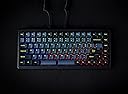
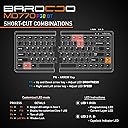
The Mistel BAROCCO MD770 RGB is a compact 85-key wireless mechanical keyboard featuring Cherry MX Red linear switches for fast, quiet keystrokes. Its ergonomic split design with adjustable width and tenting reduces strain during extended use. Durable doubleshot PBT keycaps showcase vibrant RGB lighting customizable to your mood. Bluetooth connectivity supports up to 3 devices with instant switching, while onboard memory stores multiple programmable layers for ultimate customization. Perfect for professionals and gamers seeking comfort, style, and versatility in one premium keyboard.


| ASIN | B08GWXRVBJ |
| Additional Features | Bluetooth, Lighting, Wireless |
| Antenna Location | Travel |
| Best Sellers Rank | #139,314 in Computer Accessories & Peripherals |
| Brand | Mistel |
| Button Quantity | 85 |
| Color | Cherry MX Silver |
| Compatible Devices | Gaming Console |
| Connectivity Technology | Bluetooth, USB |
| Customer Reviews | 4.1 out of 5 stars 170 Reviews |
| Enclosure Material | Polybutylene Terephthalate |
| Hand Orientation | Ambidextrous |
| Keyboard Backlighting Color Support | RGB |
| Keyboard Description | Gaming |
| Language | English |
| Manufacturer | Mistel |
| Mfr Part Number | MD770RGBBT-YLGB-BK-SL |
| Model Number | MD770RGBBT-YLGB-BK-SL |
| Number of Keys | 86 |
| Power Source | Battery Powered |
| Recommended Uses For Product | Travel |
| Series Number | 770 |
| Special Feature | Bluetooth, Lighting, Wireless |
| Style Name | Linear, Shorter Actuation (Cherry MX Silver) |
R**Y
Great Keyboard
I think the size of this keyboard is about perfect. You only add one regular key worth of width to maintain your general navigation like paging, arrows, home, end, etc. You also keep the function row which is used fairly heavy in some applications. The split is nice for maintaining a more relaxed posture while typing, as is the small amount of "tenting" you can add with the included rubber feet. It has a few nice features like being able to change the caps-lock key's function with DIP switches on the bottom, as well as reprogramming layers if you really want to customize things for a particular workflow. The keycaps are really nice; I'd see no reason to change them out unless you really hate the styling. The LED effects are fairly subtle since the keycaps are solid and not transparent, but they are still enjoyable. Adapting to the layout and split took me maybe a day before I was fine with it (coming from recently using a full keyboard). The downsides with getting this board are minor. There is no GUI for editing layouts/layers like on other more expensive boards, so it might be a bit of a task to get things just right for you on one of the customizable layers. I don't need anything changed from the default keyboard layout personally, so this isn't a big deal to me. The cherry silent switches are a bit "scratchy", but I do like how quiet they are. Screwing on the rubber feet for tenting was kind of rough since it felt like they weren't pre-threaded well enough to get them on without extra force. Overall I recommend this keyboard as an awesome choice for someone looking to change to a split design. It's not so far out there that the learning curve will be irritating if you just start using it regularly, nor does it require learning a bunch of function toggle keys. At the same time it's different enough to feel like you're moving into that "craft keyboard" territory as well as getting ergonomic benefits. I have one board more "specialized" than this Mistel board and feel like it would have been better to start here. It's just so much more intuitive as an incremental step than going all out on something radically different.
T**T
Great but could be better, especially battery life
Very nice keyboard, split design so it's ergonomic. Pros: Split design, good for shoulder and wrists. Keycaps can be replaced. Very versatile LED control. The DIP switches can swap the alt and option key, but in MAC settings this can be done with the keyboard modifier settings. Can connect to several devices with bluetooth and switch between them. Cons: Could be completely wireless. Bluetooth earphones work together and are completely wireless. Battery life could be longer. Mines lasts only 2 days with LED function on. Looking forward to version 2, completely wireless and super long battery life.
R**K
Love the keyboard, hate the battery life
Update: My review is still valid, but I wanted to provide an update about the battery. I finally got annoyed enough with the battery life to contact Mistel Support (my keyboard is still under warranty). WOW. I wish I had contacted them sooner, as I would not have annoyed myself so much. Their support jumped to help me. They immediately acknowledged the problem and said they would resolve it. The sent me a shipping label, and had me send it in for repair. They paid shipping both directions. I was kept updated on the status. I have had it back for 2 weeks now, and my keyboard has been perfect. Thank you Mistel Support. Specifically Chris and Luka. You were great. Review increased from 4 to 5 stars. Original review: This is the second Mistel split ergonomic keyboard I have owned. I loved my first one so much, i bought this one for my office computer. The first one was wired, which was fine for home. But for work, I wanted wireless. The layout is outstanding, and I never find myself having to deal with odd finger contortions that happen with some ergonomic keyboards. I went with the Cherry Brown keyswitches which I find to have pleasant resistance, tactile feedback, and snappy response (some people prefer the Cherry Red, but not me). Connecting via Bluetooth to my computer was no problem, and the connection is reliable. Overall, I like this keyboard and will continue to use it but I do have one MAJOR issue. The battery life is the worst I have ever come across on any keyboard EVER. To put that statement into perspective, I have purchased an average of 3 keyboard per year for the past 20 years. I love trying out different keyboards. I turn off the RGB (it only comes with an RGB option). They claim that this is Bluetooth v5 but I question their implementation. BT5 is a very low power draw, yet this battery cannot last 2 full days (my Keychron BT keyboard went 3 months before needing to be recharged, used in an identical fashion). So, there is either a severe Firmware flaw or they have have severely undersized the battery. If you want a high quality BT keyboard and don't mind plugging in every day to recharge it, this is a good option. But if that constant need to recharge is a problem for you, and you would prefer to go wired then go with the Mistel BAROCCO MD770 TKL (there is an RGB version of it if RGB matters to you), or the KINESIS Freestyle2 (if you prefer a membrane keyboard). Both are just as nice, will cost less, and won't pretend to be a wireless product.
S**T
I really WANT to like this keyboard
I'm a long-time user of the old-style Microsoft keyboards that are split down the middle, which allow me to type without having to squish my arms together. I'm also a software engineer, so I spend a lot of time in front of my computer. I decided to try one of these on a whim. I not sure if that was such a good decision. It's nice being able to type with my arms farther apart. I also really like the Cherry key switches, as they bring back the familiar feel of keyboards that I really, really liked in the 90's. This keyboard is always connected to my MacBook via USB. (I've never understood the point behind wireless keyboards - it's not like I'm going to carry my keyboard with me somewhere.) Even while constantly connected, the left side randomly stops working at least once a day. To get it working again, I have to unplug all the USB connections and reconnect them, and sometimes multiple times. Some days it happens rather frequently. I've had to perform that ritual twice during the last hour, which is what prompted me to finally leave this review. If I'd known about that defect, I wouldn't have purchased one. The key layout is ANNOYING. Maybe I'll adjust to it. I've been hopeful that I'd even start to like it better than the traditional layout, but it's been several weeks and I'm losing hope. Having the Home, PgUp, and PgDn keys to the RIGHT of the backspace key absolutely drives me insane. I'm constantly hitting one of those with my pinky while reaching for backspace, and suddenly I'm in a completely different place in the document I'm editing. Talk about instant loss of concentration... I also miss having a number pad when entering one-time passcodes. (Yes, I'm aware you can buy them separately, but I'm not shelling out even more money for something I'll only use for passcodes.) This keyboard supports multiple key layouts that I'll never use. More than once I've had the key-code to change layouts get pressed accidentally, and suddenly this thing in Dvorak mode, or something. That's happened twice, and both times I've had to use my laptop keyboard to look up the manual online and find the right key combination to restore QWERTY functionality. I didn't want that feature, I wish I hadn't had to pay for it, and it would be really, REALLY nice if I could just turn it off! Finally... the price. WTF, Mistel?! I expected way, way more at this price point. This is by far the most expensive keyboard I've ever purchased. I can get a new Microsoft keyboard for $30. I should have. Even Logitech has high-end products that cost less. EDIT: Well, now that I'm past the Amazon return window, this thing has become nearly unusable. The left side just randomly quits working, and it's harder and harder to get it to work again. Do yourself a favor and just go buy a Microsoft keyboard... Or ANY brand other than Mistel. I wish I had. What an absolute waste of money.
M**D
Awesome keyboard!
I got the keyboard 2 days ago and can honestly say that I cannot miss it anymore! As I stopped counting how many different keyboards I had over time - I can honestly say that I do recommend this one! The goods: - Super keyboard feeling , didn't have a single typo anymore (as many other keyboards produce unwanted double / no keys) - Ergonomic keyboard layout (split keyboard) - Keyboard is small (compared to others) while still having the same sized key caps - Yes - the keyboard has cursor keys! (not like another one I have which is really hard to get used to without) - Battery build in in case the power gets turned off - so settings do not get quickly lost - USB-c - BT - Lots of additional functionality (e.g. on keyboard programmability and very colorful illumniation) - The price is correct The things which would make it an even better one would be: - The illumniation is a pure "below the keys illumination" - which is less useful than having the letters being illumniated (this is my biggest ask for improvement :) ) - As I have a KVM which requires Prt Screen and Num LOck (which are both absent on the keyboard) it requires to have another keyboard close by. Would be awesome to be able to add those keys via double function onto another key (e.g. Fn+ [ or so). - There is no way to see the remaining battery power of the keyboard. Neither on the keyboard nor on the computer. (Didn't try BT yet - maybe that reports it) - All settings are gone once the battery is empty (a bit of static ram would help) Last sidenote: Both sides have a USB-C Plug, but only the right one is able to drive both sides. I did of course start with the wrong side...
G**.
A good effort, but flawed.
I upgraded to this keyboard from a Microsoft Ergo Pro that I have been using for twenty years. It’s a split keyboard that is still attached in the center. Out of the box: Everything was nicely packaged but I couldn't get the keyboard to work right away. It seemed like the keyboard was dead on arrival. The instructions that came with the keyboard mentioned that you could hard reset the keyboard holding down a specific combo of keys for 5 seconds. After performing the reset the keyboard started working but there was input lag between the two halves. Rapidly pressed keys from opposing halves of the keyboard would not always appear in the correct order. Updating drivers fixed this problem. When you get this keyboard if you are having any problems hard reset it, then upgrade the drivers. Ergonomics: For me this is a big ergonomic upgrade to the Microsoft Ergo Pro. The two-piece design allows me to place the two halves of the keyboard directly in front of my arm rests. I no longer need to reach inward in order to place my hands on top of the keyboard. This has been a big quality of life improvement and has greatly reduced tingling in my wrists, hands, and fingers. I did not find the tiny tenting feet to be useful. The keyboard does not come with wrist rests design to work with the tenting kit which places the keyboard uncomfortable high for my tastes. if you wrest your wrists on your table or arm rests while typing plan on getting a split wrist rest to complement your new keyboard. Bluetooth: For me a disappointment. The battery dies after only a couple days of use which leaves me fiddling with the UCB-C connector all the time, which I'm worried might eventually wear out the port. I would recommend either a magnetic USB cable, to save the port, or leaving it plugged in most of the time. Also keep in mind that Bluetooth connectivity might not be supported by your bios so this can be an inconvenience if you dual boot. Keys: All the keys work fine and are nice and clicky, I went with blues. I feel like these switches are easier on my fingers than the old non mechanical keyboard I was using, this might just be in my head though. Programmability: Haven't played around with this much. I don't think you reprogram the top layer and the function button to change layers is in a tough spot for me to reach consistently. I wish the function keys were on both sides of the keyboard and on the inner edges of the space bar instead of between the right side ctr and alt keys. Conclusion: There aren't a lot of choices when it comes to two-piece mechanical keyboards that aren't custom as of 2021. This keyboard has its place but for the price I was hoping for a bit more out of it. Driver issues, sub-optimally laid out keys, and an almost useless battery hold it back BUT if you use your keyboard professionally and are having repetitive motion pain in your writs, hand, fingers, or posture issues, that you suspect is being caused by interior rotation of your elbows and compensating outward rotation of your wrist then this product is worth a shot.
P**.
Not 100% "wireless," but good enough.
First: The left half of the keyboard has no Bluetooth function of its own. To use it you either have to run a USB-C to C wire from one side of the keyboard to the other, or run a USB wire from your computer to the left half of the keyboard. I was disappointed to learn this, but I've learned to live with it. I often have the left side directly plugged into my PC, with the right half connected by Bluetooth. It gives me a lot more flexibility, as far as managing the space on my desk, and avoiding repetitive injuries. This setup has the following effects: • Your PC will recognize it as two separate keyboards. • Left side RGB is disabled • Any macro (or embedded command) that relies on a key on the left half cannot be used. This includes switching from wired to BT mode, and switching your pre-saved BT pairings for other devices • The lag between the two sides in negligible TO ME, A SLOW TYPIST AND A NON-GAMER. I suspect lag would be a problem for more advanced users. • This setup does avoid the issue of the left side not waking up until a key on the right side is pressed. (This happens when the two sides are connected by a wire.) For me, it was my need for a true split keyboard with wireless function that led me to this purchase. The macros and lights and mechanical keys were all just bonus. (Though I don't know how I'll ever go back to membrane keys.) I'm very, very happy with it, In fact, I'm learning to touch type now (at over 40 years old!), and refuse to practice on any other keyboard. It feels that good.
K**A
6 Months of Use: Still Satisfied
I've been using this keyboard for about 6 months now, and I'm pretty much happy and satisfied with the MD770 RGB Wireless. Comfort - 5/5 I'm behind a computer for 90% of my time at work work so having an ergonomic split keyboard is very useful and comfortable for me. What prompted me initially to buy the MD770 was wrist pain, and after some weeks of using this keyboard, as well as rest at home and using immobilizing braces on my hands at night, the pains went away. I won't credit this keyboard with miraculously curing the strain on my hands, but it certainly helped! Usefulness - 4/5 ......In the Office and At Home Every day I take this keyboard to work and use it in the office, connected via bluetooth to my work laptop. When I'm at home, I plug it in and use it for playing video games. I usually play FPS and RTS games, so I've never had an issue with missing keys, but I suppose people who play RPG's like WoW would be limited by a missing numpad and other buttons. This can be (mostly) fixed by just buying a separate num pad. I use a bluetooth numpad to accompany this keyboard at work and at home. ......Efficiency It took some getting use to but I my typing speed has increased and I've found that the split keyboard configuration is generally more efficient to use, because I don't have to move my hand around so much to reach for keys anymore. I would choose the MD770 or any other split keyboard over a regular one any day. ......Bluetooth Connectivity I don't usually have a problem with connecting the MD770 to my devices, but sometimes it takes a few tries or even a device restart to get it connected. I suspect it's because of all the BT and 2.5ghz signals in the office disrupting the connection, or maybe it's just the keyboard. In any case, it doesn't really bother me, as I can always just plug it in with a USB-C cable into my laptop and use it immediately. I do really appreciate the fact that it can configured to connect to several devices. I've paired my MD770 with my work laptop, my personal laptop, and tablet and can USUALLY switch between them seamlessly. ......Macros Honestly, this could have been a 5/5 for overall usefulness but I just don't like how the MD770 doesn't have any accompanying macro software that comes with it to change key assignments. Instead, if you want to macro a key to something else, you need to configure it using the keyboards various macro layers and button combinations. This is far too complicated for me, a casual keyboard user to use, but is something keyboard enthusiasts might be into. It's definitely not my thing, and I couldn't care less about it. Battery Life - 3/5 The one thing I'm actually disappointed by is the MD770's short battery life. It's a major complaint in many of the reviews, but I DO want to point out that the battery life is largely affected by the light effects on the keyboard. With lights on, I've found that it can last between 1-2 hours without being plugged in, which is pretty pointless if you ask me. Why even bother putting flashy lights on a bluetooth product if it can't survive more than an hour with the lights on? At the very least, you can stretch out the battery life to more than 8+ hours on bluetooth if you keep the lights off on the keyboard. Like I said, I use this keyboard at work everyday with bluetooth turned on (without the lights), then plug it in at home to charge (I use the fancy lights at home because they're cool). You can use it while it's charging so as long as you charge it every night, you will probably not see any interruptions throughout your daily use. Aesthetic and Feel - 3/5 ......Texture My MD770 came with blue keys and a black frame, as well as extra keys which I installed onto my bluetooth numpad to match. The keys are textured and feel nice to the touch, and since they're textured, they don't reflect the sheen left behind by oils or sweat! The material also cleans well with alcohol-water (I don't recommend using cleaning wipes or anything with bleach, as it'll destroy the material eventually). ......Backlighting The reason why I gave this a 3/5 instead of a 4/5 is the fact that the lights on the keyboard don't illuminate the keys very well. The LED's are oriented in such a way that they shine around the keys, so that the lights are in your eyes instead of illuminating the keys you should be looking at. It's bearable at dimmer settings, but it's distracting as hell when set to max in a dark room while playing video games. My old keyboard's backlighting illuminated the keys and allowed me to see them in the dark (the letters themselves were lit up) but the MD770 can barely accomplish even that. Verdict All things considered, I'd give the MD770 a 4/5. It's not perfect, especially with the poor backlighting and disappointingly-short battery life, but it suits my daily purposes at work and at home and for that I cannot really complain. Overall, I'm satisfied with this keyboard, and expect to use it for many years to come.
B**I
Expensive, poor battery life, poor connectivity
Expensive product with poor battery life and poor connectivity. I often need to spend more than 10 minutes and try several times for it to connect. Absolutely horrible.
Trustpilot
5 days ago
2 weeks ago