Buy anything from 5,000+ international stores. One checkout price. No surprise fees. Join 2M+ shoppers on Desertcart.
Desertcart purchases this item on your behalf and handles shipping, customs, and support to KUWAIT.
🚀 Elevate your workstation game—connect more, do more, stress less!
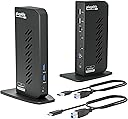
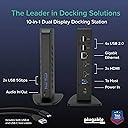
The Plugable USB 3.0 and USB-C Universal Laptop Docking Station is a versatile productivity powerhouse designed for professionals who demand seamless multi-monitor setups and extensive peripheral connectivity. Supporting dual HDMI displays up to 1920x1200, it works across Windows, macOS, and ChromeOS, including M1 to M5 MacBooks, overcoming typical display limitations. With 10 ports including USB-C, USB-A, Gigabit Ethernet, and audio, its compact vertical design declutters your desk while expert lifetime support ensures smooth IT deployments and minimal downtime.


| ASIN | B08B6FMPTP |
| Best Sellers Rank | #675,645 in Electronics ( See Top 100 in Electronics ) #222 in Docking Stations |
| Brand | Plugable |
| Brand Name | Plugable |
| Colour | Black |
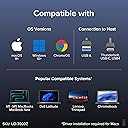
| Compatible Devices | macOS (with DisplayLink driver installation) 11+, Windows 10+, and ChromeOS 100+ systems including: Apple MacBook Neo, MacBook Air, MacBook Pro (Intel / M1 / M1 Pro / M1 Max / M2 / M2 Pro / M2 Max / M3 / M3 Pro / M3 Max / M4 / M4 Pro / M4 Max / M5 / M5 Pro / M5 Max), HP Spectre x360 / Pavilion / Envy, Dell XPS / Precision / Latitude, Lenovo ThinkPad / IdeaPad / Yoga / Flex, Surface Pro 7 / 7+ / 8 … |
| Country of Origin | China |
| Customer Reviews | 4.5 out of 5 stars 1,907 Reviews |
| Hardware Interface | USB 3.1 Type A, USB 3.1 Type C, USB Docking Station , USB Type C |
| Item Dimensions L x W x H | 13.5L x 7W x 19H Centimeters |
| Item Weight Unit of Measure | 333 Grams |
| Manufacturer | Plugable |
| Manufacturer Part Number | UD-3900Z |
| Model Number | UD-3900Z |
| Number of Ports | 12 |
| Product Dimensions | 13.5L x 7W x 19H Centimeters |
| Smart Home Compatibility | Not Smart Home Compatible |
| Total HDMI Port | 2 |
| Total USB Ports | 6 |
| UPC | 819927012030 |
| Unit Count | 1.0 Count |
| Wattage | 24 |
J**K
Works well with Mac
Turned my M2 mac pro into a 3 display unit. Compatible with a wide array of monitors. I'm using a a Dell 24" and a acer gaming monitor. works totally fine..
G**O
Excelente producto
Excelente! Su función permite sincronizar los dos monitores sin mayor problema.
M**E
Plug & Play, Works out of the Box
Wish I would have found this dock earlier. Worked like a charm, literally Plug & Play. No hassle.
K**G
Excellent two-screen dock for my Mac—reliable and sturdy!
This Plugable dock works perfectly with my MacBook and lets me use two monitors with ease. Setup was simple—just plug it in and install the DisplayLink driver, and both screens worked right away with clear picture quality. I use it for work every day, and switching between my laptop and dual external monitors is fast and smooth. The dock offers plenty of ports: two HDMI for monitors, several USB 3.0 and USB 2.0 ports for accessories, plus wired Ethernet and audio jacks. I can connect everything I need—keyboard, mouse, hard drive, and even my webcam—without any problems. The connection is stable, and performance stays fast even with lots of devices plugged in. It also helps keep my setup tidy; I only need one cable to my Mac for everything. The dock feels sturdy and reliable, never needing to reset or unplug. I highly recommend this docking station for anyone wanting a simple, powerful solution for two displays on a Mac
B**R
Excellent dock with great compatibility
This was exactly the docking station I needed to complete my home office setup. It allows me to switch between my newer work laptop and my old home-use-only laptop that essentially functions as a desktop because the battery died long ago. This docking station is compatible with a wide assortment of computers, which made it perfect for my use-case. Another benefit to this docking station is that the cable that connects to the computer is not attached to the dock and can be switched out. This allowed me to get a longer cable so I could put the docking station in a side cabinet on my desk and keep the laptops in the front "keyboard tray" drawer, which was too far for the original cable to reach. The only potential drawback to this dock is that it's not going to charge your laptop when plugged in like the USBC / thunderbolt docks. However, that was never in the cards for me anyway because my old laptop doesn't charge by USBC. I've also come to view this as a positive thing for my newer laptop because it allows me to unplug it from power while using the dock in order to better preserve battery longevity. My thunderbolt dock at work is always charging my work laptop while in use and I worry that this degrades the battery faster. Lastly, this docking station just works. It was dead simple to power it on and plug in. Every day when I want to use one or the other of my computers, it's as simple as plugging in the USB and powering on the laptop. This is a great product and comes highly recommended for anyone with a use-case similar to mine.
A**T
Easy to set up and works well (Mac M2) but streaming might be tricky!
(NOTE: I've only had this product for a few days, so not comment on the longevity) For my work, I need to have multiple windows open, and my MacBook Air (M2) wasn't cutting it. I bought a 27-inch BenQ monitor, but it wasn't enough, so I got this to add another monitor (a 21-inch Asus) that was just sitting around. Set up 1: You go to their website and download and execute the driver. Very easy. Set up 2: You connect the dock to your laptop (USB C for me), then to the monitors (HDMI-HDMI for me). HDMI cables were NOT provided. Set up 3: Go to your Mac preferences and arrange the screens the way you like them. That's it. Just make sure that you have the screen recording permitted, otherwise it doesn't work. Con 1: It DOES NOT charge your laptop or monitors, so you'll need to power two monitors and the laptop all separately (i.e., you need a big power bar). A LOT of cables everywhere, and it's a bit inconvenient. Con 2: For Mac OS users, HDCP won't work. So technically, no streaming services (just audio and no visual). However, I contacted them and they showed me a way around it. Overall, I'm very happy with everything. Price: Reasonable Ease: Very easy to set up and use Performance: Good Longevity: Don't know yet. Customer service: Great Recommend: Highly
Trustpilot
3 weeks ago
4 days ago