We remain fully operational. Our teams are working around the clock to ensure your deliveries continue safely.

قم بتنزيل التطبيق


معلومات عنا
حقوق الطبع والنشر © 2024 Desertcart Holdings Limited
قم بتنزيل التطبيق
Buy anything from 5,000+ international stores. One checkout price. No surprise fees. Join 2M+ shoppers on Desertcart.
Desertcart purchases this item on your behalf and handles shipping, customs, and support to KUWAIT.
🚀 Carry Speed, Security & Style Everywhere You Go!
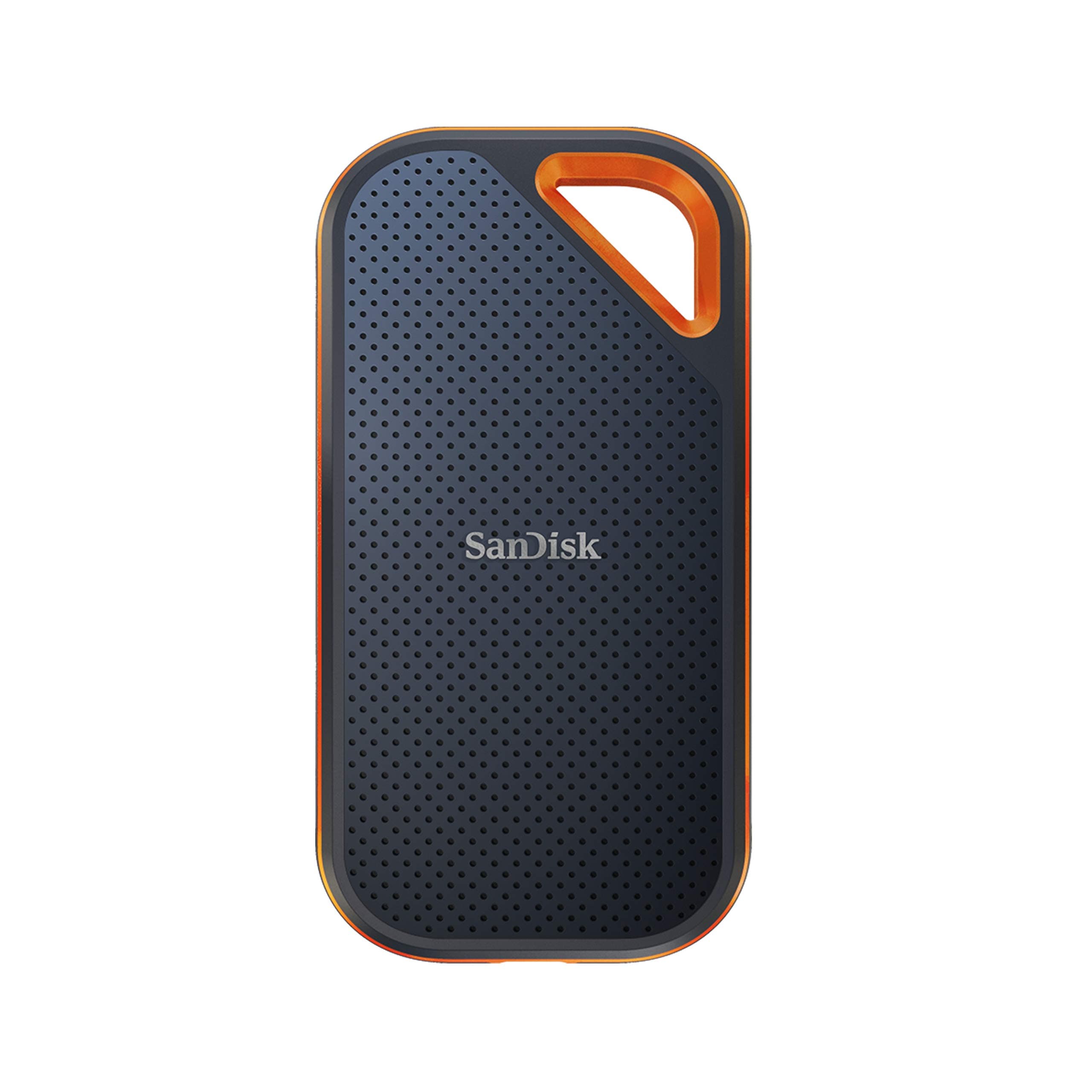
The SanDisk 1TB Extreme PRO Portable SSD delivers professional-grade NVMe performance with up to 2000MB/s read/write speeds via USB 3.2 Gen 2x2. Its rugged forged aluminum design offers IP65 water and dust resistance plus 3-meter drop protection, making it ideal for demanding environments. Enhanced with 256-bit AES hardware encryption and a handy carabiner loop, this compact external SSD combines blazing speed, durability, and security in a sleek portable form factor trusted by creators and professionals alike.


| ASIN | B08GV9M64L |
| Additional Features | External, Portable |
| Best Sellers Rank | #5 in External Solid State Drives |
| Brand | Sandisk |
| Built-In Media | 1 x SanDisk Extreme PRO Portable SSD |
| Cache Memory Installed Size | 1 |
| Color | Black |
| Compatible Devices | Laptop,Desktop, Smart Phones, Tablets |
| Connectivity Technology | USB |
| Customer Package Type | Standard Packaging |
| Customer Reviews | 4.4 out of 5 stars 16,444 Reviews |
| Data Transfer Rate | 2000 Megabits Per Second |
| Digital Storage Capacity | 1 TB |
| Enclosure Material | Information Not Available |
| Form Factor | Portable |
| Global Trade Identification Number | 00619659181284 |
| Hard Disk Description | Solid State Drive |
| Hard Disk Form Factor | 2.5 Inches |
| Hard Disk Interface | USB 3.0 |
| Hard-Drive Size | 1 TB |
| Hardware Connectivity | USB Type C |
| Item Dimensions L x W x Thickness | 4.36"L x 2.28"W x 0.41"Th |
| Item Type Name | External SSD |
| Item Weight | 0.17 Pounds |
| Manufacturer | Sandisk Technologies, Inc. |
| Media Speed | 2000 megabits_per_second |
| Model Name | SanDisk Extreme PRO Portable SSD |
| Model Number | SDSSDE81-1T00-G25 |
| Number of Items | 1 |
| Read Speed | 2000 Megabytes Per Second |
| Special Feature | External, Portable |
| Specific Uses For Product | business, personal |
| UPC | 619659181284 |
| Warranty Description | 5-year limited manufacturer warranty |
A**A
Great for backups
I use this for backups on my MAC / great little item, fast, no problems, easy to setup and use. While this is a 2TB, I do have a 1TB I use for other items. Durable, lightweight, great quality. Would buy again when needed.
M**D
Specs are probably true (read below)
OK, so I read many of the reviews of this drive, and I believe that people who are saying this doesn't give them the speeds that it's rated at, may not be testing it correctly. There are MANY factors that go into properly testing the speed of an HD ... OS file buffering/caching being a HUGE one. The drive that I bought, SDSSDE81-1T00-G25 - SanDisk 1TB Extreme PRO Portable SSD - Up to 2000MB/s, boasts speeds up to 2000MB/s (read/write). If you plug this drive into your computer and you use the blue USB 3.0 cable, you will not get the maximum speed out of this device because the max speed for USB 3.0 is 625MB/s. If your computer happens to truly have a USB 3.2 Gen 2x2 port, and you have a cable that supports that, then you could theoretically get the max speed out of this drive. Next, if your computer has a USB-C port, is it truly a USB 3.1 or better (or a Thunderbolt) port, or just a USB-C 3.0 port. Finally you have all of the OS file buffering stuff to deal with. Once you plug this drive in, you'll need to make sure you've set your OS's file buffering/caching to it's highest performance settings. Even with that, testing may not reveal the correct speeds because your OS may not buffer enough of the files being transferred to accurately test the read/write speeds of the drive. Another area for potential speed (and max file size) issues is the file system. You'll most likely want to format (keep) this SanDisk external SSD with exFAT (what it comes formatted in) unless you're going to use it 100% exclusively with your own computer (exFAT is readable/writeable in most OSes). If that's the case, it might be faster performing in your OS's native file system format, but that's not a for sure thing. It'll depend on the size and number of files that you're planning on using it to read/write. Several large files compared to thousands of small files makes a difference in performance too (you may want to look into this further yourself if it is a concern to you). I have a WIndows PC. After doing the stuff I mentioned above, when I do a large file transfer to the drive, it starts out at 1.7GB/s and then begins to drop to a steady 915MB/s or so. This reflects close to the drive's specs at the start, but Windows file buffering doesn't cache enough of the file to get a continual accurate reading, hence the speed drop in write speed. In testing out the read speed, I was only able to get around 700MB/s, but that is because I am copying a file from a super fast HD (this Sandisk drive) to a much slower HD (my internal PC HD), so it can't transfer any faster than this. I also tested reading and writing just from this Sandisk drive and got around the same 700MB/s, however, this is not a fair nor accurate test, because the same drive is doing the reading AND the writing. Finally, I ran the Blackmagic Disk Speed Test that everyone else seems to be using to test drive speeds, and got only 915MB/s read and write speeds. We know this is not accurate since I got 1.73GB/s in my own testing. So all of this to say that I believe this drive is probably fully capable of its advertised speeds, but you will likely not see speeds that fast due to OS limitations, other drive limitations, hardware limitations (your cable and/or port), etc. I'm happy with it because it averages about 1sec/GB throughput, and for files that Windows can buffer completely, I'm getting much closer to the spec's speeds. Hopefully all of this info. is helpful. Just remember, you get the best possible speed out of this drive by connecting it to a true Thunderbolt 3 port on your computer and by setting your OS's caching/buffering settings to maximize the performance (even a USB-C 3.1 or better port will get you the best speed out of this drive).
E**T
An absolute must if you require true sustained large capacity speeds
TL;DR: This drive personally verified capable of large, sustained reads for hours if needed and had no problem transferring 500GB+ of data (both read and write) without slowing down at all. If you're tired of external SSDs that slow down due to cache outs and/or overheating, this drive will take care of those issues. ------- I've gone through several Samsung and Crucial external SSDs and one common thing is they all "cache out" sooner than later or even overheat and transfer speeds quickly plummet (sub 50-75MB/sec in some instances) when you're doing large (>100GB) transfers or if you're using the drive as an attached active media for real time use like using a replicated database or photo editing. If the job ends up R/W > 75-100GB+ I will always see drive slow downs consistently on those Samsung and Crucial models. They are good for small, quick transfers especially sub 25GB but anything remotely large and sustained and the slowdown happens. After doing a lot of research and reading along with personal recommendation from some fellow developers and editors, I gave the SanDisk 2TB Extreme PRO (you know it's serious when "PRO" is all in caps) a try. It is very compact and nicely built. Excellent external texture with even a corner clip hole. It comes with both USB-A and USB-C USB 3.2 2x2 cables and is ready for data transfers up to 2000MB/s. So how did it fair? I plugged it into my 1000MB/s rated USB-C port to backup over 500GB of data in one sitting and sat there and watched it transfer the entire set of data with zero slowdowns sometimes peaking OVER 1000MB/sec on large contiguous data asset transfers. This is a first among the pile of external drives I've used over the last 10 years. When it came time to copy the information back, the sustained speeds were still there during the entire transfer. I used it even to run some games for testing and it had no problems for Steam or Blizzard games albeit for normal use I use internal storage. I also did a couple of dev projects externally and it worked absolutely fantastic. As with most external drives, it does get warm during heavy use but nothing that is worrisome. I was able to pick up and hold the drive no problem. I tested it on both Windows 10 and 11 and Windows 11 is slightly slower than Windows 10 in data transfers under the same conditions but still peaked over 900MB/sec. It isn't the Sandisk's fault but the OS. Overall, I can't recommend this drive highly enough. It fixed all the issues I had grown used to accepting with my previous Samsung and Crucial models with expected slowdowns (it wasn't an issue of "if" but "when") and 2TB is spacious enough for now. If I end up needing more capacity I will pick up the 4TB version if needed but as for the 2TB model specifically? Highly recommended. 5/5
S**S
ok SanDisk I see you.
Bought to attempt to run some light games and use to transfer footage... can play arma reforg right from it plugged into my laptop (far heftier of a program I expected to be able to run with the same experience as a direct C drive install. Speeds are great, no stutters as of yet. I'm getting way more out of this than I expected tbh. Not a single issue so far with a little over a week of heavy use. Software loaded fine - haven't installed it yet (don't need it atm), but I don't see it being an issue with how easy it was to find. I travel a lot so needed something to withstand being tossed around in a duffel, so far so good. I've been suggested this SSD a lot in the past, of all the times I've seen it I did NOT expect it to be so small and portable. It FEELS durable like an HDD with the compact fit of a SSD. I typically use Samsung devices for my portable drives, but SanDisk might have made me a believer here.
T**N
Je conseille la version avec les transferts les plus rapides...c'est beaucoup plus confortable pour le travail
I**R
Haven't had many chances to test the capabilities of the SSD, but, so far its performance is quite impressive. Turning on its encryption was also straightforward. I heard many news in the past if its data integrity issues but I hope SanDisk has fixed it and it wouldn't happen down the road.
O**E
BEST EXTERNAL SSD I'VE EVER USED - First it's too fast, I'm a video editor editing 4k videos, and I don't need to edit the project using my laptop storage, I edit the project directly in this SSD with 2000mbps no delays at all. Editing workflow works fine. Second it's too portable with it's compact size, good for digital nomads. I happen to go on holidays and travel out of country at the same time, do my projects digitally and with this SSD it helps me a lot.
N**S
So small and convenient. I bought the Monterey color as well and it is similar transfer speed. Just Wow! For both of them. It's super fast and the perfect size. I'm using it as an external drive, I truly like the size..wanted alot of space..just excellent for what I need to store. I would recommend. Thanks Seller Amazon!
A**N
Wow super snelle schijf. Ik ben er erg blij mee met sandisk op mijn Mac air
ترست بايلوت
منذ 3 أيام
منذ شهر