![Yottamaster 10Gbps 5 Bay USB C Hard Drive Enclosure Daisy Chain, 150W Aluminum 3.5" HDD Enclosure for 3.5 & 2.5 Inch SATA HDD/SSD up to 5x18TB, Non-RAID DAS Daisy Chain 270TB Storage Expansion[FS5C3]](https://m.media-amazon.com/images/I/71KyBGngB8L.jpg)
💼 Elevate your data game with speed, scale, and style.
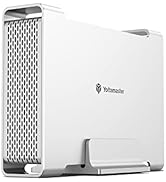
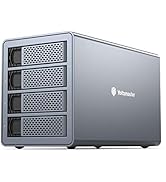
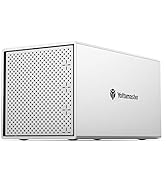
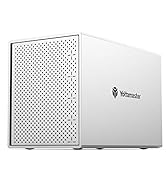
The Yottamaster FS5C3 is a premium 5-bay USB-C hard drive enclosure designed for professional-grade storage expansion. Supporting up to five 3.5" or 2.5" SATA HDDs/SSDs with a combined capacity of 90TB, it delivers ultra-fast 10Gbps transfer speeds and can daisy chain up to three units for a staggering 270TB total. Its durable aluminum alloy casing and active cooling system ensure reliable performance during intensive use, making it ideal for managers and tech-savvy professionals seeking scalable, high-speed, and efficient data storage solutions.








| ASIN | B08DLTKXCP |
| Best Sellers Rank | #740 in Enclosures |
| Compatible Devices | Laptop |
| Customer Reviews | 3.7 3.7 out of 5 stars (216) |
| Data Transfer Rate | 10 Gigabits Per Second |
| Date First Available | September 15, 2020 |
| Hard Disk Form Factor | 3.5 Inches |
| Item Weight | 9.98 pounds |
| Item model number | FS5C3 |
| Manufacturer | Yottamaster |
| Material | Aluminum |
| Max Number of Supported Devices | 5 |
| Memory Storage Capacity | 90 TB |
| Product Dimensions | 10.43 x 5.39 x 7.87 inches |
O**E
Good with a tiny-brick computer
I've been replacing the big old desktops, towers, and rack-mounts with the small brick computers. They're much more capable, quieter, and lower-power than the old boxes. BUT what about the data on servers? This allowed me to pull the drives from the old servers and connect them to the new "tiny box". USB-3 makes data access reasonably fast, and the transition was very smooth. Power consumption is greatly lowered, so the computer room is cool now without AC. Storage capacity is the same as the old servers, with vast speed and performance increases. It made a great conversion and utility bills went down too. Win-win.
B**L
purchased used from amazon (then new)
Update: New unit worked. Disks showed up and smart info was reliable unlike before. Existing Data was accessible. I'm guessing the used one I originally received had failed. It's only been running an hour, but is a night and day difference so far. No clue about the disks going to sleep, or the stories I keep hearing about needing firmware updates. If I experience any issues I'll report back. Right now I'm just running two disks mounted. However I plan to do a software raid or zfs or something. Added 3 stars. The screws are different, better. The carriages are metal on the new one, and I'd swear the old ones were plastic. I rsynced 5.2TB onto each disk, then compared them. Sustained reads on two drives was around 200MB each. The entire usb bus reset while doing that load test (a compare).....Two reads on two sectors, had issues on one drive before the reset. A second read after the rest was fine. Not going to blame this enclosure yet, but this is the first time I've seen these drives complain. Once I have all four enterprise drives, I'll do some real testing. some reads/s sdb 1638.00 204.62 0.00 0.00 204 0 0 sdc 1637.00 204.62 0.00 0.00 204 0 0 For the curious. [468732.758363] sd 15:0:0:0: [sdb] tag#3 FAILED Result: hostbyte=DID_OK driverbyte=DRIVER_OK cmd_age=19s [468732.758381] sd 15:0:0:0: [sdb] tag#3 Sense Key : Illegal Request [current] [468732.758389] sd 15:0:0:0: [sdb] tag#3 Add. Sense: Invalid command operation code [468732.758397] sd 15:0:0:0: [sdb] tag#3 CDB: Read(16) 88 00 00 00 00 00 01 e4 cf e0 00 00 01 00 00 00 [468732.758403] critical target error, dev sdb, sector 31772640 op 0x0:(READ) flags 0x80700 phys_seg 32 prio class 2 I don't know enough about scsi to know what hung up here. I'll take a look at those sectors I guess. They wouldn't have remapped on a read. Yottamaster had reached out to me after my initial review on the used unit, offering a refund. Amazon had already accepted my return and sent a new one. But it's appreciated they appear proactive. So that's great! I don't mind giving this thing a shot, and hopefully it'll work out for me. If you are just wanting to mount a few drives, I'm already confident it should be fine for that. If it's not then check your cable or something. I wish I had not seen that little error :) But also I have zero experience with these usb jbod enclusures, and I was honestly just glad to see what appeared to be correct smart data :) With any luck, 4 drives should never saturate this usb-c link, so I'll see what happens. Finally, I considered getting the sabrent enclosure. However it had four soft power buttons. This one is a single switch. This enclosure makes much more sense to me for it's intended purpose. ==================================== My disks both were viewable, but all partitioning was gone. smart information was intermittently available. I was unable to see the existing data on the drives, or successfully create a partition. The drives were actually fine *save for the one that I attempted to format in this enclosure. I must have received a bad unit? Trying to decide if I should try again or go somewhere else. I liked that powers on all the disks.
K**W
Well built, and totally worth the money
I purchased this enclosure to replace a 3-year-old Sabrent DS-4SSD enclosure that's connected to a Raspberry Pi which I'm using as a NAS. The Sabrent was still working great, but the fan was getting loud and not blowing much air any more; it wasn't that quiet to begin with, actually. Though that enclosure was trayless, that might be the only advantage over this one. This one is very well built. It's lightweight but still feels very solid. The fan is silent as advertised, and the installation is trivial. I'd highly recommend this enclosure to anyone in the market. In addition, the customer service is second-to-none! Every email I've sent to them, and I've had several questions before andafter purchase, has gotten an answer within a few hours. Perhaps the only downside to this enclosure, as others who have also wanted to disable the sleep function have already noted, is the lack of clarity in doing so. For clarity, here are my instructions: 1. When you visit the Yottamaster downloads page, there are two downloads that look like they could do the job. They both might, but the one I ended up using after being instructed by Yottamaster customer service was the rar file, not the zip file: Sleep Time Setting - Firmware Update for FS4C3 FS5C3.rar. You may need 7Zip or similar to open this if your version of Windows doesn't yet have native rar support. 2. This package actually requires installation; you can't just update the firmware without installing the application. So, run the setup program inside the rar file. 3. You'll also need the firmware, the .bin file, inside the rar file. I copied it to my desktop for easy retrieval later. 4. Very important: you must have a drive in the enclosure before you update the firmware. Otherwise, Windows won't detect it, nor will the firmware application. Customer service suggested I back up the drive before doing this, too, just to be safe. Once the drive is installed, connect the enclosure to power and to your computer's USB port. Make sure you connect the cable to the "main" port and not the "hub" port on the enclosure. 5. Now, open the application that you installed, VL715MPTool. A little pop-up should come up showing that the enclosure is connected. If it doesn't, it didn't detect your enclosure. 6. In the tool bar, click on settings. 7. In the settings window, click on open file in the firmware section. Navigate to the .bin file that you extracted from the .rar archive, and click open. 8. Back in the settings window, click OK. 9. Now, click the run or auto-run button. If you don't see the run button in the toolbar, you can find it in the functions menu off of the menu bar. Or you can just use the shortcut key: ctrl+a. 10. If all went well, the pop-up window should show that one update was attempted and one update passed. You can now close the application and begin using your Yottamaster enclosure without the drives going into sleep state.
U**E
Random drop can’t disable sleep weird clicking noise
The connectivity randomly drops and the sleep function can’t be disabled after downloading the firmware update tool from their website. The performance is alright but too pricy for what it offers. Heat was well managed with one fan in the back, but the controller seems very unusable if you are going to use it with proxmox or zfs, the firmware updater didn’t work for me at all. The drive continuous to click a ton when it’s disconnected from the computer, it’s like the drives are checking for something with nothing attached to it and it doesn’t stop for 10 minutes or so.
R**R
One small flexible machine that replaces my NAS completely!
J**S
Uses the same "Meh" chipset from JMIcron as Terramaster, Orico etc. Regardless of configuration, you'll never get more than 250MB/s from the unit. So if you use a bunch of disks in JBOD at the same time, you'll be bandwidth constrained (even though the unit is advertised as 5GBits/s == 625MB/s). NB -- does NOT support 22TB drives. However build quality is decent, integrated power supply, and cheaper than the Terramaster option. Windows Utility is awful (JMIcron with some poor branding), so wouldn't trust the RAID on this for anything critical without a separate backup.
D**)
When I attached it to a USB3 port it was very unreliable. I connected it to USB2 and it appears to function well. There's not much information I could find online regarding the JMS567 and linux but I haven't done an exhaustive search. UASP doesn't appear to be supported on my linux install but I could just be doing something wrong. Like I said, I haven't done an exhaustive search. I haven't tried it with Windows or MacOS but on my linux install it works fine when connected via USB2, albeit without UASP. I had planned on returning it and getting something else, but something changed: My mind. I'm just using it to store media for a plex server and I can live with USB2 connectivity for that for the time being.
A**S
Muito bom!
R**T
Bought a pair of these (which I'm about to return) to replace some Orico enclosures that only suffer from bad airflow. Physically these are very nice, the cooling is a lot better, and the (no key) locking bays feel nice and secure. Build quality is really nice, and they *feel* very good. Sadly they are unusable. Despite anything you may find online there is no way to turn off the sleep timer on these (non-RAID) - directly contacting Yottamaster had a reply from them stating that they do not support that option, and the official software / firmware for this does nothing. Additionally plugging known good drives (Toshiba 10tb) in has resulted in generating actual SMART disk errors on most of them (even to the point of Linux marking them as read-only) - this was not related to the drives being awake or otherwise, and placing them back in the Orico bays (and a new Orico bay that I just bought for data migration) has resulted in no further errors (where they were gaining up to 20 errors per day!!) If they sort out these issues then I really like them - the features would make them very useful if they fix these issues - but I know I won't be buying from the brand again as a result of this...
ترست بايلوت
منذ أسبوعين
منذ شهر



