Buy anything from 5,000+ international stores. One checkout price. No surprise fees. Join 2M+ shoppers on Desertcart.
Desertcart purchases this item on your behalf and handles shipping, customs, and support to KUWAIT.
🖤 Cool, Compact, and Ready to Dominate Your Desk
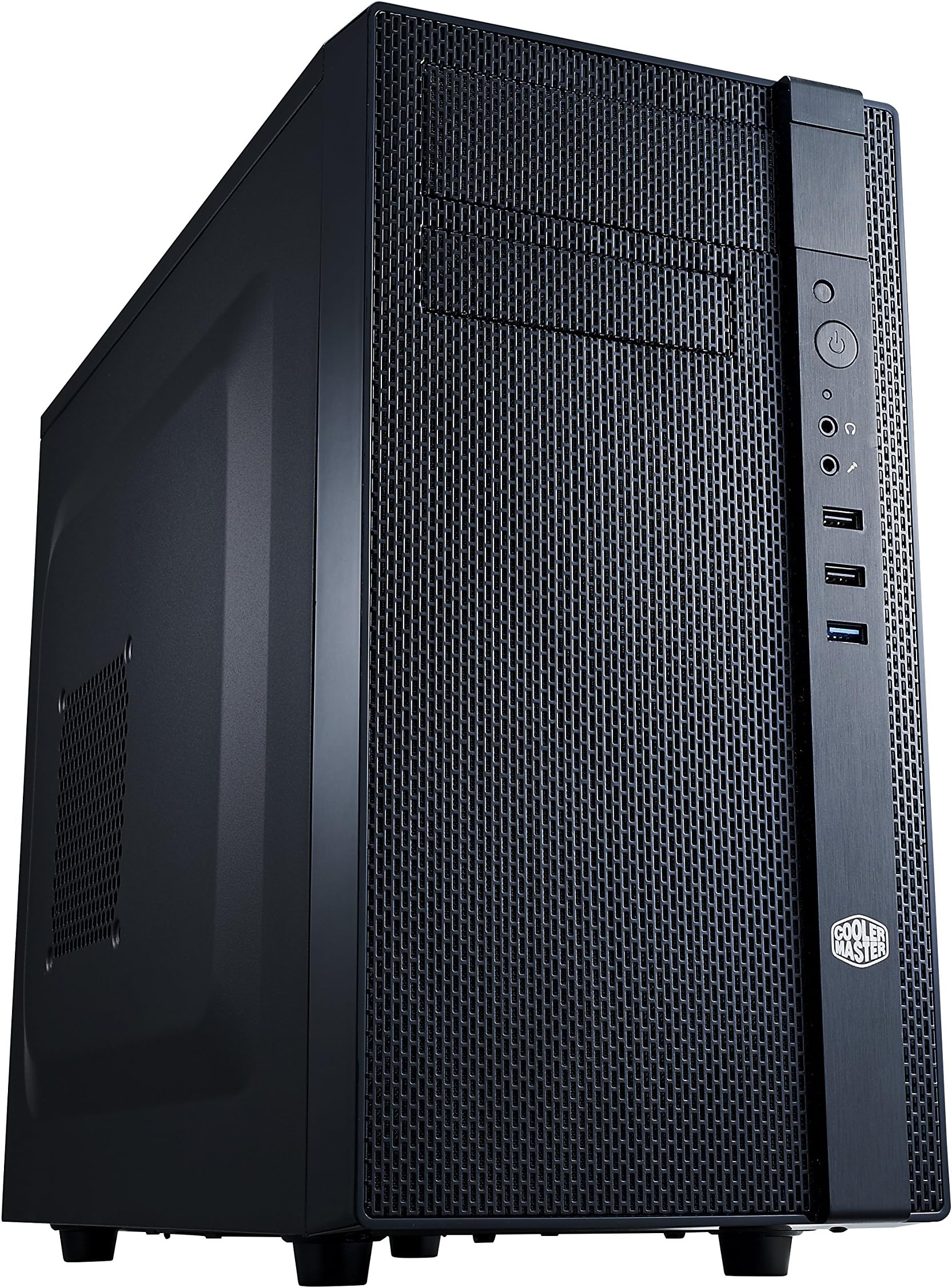
The Cooler Master N200 is a sleek mini tower case designed for mATX and Mini-ITX builds, featuring a fully meshed front panel for superior airflow, support for up to three 3.5" HDDs and four 2.5" SSDs, and compatibility with 240mm liquid cooling radiators. It accommodates high-end GPUs up to 355mm and CPU coolers up to 160mm tall, making it a versatile choice for budget-conscious professionals seeking performance and style in a compact footprint.
| ASIN | B00CUZP0SU |
| Antenna Location | Indoor/Outdoor |
| Best Sellers Rank | #126 in Computer Cases |
| Brand | Cooler Master |
| Built-In Media | Computer Mounts |
| Case Type | Mini-Tower |
| Color | N200 |
| Compatible Devices | Micro ATX Motherboards |
| Cooling Method | Air |
| Customer Reviews | 4.4 out of 5 stars 891 Reviews |
| Enclosure Material | Metal, Plastic |
| Fan Size | 120 Millimeters |
| Global Trade Identification Number | 00884102021862 |
| Hard Disk Form Factor | 2.5 Inches |
| Internal Bays Quantity | 6 |
| Item Dimensions D x W x H | 14.9"D x 7.9"W x 17.5"H |
| Item Type Name | CoolerMaster NSE-200-KKN1 N200 Mini Tower Computer Case |
| Item Weight | 9.5 Pounds |
| Light Color | Azul |
| Manufacturer | Coolermaster |
| Material | Metal, Plastic |
| Mfr Part Number | NSE-200-KKN1 |
| Model Name | Cooler Master NSE-200-KKN1 Cooler Master USA N200 - Mini Tower Computer Cas |
| Model Number | NSE-200-KKN1 |
| Motherboard Compatability | Micro ATX |
| Number of Fans | 3 |
| Other Special Features of the Product | Dust Filter |
| Power Supply Maximum Output | 500 Watts |
| Power Supply Mounting Type | Bottom Mount |
| Recommended Uses For Product | Indoor/Outdoor |
| Supported Motherboard | Micro ATX |
| Total Expansion Slots Quantity | 4 |
| Total USB 2.0 Ports | 1 |
| Total USB 3.0 Ports | 1 |
| Total Usb Ports | 2 |
| UPC | 884102021862 745734218344 112840362542 |
| Warranty Description | 2 Years Warranty |
X**L
High quality and enough space (and some)
I had a slim form factor computer with M-ATX components that were beginning to show age. I effectively gave it to my 10-year old son for his minecraft and occasional writing. I had an Intel Core i3 from 2011 with integrated graphics HD-200. It was good enough for Minecraft although it got "laggy" occasionally according to my son. So I thought it was probably due to the integrated graphics performance. These days, CPU performance improvements seem to have hit a ceiling and I don't really see significant performance improvement from generations to generations, except maybe when you run heavy-duty applications like video editing and large data set processing. For browsing, youtube, minecraft, I suspect new SSD drives and graphic cards would address the bottlenecks better. Since the slim factor case was too small for any graphic cards, I had to buy a new case. I didn't want to buy a regular ATX case, because he's only 10. I don't expect him to need 3 hard drives, 2 graphic cards, water cooling systems, 1000W PSU in the next 3 years. Micro-ATX seems to be the sweet spot for sufficient expansion flexibility and efficient space. I also wanted a good quality case. My last one was partially made of plastics (it had two plastic stands to stand up the main case that recently broke). I want to build a cost effective, high quality minecraft PC that has more than enough power to make him happy for Xmas. For this purpose, this computer case is really PERFECT. What I like about it: 1. Quality build: The whole case except for the front cover is made of metal (not sure what type), and painted evenly with black paint. This is much nicer than a "high-end" Dell XPS I saw in Costco. The screws that come with the case also seem to have high quality. The two pre-installed fans are made by Cooler Master, not a no-name maker. That's reassuring to me. The fans are very quiet, too. 2. Surprisingly large space: This is a case for Micro-ATX motherboard, or the smaller mini-ITX. But the space left after you install the motherboard is surprisingly large to me. Usually small cases have trouble installing large graphics cards. For that reason, I was going to compromise for a single-fan Gigabyte GTX 960. The heat dissipation probably isn't very good, but I wanted to build a small computer. Then I found this case that can easily support Gigabyte GTX 960 Windforce (the 2-fan model). The case layout is very smart. It positions the 5.0 and 3.5 internal bays on top, the PSU and additional hard-drive bays at the bottom. So the middle part is wide open. You effectively have the entire front to back case depth to install your graphic card. It handles my Gigabyte with so much easy. I suspect I could've installed a 3-fan model if I had wanted to. And then on storage bays, I have a DVD drive, a hard drive only, which I put all on the top internal bay. There is another internal rack that can host 3 3.5 HDs. I doubt I'd ever need that many drives. In total, with 1 DVD rom, 1 HD, 1 mATX motherboard, 1 2-fan graphic card, 1 WIFI PCI card, 1 mTAX 450X PSU, the stock CPU fan, the case inside doesn't seem crowded at all. It's not empty, just well utilized. Very smart design for a mATX case. 3. Reasonable cost: 49.99. If you buy from newegg, I saw a $20 rebate. I just skipped the hassle and bought here. This is a pretty decent price. What I don't like about it: 1. It supports ATX PSU. This would be a plus to most people because of the ATX PSU flexibility and power. I already have a mATX PSU. Thus I needed a converter plate. Fortunately I saved the mATX to ATX converter plate that came with my PSU (which I bought a year ago). It didn't turn out to be an issue for me, but if I had bought my PSU many years ago, or it came from another pre-assembled PC, I would've been out of luck. My point is, this is a mATX case. It's great that it can support ATX PSU, but it should include a converter for mATX PSU. 2. The HD audio head for the front audio panel got broken when I tried to install / uninstall / reinstall it over the 2 days as I received several upgrade components (e.g. the WIFI PCI card). Because of the limited space, I needed to unplug the head from the motherboard a couple of times to make room. It was really hard to reach the head itself, so I pulled the wire attached to the head. After a few times, the speaker wire came off. I was able to fix it myself in 30 minutes. But it worried me a little at first that I had to buy another case. Net net, this might not be the vendor's fault, but I wished the wire fixture were stronger. Next time I will be very careful. In summary, this case is great for me: a minimalist and (somewhat) perfectionist. It has just enough space (and a little extra) for a high quality mTAX build with high-end graphic cards, quality and quiet fans and case build quality and materials, and at a good price. If you want a monster case to play with constant upgrades, this might not be for you. I just wanted a good case for a good 10-year old boy's game PC and then be done with it. This worked really well for me. My son is super happy. :-)
D**N
Great case, somewhat retro look
Very good case. I bought it because it reminded of some older cases I owned a decade or two ago. Metal is a decent thickness so it won't fall apart anytime soon. Comes with thumb tightened screws so it's easy to take apart, which makes it very easy to clean. Airflow is pretty good due to the two fans input in front, an exhaust fan in back and another exhaust on top. There's also a fan port on the side panel, but I don't need that one. I just wish it had more room for hard drives.
K**.
Great case for the price, only 1 issue to consider
This is a great computer case for a budget build. It is a well constructed steel chassis that is great for a mATX motherboard build. I liked the front ports and the ability to add a DVD/Bluray drive. I had no issues adding my components to the case either. There is one issue to consider though, and the reason why I dropped this down to 4 stars. The fan on the front has a bit more RPM than most fans I've worked with and for some reason it sounds very noisy and annoying with how it lays against the front grill. When taking it out, the noise was almost a non-issue, but when it was inside against the case, it was an issue. My theory is that the airflow going through the grill created the sound problem. I had a solution to fixing this issue. I took two steps: the first was to replace the fan with a better fan that didn't spin as fast. This fan still created the sound, but it was less noticeable. The second and more important change was that I went to a hardware store and bought a few small rubber washers that I added as padding between the fan and the case, which allowed the fan to sit back maybe a quarter inch or so which helped prevent the airflow from creating the noise against the fan. Now it's a 5 star case!
J**F
Still an excellent mATX case
I have built a number of computers utilizing this case and it is one of my all-time favorites. The Good Supports more 3.5” hard drives than anyone should ever need in the modern era of SSDs and M-2s. If you don’t need it the hard drive cage at the bottom of the case can be removed. Supports multiple SSDs, but the one at the top of the case is usually the only one I need. The ease of removing and installing that one is appreciated. The case comes with a bottom mounted power supply with a removable dust filter. The location of the hard drive cage and the other drive mounts leaves lots of room in the middle of the case to install large video cards. Never have had any issues using air cooling with this case, but it will also support 240mm liquid cooling solutions if you are a gamer. For those who want a neat build there is some room for cable management between the side panel and the internals. I never feel cramped for space when building with this case. Other Stuff I would rather have two USB 3 connections on the front panel. But for me, not a deal breaker, since I can always add a couple of USB 3 connections with a 3.5” adapter on the front panel and a USB 3 card on the motherboard. I like this case best without an optical drive since it looks better without breaking the flow of the front panel. That is becoming less of a problem these days since CD’s & DVD’s have gone the way of the cassette in this era of streaming everything. If you move your case around a lot you may end up scratching the front panel plastic. If you don’t move it around it shouldn’t be a problem. Although the current price seems a little high, I still highly recommend this case for anyone building an mATX based computer that will include multiple drives and a high-end graphics card.
R**I
Great cheap mATX case for cheap builds or sleepers
So I bought this for my first ever PC build and I love it. I'm not a fan of the current trend of having glass and see-through components I've always loved just a basic office tower and with this case it's perfect for a sleeper build which I did. Very compact and sturdy built. The panels on the side are screwed in and easy to remove to work on it and clean and the USB and front panel buttons work perfectly. It's small but the airflow is great with my setup.
B**N
Great value mATX case
I chose this case for a less flashy system due to the mesh side panel. It is sturdy and lightweight, and there is plenty of space to fit components. It also contains slots for optical drives, which is rare to see nowadays. There is space for two 120mm fans in the front, one in the top, and one in the rear, allowing for plenty of air cooling or installing a radiator or AIO. The front panel and hard drive bay are both easy to remove to make building easy. One difficulty I had was fitting all the cables into the rear panel, which led me to keep a rat's nest hanging in front of the PSU. While this is a minor issue that can be solved with using a modular PSU or simply some patience with cable management, I found that the 24 pin connector from my PSU was too thick to route behind the backplate, and attaching the CPU power connector alongside the 120mm fan at the top was difficult due to the narrowness. Overall, a fantastic case for the price, especially if you are looking to build a simple-looking office tower, and even more so if you plan to utilize an optical drive in your next build.
M**N
Optical drive bay as well as 3.5" bay in a sturdy package.
At the price point, if you need an optical bay (or 3.5" for that matter) this is an unbeatable value. This was fairly easy to build in, but better than anticipated at the price point. I transplanted one of our machines to this case so I could include an optical player/burner to work with archives and old CD and DVD-Rs that are aging. I suggest the following steps: 1. find the screw holes in your motherboard and match and install offsets to them. 2. install everything you can to the motherboard outside the case, and carefully prepare your I/O cables in advance to avoid pain and suffering working in the limited space. 3. look at what cables will be hard to put in place and make sure those are either in or go in as you install the motherboard. 4. cable mange as you go-- but don't get too greedy on hiding everything -- its a good case but not 'luxe with extra panels and hidden areas. 5. Put in any non motherboard based storage at the very last, and put your optical drive (if you are using one) in as the last or second-to-last item. I also took out the drive cage and put it in after the optical drive, and this worked very well. This case is sturdy and not flashy, but that's exactly what we had in mind, and it delivered.
J**E
Fantastic Case with One Frustrating Quirk
The Cooler Master N200 is easily one of the best micro-ATX cases I’ve worked with, especially for the price. ✅ Incredible airflow thanks to the fully meshed front panel ✅ Compact but very easy to build in ✅ Room for fans, radiators, SSDs, and even a 240mm AIO ✅ Clean, minimal design with solid construction It’s a great choice for budget builds, home servers, or general-purpose PCs. Cooler Master did an amazing job overall. However, there is one issue I ran into: The motherboard standoffs. When you install your motherboard, things seem fine — but when you try to remove it later, the screws can get so tightly stuck in the standoffs that the whole standoff unscrews from the case with the screw still attached. Once that happens, getting the screw out of the standoff is nearly impossible. I tried everything, but they were just locked together. And unfortunately, the standoff doesn’t go back in securely either. It’s a small issue, but definitely frustrating if you do upgrades or maintenance often. That said, I still really love this case. If Cooler Master fixes the standoff issue in a future revision, it’ll be near perfect. Just handle the motherboard screws gently and be prepared in case you need pliers. Otherwise — this is a fantastic case with unbeatable value.
P**O
Tamaño y diseño sobrio
Caja muy práctica para equipos con placa micro-atx y mini atx. Fácil instalación. recomiendo instalar los discos duros y placa antes que la fuente de esta manera el montaje es mucho más fácil. Calidad precio muy bueno y de una marca de garantía como Cooler Master. Saludos
N**E
Small but powerful
Lots of ways to mount an SSD on this thing. Plenty of room to fit even a massive graphics card. Only downside is the difficulty of cable management as it is a tiny case.
A**R
Great
This is a good value, compact, no thrills case that contains everything I need.
K**A
Compact Efficiency
After extensive use, the Cooler Master N200 stands out as an exemplary mini tower case, offering a remarkable balance of compact design and efficient performance. When I first got my hands on it, I was impressed by its sleek, minimalistic design that fits perfectly into my workspace without dominating it. The N200's structure is solid and robust, providing a secure housing for my PC components. Despite its smaller size, the interior is surprisingly spacious, allowing for good airflow and easy installation of various components. It supports multiple cooling options, and I've found that it keeps the system cool and stable, even during intense gaming sessions or heavy workloads. Cable management was a breeze with the N200, thanks to its thoughtfully designed interior. I could neatly tuck away cables, which not only improved airflow but also gave the inside a clean, organized look. The dust filters are a boon, significantly reducing the dust that accumulates inside, thereby prolonging the life of my components. The front panel's simplicity is complemented by its functionality, providing easy access to USB ports and other necessary connections. It's evident that Cooler Master has thought about everyday use and accessibility, making it a practical choice for any PC builder. The Cooler Master N200 is a compact, efficient, and aesthetically pleasing case that doesn't compromise on performance or quality. Its thoughtful design and solid construction make it an excellent choice for anyone looking to build a smaller PC without sacrificing functionality. Whether for gaming, work, or general use, the N200 has proven to be a reliable and worthwhile investment.
O**A
Buen gabinete para oficina
Flujo de aire correcto , muy compacto aun si esta algo ancho pero su calidad de construccion lo compensa , si buscas algo que pase desapercibido o muy oficinista este es tu gabinete , le da un buen toque , y no es como otros gabinetes sencillos, muy bueno con un ventilador que si mueve bien el flujo de aire para pocos compontes.
Trustpilot
2 months ago
2 weeks ago