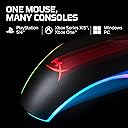
🔥 Elevate your game with precision and style — RGB power in your palm!
The HyperX Pulsefire Surge is a wired RGB optical gaming mouse featuring the high-performance Pixart 3389 sensor with up to 16000 DPI sensitivity, an ergonomic design, and six programmable buttons. Its dynamic 360-degree RGB lighting and onboard memory for custom profiles make it a standout choice for gamers and professionals seeking precision, customization, and eye-catching aesthetics compatible with Windows platforms.


| ASIN | B07B9TVQ82 |
| Additional Features | Ergonomic Design |
| Antenna Location | Gaming |
| Are Batteries Included | No |
| Are Batteries Required | No |
| Best Sellers Rank | #3,236 in Videogames ( See Top 100 in Videogames ) #149 in PC Gaming Mice |
| Brand | HyperX |
| Built-In Media | Mouse, Quick start guide |
| Button Quantity | 6 |
| Color | Black |
| Compatible Devices | Compatible with Windows 10/8.1/8/7 |
| Connectivity Technology | USB |
| Customer Reviews | 4.5 4.5 out of 5 stars (9,181) |
| Embellishment Feature | LED |
| Enclosure Material | Plastic |
| Finish | Matte |
| Global Trade Identification Number | 00196188049525, 00740617272680, 07406172726800 |
| Hand Orientation | Right |
| Hardware Platform | Laptop, PC |
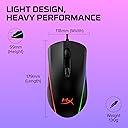
| Item Dimensions L x W | 12L x 6.3W centimeters |
| Item Type Name | Pulsefire Surge - RGB Wired Optical Gaming Mouse, Pixart 3389 Sensor up to 16000 DPI, Ergonomic, 6 Programmable Buttons, Compatible with Windows 10/8.1/8/7 - Black |
| Item Weight | 0.29 Pounds |
| Manufacturer | Konica Minolta |
| Model Name | Pulsefire Surge |
| Model Number | HX-MC002B |
| Mouse Maximum Sensitivity | 16000 Dots per Inch |
| Movement Detection | Pixart 3389 Sensor |
| Number of Batteries | A batteries required. |
| Operating System | Windows 10 |
| Power Source | AC plug |
| Range | 33 feet |
| Style Name | Modern |
| Theme | Video Games |
| UPC | 740617272680 793707175064 196188049525 |
| Warranty Description | 1 year from the date of purchase |
M**D
amazing mouse for its price
this mouse has definitely impressed me with its capabilities and how good it is for its price. the RGB light is fantastic and the mouse has great build quality. overall a very good Mouse, and you shouldn't buy a really expensive mouse because before this mouse I had a razer mamba mouse and it wasn't worth it since it didn't have the RGB and the build quality wasn't as good.
S**D
Nice mouse but i need a new one
my mouse was good but now it disconnectes on its own and the rgb is messed up i did nothing but play on it i have warrenty i need a new one
A**K
Decent
You get what you paid for and the quality is also nice but it sometimes glitches
S**A
Very Precise
Fantastic Product & Design
Y**7
good mouse
the mouse were delivered really fast and its a good quality mouse nd good for games
A**I
A little bit big for my small hands but a great mouse nevertheless
I use this for office use and it feels nice. Also, the RGB is top notch.
T**I
Good Product
Nice
J**Y
On Point
Default Sensitivity and product finish is on point, definitely would recommend to people looking for a gaming as well for work purpose use mouse.
A**B
Last week i managed to snap up the HyperX Alloy Elite RGB Mechanical Gaming Keyboard, for only £62.50 on a day only deal within the black Friday 2 week deals(ruddy bargain!) on Amazon, so i also needed a new mouse so ordered the HyperX Pulsefire Surge RGB Gaming Mouse for £29.99 aswell. Luckily for me the lead from the keyboard just went to the back of where my PC is situated, and even more luckily for me the Elite keyboard comes with a USB pass through so i was able to plug the mouse into that!, with everything working AOK, phew!. I had a play around with the mouse settings that is quit easy to suss out but i wanted to change the colour to match my PC set up colour(anal i know lol). After going to the HyperX site it forced me to download the HyperX NGenuity app from the Web store ?. Anyway i did that but discovered that this app needs to open ALL the time for the chosen settings to work(there is no way for the app to let you save the settings on the mouses memory ?). Anyway part 2 - I then went back to the HyperX site to get the HyperX NGenuity exe program for my Elite keyboard and to my de-lite i noticed i can change all the colours/settings for the mouse in there as well. So i got red of the stupid "app" version and just used the exe one. For the keyboard and mouse i can now set the 3 option types to my liking and they both save the info in its own memory!. As you can see by the 2 pics i have one for showing off the colour wave light show, and the other purple and green to match my PC RGB when looking through the glass side window. Love the button on the top to change the DPI speed right away and also holding the same button plus a click of the wheel or the side buttons to change the saved RGB combo/brightness(after setting them up with NGenuity before of coarse). I am waiting for a big mouse matt but it glides so smooth on the desk top and the pointer on the screen is so precise with the movement(even at the top DPI 3200, amazing) A easy 5 STARS, frikken AWESOME!
M**R
I bought this mouse for a PC that I built for my brother. This mouse has decent RGB and the software is easy to use. My only complaint is that the mouse is very light.
A**S
Nice and easy to set up, works really well, has a nice weight. Better than the much more expensive Razer mouse that it has replaced.
F**A
El mouse se siente increíble. Especialmente luego de utilizar de toda la vida un mouse básico, el salto es bastante notorio. Se agradece el hecho de contar con un aplicación que nos de opciones de personalización con el RGB, los botones tienen un tacto impecable y el peso es moderado. A pesar de que califiqué con cinco estrellas existe algo que al menos a mi me ha dado problema en más de una ocasión, y es precisamente con la aplicación NGenuity de HyperX, ésta tiene que estar siempre activa para que trabajen adecuadamente las secuencias de luces programadas (o al menos yo no he logrado que éstas funcionen con un simple plug and play obviamente despues de haber configurado por primera vez la personalización). Me gustaría que la aplicación trabajara en segundo plano sin que esté visualmente activa en la barra de inicio. Dejando de lado esta crítica, ha habido ocasiones en que aún después de haber arrancado y detectado "correctamente" el mouse en NGenuity, la secuencia omite alguno de los efectos configurados (ya sea la onda, respiración , activador, ciclo, etc.) lo que te obliga a dar la opción de cerrar aplicación y/o enchufar y reenchufar el usb del mouse para que las secuencias hagan correctamente su trabajo. Por todo lo demás, la calidad abunda y luego de un mes estoy contento con la compra. La relación calidad precio es un punto muy a favor del producto (lo adquirí en oferta por menos de 700 mxn).
V**M
Dobra mysz, szybka i darmowa dostawa.
ترست بايلوت
منذ 5 أيام
منذ أسبوع