

🖊️ Elevate your iPad experience—precision meets power in one sleek stylus.
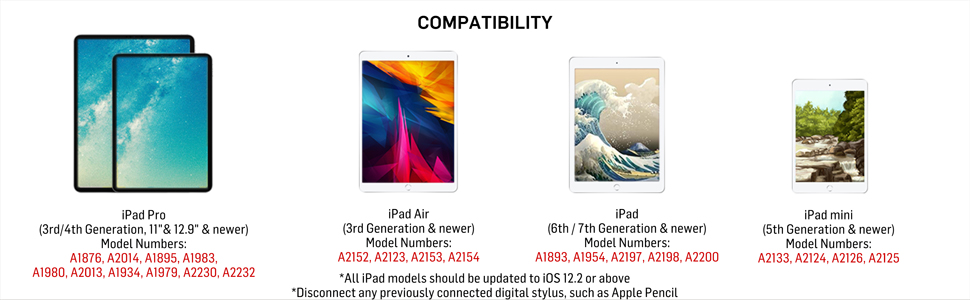
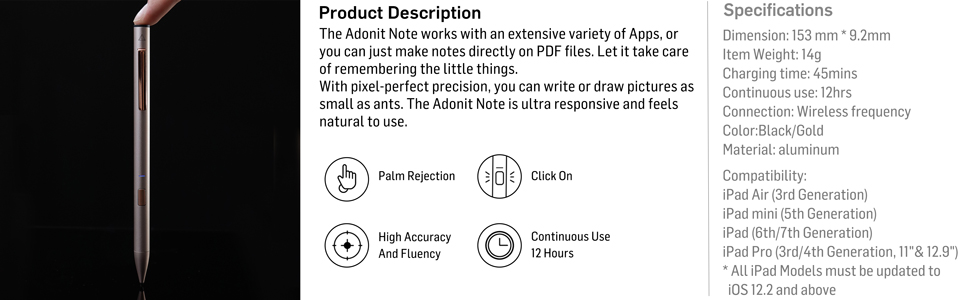
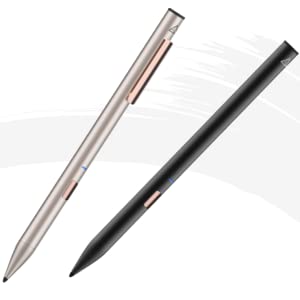
The Adonit Note (Black) is a high-accuracy stylus designed for iPads running iOS 12.2 or newer, featuring palm rejection technology, pixel-perfect precision, and a robust 12-hour battery life. Its aluminum body weighs just 3 grams, and it supports charging via Micro USB even while in use, making it the ultimate tool for professionals seeking seamless digital note-taking and drawing.




| ASIN | B07R9HPSYN |
| Are Batteries Included | Yes |
| Are Batteries Required | Yes |
| Battery Average Life Standby | 12 Hours |
| Battery Description | Lithium-Ion Polymer |
| Best Sellers Rank | #27,283 in Mobile Phones & Communication Products ( See Top 100 in Mobile Phones & Communication Products ) #567 in Mobile Phone Stylus Pens |
| Brand | adonit |
| Built-In Media | Adonit Note*1, Micro-USB Cable*1, User Guide*1 |
| Charging Time | 3 Hours |
| Color | Black |
| Compatible Devices | iPad Pro (3rd/4th generation), (6th/7th/8th Air Mini (5th generation) |
| Compatible Tablet Computer Models | Apple iPad mini 5 |
| Customer Reviews | 4.3 4.3 out of 5 stars (1,350) |
| Enclosure Material | Aluminum |
| Global Trade Identification Number | 00847663023379 |
| Item Dimensions | 9 x 9 x 153 millimeters |
| Item Weight | 3 Grams |
| Manufacturer | Adonit |
| Mfr Part Number | ADNB |
| Model Number | ADNB |
| Number of Batteries | 1 Lithium Polymer batteries required. (included) |
| UPC | 847663023379 |
| Unit Count | 1 Count |
| Warranty Description | 1 Year Manufacturer |
N**N
Stylish pen that’s Easy to use
Easy to use and charge lasts a long time Looks very stylish too Overall very happy with this pen
B**A
Highly recommended
Really good; works well like a pen
A**5
Good
I bought it for school ipad... My kid liked the pen
N**W
Works good
Works good
M**M
Useful
Lovely pen very useful
F**A
Faulty
horrible company. Horrible product. Waste of my time and money. Difficult to return and no reimbursement. Will not order from this company again.
G**H
na
na
M**D
مرت سنتين تقريبا على استخدام هذا القلم الرائع. لم يخيب ظني
M**R
I’ve been using this amazing stylus on iPad (7th Generation) for 2 months now and I can positively tell that this stylus is the PERFECT REPLACEMENT for Apple Pencil (1st gen). Things I loved about it: • Palm Rejection works fine: EPIC for drawing and taking notes • On/Off button: Saves battery somewhat. • Charges real quick. • Precise and Accurate Things that might bother you: • No battery indicator to tell the remaining battery percentage unlike Apple Pencil. • Uses microUSB as the charging port. Not lightning or C type. • NO WARRANTY That’s all folks! :)
S**O
I have only had this for a day, but I’m really enjoying it. I have the second gen Apple Pencil for my iPad Pro, and a Logitech “Crayon” for my iPad mini 5 and the iPad Pro. I use the styli for note taking and annotations, not for drawing. The Crayon and Note don’t have the same feature set as the Pencil, but since I don’t use them for drawing, I don’t miss those features (except the double tap to erase). I really wanted one stylus to use on both my iPads (the second gen Pencil does note work on the mini). That’s why I got the Crayon. It works fine, but it’s fugly looking, feels awkward in the hand, and it takes a prolonged press on the on/off button to turn it on/off. The Note looks great, connects and disconnects instantly with a quick press of the button on the barrel, feels great in the hand, and, importantly for me, has a clip on it for your pocket, or, in my case, clipping it to the cover I have on the iPad Mini. I’m always afraid I’m going to lose the Crayon. They all write about the some, with very little latency and similar feel across the glass. I really love how easy it is to turn on/off the Note, the pocket clip, the feel in the hand, and the price. Can’t beat it!
J**M
Wer, wie ich, keine 100€ übrig hat für einen Apple Pen hat mit dem Adonit Note Stylus die perfekte Alternative gefunden! Der Stift kommt in einem schönen schwarzen und rosegoldenem Design. Er liegt perfekt in der Hand und lässt sich durch den An-/Ausknopf leicht bedienen. Ich nutze den Stift in Kombination mit meinem iPad 2018 und der App Good Notes 5 für die Uni. Der Stift wird inklusive Ladekabel geliefert (ein USB Kabel, es wird kein Adapter für die Steckdose geliefert, aber den hat man üblicherweise sowieso zu Hause). Die Akkulaufzeit ist sehr gut und das Aufladen geht schnell. Allgemein kann ich diesen Stift nur jedem empfehlen der eine Alternative zum Apple Pen sucht und dabei Geld sparen möchte!
A**D
Used on iPad Pro 11 ,Amazing for taking notes and doing basic graphics work and compared to the apple pen It’s a great value for money, it feels more like an actual pencil in terms of weight and feel when compared to the apple pencils 2. Doesn’t have the same gesture, magnet or wireless charge but I do prefer this over it. The charging is an issue for some people but honestly me being a university student, I haven’t face any issues
A**R
Sin duda creo que ha sido de las mejores compras que he hecho. Le da una nueva vida al iPad y me ha permitido dejar las agendas de papel. Las agendas las obtengo de etsy.com (vendedora forLittleLion) y con esta pluma funcionan a la perfección. Según mi exhaustiva investigación, la única diferencia con el original de Apple (aparte de costar menos de la mitad) es que no reconoce la inclinación de la pluma. Si vas a dibujar y esto es un factor, quizá sí convenga invertirle a la original. Yo la uso para escribir principalmente y me funcina perfecto. La pila le dura unos 10-12 días, usándola diario para planear y para notas de reuniones algunas 3 veces por semana. Algunos pueden encontrar como una desventaja que el botón se presiona de manera muy fácil (y así la apagan accidentalmente) pero igualmente fácil se vuelve a encender. Tengo 13 meses con ella (agosto de 2021) y sigue funcionando como nueva, no le noto baja en rendimiento de pila. Se me ha caído y la punta está algo doblada pero no afecta nada el funcionamiento. Venden 3 puntas, creo que a 400. Como dice en las características, no tienes que hacer nada más que presionar el botón para que el iPad la identifique y, por lo tanto, las apps también. Todas las ven como si fuera el pencil de apple. ¿Has intentado doble toque con la pluma (encendida) en la pantalla de bloqueo del iPad? Te lleva directo a las notas. La app por excelencia para usarla es GoodNotes 5, que hasta puede servir para alguna presentación.
ترست بايلوت
منذ شهر
منذ 5 أيام