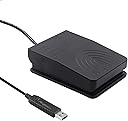
![[Upgraded] iKKEGOL USB Foot Pedal Switch Video Game PC Hands Free Footswitch One Key Control Program Computer Mouse Keyboard HID with 2M Cable](/_next/image?url=https%3A%2F%2Fm.media-amazon.com%2Fimages%2FI%2F71lCGfprTXL.jpg&w=3840&q=75)

Buy anything from 5,000+ international stores. One checkout price. No surprise fees. Join 2M+ shoppers on Desertcart.
Desertcart purchases this item on your behalf and handles shipping, customs, and support to KUWAIT.
🎮 Step into the future of control!
The iKKEGOL USB Foot Pedal Switch is an upgraded, programmable footswitch designed for hands-free operation across various applications, from gaming to medical use. With a durable build, ergonomic design, and easy setup, it offers a seamless experience for users looking to enhance their productivity and comfort.
| ASIN | B08MC456TC |
| Actuator Type | pressure switch |
| Best Sellers Rank | #9,089 in Industrial & Scientific ( See Top 100 in Industrial & Scientific ) #3 in Foot Switches #132 in Computer Keyboard & Mouse Combos |
| Brand Name | iKKEGOL |
| Circuit Type | 1-way |
| Color | Single Pedal |
| Connectivity Protocol | Usb |
| Connector Type | Usb |
| Contact Material | Metal |
| Contact Type | Normally Open |
| Control Method | Touch |
| Current Rating | 100 Milliamps |
| Customer Reviews | 4.3 4.3 out of 5 stars (897) |
| International Protection Rating | IP00 |
| Item Dimensions | 3.9 x 2.8 x 1.3 inches |
| Item Weight | 5.8 Ounces |
| Manufacturer | iKKEGOL |
| Material Type | Rubber, Thermoplastic Polyurethane |
| Model | 10731 |
| Mounting Type | Surface Mount |
| Number of Items | 1 |
| Number of Positions | 1 |
| Operating Voltage | 5 Volts |
| Operation Mode | Manual |
| Switch Type | Touch Switch |
| Terminal | Physical |
| Unit Count | 1.0 Count |
C**S
Works great for Clumsy vs Joy2key
Works excellent we have used this daily and continuously it is definitely worth the price. Ps yes I use this with clumsy for lag switching i know someone has been wanting to hear this lol.
D**D
Great bang for your buck
Great for its price and use case. Found myself using a dual pedal one later on instead but as a starter pedal with limited use cases I think this is definitely the way to go. Quick set up and easy use.
A**C
Works well, but not a fan of the clicking or foot ergonomics.
It works well, but there are a couple of things I'm not a fan of. They make a different switch that has a lower form factor that I think would be a better fit. First, the software is a little odd on how to setup the device. I'm a software developer and even I found it confusing. However, this is a one time thing so it's not a big issue. The settings are saved on the hardware, so it doesn't require software to be running on the computer for it to work. There are a couple of things I don't like. For one, it has a click every time it is activated. This is a bit annoying and I didn't expect it. The second would be the ergonomics. Too be honest, I think their newer, lower height pedal would have been a better way to go. I haven't found a good way to position my foot on it so I can change between activating it and resting my foot. If I put my foot pad on the top and forward, it is somewhat comfortable to rest on. However, it makes it hard to activate since I have difficulty getting it to depress enough to activate without moving my foot. Same with the ball of my foot on the top. If I put my toes on the top instead, it is easy to activate by mistake. I've decided to only put my foot on it when I need to use it, but then I have to search for it with my foot. I like the functionality, but not the form factor.
D**T
One of my favorite purchases ever
I originally bought this over a year ago to get level 99 Magic in Old School RuneScape via high alching while doing my WFH job. It withstood that constant pressing for several hours for many days. Since then, it's still been daily-use for me, facilitating some niche uses like being a hands-free mute/unmute for Discord, working as an overdrive petal for Fortnite Festival, and simply being a click in other games when I'm eating and just need to click to progress a screen. This thing is very very customizable too. Don't let my simple usage fool you. You can set it to multi-key binds, multimedia functions, gamepad functions, even whatever "string" entails! If you're considering buying this, do it and I promise you'll find even more uses for it beyond your initial reason
J**N
Works great
Works and the software is easy enough to use. The button has just the right amount of force to make it purposeful to hit and not accidental and provides an audible click as feedback that you've hit it.
M**A
Great value pedal and software with only one caveat
Great Pedal Only a single Con The only single con is how loud the switch can be at night if you need it to be less intrusive maybe putting it on a soft mat might help. So far the software has been great and flexible even more than I expected. Has filled all my needs and feels like I don’t need any 3rd party apps to make it smooth going. I don’t know about longevity (1 week use) but the switch is definitely strong and has a good clicky feedback which is really enjoy. It took a couple nights to learn where the best angle and placement of the switch lays in relation to foot in my sitting position when under the desk without eyes on it. That’s something to determine with your set up but it’s been great as well for using it during standing desk work as well as sitting and the cable is a comfortable length for most applications I believe other than the most strict invisible cable management.
J**S
Does the job, fragile though
You don't have to use the software others refer to, by default it acts as a keyboard that just sends the letter 'b', which was good enough for my purposes. It did send it repeatedly though (if you hold it down it keeps sending the key), which was inconvenient but not a deal breaker. Maybe the software lets you change this, not sure. The USB connector broke after plugging it in a dozen times, so have to get another one. Probably my fault, though hasn't happened with any of the other devices I regularly plug in. Edit: Just tried the software on my second purchase of this pedal and you can indeed set it to a key or combination of keys and change the trigger to not trigger repeatedly, though the interface is a bit confusing. When you save the configuration it resets to repeated trigger on the window but it still only does one trigger.
I**R
Poor performance
This pedal sucks and does not register clicks all the time. I will very often have to double or Triple click to register one click. There is nothing stuck in it, the construction is shoddy. I expected more for something that costs ~$15
A**E
So this is actually a really decent foot switch! this is the second one i've picked up and it does exactly what it says, currently using it for Drumming but can easily be configured to play/pause or mute etc If your having trouble like i did with the Programing of the button (It was stuck on B) a free program called ElfKey is the easiest fix, ^_^ Just be aware there is a click sound to notify you when its pressed, its not super loud but if your playing sounds outloud might annoy you if your pressing it Alot! ^_^
M**H
I use this as a PTT (push to talk) on my computer and it works great. I have been using it for 3-4 years now and haven't had a single issue.
L**E
Simple driver installation. Works perfectly for push to talk.
P**L
The plastic is not robust, If you are gentle with it this should not be an issue. Use it for press to talk and it works great.
N**K
Very good for the price
ترست بايلوت
منذ أسبوع
منذ 3 أسابيع