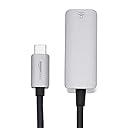
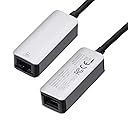
🌐 Stay connected, stay ahead — the ultimate USB-C Ethernet adapter for pros on the move!
The Amazon Basics Aluminum USB-C to RJ45 Gigabit Ethernet Adapter delivers fast, stable wired internet with up to 1 Gbps speeds. Featuring a reversible USB-C plug and durable aluminum casing, it offers plug-and-play convenience with no drivers required. Compact and lightweight, it’s designed for professionals needing reliable connectivity on modern laptops, desktops, and even the Nintendo Switch.


| ASIN | B08989MYQ2 |
| Best Sellers Rank | #2,108 in Our Brands ( See Top 100 in Our Brands ) #16 in USB Computer Network Adapters |
| Brand | Amazon Basics |
| Built-In Media | Adapter |
| Color | Grey |
| Compatible Devices | Desktop |
| Connector Type | RJ45 |
| Customer Reviews | 4.6 4.6 out of 5 stars (3,156) |
| Finish | Gray aluminum housing, black TPE cable |
| Item Dimensions | 2.07 x 0.81 x 0.6 inches |
| Item Weight | 0.02 Kilograms |
| Manufacturer | Amazon |
| Model Number | UTC-GE-AL |
| Number of Items | 1 |
| Number of Ports | 2 |
| Package Quantity | 1 |
| Power Plug Type | No Plug |
| Specific Uses For Product | Ethernet connection |
| UPC | 192835002899 |
| Unit Count | 1.0 Count |
T**Y
Simple, reliable, well made, and just works
The Amazon Basics Aluminum USB 3.1 Ethernet Adapter does exactly what it’s supposed to do. Build quality is solid, with a sturdy aluminum housing that feels durable enough for travel. I’ve used it on multiple Windows 11 laptops, and it’s worked flawlessly every time — plug it in and it just works, no fuss or driver issues. I mainly use it for work when traveling or at trade shows where a reliable physical network connection is needed, and it’s been dependable in those situations. Stable connection, no dropouts, and consistent performance. Simple, reliable, and well made. A great value if you need wired Ethernet on a modern laptop.
B**A
Simple, Reliable, Plug‑and‑Play USB‑C to Ethernet Adapter That Just Works
I recently tried the Amazon Basics Aluminum USB‑C to RJ45 Gigabit Ethernet Adapter, and I’m really impressed with how effortless it was to use. I plugged it into my laptop, and it worked right out of the box with no setup or drivers required. Windows instantly recognized it and gave me a fast, stable connection — exactly what you want from an Ethernet adapter. I’ve also used other adapters in the past (like a TP‑Link USB 3.0 to Gigabit RJ45), and while that one has its place, this Amazon Basics USB‑C version felt more solid and well‑built — noticeably heavier and sturdier than many similar adapters. The aluminum build inspires confidence and feels like it’ll hold up over time. I didn’t need it full‑time yet, but its performance was very fast and reliable, exactly what you want when you need a wired internet connection without fuss. Whether you’re in a location with slow Wi‑Fi, working in an office, or just need a dependable connection for video calls or downloads, this adapter gets the job done. No drivers, no troubleshooting, just plug and go — and that’s worth a lot in convenience. I’ll definitely keep it on hand for future use. Highly recommended for anyone who needs a simple, dependable Ethernet solution for their USB‑C device.
W**E
It Works!
It works as intended. The price was fair and I'm satisfied. Thank you!
D**E
Didn't need to do anything to get it to work with my Samsung Galaxy S* pones but plug it in.
I'm totally blind. I got this to see if it would work with my Samsung Galaxy S series phones to use a direct Ethernet connection so I don't need to use Wi-Fi. I figured if it work, it would be faster then my 2.4G Wi-Fi network. Yes 5G Wi-Fi would be better; But I've found you can't have a mixed network of 2.4G and 5G when running some smart speakers being when you have them setup as a group! They must all be on the same Wi-Fi band in order for things to sink correctly in order to play through all of them. But anyway! I receive this. I plugged in a cable to my Router and the adaptor. Then I check to insure I didn't need to update anything on the phone. I did fin d a Ethernet option in the Setting of my Samsung Galaxy S23 plus! but it was grayed out. I then turned on Airplane mode to ensure all the Radios in the phone got turned off. Wi-Fi, Bluetooth and cellular connection. I then plugged in the adaptor to my phone. After about 5 seconds, the Ethernet option in the setting became available. I went into this to see what was all under it and if I needed to change anything. Everything looked good. It was set to pick up an IP from the router. I next went into the Play store to update the phone installed programs. I had 30 plus program to update. After about 3 or so have them udpate! I went into the Notification shade to ensure Wi-Fi was still off and it was. I also checked to ensure the cellular was still disabled. So at this point, it was truely using the Ethernet connection. Went back to the Play store and waited for all the installed programs to finish updating. Then I went and did the same for the Galaxy Store. Both worked with the Ethernet connection. I next tried going to the Software udpate to update the phones OS and that failed. That only will work with Wi-Fi and will not take Advantage of a Ethernet connection. But that isn't the falt of the adaptor. I also tried seeing if Wi-Fi calling would work over an Ethernet connection. That also didn't work. But again, no falt of the adaptor. I did the same test with a S21 and S10E Galaxy phone and neither one of them have cellular service to start with and the Ethernet connection also worked. I also found when you connect your phone with this adaptor to the Ethernet! It automatically disables Wi-Fi. At least when I was downloading the Phone OS Software over Wi-Fi and plugged in the cable, the download stopped. So if you want a way to connect your Samsung Galaxy S series phone that is secure to your home network and you don't want to use Wi-Fi this is the way to do it. Keeping in mind most things will work but a few items will not. But that isn't the falt of the adaptor. And I didn't need to do anything extra with the phone in order to use the Adaptor. This worked better then I was guessing it would. No I wasn't using Ethernet Tethering either. That was turned off. That is an different option.
R**4
Great For the Price
This adapter works great to allow me to leave the WiFi off on my router and connect my Moto Z4 Play phone to Ethernet when I don't want to have EMF radiation. I am sensitive to EMF and so I try to limit my use of WiFi whenever possible. There are a few drawback to using this with my model Mobile Phone: The adapter does get quite warm and using Ethernet with this phone does drain be battery *very* quickly. The lights on the adapter are quite annoying as some have mentioned, but mine burned out so I didn't have to worry about them anymore. All in all, great purchase that I can use for other devices that use USB C as well. The adapter is built like a tank. Very sturdy and the cable is durable as well. I have not had any problems with my Ethernet cable coming out of the adapter. The cable snaps in firmly and securely. I've been using this device for almost a month.
B**W
Works on my MacBook Air after some trial and error
There is no installation or drivers involved, nor any instructions. Just plug it in. Kind of. I tried it on my MacBook Air M3 and it initially did not work. I bought the adapter so I can check my modem for internet speed. When my wifi disappears, I need to know if the problem is the modem or the router, so I need to be able to connect an ethernet cable from my MacBook directly into the both devices. When connected directly to the modem, I saw that the network connection said "router", so I restarted the modem. Suddenly it worked! The bigger problem was getting the modem to talk to the router again when I unplugged the adapter and went back to my original config. I was eventually successful after restarting both devices a few times (using some prior support help for the router). I have no knowledge of the speed. I'm just happy to have a basic adapter that works when I need one, and hope I only need it once in a while.
T**T
Works great with mac Taho on mac book pro and others.
Works great with max OS (Taho), on mac pro and non-pro mac. Was able to record gigabit speeds.
J**M
Adapter funktioniert.
T**S
The Amazon Basics Aluminium USB 3.1 Type-C to RJ45 Gigabit Ethernet Adapter has become an indispensable tool in my tech arsenal, providing a seamless and stable wired internet connection for my devices. The compact and sleek design of this adapter is a standout feature. Measuring just 2.07 x 0.81 x 0.6 inches, its small footprint makes it incredibly portable, easily slipping into a pocket or laptop bag without adding bulk. The aluminum construction not only ensures durability but also blends seamlessly with modern tech devices. Setting up the adapter is effortless – simply plug the USB-C end into the port of your device and connect an Ethernet cable to the RJ45 port. Instantly, I experienced a notable improvement in internet speed and stability compared to Wi-Fi connections, especially when dealing with large file transfers, streaming high-definition content, or engaging in online gaming. The adapter's Gigabit Ethernet functionality delivers reliable and consistent network performance. It maintains a strong, steady connection without dropouts or lag, providing a hassle-free experience for heavy bandwidth activities. The adapter is backward compatible with slower Ethernet standards as well, ensuring compatibility across various networking environments. Amazon Basics' commitment to quality and reliability is evident in this adapter. Its plug-and-play nature eliminates the need for additional drivers or software installations, streamlining the user experience. Moreover, its compatibility with a wide range of devices – from laptops to tablets and even smartphones with USB-C ports – makes it an excellent choice for anyone seeking a dependable wired internet connection. Overall, the Amazon Basics Aluminium USB 3.1 Type-C to RJ45 Gigabit Ethernet Adapter excels in delivering what it promises: a swift, stable, and hassle-free wired internet connection. Whether in a professional setting or for personal use, this adapter proves to be a valuable addition to any tech setup, ensuring uninterrupted connectivity whenever and wherever needed. Highly recommended for those seeking a reliable solution to enhance their network connectivity.
D**M
I tried other hubs and adapters to give me RJ45 for connection to my home network with a new HP laptop. They all worked to some extent but were slower than with the laptop wireless. This was the only one that provided me with the same hard wire connection speed as my other (and older) laptop. The other ones which had additional ports may promise the direct connect speed but the ones that I ordered and returned didn't live up to the promises.
E**Z
Lap laptop que tengo ya no tienen puerto ethernet, a veces lo necesito y no tenia un conector. Este funciona bastante bien y me da los 300mbps que mi modem y plan ofrecen. Funcionó correctamente.
C**0
L'articolo risulta davvero ben fatto, molto utile in quanto era proprio l'adattatore di cui avevo bisogno. Funziona molto bene e trasferisce i dati in maniera molto rapida grazie al USB-C 3.1.
ترست بايلوت
منذ شهر
منذ أسبوعين