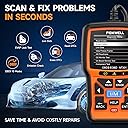
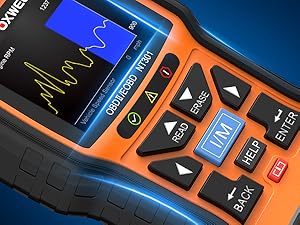
🚗 Diagnose Like a Pro, Drive with Confidence!
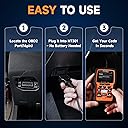
The FOXWELL NT301 is a professional-grade OBD2 scanner designed for quick and accurate vehicle diagnostics. Featuring a vibrant 2.8-inch color display, it reads and clears engine fault codes, monitors live sensor data, and supports multiple OBDII protocols for broad vehicle compatibility. Plug-and-play with no battery required, it’s a must-have tool for home mechanics and professionals alike, offering free lifetime updates and trusted by thousands worldwide.


| ASIN | B00UJV3E12 |
| Automotive Fit Type | Universal Fit |
| Batteries | 1 Lithium Polymer batteries required. |
| Best Sellers Rank | #336 in Automotive ( See Top 100 in Automotive ) #3 in Code Readers & Scan Tools |
| Brand | FOXWELL |
| Customer Reviews | 4.5 4.5 out of 5 stars (29,513) |
| Date First Available | April 18, 2016 |
| EU Spare Part Availability Duration | 2 Years |
| Global Trade Identification Number | 00721272382099 |
| Is Discontinued By Manufacturer | No |
| Item Weight | 5.6 ounces |
| Item model number | NT301 |
| Manufacturer | FOXWELL |
| Manufacturer Part Number | NT301 |
| Model | FOXWELL |
| Operating System | [Choice Of Millions People] [Recommended by Major Websites/Mechanic] Windows_XP/7/8/10 to update, Mac and IOS system not supported. |
| Product Dimensions | 8.66"L x 3.15"W x 6.69"H |
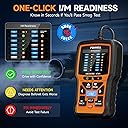
| Special Features | ➤1. Check engine/live sensor test data, ➤2. One-click readiness key, ➤3. On-board monitoring test, ➤4. Display fault code definition automatically with HELP Button to get Possible Causes, ➤5. OBDII monitors supported: Misfire Monitor, Fuel System Monitor, Comprehensive Components Monitor, Evaporative System Monitor, Secondary Air System Monitor, Air Conditioning Refrigerant Monitor |
| UPC | 721272382099 634769664960 602938429979 710882313685 689782535353 |
B**G
Incredible Value and Super Easy to Use
So much value packed into this tool. The design is clean, it’s compact, and the screen reads crystal clear. Very functional and easy to navigate. It took me under five minutes to figure out how to read and clear codes. I was able to diagnose and clear two EVAP codes with it. Pull the code, look it up, and follow the fault tree. I also really like the EVAP test function and the live data readout in real time. Without that, you’d have to wait for the engine to eventually throw a code, which can take several minutes depending on what the purge valve is doing. Great diagnostic tool for the price.
A**N
Check engine light on? Here's the solution!
Works like a champ! I've used it for years on my 2016 Ford F-350 with a 6.7l Powerstroke. It's reliable and easy to use. Works so well i ordered a second one for my other pickup. It's easier to just read and clear a code that pops up rather than drive home with a check engine light. I keep one in each truck. And, it's worked multiple times in -40 degree temperatures. Great product!
R**N
Not for batteries
Code reader was easy to use but the instructions were on the weak side. I bought this to reset a light caused by my battery being bad. Would not read the code or reset. I think there is a plus model or the 501 does it. I should have read more. Oh well.
V**K
Big bang for your buck!
Excellent product. Very detailed and very easy to use. The scan tool offers more than most scanners in this price range. Being able to not only scan for codes but having this tool tell you this likely cause of that code is pretty awesome. Zero complaints. Fast, easy and great price.
A**I
Great scanner
Product works great. Told me exactly what was wrong and was very easy to use. I highly recommend.
R**I
Must-Have Tool for Every Car Owner or DIY Mechanic
I purchased the FOXWELL NT301 OBD2 Scanner after my check engine light came on, and I couldn’t be happier with the decision. This scanner is incredibly easy to use, even for someone with limited car knowledge. Just plug it into the OBD2 port, and it powers up instantly — no batteries or setup needed. The 2.8" color screen is clear and bright, and the menu is very intuitive. It reads codes fast and gives detailed definitions, so you don’t need to Google what each code means. I also love the live data graphing feature, which helps track engine performance in real time. The I/M readiness button is a handy bonus — great for emissions testing prep. I’ve already saved money by diagnosing and clearing codes myself rather than running to a mechanic for every issue. It even prints data for records if needed. If you own a car (1996 or newer), this tool will pay for itself in no time. Whether you're a weekend DIYer or just want to avoid unnecessary shop visits, this is one of the smartest tools you can keep in your glove box.
G**Y
Very nice code reader and diagnostic tool.
Product arrived promptly and in flawless condition. Used it on my 2020 Honda Ridgeline to gain some familiarity, and it worked fine. Then I used it on a 1999 Ford E350 van with a V10 engine. Wanted to test the oxygen sensors because I believe they are the original sensors. The vehicle has about 170K miles and is over 25 years old. To my surprise, the oxygen sensors tested fine. Really liked the "live data" graphing of what the sensors are doing. This Foxwell NT301 scanner has proven to be a good investment for me. For now, it has saved me the battle of trying to replace those oxygen sensors.
N**E
Nice gear but the documentation.
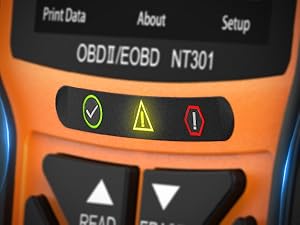
Hailing from the shade tree mechanic era of points & plugs ignition and the carburetor accelerator pump, most of what goes on that fills the NT301 data stream is way above my pay grade. While the likes of EGR, O2 and catalyst are not beyond my understanding, the value 12.226 associated with a VPWR(V) certainly is. Being the consummate motor head, the dreaded "service engine soon" lit up for the first time from behind its mask on my dashboard finally gave me the impetus to purchase a code reader. Upon some goodly research, and a screaming hot Amazon deal (a few bucks more than the NT201), I settled on the NT301 and I'm not disappointed. I had two reasons for the purchase: 1) To read the code(s) and have some knowledge in advance of a mandatory visit to a repair shop as that "service engine soon" (or "check engine") light is grounds for instant rejection for my county's annual inspection, even if the good ol' tailpipe sniffing and other "hands on" checks would pass the Federal mandates. As well, it might reveal a serious issue that shouldn't be ignored. 2) To satisfy that ubiquitous question: how can one turn that light off if one wanted to? Searching teh googuhl for either "check engine" or "service engine soon" returns gazillions of hits with bazillions for ODB scanners. Makers, sellers, yoot oobs, reviews, best of... oh my. Not to mention, "over 1000 results" here on the 'zon. I opened NT301_OBDII_V1.00.pdf (the equivalent of the printed manual) in Tracker Software's PDF-XChange Viewer and used its powerful search engine to help out. The words "check engine" or "service engine soon" do not appear in the manual. Instead, one finds section 4.2, Erase codes, for the two choices - an "Erase hot key" and an Erase Codes item in the diagnostic menu. The reference to the hot key appears no where else. The down key has a big old ERASE printed on it. Section 2.1 refers to that as a "Quick access to the Clear Codes function before going to diagnostic menu..." And that's it. Clear = Erase?? Hot key = Quick access?? Fortunately, using the down/ERASE key (you really, really need down) didn't seem to erase or clear anything. My "service engine soon" light remained shining bright as my county and the Federal bureaucrats and repair shops far and wide would have it. I'm OK with that, but in that respect, an obscure "Erase hot key" is dangerous if that shuts off the light. Yet, the question remains, does NT301 anything extinguish the light? Another documentation shortcoming is illustrated in figure 4-30. Although the green check mark and the no symbol can be presumed, my result had two white-X-on-red results with no explanation on what that means. Considering the Federal legal implications of the environmental technology presented by the the I/M Readiness Status, the documentation focuses only on the the three simple LEDs while fully ignoring the really neat Diagnostic Menu Screen. All that said, even at the regular price, the NT301 seems to deliver a great bang for the buck. Further, I'm motivated to hit the books, uh, internet and study up on some of this OBD stuff. Kudos for the 08/01/18 firmware (v4.24) burn date on an 08/15 purchase. A pleasant surprise. But I've got to ding two stars for omitting The Obvious from the manual. Some other reviewers here are less than satisfied with the manual as well. Admittedly, the manual should not be held to the standard of a concise tutorial. SIDEBAR: The problem was repaired; the car passed emissions testing. I still have the two white-X-on-red symbols in the I/M Readiness Status Diagnostic Menu Screen. So, what the heck...
G**V
Voldoende
A**R
Great item. Works as it should.
U**1
Would recommend.
相**3
全部英語です。仮に日本語対応させたところでsensorがセンサーとカタカナ表記になるだけですし(笑) エラーコードの内容も表示されますがメーカーによってはコード番号が異なる可能性があるので 最低限ネットで検索するだけのスキルは必要です。 取説は紙媒体及びCD-ROMにPDFで収録されていますが、メーカーHPからもDLできます。 YouTubeに使用方法も上がってますね。 同梱のCD-ROMからファームウェアの更新も出来ます。 (2017/08/06の最新版が2017/0703リリースVer2.10) 陸送屋で中古車を運んでいた時はほとんどの輸入車が何かしらの警告灯点きっぱなしになってましたので、 オーナーさんやユーザー車検代行業者さんなどは役に立つんじゃないでしょうか。 2017年2月から警告灯点いてる車は車検通してくれなくなりましたしね(*'ω`*)
M**I
if you have trust issue with the local garages and wants to know the fault in your car by your self than go for this device.
ترست بايلوت
منذ شهر
منذ شهرين