We remain fully operational. Our teams are working around the clock to ensure your deliveries continue safely.

قم بتنزيل التطبيق


معلومات عنا
حقوق الطبع والنشر © 2024 Desertcart Holdings Limited
قم بتنزيل التطبيق


Buy anything from 5,000+ international stores. One checkout price. No surprise fees. Join 2M+ shoppers on Desertcart.
Desertcart purchases this item on your behalf and handles shipping, customs, and support to KUWAIT.
🚀 Double your screens, double your hustle — stay ahead in the productivity game!
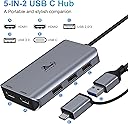
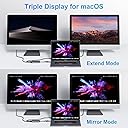
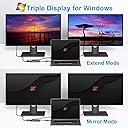
The LIONWEI USB 3.0 to Dual HDMI Docking Station transforms a single USB-C or USB 3.0 port into a powerful 5-in-1 hub featuring dual HDMI outputs (4K@30Hz + 1080P@60Hz) and three USB 2.0 ports. Compatible with MacBook Air/Pro (M1/M2 & Intel), Windows laptops, and more, it supports both mirror and extended display modes. Certified safe and backed by an 18-month warranty, this docking station is designed to elevate your multi-monitor setup and streamline connectivity for professional and creative workflows.


| ASIN | B08PV132WJ |
| Additional Features | Powered |
| Best Sellers Rank | #6,980 in Electronics ( See Top 100 in Electronics ) #99 in Laptop Docking Stations |
| Brand | LIONWEI |
| Color | Space Gray |
| Compatible Devices | Dell Latitude, HP EliteBook, Laptops, MacBook Air, MacBook Pro |
| Customer Reviews | 4.2 out of 5 stars 7,887 Reviews |
| Data Transfer Rate | 480 Megabits Per Second |
| Enclosure Material | Aluminum |
| Hardware Interface | HDMI , USB |
| Item Dimensions L x W x H | 3.9"L x 2.24"W x 0.7"H |
| Item Weight | 3.36 ounces |
| Manufacturer | LIONWEI |
| Mfr Part Number | UC0228 |
| Minimum Required Operating System Version | Windows 7 |
| Model Number | LIUC0228 |
| Number of Ports | 5 |
| Operating System | Chrome OS, M1/M1 pro/M2 MacBook, Mac OS, MacBook Pro/Air, Windows |
| Special Feature | Powered |
| Total USB Ports | 3 |
| Total Usb Ports | 3 |
| UPC | 779139580355 |
| Warranty Description | 30 days to try out and 18 month's warranty |
B**Y
AMAZING DOCKING STATION
I did have a few issues when I first started working with the docking station. The the plug that I put in the docking station instead of my computer to charge it wasn’t working but once I realized that it needed to be plugged in on the opposite side, everything has been working wonderful. I work from home and I plug into monitors as well as my laptop into the station plus other items like my headset and keyboard and it keeps everything humming! The other things that I really love about it is that you don’t need any software to use it like some other docking stations. Since I use it for work, I can’t have any software installed for anything that isn’t installed on my computer.
J**M
Amazing Choice!
I happened to catch this when it was on a sale, and am so happy I bought it. I am surprised it is only rated at a 4.1 as it surpasses other docking stations I have bought in the past. I plugged it into my laptop, plugged in three additional monitors, and it handle the load like a pro. Also has the ability to plug the dongle for my wireless mouse and keyboard into it with no lag or issues like I have run into with other docking stations. I also have a thumb drive plugged in and same, no lag or any other issues. With my laptop that has a USB type C power supply this dock charges it when plugged in. I did buy the one that comes with a power chord and would recommend that you do it too. Easy to setup as there is no software or anything else that needs to be downloaded. All you do is plug it in, plug everything else in and you are on your way. Highly recommend this product!
T**N
Gets the job done on Mac and Windows, but still has a big problem...
I wanted a docking station that allowed me to connect my work laptop to my two my monitors, allowing me three desktops, plus having extra ports for external devices. Since my work laptop is a windows with a USB-A port and my personal Macbook only has USB-C ports, this was the best option for me as I only wanted one dock that has all of what I need. I love the fact that this dock has two HDMI and three USB ports, so I was able to connect both my monitors to my Windows and Mac computers without much hassle. My keyboard, mouse and flashdrive connect to my laptop via USB-A; since my work computer only has one port, I can now use all three at once! What makes me give this 4 stars out of 5 is because my keyboard and mouse will occasionally lag. In other words, typing will sometimes delay a long while, which is really inconvenient for people who type fast like me - I'd realize a word was spelt wrong and I have to wait for the backspace to kick in and I'd be stuck on that one word for a while. The lagging really occurs with my mouse; when I miss my click or hit the wrong thing, it gets annoying real quick. In short, this dock great for connecting multiple screens at once! The problem I have with it is the occasional input lag. It's enough to make me consider returning this dock for a new one.
N**S
Good features for the price. Customer support was helpful.
I've purchased 3 of these in the past 3 years since I have multiple "workstations" at different houses. Works well with my Dell XPS-13, but be sure to pay attention to the pictures and description to ensure it will fit your needs as it's "Triple Screen" modes will differ depending on your hardware (PC, MacBook, GPU settings, etc.). The most recent purchase I made had an issue where HDMI Port 2 stopped working. I confirmed this by swapping it out with another dongle (same product, just purchased at a different time). Seeing as how it was less than a year since purchasing, I reached out to customer support to see if they could help me...I honestly had low expectations and wasn't expecting a response since it's an overseas company (probably across the world in China) but they actually responded early the next morning! Customer support was helpful and had me follow some simple troubleshooting instructions to confirm the dongle was in-fact defective and so they sent me a brand new replacement which is working great. Very happy with this product and the customer support. I do agree with the other reviewers that after a full 8 hour work day, the dongle does feel warm to the touch but even my oldest dongle from 3 years ago is still working fine so I don't have an issue with it.
D**1
I wish I had returned it ASAP.
Cannot connect more than two USB3 devices and the HDMI monitor adapter to a 4K display otherwise the screen flickers every time the computer spins up the hard drive. I tried to stop the HDs from going to sleep, but eventually what happened was that I would leave the monitor and the HDs on and then the computer would just completely freeze up after a few hours and then I would need to use OSX's first Disk utility to do first aid before it would mount again. I tried using big HDs like WD Elements that plug into the wall, and small laptop HDs that don't require any power of any sort and could not connect three USB drives and the monitor to USB 3, 2, or USB-C ports on this adapter.
E**R
This works with my Mac no major issues
I have had this for a year with no real issues. Occasionally I’ll have to unplug and plug it back into my Mac because one of the mo itors goes blank.
K**R
Good hub but might not work with more than one video output
This hub is pretty good but was still a little problematic for me. On the good side, all the USB ports work perfectly. It can charge my laptop at the same time. Also since it's aluminum it feels sturdier than a plastic one. I really wish the USB cord was longer, but that's not a deal breaker. The main reason why I chose this hub over others was that it claimed to be able to output a 4K display and 1080P at the same time. It's got 3 video ports for Pete's sake. I have one monitor that is 1080 and one that is 2K (1440P). The one at 1080 is perfect but the higher resolution one will only show 1080P with HDMI or DisplayPort. If it's the only thing plugged in, it's fine. Also if I have the smaller monitor plugged in through the hub and the other plugged directly into the laptop it works perfectly, so I know my laptop can handle it. This hub claims it can do it but it's not. It's still good otherwise, so I'm keeping it, but it's a pain to still have to plug one monitor into the laptop directly when I spent a little extra to have a single connector to handle it all.
S**E
I have 3 screens now
After downloading the drive that was needed equipment worked as should
ترست بايلوت
منذ 3 أيام
منذ 4 أيام