We remain fully operational. Our teams are working around the clock to ensure your deliveries continue safely.

قم بتنزيل التطبيق


معلومات عنا
حقوق الطبع والنشر © 2024 Desertcart Holdings Limited
قم بتنزيل التطبيق
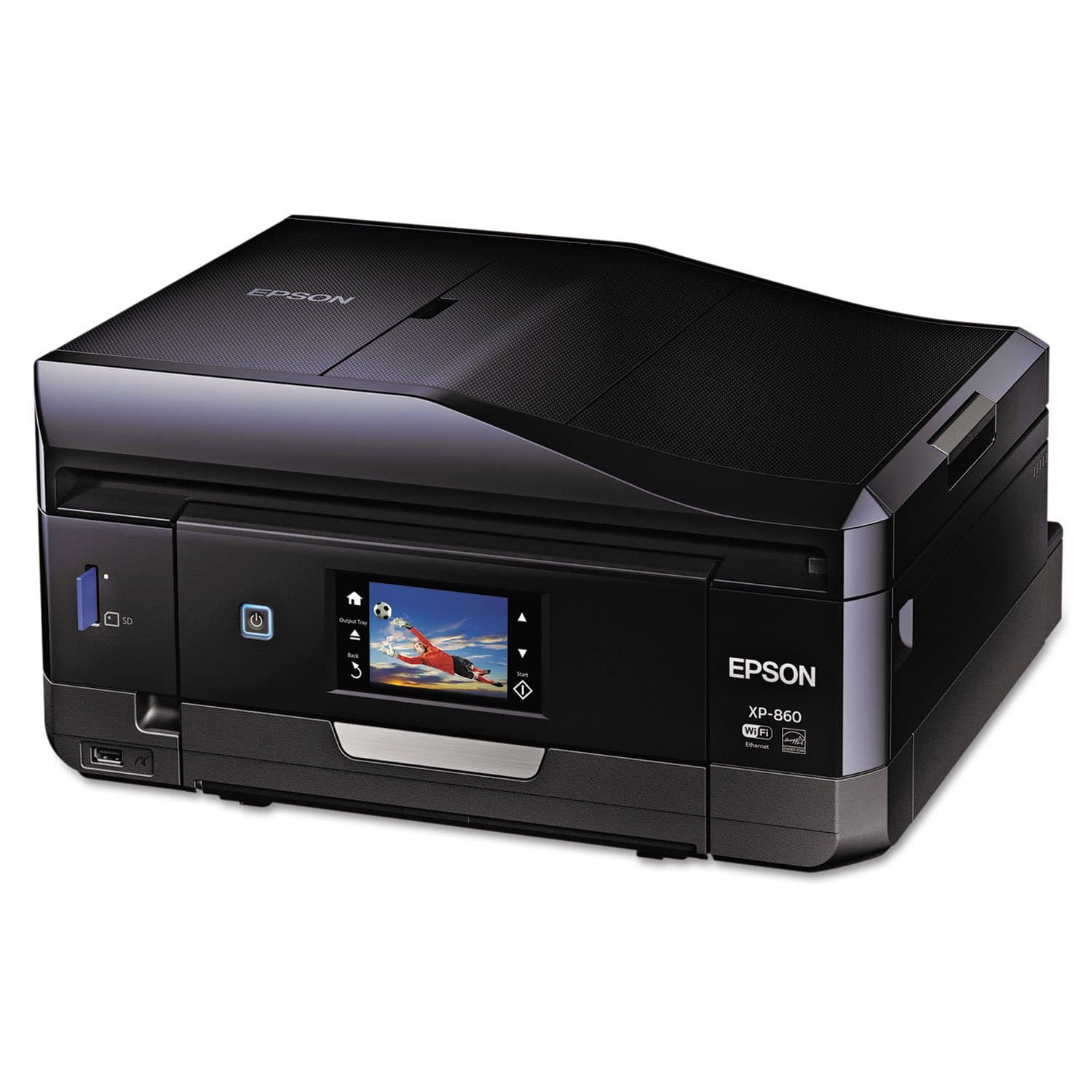

🖨️ Elevate your prints, automate your workflow, and never miss a moment!
The Epson Expression Photo XP-860 is a wireless all-in-one color photo printer designed for professionals and creatives. Featuring 6-color Claria Photo HD inks, a 30-page Auto Document Feeder, and automatic duplex capabilities, it delivers high-quality borderless photos up to 8" x 10" and versatile media support including CD/DVD printing. Integrated with Amazon Dash Replenishment, it smartly manages ink levels to keep you printing without pause. Compact and energy-efficient, it’s tailored for dynamic office environments and photo enthusiasts seeking premium results.


| ASIN | B00LV97LTW |
| Additional Printer functions | All In One |
| Best Sellers Rank | #850,635 in Office Products ( See Top 100 in Office Products ) #253 in Desktop Photo Printers |
| Color Depth | 24 bpp |
| Control Method | App |
| Controller Type | Vera |
| Customer Reviews | 2.8 2.8 out of 5 stars (192) |
| Date First Available | July 16, 2014 |
| Dual-sided printing | Yes |
| Duplex | Automatic |
| Global Trade Identification Number | 00010343914322 |
| Hardware Interface | USB |
| Included Components | Printer Accessory |
| Ink Color | Black |
| Is Discontinued By Manufacturer | No |
| Item Weight | 21.5 pounds |
| Item model number | C11CD95201 |
| Manufacturer | Epson |
| Max Copy Speed (Black & White) | 9.5 ppm |
| Max Input Sheet Capacity | 30 |
| Max copy resolution black-white | 4800 dpi |
| Max copy resolution color | 4800 dpi |
| Maximum Black and White Print Resolution | 4800 dpi |
| Maximum Color Print Resolution | 4800 dpi |
| Maximum Media Size | 8.5 x 14 inch |
| Memory Storage Capacity | 64 MB |
| Model Series | XP |
| Number of Trays | 3 |
| Number of USB 2 Ports | 1 |
| Output sheet capacity | 30 |
| Power Consumption | 21 Watts |
| Print media | Glossy photo paper, Paper (plain) |
| Printer Ink Type | Pigment-based inks |
| Product Dimensions | 19.1 x 10.4 x 16.8 inches |
| Scanner Type | document |
| Series Number | 860 |
| Sheet Size | 4 inch x 6 Inches |
| Specific Uses For Product | Photo Printing, Office |
| Supported Media Sizes | 4 x 6 inches |
| Total USB Ports | 1 |
| UPC | 010343914322 |
| Warranty Type | limited warranty |
| Wattage | 21 watts |
S**Y
Multiple issues makes it necessary to return printer and purchase another printer. I am trying a CANON PIXMA MG7520.
This was my third Epson printer. Pros: It made wonderful copies. Nice footprint. The size is acceptable. The feeder is a great feature. Screen easy to understand. When it was good - it was very good. Cons: After unpacking the first issue was setting up wireless. It wasn't straight forward and since I really needed to print I ended up using the USB port. I connected to a Mac. Sometimes with Mac software isn't updated or as elaborate as a PC. The black ink was difficult to get recognized but did after several tries. Later when I had to replace the black with another Epson cartridge. It wouldn't accept it or the original cartridge I took out. After many attempts (and wasted ink) I looked into the ink reservoir to determine how the cartridge made contact with the receptacle. Inside the machine the contacts are nine pins that contact the cartridge. This time I put the cartridge back and pulled it gently toward the pins. The cartridge was recognized. In printing a test Christmas card on letter size plain paper I had lines going through the print at regular intervals. I increased the ink output by changing the setting to Presentation Matte. I no longer had lines. I enjoyed the feeder for copying but when I tried to feed two sheets it printed it at a snail's pace and never printed the whole document. I cancelled and fed the sheets one at a time. I was printing a black laden document and I ran out of ink again. The problem is the information about ink reserves on your desktop isn't updated so you aren't aware in of ink reserves in real time. Not wanting to change the ink I tried "to cancel". That just confused the printer and locked up (even though it was and option). The design of the printer is good except when you lift the scanner to get to the print reservoir the lid is heavy and wobbly. I wish they had some air hinge that made this more secure. We wanted to be able to fax and that was one reason we purchased this printer but guess what, you need a landline. I assumed it would go wireless. All three of the Epson's I have had had the same problem not recognizing or realizing ink levels. i have a wonderful R1900 I am still hoping to resurrect. Lastly, the Epson support in weak. I called Epson but oh, it was Sunday. I went online and they ask all information about your incident but they return information which I already checked out and is nothing new. If I was responsible for Epson I would scour sites to see what people are saying about our printers. I would rectify that and provide real support. Why ask what kind of ink do you use and you say Epson and their solution is to use Epson ink. I don't think they care about support. They are so close. They could be great. Adapt, listen and fix. So software, quality control, some design issues and mainly lack of support are main reasons. Sorry to leave.
D**K
They came close, but its just awful!
I have hesitated to write this review, hoping that things would get better. I bought it 8 months, 3 weeks ago, and i hate it still. On the good note, when it works, it is fantastic in every area. super high quality scans and photo prints. ability to actually take full advantage of high quality paper and make some great prints. print on CDs. print on 4x6 etc photo paper. the problem is, it hardly ever works. Something is always wrong. I am retired and spent 15 years working for IBM and other internet companies in the 90s to mid 2000s- as a certified geek, i ve been able to fix some stuff that would leave most people smashing it. and frankly ive come close to smashing it. wifi will drop for no reason. and it *definitely* drops if the router is rebooted, even if you set up a static route based on MAC address for it, and manually edir the device driver in windows to use TCP/IP for that IP instead of the default port. Many times it will just flash, and you literally cannot turn it off without yanking the power cord out of the back. you have to go to every machine in the house, remove the printer, and add it back, every time the power goes out or the router is reset. I tried directly wiring it to the router, with both a crossover and a patch cat 6 cable, and neither were recognized - it demands its awful wifi. It goes through ink quickly, but not too badly, BUT other reviewers have it correct - the ink heads get clogged frequently, and cleaning them to restore a usable quality print consumes what seems like 1/3rd of a new cartridge of ink just cleaning the heads. this not only makes it expensive but unreliable and unpredictable as to ink usage. you think you have plenty, but half way thru a print job, oh boy, time to clean the heads, now its out of Light Magenta and wont print anything. Believe it or not, things DID get slightly better when i completely uninstalled ALL Epson software, and let Win10 Creators edition manage it. Scanning, which had been broken from the desktop, started working again. This printer is loaded with a ton of great features, but the bottom line is something is always broken with it - or about to break when you need it to work most. I really wish i could give better news. the scans are fast and ultra high quality... when the software can see the printer (yes, there are times you can print to it but Epson says it doesnt exist!). Its the best printer ive found as far as taking full advantage of printing on higher quality papers, 24 lb bind all the way through photo paper. The user interface is well done. thats the only thing that deserves a Star on this thing. This printer killed all of my loyalty to epson. I wont even get into the cost of the ink per page as its so astronomical but hard to calculate due to a set of cartridges never actually working correctly start to finish i have no idea *quite* how abysmal it is.
R**R
Lots of features...
Auto-feeder works great for scanning. No problems with scanning and faxing. Scans are bright and clean-looking, and there is no delay waiting for it to warm up as in older models. Pictures look great and print quickly. The tray that catches your printed pages is motorized and extends automatically when you print. The touch screen is legible and a decent size. Includes a memory card slot so you can plug the one from your camera right into the printer and print without firing up your computer. Also includes a USB connector to print photos from flash drives or portable hard drives. The scan feeder also flips closed to keep dust out of the unit. The only minor issue I can find is how it handles printing CD/DVD. There is a plastic carrier that you put the CD/DVD in, then slide it in above the paper cartridge. This is a little awkward, but works fine. I don't print too many CD/DVD anyway. Overall a very well thought-out and flexible printer.
K**H
This is a great printer no problems at all could be a bit faster but for what I need it for it is perfect.
V**A
llego bien, pero se ve usada, no nueva. La tintas estan casi vacias. Y tenia papel y dentro atorado. Muy mal
N**K
Worst printer among all I had. Issues from first days. While printing photos are fine (when works) the connectivity is ancient: WI-FI never works well and reset, reconnect, does not help. Each day you have to re-connect again, getting no IP or shows perfectly connected but "printer can't be found", can't print from smartphones and EVEN direct LAN via cable printing is working not every tine. Installing drivers on PC (Windows 10) is bad as well, need to re-install often. Interlace is slow, firmware update didn't change anything. I am IT Engineer, had dozen of printers (at least) in my past and never had such issues. Laser printer from Samsung I have beside works always fine, for example, on the same network, reliable and quick. Can't recommend this printer until Epson resolves issues.
P**E
Very pleased with its performance
S**Y
she likes it
ترست بايلوت
منذ شهرين
منذ يوم واحد