We remain fully operational. Our teams are working around the clock to ensure your deliveries continue safely.

قم بتنزيل التطبيق


معلومات عنا
حقوق الطبع والنشر © 2024 Desertcart Holdings Limited
قم بتنزيل التطبيق

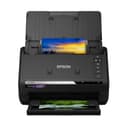
📸 Preserve your past at the speed of now!
The Epson FastFoto FF-680W is a wireless high-speed photo and document scanner that digitizes up to 30 photos per 30 seconds with an auto feeder. It supports photo sizes from 9x13cm to panoramic 21x91cm, automatically enhances images with color restoration and cropping, and uploads scans directly to cloud services like Dropbox and Google Drive. Beyond photos, it scans double-sided documents at 45 pages per minute and offers OCR for searchable PDFs, making it a versatile tool for preserving memories and managing documents efficiently.
| ASIN | B07MLQJC6Y |
| Are Batteries Included | No |
| Best Sellers Rank | #28,126 in Computers ( See Top 100 in Computers ) #42 in Document Scanners |
| Brand | Epson |
| Color | white |
| Customer Reviews | 4.2 4.2 out of 5 stars (192) |
| Date First Available | 31 January 2019 |
| Item Weight | 3.7 Kilograms |
| Item model number | B11B237401BY |
| Manufacturer | Epson |
| Product Dimensions | 16.9 x 29.6 x 17.6 cm; 3.7 kg |
| Series | FF-680W |
| Wattage | 680 watts |
S**D
Amazing.
Do not doubt the capabilities of this scanner. Scanned 4000 photos in 1 day.
B**R
I bought the Epson FastFoto FF-680W to digitise decades of family photos, and it has exceeded every expectation. This scanner is lightning fast (up to 30 photos in 30 seconds). The auto feeder means I don’t have to babysit the process. It even detects and scans the back of photos if there are handwritten notes, which is a brilliant touch for preserving family history. The scan quality is superb at 600 DPI, with crisp detail and vibrant colors. Faded prints come back to life thanks to the built-in colour restoration, and I love that the software saves both the original and enhanced versions so I always have a backup. The included FastFoto software is intuitive, making it easy to crop, rotate, and share scans directly to cloud services like Dropbox or Google Drive. Beyond photos, it doubles as a powerful document scanner. Handling A4 pages, receipts, and even panoramic images. OCR support means I can turn scanned documents into searchable PDFs, which has been a huge time saver. Yes, the price is on the higher side, but if you have boxes of old photos or want a reliable all-in-one scanner, it’s worth every penny. It’s compact, easy to set up, and has quickly become one of my favorite tech purchases. I can finally share priceless memories with family without worrying about losing them to time. Highly recommended for anyone serious about preserving their photo collection.
D**G
I purchased the ES-580W and it's a lovely looking device, and smaller than I thought it would be. I’ve actually put it on the front room next to a vase as I like looking at it. I often go to court to defend my data protection rights and this process generates a lot of paperwork. I've been using the Canon imageFormula P-150 for many years but I had so many issues with double-feeds that I have to feed each page in one by one. It did a good job though. So, the main criteria for this scanner was that it needed to have the technology to prevent double-feeds. I also liked the idea of scanning directly to USB without having to use my PC. I had it up and running within minutes and I was scanning to USB. I was a bit concerned at first because it started beeping every time I pressed a button on the screen and that would have done my head in but fortunately there’s an option to set the sound to zero. I’ve also figured out how to set my user settings – 600dpi, colour, PDF, single document, duplex. When I get any post now, all I need to do is turn it on, scan the letter to USB and shred it. It took about 10 minutes to scan a 30 page document and I think it is the saving to USB process that is slows it down. It’s not an issue though for someone who is used to scanning page by page. My mission now is to scan in everything stored in my three drawer metal filing cabinet. My only niggle so far is that the touch screen is a bit sensitive and therefore, difficult to scroll. For example, when I try to scroll down the menu I often select an option by mistake. This is not a big issue though as I’ve now saved my settings.
T**L
War nicht mehr Original verpackt (geschützt) im Karton, Anleitung fehlte, ansonsten gut wie erwartet.
W**3
With boxes of old prints of all sizes and from cameras of different quality that I wanted to scan to preserve for posterity and ease of viewing and sharing, this was the only option as scanning on a flatbed would take a lifetime. I was sceptical and it was not cheap but decided to go for it. Well, more than 15000 prints later I am still amazed by this machine. It was easy to set up, is easy to use and gives good results. Even scanning at maximum optical resolution (600 dpi) it is SO quick. A 36 print pack goes through in not much longer than it takes to get the next ones ready and pack the previous ones away so you really can digitise a lifetime of prints in a reasonable time. Feed jams are rare and only caused by prints with album glue residue or being lazy and trying to get different print sizes through in the same run (and to be fair the instructions say not to do this). The option to scan the back at the same time is a real bonus where information has been written on a photo. As the process of scanning is so quick I moved on to prints inherited from my Grandmother, the oldest being early 1900's with a lot of family history recorded on the back which has been automatically captured. The auto correct works well for most prints, and of course further editing can be done in Photoshop or Lightroom. It is very impressive on old, slightly faded prints (see examples). Black and white works as well as colour, and the option to create 2 copies of the scan - the original and a corrected one - automatically means that if you are not happy with the auto corrected version you have the original to work on as you wish. With the volume of scans I have done, and the age and poor storage of some of the originals I have had a few issues with lines on the scans that have been easily resolved by a quick clean of the scan area which is easy to do and good instructions are supplied. Really recommend this scanner if you have a lot of prints to digitise - the old photos have been looked at more on the computer by the family then they ever were in the boxes in the loft ! I have disposed of all the prints, saving quite a bit of space, but kept the negatives just in case.
Q**R
After ample confusion of choice and research, I finally decide to buy this rather than buy a Canon DR-C225W II, or any another Canon and Brother scanner, because: * The Canon DR-C225W II looks to still use the same flawed sheet-feeding mechanics and sensors as the Canon DR-C225W, including the same overpriced rollers! Possibly hiding designed-in obsolesce too. * This document scanner has USB 3, which later proved it's worth, and WiFi, also allowing use over network, a decent sized touch screen and far more powerful functionality, including a contacts directory and direct send to file shares, email, cloud, etc. * Epson seems to provide Linux support for most/ALL of their scanners, unlike the pathetically limited Linux support of Canon and Brother, contrary to some web articles about document scanners for Linux! * Other makes and models were far too expensive for equivalent functionality, with Ethernet support being shockingly more expensive, than the price of a decent USB 3 Gigabit Ethernet adaptor, maybe only 100Mbit too! * This only cost me £279.99 via the recent Prime day sale, bargain. Pros: * It is small enough that it does take up much desk space and maybe portable in a large laptop backpack. * The paper exit bends the paper far less that the U travel to the Canon DR-C225W exit sheet slot, is simpler, and has a higher capacity optional pull-out tray. * Hopefully the, initially confusing, pull off-the-back (queue-type) sheet feeding, will ensure more reliable feeding, and top-first (upside-down sheet) scanning, will ensure faster throughput, with less need for feeder maintenance, than the pull-off the front (stack-type) sheet feeding and bottom-first scanning, with spurious feed failures, of the Canon DR-C225W and probably C225W II too. * Epson provide a downloadable "Epson Scan 2" desktop GUI with a "epsonsane2" SANE backend for Linux, with useful options, which works for USB 3, and source code separately; the latter probably to support other Linux distributions and CPUs. They even support Linux for ARM 32-bit and 64-bit, so it's probably usable by a Raspberry Pi with enough RAM. * The "epsonsane2" backend was faster and more functional than the SANE provided driver, for both USB and network devices. * The USB 3 connection really shows its value for 1200DPI A4 scans. * Network seems good enough up to 600DPI A4 scans, which should be good enough for more uses. * For Linus, the github.com/cyanfish/naps2 deb SANE frontend worked great with it for both USB and network, (epsonsane2) devices, generating a searchable (OCR'd) PDF from a multi-page duplex document, and is probably a better SANE frontend than the "Epson Scan 2" GUI for most uses. Cons: * "Epson Scan 2" for Linux failed to scan anything via network device, despite triggering the scanner to show the "Load originals." screen, whereas other SANE frontends worked fine, hmm! It also lacks a lot of the other functionality of the Windows bundle, and does not appear to support auto-generation unique filenames for saved files, which may cause accidental overwrite of prior saved files, and does not allow page view/edit before pages saving. * I can't say I was impressed by the Windows utils for it either; so maybe NAPS2 would also be better for it on Windows too. * This document scanner doesn't appear to support 5G WiFi, because my router listed it as a 2.4G connected Wi-Fi device; and when I test scanned A4 pages at 1200DPI using NAP2, it was a noticeably slower transferring the page images than over USB 3! 1 star dropped for not supporting 5G WIFI. Notes: * WPS WiFi setup didn't want to work for me (maybe an ISP router issue), but WiFi was easy to manually setup using the touchscreen. I'm wary of WPS, anyway, because it's a security risk, even for only 2 minutes. * Beware of brscan4 (official Brother SANE backend) for Linux, I had it installed, and mine had a broken libsane-brother4.so.1 causing a seg. fault, causing puzzling exits of multiple SANE frontends; so I had to uninstall it! This is one reason why decent and maintained Linux support is so important, also why the SANE maintainers need to cut the lame "proprietary" excuses, and trap and log device-backend load failures, to prevent puzzling (seg fault crashed) disappearance of SANE frontends! Update 2025-11-03: I discovered that the "Epson Scan 2" desktop GUI for Linux provided the option to scan extended length pages, with no specified length limit, at 300 DPI (max allowed for this mode). Speculatively, I tried to scan some very-wide old landscape school photographs sideways, each approximately 2 to 3 times A4 height, and it worked. I later rotated the images back to landscape and re-saved them, to view them and zoom in. Before that I could only to use a flat scanner and scan multiple sections which was obviously disjointed to view; it would probably have been hard to trim the overlays and splice all of the sections into one image for each photograph. I may later try to specify a custom page-size of the photograph dimensions, to see if the scanner can support scanning them at higher DPI, to allow seeing more detail.
ترست بايلوت
منذ أسبوع
منذ 3 أيام