We remain fully operational. Our teams are working around the clock to ensure your deliveries continue safely.

قم بتنزيل التطبيق


معلومات عنا
حقوق الطبع والنشر © 2024 Desertcart Holdings Limited
قم بتنزيل التطبيق
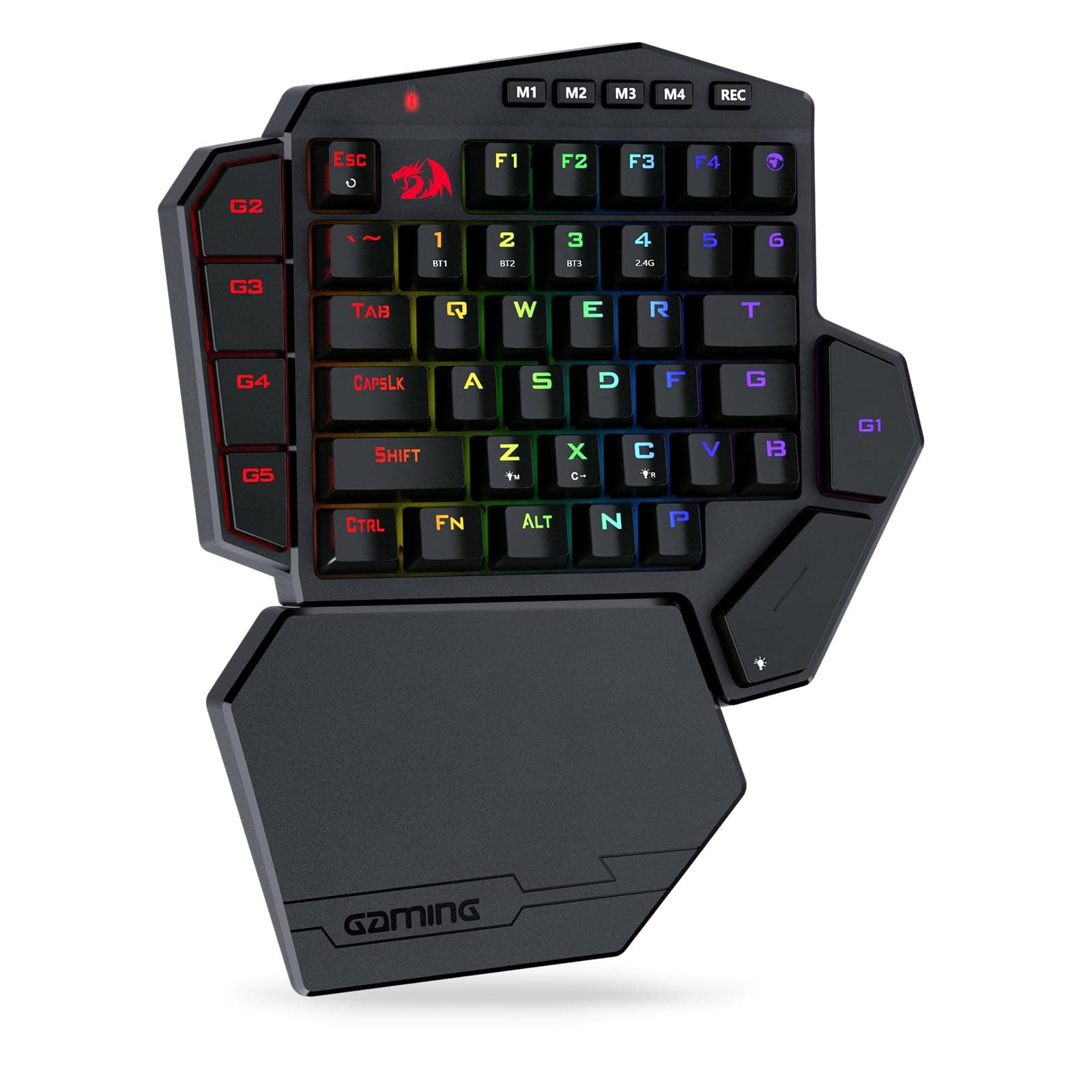
🎯 Dominate your desk with the ultimate wireless one-handed gaming weapon!
The Redragon K585 PRO is a compact, wireless one-handed mechanical keyboard featuring 42 keys with customizable RGB lighting, 7 programmable macro keys, and quiet linear Red switches. Designed for gamers and professionals alike, it offers up to 20 hours of battery life, multi-mode wireless connectivity (Bluetooth & 2.4GHz), and an ergonomic detachable wrist rest for extended comfort and precision control.


| ASIN | B099W5MSFM |
| Additional Features | 3-mode Wireless, Ergonomic, Hot-Swappable |
| Antenna Location | Gaming |
| Best Sellers Rank | #1,758 in Video Games ( See Top 100 in Video Games ) #161 in PC Gaming Keyboards |
| Brand | Redragon |
| Built-In Media | USB Cable |
| Button Quantity | 5 |
| Color | Red Switch |
| Compatible Devices | PC, Laptop, Tablet |
| Connectivity Technology | Wireless |
| Customer Reviews | 4.3 4.3 out of 5 stars (615) |
| Enclosure Material | Plastic |
| Hand Orientation | Ambidextrous |
| Item Dimensions L x W x H | 10.83"L x 9.06"W x 1.57"H |
| Keyboard Backlighting Color Support | RGB |
| Keyboard Description | Wireless One-handed Gaming Keyboard |
| Keyboard Layout | QWERTY |
| Manufacturer | Redragon |
| Mechanical Keyboard Switch Model | OUTEMU Red |
| Model Name | DITI |
| Model Number | K585 |
| Number of Batteries Required | 1 |
| Number of Keys | 49 |
| Number of Sections | 1 |
| Power Source | Battery Powered |
| Series Number | 5 |
| Style Name | Contemporary |
| Switch Type | Linear |
| Theme | gaming, red |
| Warranty Description | 1 year |
R**T
Software to program works. Many features
This keyboard is shockingly good for the price. It feels very solid to use and the switches are smooth. The software is not easy to find, install, or use but it gives more features than most high end keyboards. It allows you to remap every key, change the colors to however you want, and each M# button at top can contain a different key mapping and/or color setup. It is fairly easy to use once it gets running. Now to install and use the software. First you have to go to red dragons web page and go to the download at top of screen. Search of the k585 and make sure you pick the wireless one. You get some zip file that has a couple of directories. Inside one directory is another archive (a rar instead of zip). If you are running the latest version of windows 11, it can handle extracting from the rar otherwise you’d need winrar. Once you extract the exe file from that rar, you run it to install the software. Then you launch the software. It seems to not load or do anything. But actually it does start running, but only shows up in your taskbar corner icons. The icon will only be in the hidden area so you have to click on the up arrow to expand those. It will be just a grayed out symbol that you can right click on. Now you have to plug in the keyboard directly via usb cable. Once the keyboard is plugged in, that task bar icon for the red dragon software will go to red from gray. You now can right click on and then click on configure. Not an easy process for sure. But it does work and is excellent once it gets going.
B**T
Great for PC gamers.
This is the second time I have purchased one of these units. The first one was wired. I liked it so much, I purchased this wireless one. It is very easy to setup. Dragon has a software package you can download from their site that allows you to setup the extra keys. Then it works like any other keyboard. Like most of Dragon's keyboards, this one is very solidly built. I use it in my recliner, and have already dropped it once. A key popped off, but it was easy to pop it back on. The LEDs ae convenient for helping identify keys in the dark while you are getting used to it. It does come with a palm rest, but I don't use that. I find it uncomfortable. I have 4 Dragon keyboards, and will continue to use them. Their quality and support are unbeatable.
S**E
It checks all the boxes, save one.
I have had a lot of experience with building and repairing computers over the years and I know what it means to sit down and plan out a new computer build from top to bottom so that you can squeeze out the very best performance and experience for your dollar. Up until about 2 years ago I always used Logitech products as my go-to for gaming oriented computer peripherals. But then I started to ask myself about what I was actually getting for my money. I had a Logitech G13 Gaming keypad that I absolutely loved but ultimately ended up selling along with my latest computer build up to that point. So I was then searching for a product to replace the one I had and after careful consideration I decided to go with the RedDragon brand. I originally purchased the K585 Wireless keypad over a year ago and I had grown to love it. It had blue switches that gave that satisfying clickity clack with every keystroke. I used it more than my actual keyboard when gaming. Then, just a few days ago I had a little accident regarding a full glass of apple juice (yes, I am a full grown adult who drinks apple juice on a regular basis...deal with it). My K585 took a good apple juice bath and although it survived after I further drenched the thing is isopropyl alcohol (works as a water displacement and evaporates quickly, you're welcome) some of the keys no longer had that clickity clack I was so used to. So I bought some blue switches with the intention of replacing said keys. And it worked! Up until I tried to replace the "G2" key, which are apparently not supposed to be removed because those pins broke off in the PCB. So then I thought, yes, I could fix it, but then I thought I don't want to. So I ordered another RedDragon K585 Pro Wireless with red switches. Here is my review: The build quality is great. It's light weight, but not so much to where you are thinking you are going to break it by looking at it. I'm not a huge fan of the shape, but this is easily overlooked after you consider how many keys there are on this thing and one cool thing about it and one of the things that was a requirement when I was looking for a product to replace my Logitech G13 was programmable keys. All of the keys can be reprogrammed to multi-keystrokes, media control, app launch, or device control, making the keypad great for both gaming and 3D/CAD software navigation. You have the option to either use USB, Bluetooth, or 2.4Ghz wireless connections. the Bluetooth has 3 profiles and therefore can be paired with three different devices. The RGB, though not as robust as it was on the G13 is still great and satisfying. I, for one like to change the theme of my setup on a regular basis so, like it or love it, it's a nice feature to have. There is also great FN control so you can do simple tasks without the use of the software including changing the RGB for specific keys. The software is not necessary unless of course you want to use macros, or change key combinations. I have the software installed and compared to my previous K585 the software has gotten a facelift and it looks and operates great! It's easy to follow and understand and any changes made are quickly saved to the device and the software can then be put away. But, I do have one major gripe about RedDragon products and that is that if you have multiple products of theirs you have to have multiple software applications to control each one. So if you have a keypad, keyboard, and mouse, you have to have 3 separate RedDragon software programs to control each one individually. This sucks. It would be exponentially better if they decided to implement a software control programs that encompassed all of their hardware devices so you didn't have to switch back and forth all the time. Aside from this, I am very pleased with the product and will consider this brand for my next PC build.
H**2
Good purchase
Great keyboard!
N**.
Highly recommend!
Absolutely love this keypad so far. The wireless connection is rock solid with no lag in my games, and the red switches feel smooth and responsive without being too loud. The layout makes all my main keys easy to reach, and the macro buttons on the side are super handy for quick abilities and shortcuts. RGB looks great out of the box, the detachable wrist rest is surprisingly comfortable, and the battery life has easily handled long gaming sessions without needing a recharge every day. If you play FPS or MMOs and want to free up space on your desk, this thing is a 5/5 no-brainer.
A**N
Better than expected
I bought this to use in combination with a mouse on a laptop pad. It works very well with every button you need for most first person shooters, including the map button. Detachable wrist pad and wireless functionality are also very useful and nice to have. I'll probably keep using this even when I return to my desk so I have more mouse space. Again, outstanding keyboard. No need to have a full set of keys when you are only using your left hand anyway.
N**E
Unfortunately the official software didn't work on my home pc and work pc.
Layout will take a while to get use to, remapping the keys will be required for most people, since that "N" and "P" key sits right where the default space bar was suppose to be. Most of the hot swappable switches are very tight, as if I was trying to pull a tooth out difficult. Stock keycaps and red switches are loud when pressing on it carelessly, which is normal for these keyboard.
R**O
Muito bom, o material parece duradouro, é robusto, o toque e o clique são muito bons e não noto nenhum atraso em jogos, seja por fio ou sem fios… Uma coisa muito importante para mim é que funciona bem com ou sem fios ligado à ps5 para jogar :) (coisa que tinha sido uma desilusão com o teclado caro que tenho Logitech g915)
C**T
Dit half draadloos gamerskeyboard is echt een aanrader voor first person shooters. Hij kan simpel gebruikt worden op computers maar via de 3 bluetooth connecties ook op Android tablets en Steamdeck. In combinatie met een draadloze muis is het voor elk systeem de ideale bediening voor fps games. Gewoon verbinden en de toetsen instellen en je bent klaar om te gamen. De toetsen zijn geluidsarm en ik merk nauwelijks of geen vertraging bij aanslag. De RGB verlchting is een leuke extra die je ook nog naar eigen smaak kan aanpassen. Ik heb lang gezocht naar een BT gamerskeyboard en deze voldoet aan mijn verwachtingen.
M**T
Pretty good keyboard, the feeling of the keys, the responsiveness and the pretty lights makes it a great tool for gaming for a pretty decent price.
B**R
Guzel
J**.
Good product 👍🏻
ترست بايلوت
منذ يومين
منذ أسبوعين