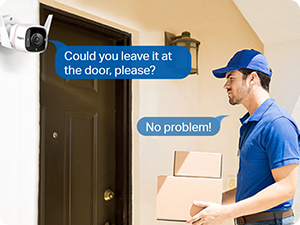
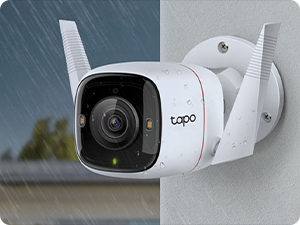
🔒 Elevate your home security with crystal-clear color day & night — because your peace of mind deserves the best.
The Tapo C320WS is a versatile outdoor security camera delivering stunning 2K QHD resolution with 8x zoom, full-color starlight night vision, and dual wired/wireless connectivity. It features intelligent person and vehicle detection, instant motion alerts, and built-in sound and light alarms for proactive protection. Compatible with Alexa and Google Assistant, it offers flexible voice control without monthly fees, storing footage locally or in the cloud for easy access. Designed for seamless installation and reliable all-weather performance (IP66), it’s the smart choice for modern home security.


| ASIN | B09B44P6C2 |
| Are Batteries Included | No |
| Best Sellers Rank | 169 in Electronics & Photo ( See Top 100 in Electronics & Photo ) 7 in Dome Cameras |
| Colour | White |
| Compatible devices | Smartphone, Tablet |
| Connectivity protocol | Wi-Fi |
| Controller type | Amazon Alexa |
| Customer Reviews | 4.6 4.6 out of 5 stars (11,053) |
| Date First Available | 24 July 2021 |
| Effective video resolution | 1440 |
| Form factor | Dome |
| Guaranteed software updates until | unknown |
| Included components | Anchors and Screws, Mounting Template, Power Adapter, Tapo C320WS, Waterproof Seal;Waterproof Cable Attachments;Quick Start Guide |
| Indoor/Outdoor usage | Outdoor |
| Item Weight | 210 g |
| Item dimensions L x W x H | 14.2 x 6.4 x 10.3 centimetres |
| Item model number | Tapo C320WS |
| Manufacturer | Tapo |
| Mounting type | Wall Mount |
| Night-vision range | 98 Feet |
| Number of channels | 2 |
| Number of items | 1 |
| Power source | Corded Electric |
| Product Dimensions | 14.23 x 6.43 x 10.34 cm; 210 g |
| Video capture resolution | 1440p |
| Voltage | 9 Volts (DC) |
| Wattage | 65 watts |
| Wireless communication technology | Wi-Fi |
D**N
Good value; efficient, nicely designed.
These Tapo C110 cameras by TP-Link are remarkable little gadgets. I recently had a change of email address and I found that reconfiguring my existing three IMOU cameras to recognise the new address quite impossible and customer support from IMOU was frustratingly poor. I then contacted TP-Link by phone and was given some good advice and purchased three of their cameras from Amazon at just £16 each. Setup up was incredibly easy and they are far better and smaller than the IMOU cameras: the image is sharper and wider. The App is very good, too. Following my email to TP-Link I received a further message asking if my enquiry had been resolved. Unusually efficient.
A**R
Great indoor camera and so easy to use
Fantastic piece of kit. Easy to set up and quality picture quality. The app is so easy to use too. I have already added another camera. Will be adding more
C**S
Tapo's range of cameras continue to impress as I expand my security to 11 of their cameras.
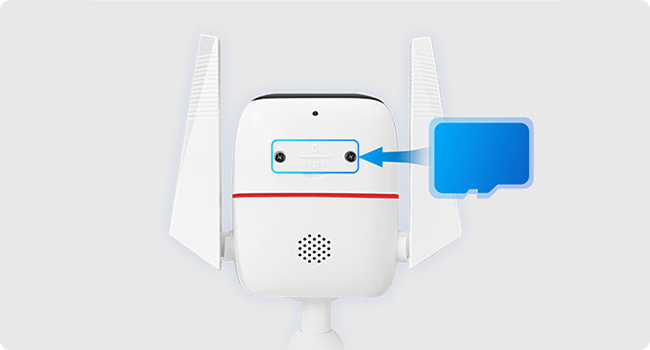
There are two parts to this review as there are multiple different products on the same Amazon sales page that I have tested and reviewed. My original review, below is 2 years old and is for the TP-Link Tapo C210, C225 and C320WS. This first part of the review covers the new Tapo TC46. Firstly, let me note that I’m pretty confident in saying the Tapo TC46 is the same camera as the Tapo C560WS. I’ve compared both cameras on Amazon and Tapo’s website and I can see no difference either visually or in specification. This the 11th Tapo security camera that I now have, and 6th different model from their range. The C210, C225 internal cameras and C320WS, C520WS and C660 external cameras are all dotted around my house and garden, slowly replacing a large-scale Swann CCTV system I have. The TC46 / C560WS are also very closely linked to the C660 camera, again being practically the same device however that is a solar powered camera rather than main powered. As such, the performance of the TC46 is incredibly similar to the C660, however because it doesn’t have to be as energy efficient it allows it to stretch its legs a little further and be more vigilant. In the box you get the camera itself, a main charging unit, mounting bracket and fixings and basic instructions. You’ll need to download the Tapo app for iOS or Android to set-up and operate the camera. Installation is straight forward. You get a stick-on template which you’ll need drill 4no holes for a wall mount or 2no holes for a soffit mount. Screw in the mount, slide the camera over it and then there are two further small screws to fix the camera more securely. Open the app (create an account first if necessary), add camera and allow it to join your Wi-fi. It’ll take a couple of minutes to go through the motions, and it’ll need to format your memory card (microSD, not supplied) if you’re using one. There will also be a firmware update, which Tapo are very good at rolling out improvements for. You’ll need to have a power source relatively close by, which is always the greatest challenge when placing IP cameras. The size of the plug means that it won’t fit in a standard wall-mounted weatherproof socket so you may need to put it into a weatherproof socket box. One little tip I’d give though is that you can use the power lead from a BNC cable to power the Tapo external cameras. If you’re replacing a CCTV camera, such as the Swann system that I’m replacing, you can re-purpose the existing cables to power the Tapo. I’ve done it with several cameras already and it works perfectly well. The TC46 / C560WS camera follows Tapo’s new 4K design of dome camera. While it looks quite attractive, I’m not a fan of it. Being an egg-shaped thing it doesn’t have the range of articulation that the C520 or C520 have, and that means I can’t see things directly below it and also can’t lift its head up high enough to look too far away. This means if you position it just above a door it can’t look directly down and also isn’t high enough to catch faces as they walk towards the door. You ideally need to have this camera at least 3m above the ground. Beyond the physical issue, the camera is really very good. It is worth noting that while many security cameras may state they’re 4k, they need to implement a degree of compression of the image otherwise you’d quickly decimate any available storage. Especially if you’re filming 24/7. As such you’ll find that if you compare footage side-by-side with that from a device like an iPhone or a DSLR they won’t be quite as good. You’d need huge amounts of storage to record 4K 24/7. That said, footage from the TC46 is impressive. I’ve mounted the camera on the house above the drive way and I can clearly see the registration plate of a car 10-15m away. The most impressive thing with Tapo cameras, however, has always been the software. I’ve got cameras from Arlo, Eufy, Ring and Swann and the Tapo app has always been the most complete. The options and level of control it offers is excellent, and comes more and more into its own the more cameras you have. You have the ability to really fine tune what you want the camera to do. Not just in selecting the recording quality, but what type of events can trigger a detection, what level of notifications you want and when. For example, you can chose basic motion detection, person detection, pet detection and vehicle detection. You can set up a line-crossing detection by drawing a line on the display and if anything moves across it it’ll trigger a detection. It has facial recognition too. All of these can trigger a detection (it’ll record that event specifically if not in 24/7 mode), and you can also get it to send you a notification for any one or all of those events. You can then also tailor the times that you receive those notifications, which is great for high-footfall areas that you don’t want alerts for all the time, but do want them during a specific time frame. You can choose to have night vision or colour vision, where the floodlight comes on, set up privacy zones, it has an alarm mode plus 2-way communication. You can also manually turn the light on, plus have full manual control of the pan/tilt function or set up preset views to quickly switch between. This is not a cheap camera, it must be said. The 2K cameras by Tapo, such as the C520, offer excellent value for only a minor drop in visual quality but retain the ability of the app. They are a worthy alternative. However, my experience so far of the C46 / C560WS has been very good. This part of the review covers three products I purchased and tested together in February 2023. The TP-Link Tapo C210, C225 and C320WS IP security cameras. The C210 and C225 are both sold on Amazon via the same page with same reviews applying to multiple cameras. The C320WS has a separate sales page and reviews, however all points raised in this review apply to all three of these cameras therefore I have submitted the same review across two sales pages for three products. You may have a different reasons for being here looking at IP cameras. You could be doing it for home security, or perhaps for monitoring babies, children or pets. I’m writing my review from the perspective of a pet owner who likes to know what his border collie is up to, but also with a nod to home security. I already have in place several security camera systems around my property which have different benefits and weaknesses. We have an 8-channel Swann CCTV system, which is a more traditional wired product using BNC cables and requiring a lot of wiring and thought about placement. While being accessible from an app anywhere in the world they record all of their footage to a base unit. They can be very incredibly expensive to buy, difficult to install and a challenge to set-up, but once in place they are very good quality. They’re not for everyone, though, and aren’t as long-living as their price might suggest. I also have an existing IP camera system, from a company called Victure, which I assembled over several months with purchases from Amazon some four years ago. Amazon no longer sell them, and the quality was rudimentary. They got the job done, but they were showing their weaknesses. A recent upgrade of our home internet with a new router that the Victure cameras refused to connect to was the last straw, which set me on a path looking for a new IP camera supplier. An IP camera system is generally much simpler and cheaper to set up than the traditional system. You buy the cameras individually and they can operate independently of any other devices, or you can add to them over time to create a really large network of cameras that you can control through a single app. You record either to a memory card which is either in the camera itself or in a central hub, or you can subscribe to a cloud based service. A memory card can be typically £10-30 so you need to factor that into your budget, but that cost is quickly returned after perhaps 9-12 months of paying for a cloud subscription. IP cameras are normally powered by either a USB (USB-C or USB-A) cable or a DC adapter, although some cameras can be powered by a solar panel. They’re typically quite a bit more expensive though. There are hundreds of different manufacturers of IP cameras when you look around, and they all have their own app to control them. I mention this because it’s very tempting to buy whatever camera is on offer at that time and find yourself with several cameras from several different brands requiring different apps to view the footage. You’ll get frustrated hunting through the apps that control the camera you want to view so one of the biggest pieces of advice I can give is to find a single manufacturer that you’re happy with and stick to their ecosystem. And, with that in mind, you ideally want a brand that is reputably, reliable, and is going to be around for some time. TP-Link are just such a company. If you’re not familiar with them, TP-Link manufacture some of the very best WiFi routers, smart sockets, range extenders and network switches. I have examples of all of these in my home and I’ve never been let down by them. They also make a wide selection of IP cameras for different purposes, and the range is continuing to grow. The make internal and external cameras, mains powered or solar powered, static or rotating cameras in different qualities of image resolution. They gave me confidence that if I did invest in a number of cameras I wouldn’t find myself in a dead end in a couple of years time. My current IP system is 8 internal cameras and 2 external. My intention is to replace all of them. Although I was happy with the brand, I did have my concerns about a couple of things. Firstly, I’d noted that the power delivery to the camera was by a DC adapter and 3m long cable. All of my previous IP cameras were powered by USB cable which are easily and cheaply replaced should you need a longer cable. And, that’s the issue with security cameras. You normally mount them somewhere where they’re not necessarily close to a power socket. I was concerned that I was going to struggle to wire the cameras up in a method that was safe and visually tidy. Additionally, the app is your main interface and you’re never too sure of how good the app is going to be. I’ve tested a lot of camera apps for Amazon over the last few years and more often than not they’re clunky at best. They struggle to connect, even more so to remain connected, don’t offer much in the way of parameter customisation, and either don’t show live screens or only show one camera at a time. I didn’t know what the TP-Link Tapo app was going to be like. I decided to buy one each of the C210, C225 and C320WS cameras to try them out before I committed to buy the full system. Each of these are the top of the TP-Link Tapo range of their particular styles. The C210 is the traditional internal dome camera, the C225 the brand new internal dome camera with motion tracking ability, and the C320WS is the external camera. There are battery-powered external cameras also available at a higher cost, but these aren’t what I was looking for, so these three cameras are the best available for my particular needs. I should also note that care must be taken in selecting the right camera. TP-Link and Amazon continue to sell older or lower specced versions of their cameras. With some cameras being on offer at different times it can lead you to believe that a more expensive camera is the better specced camera, which isn’t always the case. Inside each camera’s box you get the camera itself, a DC adapter with fixed 3m cable (note that it’s a 9v DC adapter with the C210 and C320Ws and a 12v DC adapter with the C225), wall fixings with screw marking guide and a basic instruction manual. To set up and operate the cameras you will also need to download the Tapo app for Android or iOS. My concern over the cameras being powered by DC adapter was realised, and the cables were too short for the locations I wished to place the camera. Fortunately you can be extension cables for DC adapters, so I purchased a twin pack of 5m cables for £8 off of Amazon. Not ideal that it was additional expense, but it was a problem that was easily solved. The cameras are really straightforward to set up. After you plug the camera in you go into the Tapo app and select add camera. After a few moments the status light on the camera flashes green and red to signify it’s ready to connect. You go to your internet settings on your phone and connect to the TP-Link WiFi that will have appeared, and go back to the app. You’ll hear a voice coming out of the camera to say it’s connecting, and then has connected, and that’s it. The camera will be connected to the app. You can then tailor the settings to suit your requirements. You can set up scheduled recording between certain times or have it recording 24/7. You can change what resolution it’s recording in, which effects how quickly you’ll fill up your memory card. You can adjust when you get alerts to your phone, or no alerts at all. Set up privacy zones so that neighbours aren’t getting recorded, for example. You can also invert the image which allows you to mount the camera upside down should you wish to attach it to the underside of something. And, most pleasingly of all, you can view up to four screens live all at once. That means I can see the live images from four screens constantly without having to swipe across or back out and choose another camera. That to me is worth so much. My iPad sits above my laptop and I can see the four locations that my dog is likely to be around the house with just a glance. No further interaction necessary. I genuinely can’t tell you how valuable that is. It’s pretty standard for a traditional CCTV system like my Swann, but I’ve not seen that in any other IP camera system I’ve used. My only complaint with the app is one that irritates me about several apps. The majority of the interface in the app is in portrait mode. If you mainly use your phone for viewing the app then you might not worry about that, but tablets such as the iPad are usually used in landscape mode. Quite a lot of apps don’t take that into account so you’re forced to tilt your head if you’ve got your tablet on its stand. It is a pain, but not the end of the world. Fortunately, when you go to watch the live view of the cameras the orientation does change to landscape if you wish. And that’s where the app will spend the majority of its time, so I can live with that. I’ve spent two weeks with the cameras and app now, and despite my concerns about a couple of details prior to buying them I have to say that on reflection the cameras have exceeded my expectations considerably. The quality of the image from the cameras are superb. All of them, not just the new C225. All have excellent low light capabilities, even when remaining in full colour. When it does go to night vision the image is crisp and clear. Reviewing footage is also very simple. You can see activity along a time line, or pick out the activity from a list showing times, type of motion detected and a freeze frame. It works very well, rivalling my Swann system and an Arlo 4 Pro I also have which was close to £200 for a single camera. The general footage throughout the day is so much better than what I used to get with my old Victure cameras, I really have been very impressed. The C210 is highly recommended, especially when on offer. It’s not got quite the overall build quality or motion tracking features as the C225, but it’s also a lot cheaper. If you’re building a multi-camera system then I would go with those. If you’re only wanting one or two cameras then the C225 becomes the better camera. Are the cameras perfect? No, there’s always ways to improve any system. The DC power cable was a pain for my application and I’d rather it had been USB, but it was a problem that I got around and I’m sure most people wouldn’t even notice. The app being mainly in portrait mode was irritating, but the important views are in landscape so I’m not going to complain too hard. The footage is exceptional for the price of the cameras. I can see what the dog is up to at all times, in any lighting condition. Overall, despite my initial misgivings that had me thinking it was never going to be more than a four star product I have to say that the TP-Link Tapo cameras have turned it around and delivered three products that I would happily award a five star review to.
A**R
Great picture quality and easy to use
First time using a pan/tilt camera, but not my first Tapo product. I'm deep in the tapo ecosystem, and just like my other Tapo products, the quality of this camera is excellent. It's simple set up/installation and the app is very user friendly. The picture quality is superb at 4k, however, this pan/tilt version has a smaller field of view than my other fixed tapo cameras. I've found that the pan/tilt to be decent for live monitoring. And has options to patroll, too, where it can auto pan to custom saved view points at set intervals. It works as it should, but you really have to be careful that you aren't trying to cover too much area with one camera. I've found it really easy to miss events when the camera is bouncing between viewpoints. For instance, if it's looking at the front of your house and spins to cover the garden gate, you'll obviously miss anyone arrivng at you house. The spotlight isnt the brightest either, especially if mounted up high. But the night vision, thankfully, is very good. No complaints with the video quality at all. One of the best I've had for night time footage. Overall, it's a good camera. Clear footage and clear audio, which are the things you need. I just find that the pan/tilt isn't really suited for my property, and depending on your property, may not be best suited for yours either. Depending where you point it, it can be really easy to miss important events. I'd recommend 2 or 3 static cameras over this. You won't be disappointed by the quality if you do get this one. But you should make sure you actually need the pan/tilt feature.
H**S
Really good
I got this a couple of months ago and it was easy to install and works very well. The picture is very clear at day and night and the person detection has been perfect except for one night it decided a cat was a person. When I set it up initially it seemed from all the research I did that the person detection didn’t get announced by Alexa, it was only motion detection However recently I have been getting Alexa notifications for person detection so maybe there has been an update. I don’t use motion detection as you get too many notifications. The camera works well when you want to talk to the person detected. I got this camera instead of a Ring doorbell which I sent back as it didn’t work very well. The camera works better than the Ring doorbell and was considerably cheaper. I’ve even used it on a mobile phone when I have been away in Spain.
Z**I
This is a great cost effective little camera for security
We bought this camera to use on holiday in our hotel room but instead have used it at home whilst we're away and also to view parking in out secured private car park enclosure. It has a good camera and is very clear even at night as long as there is outside lights on.
K**T
Great product
Brilliant product very clear picture day or night, so easy to set up in minutes
N**K
Very impressive
This camera is brilliant, mines set to record detections only and it's so reliable. When it detects motion it adds a few seconds of video before the detection so you see people walk into the frame. Really impressed with it.
M**L
When I bought two of these the price delivered to my door was just $35(each), that’s $20 less than any local retailer. So if you get the UK socket to AUS plug adapter for less less than $10 it’s still a saving. After that the units have both performed faultlessly.
T**Y
Easy to set up, great range of vision, super clear. Night vision really good too. Had one set up to monitor the room and then set one up as a hamster cam, no complaints
M**.
top comme d'hab.
M**.
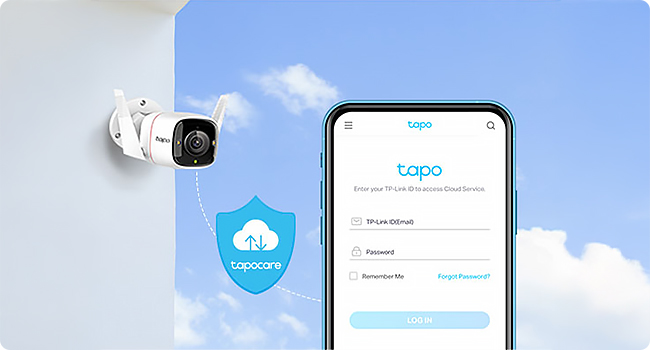
Gotta love TP-Link security cameras. They are affordable, feature rich and do the job perfectly. Whether it is this one or others in the camera product range, they just seem to work very very well. The downside is the cost of connecting to their cloud service (if you want to take that up) - it starts to get a bit pricey. You can always host you're own NVR and switch these to ONVIF. But I like the ecosystem and it definitely has a wife approval factor ticked!
A**S
Funciona perfectamente
ترست بايلوت
منذ شهرين
منذ 3 أسابيع