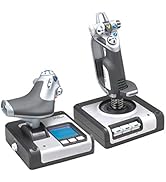
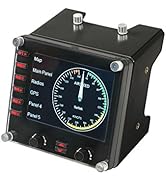
✈️ Take control like a pro—because your cockpit deserves the best!
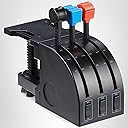
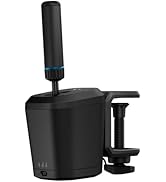
The Logitech G Saitek PRO Flight Throttle Quadrant elevates your flight simulation with 3 precision axis levers, 3 two-way rocker switches, and a customizable LCD display. Designed for professional-grade control, it features an adjustable mounting bracket and interchangeable lever heads to perfectly tailor your setup. Compatible with Windows 7 through 11 and USB-ready, this throttle quadrant is the essential upgrade for serious sim pilots seeking immersive, versatile, and ergonomic flight control.


| ASIN | B01M00UHE3 |
| Additional Features | Ergonomic |
| Best Sellers Rank | #12,573 in Video Games ( See Top 100 in Video Games ) #37 in PC Game Flight Controls |
| Brand | Logitech G |
| Brand Name | Logitech G |
| Button Quantity | 6 |
| Color | black,blue,red |
| Compatible Devices | Windows |
| Connectivity Technology | USB |
| Controller Type | Throttle Quadrant, Yoke |
| Customer Reviews | 4.4 out of 5 stars 1,671 Reviews |
| External Testing Certification | ANATEL |
| Global Trade Identification Number | 00097855127976, 10097855127973 |
| Hardware Platform | PC |
| Included Components | Pro Flight Throttle Quadrant, QSG, additional lever heads, desk clamp |
| Item Dimensions | 4.33 x 6.5 x 3.54 inches |
| Item Type Name | Logitech G Pro Flight Throttle Qudrant (945-000032) |
| Item Weight | 17.67 Ounces |
| Manufacturer | Logitech, Inc |
| Manufacturer Part Number | 945-000032 |
| Model Name | Logitech G Saitek PRO Flight Throttle Quadrant |
| Model Number | 945-000032 |
| Package Quantity | 1 |
| Power Source | Information Not Available |
| UPC | 097855127976 |
| Warranty Description | 90- Days |
C**M
Excellent, Affordable Addition
This is an excellent, relatively compact, exceptionally versatile controller to add for pretty much ANY gamer. It works extremely amazing for single engine aircraft in flight simulators, consisiting of the standard controls for most small craft. Space sims like Star Citizen? Who CANT find a use for three more slider axis?! Tank simulators/games like War Thunder? You can use these for individual track control on tanks, etc.. Its pretty fun when you play a game with multiple crew in a tank and you can drive using just the throttles.. Its affordable. Its pretty solid. The desk mount is versatile. After a few weeks, the sliders still are very accurate, smooth, and have no "wobble" to them. You will not find a better throttle/slider quadrant for the price.
A**D
Good beginner throttle quadrant for playing games.
Bought this throttle quadrant to play Diesel Railcar Simulator. It does the job. Hasn't broken yet - don't tighten it to the table too much. Some of the knobs are a bit sharp if you grab them by the palm of your hand. Good value for money.
J**.
MSFS budget awesomeness
So this throttle quadrant comes 'PLUG AND PLAY' for MSFS. I didn't need to install any software. Microsoft was ready for it as soon as I plugged it in. The throttle itself is made from very low cost, form molded plastic. You get what you pay for here, so you need to be extra careful with it, because parts can break easily. The piece that mounts to your desk is also made from the same plastic. There is no metal, and the plastic screw going through the plastic lip to secure it to the desk could EASILY snap if hit very hard. Use caution. The levers are also made from plastic, but it's a slightly more pliable plastic that can take a little bending. Still not strong, and there's a decent risk for breakage if you have an accident. Nothing about this quadrant looks forgiving. Accidents happen, it's probably going to need replacing, but it's cheap. Functionality is terrific. Each lever is its own Axis (X,Y,Z) for complete customization in MSFS control options menu. It comes with additional lever caps and one that seems to be made if you have 2 of these quadrants side by side, because it connects to 4 levers to simulate a 4 engine airliner like the Boeing 747. Personally, I cut that piece in half to just fit across 2 levers. If I get another quadrant, I'll attach the other half so there's 2 for left and 2 for right engines. The quadrant also has 6 additional programmable buttons, 2 below each lever. These are not flip switches, so they can be programmed for 2 different functions. Very difficult to see if gaming in the dark, so you might want to apply some white fingernail polish or paint pen markings to make them more noticeable. All in all, This quadrant is 100% well worth $60, and I would say the most cost efficient throttle for flight sims under the Honeycomb Bravo. A fantastic little REALISM throttle for permanent use, or to just get you by while you wait for Honeycomb to take their sweet time figuring out the proper supply/demand ratio for their throttle. Support? Typical Logitech. Hope you never have to contact them.
E**S
Works Fine for X-Plane and MSFSX
I had a Logitech Yoke system with the Throttle Quadrant which I purchased about five years ago or more. When I purchased a new HoneyComb Yoke I could no longer use the Logitech Quadrant since it has a proprietary PS/2 connection which only works with the older Logitech (a.k.a. Saitek) yoke. So I needed to buy this newer model which has a USB connection. It works just like the original and is recognized by X-Plane so it can be configured using the in game configuration setup. All of the switches can be programmed for various functions. The levers are per-configured by X-Plane when it's first installed, but you can change them to suite your needs. I have played Microsoft Flight Simulator and it works equally well with that game too. The device operates smoothy and is a very well made and solid throttle quadrant for the price. Unlike the older model this one can be mounted in a few different ways to your desk or flight sim setup - which is pretty cool. If you are looking for a well made throttle quadrant and can do with just the three levers this one is a solid choice and money well spent. There are a lot flight simmers who use this throttle, which should tell you something. It is probably the best one at this price point...IMO.
L**Z
Excellent
I own 10s of thousands of dollars worth of high end flight sim hardware and some of the Logitech stuff is top notch. This throttle is priced very low and is a great throttle. Shows up in flight sims with no plug ins needed. Feels great despite being plastic. I purchased a Cessna style throttle from a company I will not mention, and paid $400 for it and was very disappointed. The next day I purchased 2 of these for a fraction of the price and now I have a great twin throttle. Do not let the low price and plastic fool you this is a great throttle. Yes there are metal and better ones but your looking at a minimum 10 times the price.
B**.
Works with Mac (Tahoe / MacOS 26) and X-Plane 12.
Logitech might not support this officially on Mac OS. However, I am using it with an M3 Studio and X-Plane 12. X-Plane recognizes the device and lets you calibrate it and assign the 3 levers. Each of the 3 levers has a 'negative' area at the bottom past the 0 detent. X-Plane treats that area for each slider as a button which is assignable. And the device has 3 rocker switches which can be pushed up and down. X-plane treats these as 6 more assignable buttons. No drivers needed, just plug in via USB and assign the functions in X-Plane as expected. It is a USB A type plug, so as usual with modern Mac's, if you have limited USB ports open, you might need to use a hub.
M**0
Bueno
Llego bien… mi nieto lo necesitan para su clase.
M**R
It's a great starter but far from flawless
I've been using this for about a year now with MSFS 2020. No matter what I do, the controls are never super accurate. Moving the throttle control just a hair can either not increase throttle at all, or increase it by 30% all at once. Same issue with programming flap controls, it doesn't recognize every position and isn't all that accurate. Overall for the price it's a good throttle quadrant to start out with. If you're not a beginner though, spend a little extra and get something with better response.
T**Y
That it works very well.
Used for flight simulator.
U**6
Best and high quality product, highly recommended
Very good quality, highly recommended. Beat seller on amazon . Friendly seller.. showed how to assemble product and was friendly..Good customer service skill
D**O
Ótima imersão nas simulações
Como todo produto logitech, é de boa boa qualidade, mesmo sendo algo de entrada. Mas com certeza é uma outra imersão nas simulações. Ajuda bastante nesse sentido. Por um preço justo. Vale bastante.
Y**S
Good
Good product
G**S
Muy buen producto
Lo bueno: Palancas suaves, el soporte se puede montar de diferentes modos, es muy cómodo, se siente bien hecho, plástico de calidad y funciona perfectamente, poder cambiar los pomos de las palancas lo hace configurable para cualquier tipo de avión. Lo malo: Esta hecho 100% de plástico, si las palancas fueran metal seria mejor.
Trustpilot
2 months ago
3 weeks ago