




GS1900-8HP
Product ID: 3802464
Details
- BrandZYXEL
- Number of Ports8
- Included ComponentsSwitch - 8 -
- ColorBlack
- Compatible DevicesPC
⚡30W max PoE per port
🌐8 Gigabit Ethernet ports
🛡️Layer 2 security & management
Buy anything from 5,000+ international stores. One checkout price. No surprise fees. Join 2M+ shoppers on Desertcart.
Desertcart purchases this item on your behalf and handles shipping, customs, and support to KUWAIT.
⚡ Power up your network with silent speed and smart control!
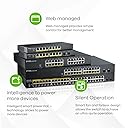
The Zyxel GS1900-8HP is a fanless, 8-port Gigabit smart switch designed for SMBs seeking high-speed, secure, and efficient network management. Featuring smart PoE+ with up to 30W per port, advanced Layer 2 capabilities, and a user-friendly web setup wizard, it delivers enterprise-grade performance and flexibility without the complexity. Its compact, silent design and lifetime warranty make it a reliable backbone for modern professional networks.


| ASIN | B00GU1KULM |
| Best Sellers Rank | #3,123 in Computer Networking Switches |
| Brand | ZYXEL |
| Built-In Media | Switch - 8 ports - smart |
| Color | Black |
| Compatible Devices | PC |
| Customer Reviews | 4.4 out of 5 stars 77 Reviews |
| Data Transfer Rate | 1000 Megabits Per Second |
| EU Spare Part Availability Duration | 5 Years |
| Global Trade Identification Number | 07605591209936 |
| Included Components | Switch - 8 ports - smart |
| Interface | PoE |
| Item Type Name | ZyXEL Switch - 8 ports - Smart - Desktop, wall-mountable (GS1900-8HP) |
| Item Weight | 3.4 Pounds |
| Manufacturer | ZyXEL |
| Mfr Part Number | GS1900-8HP |
| Model Number | GS1900-8HP |
| Number of Ports | 8 |
| Platform | DOS |
| Switch Type | Metal |
| UPC | 807034604316 595356548318 806296582813 808112768296 809190594234 760559120993 044111229141 805095142150 809390013382 |
| Upper Temperature Rating | 122 Degrees Fahrenheit |
| Warranty Description | 2 Years |
A**R
Great value. Well built, managed switch.
Great product. Good value. I originally purchased the fanless 8 port version of this switch after having issues (and returning) the TP-LINK T1500G-10MPS JetStream 8-Port Gigabit Smart PoE+ Switch with 2 SFP Slots 116W. The Zyxel product is less expensive, has no fan, works well, allows me to name the ports and has all the VLAN and QOS features that you want in a managed POE switch. In order to power all my devices, I needed to change the POE management from the default of allocating the power based on the device's class to allocating based on the consumption, but that was easily accomplished. I have another 48 port POE Zyxel POE switch in operation for 4 years now and have had no issues or downtime with it.
J**S
I wish I could write better about this switch
I wish I could write better about this switch. I'm a real switch fan boy. Rather save up for a costly L3 over a router, yada and yada. I've bought this switch 3 times as it's pretty much the most bang for your buck switch out there. Yeah ... it is. I've searched and you're not going to find more value per dollar for what you get with this switch as of the today's date. BUT even getting this switch I stepped out of the familiar high quality road and tried something different. I'm not going to say it's a bad switch. It's not. I will use words like "delicate" and "sensitive". Upgrade the firmware and nearly all your custom settings are wiped. Not all, nearly all. Unplug it for 2 seconds and you've landed back at what would otherwise be a hard reset. However, the GUI, holy smokes it's faster than *any* Netgear GUI and some high end HP GUIs. High end Netgear GUIs are like what the Flinstone's drove, but the ZyXEL is smooth, fast loading pages. It does offer a ton of features most people buying this probably won't even use. The features work. Tested and tried most options. Oh one that thing did suck: "edit" all ports for "auto" and "full" but particularly "auto" otherwise you may end up running eight 1000s at 100 and wonder why your LAN is crawling. On the basics ... quiet as quiet can be, light as feather and it is wall mountable. The power supply is nearly as big as the switch you may want to mount that as well. Front lights, as usual, are helping so you know if you're unintentionally sending power to some device that definitely brings its own power. Again, delicate, sensitive, but trouble-free on three switches about six months in and the best buck value. Not a Titan but you're not paying for one either and getting some good stuff thrown your way in its inner package.
S**E
Quiet Switch - No Fans - Great Performance
Excellent POE+ switch. And they are quiet! No fans and they don't get overly hot. Make sure that you set them up on the network you intend to use them on. I had problems with another ZyXel switch when it was connected to an AT&T two wire router and then moved to a Cisco router. Had a hell of a time getting the IP address changed. There is no hardware reset, so make sure you set it up right the first time. On these, I had no problem. Do be aware that you will have to go into the GUI and change a setting to "Consumption" mode if you intend to use all of the ports for POE. If you don't, only about half of them will work as POE. Then, presto, any additional POE device you connect to it won't power up unless it has bee configured in the consumption mode. This should be a default setting in my humble opinion. These are perfect for a smaller system or home set-up. A little more expensive than a plain unmanaged switch, but gives you the flexibility to manage the switch if you need to in the future.
O**N
Great Switch! Make sure they send a GS1900-8HP, not a GS1900-16!
Amazon sent me a Zyxel GS1900-16 instead of a GS1900-8HP, not once, but twice. On my third order of the 8HP, I received the correct unit. It is solid and well made. Very sturdy metal case. Unit itself is small but power brick is BIG. Too big. Oh well... You remove 2 phillips screws to get the case open. Electronics look high quality with no visible quality control issues. Instructions SUCK. No paper manual included, just quick start guide with basic cable connection diagrams to get you plugged in. Not much in the way of setup instructions other than the default IP of 192.168.1.1. Zyxel does have a pretty good .pdf documentation of all the settings and whatnot on their website. Their youtube videos are pretty good as well. But just connecting to the web GUI was hard to figure out because you don’t automatically get assigned an IP. This switch has no way of doing DHCP, so to get a local IP address, you need to change metwork settings to specify a local client IP address on same subnet as the switch’s default of IP (192.168.1.1), and you should be able to leave “default gateway” and “dns” fields blank while you configure client network settings to connect to the switch for the first time. Or connect the switch to a router or gateway that assigns IPs. If your router is default IP of 192.168.1.1, then either the router or switch will need different local IP as they can’t be the same, but they are by default. Once I figured out how to get properly connected to the web GUI, and once I trained myself to remember to “Save” the settings so that they carry over after a restart (or restart without saving if something screws up, reverting back to previous good config), the rest of the setup was easy. This is my first network switch, so really pretty easy considering I’m a networking noob. Firmware is more or less intuitive and seems to have all the right features, although I’ve never dug into the settings of a managed switch before. Make sure to update the firmware immediately as I think it ships with an old version which has been updated to fix security issues, so very important to install that new update! I’ve yet to hook up any PoE cameras, but I’m sure that will be no trouble. Speeds are FAST. I may be noticing a slight latency increase as could reasonably be expected since I’m adding a hop between client and modem, although I’m wondering if there are settings I could change to mitigate the tiny latency increase I’m seeing (do I need DNS servers specified on the switch? or will it always defer to my router’s settings?) Like maybe I have a slight misconfiguration... Anyway, the next thing is to figure out VLAN tagging and configure that to work with my router so that I can securely administer my home network + surveillance camera system. If I can figure out VLANs and get that working, this switch will have be a great purchase! So far so good, wish me luck! This crap ain’t easy to figure out...
R**M
Great switch and features for the money
This is a great switch. It is very easy to configure, fast & reliable. I use it in multi vlan environment and POE to power Unifi AC Pro access points. It is great and have not had any problems. I have 6 of the 8 port version and 1 of the 24 port version.
S**R
Manufacturer won't return calls
No support on the product
D**D
Random downtime like this is not great for a security system
Been using this for a while now for 4 cameras and every few weeks it just quits working. Camera's and Blue iris computer lose connectivity and i have to reset unplug it and let it reboot for connectivity to come back. Random downtime like this is not great for a security system.
C**N
Extremely unintuitive initial setup - even for experienced experts
As others have mentioned, setting up this switch is very problematic due to the fact that it requires multiple, non-intuitive step to change the default IP address that does not interfere with the default IP address of most home network routers. I made all of the changes, VERIFIED that it was using the static IP address that I entered in the web GUI, and then connected it to my network. A few days later, all devices on my network had problems connecting to the internet. I finally linked it back to this switch reverting to it's default IP address and interfering with my main router. For the benefit of others, here's the full process for changing the default IP address, including the unintuitive steps I missed. 0. Do not connect this switch to your network until you change the default IP address. Power it on and run an Ethernet cable only from it to a computer. 1. Configure the computer to use a static IP address for the the wired Ethernet port and connect it to the switch using a network cable. (To do this in Windows, go to Control Panel, Network and Internet, Network Connections, Ethernet, Properties, Internet Protocol Version 4 (TCP/IP/V4), Properties, and change from "obtain IP address to automatically" to "use the following IP address" of 192.168.1.200, subnet 255.255.255.0), disable WiFi if you're connected to a wireless network 2. In web browser, browse to the switch config page at 192.168.1.1 and log on (username: admin, password: 1234) 3. Click on the "gears icon" on the left side of the page to get to the configuration page 4. For the tab "IP v4 Address" change it from 192.168.1.1 to something like 192.168.1.2 5. Click the "Apply" button 6. IMPORTANT: Now browse to the new IP address of 192.168.1.2, log in again, go the the IP config screen again 7. IMPORTANT: Click the "Save" link in the upper right hand corner of the menu bar. The config changes you made will now be saved to permanent memory. 8. The IP address should now be both applied and saved. Unplug power from the switch and plug it back in to test that the change is permanent by browsing to 192.168.1.2 again 9. Switch can now be connected to your home network 10. Reset the changes to your wired Ethernet port settings on your computer. 11. For all other changes you make, be sure to click the "save" link in the menu bar or they will not persist through reboots. Pros for this switch: -Great value for the cost. Works well once initially configured. -Great for powering IP network cameras with PoE and also provides QoS management and VLAN. Cons: -Initial setup is unintuitive -Default IP address conflicts with the IP address of most home routers, causing network problems -Gives the false impression that changes are made, but changes do not persist through reboots unless clicking the "save" link -"Save" link is located on the menu bar, and not next to the "apply" button on each configuration page, making it unintuitive
M**D
easy set up for a non IT pro
Quality construction, easy set up for a non IT pro. The web page provides enough info for me to manage my connected devices. Have had it on my network for a short time and happy with it so far. Cons - the ip address was the same as my router and needed to be changed, which was not difficult to do. I do not know how to pronounce ZyXEL.
Trustpilot
1 week ago
1 month ago