Buy anything from 5,000+ international stores. One checkout price. No surprise fees. Join 2M+ shoppers on Desertcart.
Desertcart purchases this item on your behalf and handles shipping, customs, and support to KUWAIT.
⚡ Power your network like a pro — compact, fast, and effortlessly managed.
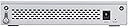
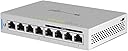
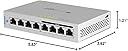
The Ubiquiti UniFi Switch 8 60W (US-8-60W) is a compact, 8-port gigabit switch featuring four 802.3af PoE ports delivering up to 15.4W each. With a robust 16 Gbps switching capacity, it supports simultaneous full-speed traffic on all ports without packet loss. Designed for seamless integration into the UniFi ecosystem, it offers centralized cloud management for multiple sites and devices. Its metal build and small footprint make it ideal for professional and home networks seeking enterprise-grade performance and reliability.


| ASIN | B01MU3WUX1 |
| Best Sellers Rank | #631 in Computer Networking Switches |
| Brand | Ubiquiti Networks |
| Built-In Media | Part |
| Case Material Type | Plastic |
| Color | White |
| Compatible Devices | Desktop |
| Current Rating | 2 Amps |
| Customer Reviews | 4.7 out of 5 stars 2,257 Reviews |
| Data Transfer Rate | 16 Gigabits Per Second |
| Global Trade Identification Number | 00810354026164 |
| Included Components | Part |
| Interface | PoE |
| Item Dimensions L x W x H | 5.83"L x 1.21"W x 3.92"H |
| Item Type Name | Ubiquiti UniFi Switch 8 Port, 60W |
| Item Weight | 15.24 Ounces |
| Manufacturer | Ubiquiti |
| Mfr Part Number | US-8-60W |
| Model Number | US-8-60W |
| Number of Ports | 8 |
| Platform | Not Machine Specific |
| Product Dimensions | 5.83"L x 1.21"W x 3.92"H |
| Switch Type | 8 Port 60W |
| UPC | 689549647848 810354026164 703624196684 |
| Unit Count | 1.0 Count |
| Upper Temperature Rating | 113 Degrees Fahrenheit |
| Voltage | 48 Volts |
| Warranty Description | Year |
D**N
Switch is a winner as an integral part of a Ubiquiti system (or by itself)
Great switch. It's the central part of my Ubiquiti setup. I use the POE to power the UAP-AC-IW, and it works flawlessly but no longer supports POE passthrough. Passthrough requires POE+, which this switch doesn't support. I wasn't using the passthrough anyway, so no loss for me. However, using this switch to power my AP allowed me to remove the POE+ injector I was using from my setup, so that's a plus. This switch is really well built, metal case and small form factor. I needed a POE switch with aggregation ability in a small form factor so this managed switch fit perfectly. As others have said, it does run hot with it's passive cooling design. Physics says that's probably not good for the long term life of the components, but I've never heard of Ubiquiti long term quality problems. Also, I have a fan pushing air to this and my Edgerouter X-SFP just in case, but I wouldn't have bothered if I didn't have that fan lying around. The switch is easy to configure with the Unifi controller (software) that I already had running for my AP. If you don't already have Unifi Controller running, it's still very easy to set up. There wasn't any other switch that met my requirements for my setup, small, POE, managed. Even better, I was already in the Ubiquiti ecosystem so it makes implementation and management that much easier. If you have a UAP and/or USG, this is a no-brainer. Even if you don't, the ease of management and control on this switch makes it very appealing. I recently replaced a quality all in one router with a Ubiquiti setup and it's one of the best things I've ever done for my home. If you rely on internet and the network like most modern people do, look into it. [Excerpt from another of my Unifi reviews:] As much as I like this switch, the real star is the whole Ubiquiti modular setup. My network is so bulletproof now. I don't ever have to worry about network being up or inconsistent wifi speeds. Where it used to be common to hear that the "internet is down" or "too slow" from my family, I have not heard a peep about the network or experienced any performance issues in the couple months that I've had this system. And this is while I've been literally constantly monitoring it throughout the day since implementation. Not a single hiccup or issue, and we probably stream video as much as anyone (cable cutters). I may sound like a Ubiquiti fanboy, but it's because this is working for me way beyond my expectations. Other setups from other brands could work just as well, I just don't have experience with them. I just heard so much about the ALMOST consumer level ease of Ubiquiti with the flexibility and power of enterprise. But honestly, if you have experience with consumer routers from 10 years ago, it's not much harder to configure, if at all. Also there's a very big support community and very helpful videos on youtube. Regardless of any trouble in setup, it's worth the initial pain to not have to deal with a slow or down network or internet on a weekly/daily basis. I'm never going back to less than excellent performance again.
S**S
Unifi Solid Networking at an excellent price
I have used Ubiquiti Unifi gear for three years now and the Enterprise Class Network devices and integrated management make this a wise choice. I've installed Unifi for four friends of mine as well. This is actually my third Unifi switch in my home. I have one other Inifi Switch 8 60W and the Unifi Switch 24 250W. I also have a Unifi USG and two of their excellent Unifi AP-AC Pro access points. I also recently upgraded from a Cloud Key Gen1 to a Gen2. When you decide to opt into the Unifi line of equipment you are making a decision to bring Enterprise class networking into your home. In order to configure and manage Unifi network devices you need to run the "Unifi SDN Controller software". The Unifi SDN is where you make all the changes and settings to Unifi devices. Unlike consumer class network devices, Unifi devices are not managed, configured or monitored from a web server embedded on the device. Instead, the Unifi SDN makes secure socket connections to the target devices for management. One way to understand this is that you can configure one wireless access point and then add ten more access points with a single click and they are automatically configured with the SSID's that you have defined on your network. You can run the Unifi SDN on Windows, Linux, Mac or a Unifi Cloud key. I have run the Unifi SDN on Windows, MacOS, Linux, and as a Docker image from my NAS. After plenty of experience, I decided that a Unifi Cloud Key was a much better choice since it is a dedicated environment from which you run just the Unifi SDN. Although it is not necessary to run the Unifi SDN 24x7, it is a great advantage to run it from a device like the Cloud Key for realtime monitoring, reporting and statistics. This Unifi 8 port POE switch is completely manageable, which means that it allows for the creation and management of multiple VLANS and four of the eight ports are Power Over Ethernet (POE). I've used the POE ports to support both my Unifi Access Points and also several POE cameras I have around my property. I've included a picture of this latest Unifi 8 port POE switch that I have which is handling my Family Room entertainment center connection to my Samsung QLED Smart TV, a Roku 3, a PS3, a Raspberry Pi running OSMC, and a camera which monitors the area when we are gone. The visual indicators on the Switch itself and on the GUI let you know if a device is communicating and at what speed and if the attached device is drawing POE power, you get the exact wattage that is being used on that device. The only downside to this switch is that it is passively cooled and needs to be used in a well ventilated area because it does run hot. My summary recommendation if to seriously consider this device, but to also consider a Unifi Cloud Key with it. As long as you make the dive into the Unifi Ecosystem, also consider the USG or USG Pro as your router to complete the integrated suite of devices.
R**P
Good switch if you are part of the Unifi ecosystem
Easy to set up, has enough power and was just what I needed
M**N
Works as expected
Exactly as expected. I wish they still made this one, solid, durable, and reliable.
H**X
An enterprise package and functionality in a little package!
Just switched over to Unify for my home network tech and away from the mash-up of the standard spattering of consumer grade devices - after many years of Cisco and Juniper experience in the infrastructure designs I make I always forget just how dismal those consumer grade products are. I finally stopped being cheap and stepped up to the Unify plate and have to say I am pleasantly surprised at how they brought functionality of what you get in those stupidly overpriced to buy, license, and maintain systems into this affordable package for the discerning home user. So far the overall tech is great, having a VM guest with a controller on it that is NOT built into the devices for single pane-of-glass management is what I was missing from home without having to kluge together several crappy apps that I am trying to "freeware" to make work.... I am sorry I waited this long to make the jump! If you are considering these devices, I would recommend giving them a try. You will hear and get a lot of different reviews from some of the deep tech folks about how they arent this or arent that - however if you are looking for something that is more capable and savvy than the TP and Net stuff but are not willing to pay the ridiculous big enterprise prices jump in, the water is great!
M**Z
Solid addition to network
I purchased two of the 8-port, 60-watt POE switches to replace ones with varying vintages and manufacturers. Adoption into my Ubiquiti-based home LAN was a breeze and the switches have been functioning as expected since they were added to the system more than a month ago. Like several other purchasers, I noted that the switches run hot despite efforts to maximize natural airflow around the case. I purchased an Evercool RC-02 fan in hopes it would provide adequate cooling. It dropped the average temperature from 116.4 F to 96.5 F (as measured by a Coolerguys’ thermal probe placed into the case through the opening for the lock). Another fan is on the way for the second switch. Bottom line: It’s early in the game but I’m happy with the switches at this point. I wish they had an onboard temperature sensor and better cooling, as is the case with the Ubiquiti 24-port POE switch to which they are attached. Review of 24 port POE I purchased this switch to replace a venerable Cisco 8-port POE switch as part of migrating my home network to a Ubiquiti-based system. The switch has been in place for more than a month and has worked as advertised. It powers my two Unifi WAPs nicely, integrates tightly with the security gateway, and adds much needed capacity. Heat is not an issue and the noise not bothersome in my home office. I’m very happy with this purchase so far.
R**Y
Great PFSense Devise
Did a bunch of research on hardware for a PFSense router and the specs on this unit were hard to believe for the cost. I removed the 16GB msata card and installed a 64GB Dogfish msata just for more storage, not sure that was really needed. Installation of PFSense was quick and painless. Setup of PFSense took a few videos to understand but worth it. My setup includes the PFSense router, two 8-port Unifi switches and for now eero wifi mesh, going to replace Unifi POE Access Points. Everything worked as it should and transfer rates are much better than with the eero acting as my router behind AT&T. I have the my eero's (3 of them) is Bridge mode allowing PFSense to take care of all DHCP, NAT, and port forwarding. Power consumption: 11 watts average over 48 hour period. If you plan to make the move to PFSense, make sure you purchase quality switches and access points so you can take advantage of the vlan capabilities. Never going back to consumer grade hardware for my home.
T**E
Works great, runs hot.
This device was a breeze to configure and I am currently using POE for two devices. I am powering an access point and a cloud key using POE so the power draw in minimal, however I have noticed the device does run hot and luckily I have installed it on a shelve that has an open weave metal construction so that it can get better airflow. I also noticed that the USG I have runs hot as well and decided to place the network gear on the open weave metal shelve to improve cooling for the devices. Still with that little nit pick being the only downside I would not hesitate to recommend Ubiquiti products to anyone. Fantastic products, beautiful construction, all devices have been stable since installation and have not any trouble.
ترست بايلوت
منذ شهرين
منذ شهر