


Unleash Your Creativity! ✍️
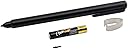
The Zodiac Surface Pro Pen is a high-performance stylus designed for Microsoft Surface devices, featuring advanced N-trig technology for enhanced pressure sensitivity, customizable tips, and a user-friendly setup that requires no Bluetooth connection. With a sleek aluminum body and included AAAA battery, this pen is perfect for professionals seeking a reliable and versatile writing tool.
| ASIN | B01N6M98IC |
| Are Batteries Included | Yes |
| Are Batteries Required | Yes |
| Battery Description | Alkaline |
| Brand | Zodiac |
| Color | Silver |
| Compatible Devices | Laptop |
| Compatible Tablet Computer Models | Microsoft Surface 3, Microsoft Surface Pro 3, Microsoft Surface Pro 4 |
| Customer Reviews | 3.6 out of 5 stars 168 Reviews |
| Enclosure Material | Aluminum |
| Item Dimensions | 4.7 x 0.4 x 0.4 inches |
| Item Weight | 18 Grams |
| Manufacturer | Zodiac |
| Material | Aluminum |
| Mfr Part Number | PENFOR34C |
| Number of Batteries | 1 AAAA batteries required. (included) |
A**R
... received the stylus within a day and was very happy with it
I received the stylus within a day and was very happy with it. As soon as I put the battery in it automatically worked on my Surface Book. For me, this pen writes way better than the newer Surface Pen. I had the old surface pen but the plastic part of the pen tip broke within a few months. When I went back to the store to get a replacement they said there was a newer Surface Pen and it was "much more durable" than the previous stylus (however the pen tip sure looked just as flimsy as my original stylus). I decided to give it a try but here I am 2 months later and my new "durable" Surface Pen tip has broken again. Being a student unable to write on my Surface Book is frustrating so I decided to purchase the Zodiac Active Wireless Stylus Pen (it's much cheaper than buying another $100 Surface Pen that consistently had issues). There are reviews saying this pen does not last more than a month and I guess I will see if they are true in a months time. Considering my previous experience with Surface Pens, even if this stylus stops working in a month it is much cheaper to buy another one compared to a Surface Pen.
M**N
My worst purchase on amazon so far.
I ordered this knowing it probably wouldn’t be as good as the Surface pen but this was just a complete fail and I haven’t even had the pen for 30 mins. I got it out of the box, put the AAAA battery in and it all went downhill from there. It seemed to lag when i drug the pen across my Surface Pro and when i went to press the buttons they fell inside the pen itself. I then tried to unscrew the head of the pen to see if i could somehow pop them back in place but I couldn’t and couldn’t screw the head back on at all. Don’t waste your money, just pay the $50 extra dollars for the actual pen, I know I am as soon as I get my refund on this.
A**N
Great alternative to surface pen, at least for writing
I bought this as a cheaper alternative to the surface pen because I lost mine. First, I like that this is significantly thinner than the surface pen, it is much more comfortable to hold. Also, I have had no issues with the responsiveness of the pen, which I did have some with the surface pen. I actually like writing with this one significantly more. I also like that it includes two different tips, I've only really tried the finer point of the two but it's nice to have options. The only reason I'm docking it a star is because it doesn't have the simple eraser function that the surface pen has. Holding down the button to erase is a bit of a pain and I frequently accidentally hit it while writing. Overall, great stylus for a good price. I'm probably going to buy myself another one just in case I lose my current one.
L**Y
Worth every penny, and probably more
As this is a fairly new product, I bought this pen based only what I had previously read about N-Trig as a company when doing research before receiving my SP3--there were no reviews on Amazon available at all yet. That being said, it seemed like a fairly inexpensive alternative option to Microsoft's OEM pen. I am very happy I took the $30 gamble. I have used the pen in various programs so far, including PhotoShop and Lightroom, and I found it to be very responsive and reactive--especially when applying different levels of pressure. Its feels similar to a regular pen in my hand which I like, and is also very well-balanced. I was using it to change the exposure, contrast, etc. on a photograph in Lightroom by dragging the small cursor very slightly with the pen, and it was able to perform even the smallest movements flawlessly--and more importantly accurately. Contrary to what I've read about many other replacement pens, the eraser and right-click buttons work perfectly. I would recommend this pen to anyone looking to buy either a first pen for their SP, or even to replace their Microsoft one. The price and performance will both leave you satisfied with your investment.
G**R
Better than Surface Pro Stylus
I bought this stylus because I lost my Surface Pro 4 stylus and needed a replacement. At less than half the cost of the Microsoft one, it was well worth it. The only difference I noticed was the lack of push button on top, but I never used it to begin with. It synced the the Surface Pro 4 very quickly and after I was using about a week I found my original one. After some thought I decided to keep using the Zodiac stylus as I enjoyed how it wrote more than my original one. I would recommend this stylus to anyone who is looking for either a replacement or even their first one.
L**.
Great for coloring, not so much for precision writing
I bought this to use with my new Microsoft Surface Pro (2017). I'm a student, so having a pen is great because I can use it to take notes in class. I didn't want to fork over $100 for a Microsoft Pen, so I decided to get this one with the idea that if it didn't work I'd bite the bullet and just get the Microsoft pen. Unfortunately, it's looking like I'll have to. It was delivered yesterday and I'm already having issues with it not reading down strokes in OneNote. It's extremely frustrating and I'm looking at not being able to use it to take notes at the start of the semester. It works fine for use with coloring in the Zen app, but it's extremely frustrating to have to attempt to write a W five times because the down strokes won't register. I've tried cleaning both my screen and the tip, but I'm continuing to have the same problem.
B**N
It works fine. But its too short
I echo others comments. It works fine. But its too short. It is a pen, not a cheap tablet stylus. It needs to be longer. It is not comfortable to use (I even have smaller hands). . The tip is harder than the stock pen. It feels like it would scratch (it does not) and makes an audible click when you tap with it. It came with no instructions. I sort of thought it would be the same eraser function as the pen but apparently its one of the two buttons. Which one? What does the other button do? The magnet is nowhere near strong enough. It is ok as a back up but I ordered the new Microsoft version despite the cost. My original will not pair anymore.
K**R
Half the Price, Equal Quality
This pen is such a good alternative for the Microsoft brand one! It still takes a AAAA battery, but I've had no issues. The pen is responsive and fluid, and I am able to produce the same quality of work as I usually do with a Wacom pen and tablet. I use this one for my Surface Book 2 and there was no setup required - just unbox and get to work!
A**R
Works well so far
I originally thought this was a Microsoft product. It is not. That being said, it works well so far and the pen tip seems stronger than the one that came with my tablet.
O**X
This pen is great! I recommend.
Used to have a surface pen, wasn't accurate, and was probably one of the worst experiences with a pen. Then I got my self this pen, thanks to a friends recommendation. I gotta say, I love this pen, It's accurate and I just enjoy the slipperiness when note taking. But that's my preference. The buttons are OK, but i find my self always rotating the pen because I'm always loosing track of where the buttons are. The buttons are flush with the rest of the housing. To fix that problem, I simply put a dab of glue or nail-polish on the button(s). Unfortunately I dropped it once and one of the pen tips broke. The box only comes with 2, so now I'm down to my last pen tip. Don't know where to get more. I currently use the pen to take note on my surface book 2, have been for about a month. Personally I'm enjoying the note-taking experience!
L**Y
Works really well but drain the battery
so the pen works really well, automatic detection by Windows 10 and no lag or delay when using it. but it is not rechargeable and use one AAAA battery that last for about 1 month. so i'd recommend using a usb rechargeable pen. but this one does the job if you dont mind buying batteries often.
D**N
Zodiac Active Wireless Stylus does not work.
It does not work a thing. Unlike the Microsoft Surface Pro 3 Pen, it has no button, nothing to show whether it is starting at all. It is not recognized by Bluetooth, it is completely blind and mute. A total waste of money.
S**N
Three Stars
Missing replacement tip according to instructions
Trustpilot
1 month ago
2 weeks ago