We remain fully operational. Our teams are working around the clock to ensure your deliveries continue safely.

قم بتنزيل التطبيق


معلومات عنا
حقوق الطبع والنشر © 2024 Desertcart Holdings Limited
قم بتنزيل التطبيق
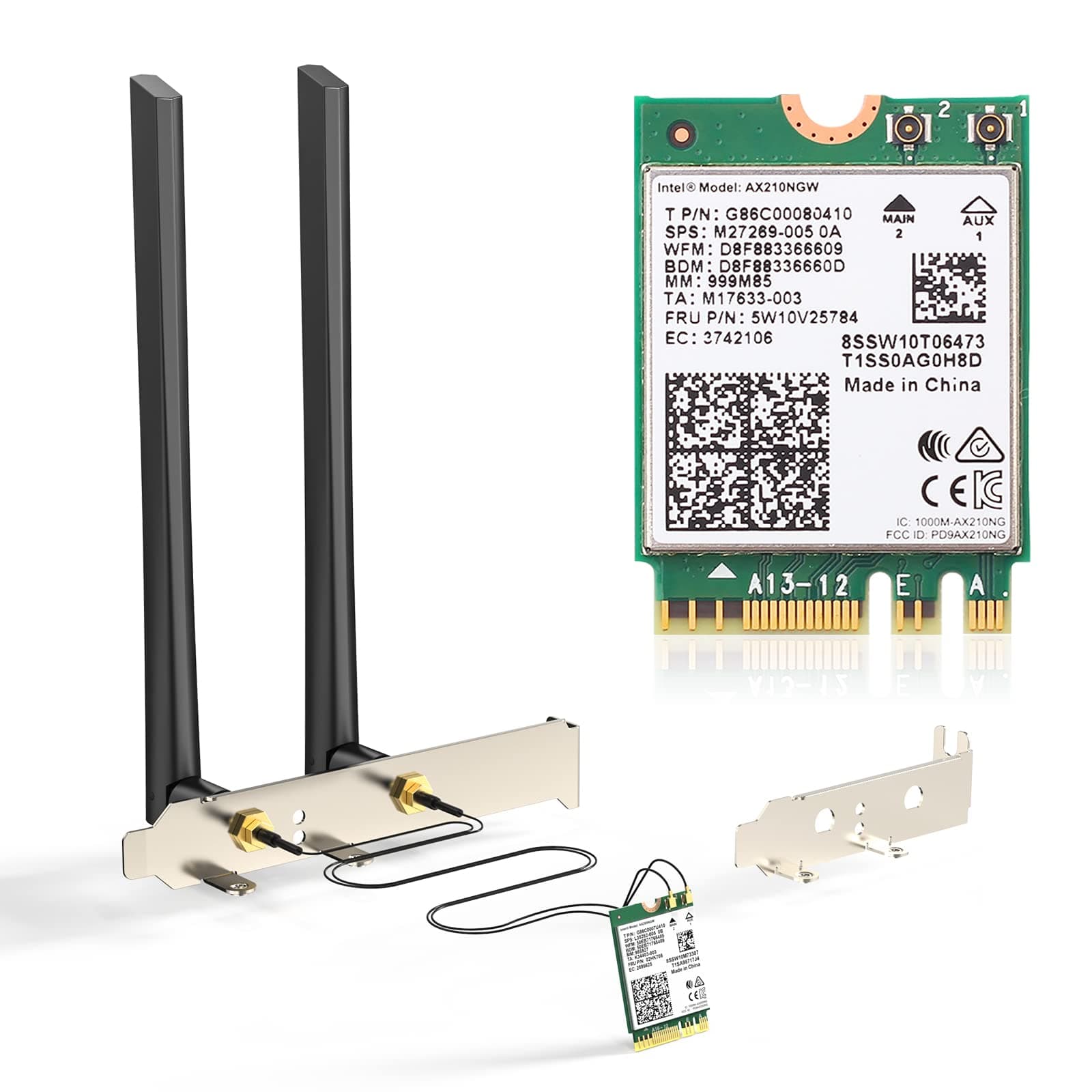
🚀 Upgrade Your Desktop to Future-Proof WiFi 6E Power!
The EDUP WISE TIGER WiFi 6E Desktop Kit (AX210) is a cutting-edge M.2 NGFF WiFi card designed for Intel-based desktops from 4th to 8th generation. Featuring tri-band WiFi 6E technology with speeds up to 2.4 Gbps and Bluetooth 5.2, it unlocks the new 6 GHz spectrum for ultra-fast, low-latency wireless performance. Compatible with major PC brands and equipped with advanced features like OFDMA and Target Wake Time, this kit ensures superior network capacity and efficiency in congested environments.


| ASIN | B088M5CK5K |
| Best Sellers Rank | #126,107 in Computers ( See Top 100 in Computers ) #363 in Network Cards |
| Item model number | AX210 desktop kit |
| Manufacturer | EDUP |
| Package Dimensions | 18.8 x 10.21 x 3.3 cm; 141 g |
L**M
Easy installation, connected to WiFi without any issues. Fit m.2 slot, speed test is perfect for the price!
S**L
We spent 4 hours trying to fit the tiny antenna pins to the wifi board and failed. Then we had to return the item. Completely unusable product just because we couldn't attach the antenna.
R**9
Update: I reset the networks on my laptop through the Windows system settings, and once my system rebooted, I was able to get the speeds I expected from the card. Original review (four stars): I ordered this kit to kill two birds with one stone. I used the external antennas to replace the ones I was using for my desktop computer, and that was a pretty simple swap-out. I used the AX210 Wi-Fi card to replace the AX201 in my laptop. My smartphone regularly records Wi-Fi 6E speeds of over 1050Mbps, and I was only maxing out at around 750Mbps on my laptop's Wi-Fi 6 card. I was hoping that upgrading to the AX210 would give my laptop speeds similar to those on my smartphone. While the card was relatively easy to install, reattaching the antennas is annoying because the connectors are so small and have to be precisely aligned to be snapped into place. I got it done, though, and I was prepared to be impressed by the speed increase. Unfortunately, not only did I not see a speed increase, I haven't come close to the top speed achieved with the previous card; the highest speed I've recorded is around 660Mbps. Don't get me wrong; that is plenty fast for a laptop. However, I'm disappointed that my smartphone's Wi-Fi6E modem achieves much faster speeds than my laptop's Wi-Fi 6E card, and that the newer, more advanced card is not as fast at its highest speed as the old one.
R**R
for $28 I am thoroughly impressed with the ease of use of this card, Dell automatically recognized the card, didn't need to connect the computer via cable to download. The speeds are great, the only issue I have with the card is that there is no screw included to mount the card in the m.2 slot, if not for having a spare screw the installation would not have proceeded. I would gladly have paid $29 and had the screw included.
M**.
I was skeptical of this Wifi card working with my Lenovo laptop since a lot of reviews and forum posts says Lenovo whitelists wireless cards on certain models. What I learned ALSO is that after a certain model/year, Lenovo stopped the whole Whitelist fiasco. My Ideapad 3 15ARH7 comes with Realtek 8825BE(?) and noticed wifi drops periodically. I searched Google and noticed a lot of Realtek Wifi card users were swapping in these Intel AX210 cards. Mine worked, and I'm glad. Be sure to download the Wifi and BT drivers before the transplant. Also, before you remove your old wifi/bt combo card, unpair any peripherals.
ترست بايلوت
منذ شهر
منذ أسبوع