We remain fully operational. Our teams are working around the clock to ensure your deliveries continue safely.

قم بتنزيل التطبيق


معلومات عنا
حقوق الطبع والنشر © 2024 Desertcart Holdings Limited
قم بتنزيل التطبيق
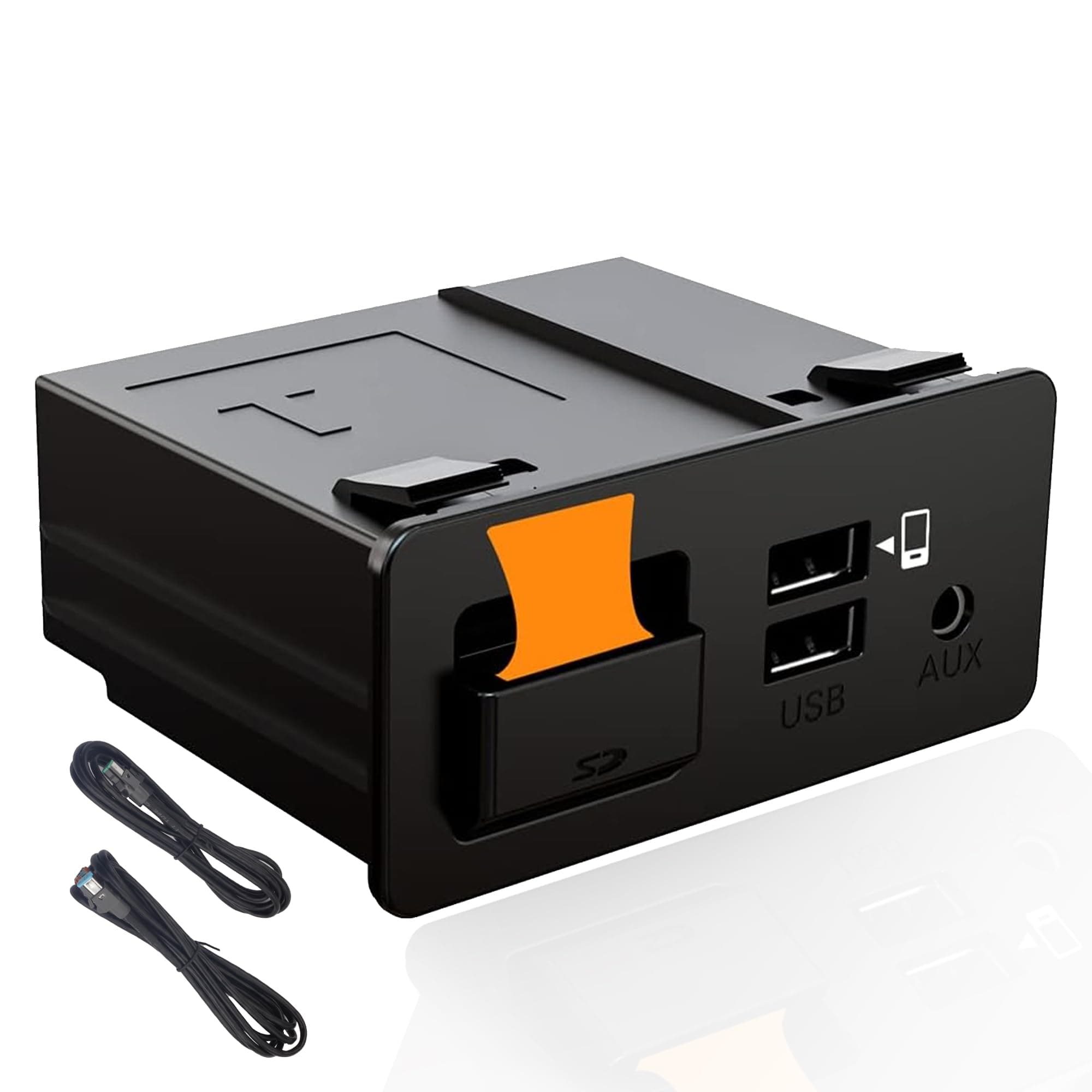
🚗 Upgrade your Mazda to smart-driving status — don’t get left behind!
The Dasbecan TK78-66-9U0C Retrofit Kit is a 2024 upgraded adapter that seamlessly integrates Apple CarPlay and Android Auto into Mazda models from 2014 to 2020. Designed for plug-and-play installation, it supports voice commands via Siri and Google Assistant, enhancing connectivity and safety. Compatible with multiple Mazda models, it requires MZD Connect system version 70.00.021 or higher for optimal performance, delivering a modern, intuitive infotainment experience that elevates your driving lifestyle.


| ASIN | B09MTJ6469 |
| Best Sellers Rank | #219 in Car Audio & Video Input Adapters |
| Customer Reviews | 4.2 4.2 out of 5 stars (459) |
| Date First Available | December 1, 2021 |
| Item Weight | 9.5 ounces |
| Item model number | TK78-66-9U0C |
| Manufacturer | Dasbecan |
| Product Dimensions | 8.07 x 4.13 x 4.53 inches |
D**Y
Transforming Mazda 3 into a Smart Tech Hub
The Dasbecan Apple Carplay Android Auto Retrofit Kit is not just an upgrade; it's a revolution for your Mazda 3 driving experience. This kit seamlessly brings the cutting-edge connectivity and convenience of Apple Carplay and Android Auto into the cockpit of your Mazda 3. It's like giving your car a brain transplant, upgrading it from a regular vehicle to a smart, connected companion. The installation process is a key highlight. Designed with the Mazda 3 in mind, the retrofit kit fits like a glove. It's a relief to find an aftermarket product that meshes so well with the existing system. The integration is so smooth, it feels like these features were always meant to be part of your car. For those who are not mechanically inclined, a professional installation is a good idea to ensure everything is up and running perfectly. Once installed, the functionality is a game-changer. The system brings the familiar interface of your smartphone to your car's dashboard. Whether you're an iPhone devotee or an Android aficionado, this kit bridges the gap between your phone and your car. Maps, music, messages, and more are all at your fingertips, or better yet, a voice command away. It's a seamless transition from your digital life outside the car to inside. The user experience is smooth and intuitive. The response is snappy, and the interface is user-friendly. It's like your car's infotainment system got an upgrade to first-class, with all the modern conveniences you could ask for. The integration with existing controls and the touch screen enhances the overall driving experience, keeping you connected without being distracting. The quality of the components in the kit is top-notch. Everything feels well-made and durable, which is reassuring when you're modifying such an essential part of your car. The attention to detail in design and manufacturing means that this retrofit kit doesn't just add functionality; it also adds value to your vehicle. TL;DR: The Dasbecan Retrofit Kit is a must-have for Mazda 3 owners looking to modernize their ride. It brings the ease and functionality of Apple Carplay and Android Auto into your car with a seamless, integrated experience. The kit not only enhances your driving experience but also adds value to your vehicle with its high-quality components and intuitive design.
B**C
Great Product
Great product, works perfectly! Installation is kind of tricky, but there is a great video on youtube that walks you through it step by step. Highly recommend as a cheap easy way to have carplay!
T**W
Great
A video on youtube had a link to this product. Not sure what the differences are between so many similar. This product ended up great. Quality looks very good. Had a thorough manual and OE looking cables and module. Had a bunch of zip ties and foam included. Once installed in my 2017 MX-5, everything worked perfectly. Had full use of the steering wheel buttons and center console buttons. I am not sure but I think Mazda locks out the touch screen when in motion. Install on an MX-5: I did not remove the shifter console! It took about 45 minutes in all. Follow the youtube video to get to the cmu. Then do the following: For the USB module, remove the passenger side center console side trim in the footwell. Remove the "H" looking trim to the sides of the USB module. Remove the Seat heater controls/airbag lights module above the USB module. From the side where you removed the passenger console trim, you should see top and bottom clips of the USB module you want to remove. Take a long but small flat head screw driver and one-by-one break the clips. It should be easy to push it out from behind now. Saved me so much time doing it this way and I hope it does for you too! Remember, all trim is held in by clips or fits like a jigsaw puzzle. NEVER force anything. A nudge and a pull should be all that it takes. I broke nothing on mine installing it. There are a couple of good youtube videos for the MX-5 that you can look at before you start.
A**S
Did your car play / android auto stopped connecting
I'm sharing some feedback on my device in case anyone else runs into a similar problem I recently had. The device works great make sure you properly install everything and it's nice and secure. I used black tape in order to make sure the cable is in good shape. I currently use it with a carlink 5.0 for wireless. But at some point wired stopped working. Fast forward I had this device nearly 3 years. And my device suddenly stopped working. After much extensive trouble shooting thinking it was the wireless device I test it with another wireless and was having the same issue. I decided to look at the box and unplugged everything under my elbow arm rest which is where the box sits at and I unplugged everything and plug everything back in and the adapter started to magically work again. For anyone with a similar issue please uninstall and install the box cables before ordering a new one before disregarding this device. I've had it for nearly 3 years and its still working well. If I run into any more issues I'll do a follow up review but so far it works great.
C**J
Great Value Added!
Got this to install in our son's 2016 Mazda CX-5 GT. Found some great YouTube installation videos and installation took just around an hour from start to finish. The instructions that come with it are pretty limited to just the wiring (not taking apart the dash to install), but the videos we found were a great complement to the wiring instructions provided. All in all, super straight forward and seems like a crazy good value for being able to add Android Auto/Apple Carplay to the built in visual display. Very happy that we bought this.
A**R
Install was easy. Product has great before and after sale support. Customer Service takes care of any concerns. I had updated software earlier, removal of panels was easy, ran cables behind the dash, took 30 mins. OEM controls work, nav works and apple carplay works fine. Make sure the usb cable is oem apple to avoid any issues. Overall happy and dont think twice, buy it. Feels like a new ride now with better map music etc. Im thinking of buying another one.
S**Z
YouTubeでも取付けされてる方がいらしたので、購入。自分でも交換取付けしました。海外からなので、届くまで1週間くらいは掛かります。 カーオーディオをご自身でされる方なら出来ます。配線通しと、本製品の元になる純正品をグローブボックスから4カ所のスナップフィット外す時が苦戦しましたが、手前側2箇所外した状態から少し回転する様に動かしたら手の入らない反対側のスナップフィットも外れました。 取付け後は問題なく動作し、Googleマップをモニターに映せる様になりました。iPhoneとは有線接続となりますので、無線Bluetoothでの劣化が無く、音圧が向上。勿論充電もされます。本製品のUSBと有線接続でYouTubeなどの動画は、(AppleCarplayのアイコンには無いのでモニターには映せませんが)音声は車のスピーカーから出せます。これが有線なので、今まで古いBluetooth規格での遅延が解消されました。音声が流せた仕組みが分からないので、どの車種でも出来るのかは分かりかねます。
D**X
Total schön, Auto ist in moderne Zustand!! Price Leistung gut, empfehlen kann ich nur!!
J**.
Que funcione
L**L
excellent product update took me 45 min and installation about 1 hour not that difficult at all just need to remove few pieces to run the 2 wires thru to the head unit and done in no time works flawless I plugged in wireless dongle and its converted to wireless car play it connects always and never fails very happy with the product
ترست بايلوت
منذ شهرين
منذ 4 أيام