We remain fully operational. Our teams are working around the clock to ensure your deliveries continue safely.

قم بتنزيل التطبيق


معلومات عنا
حقوق الطبع والنشر © 2024 Desertcart Holdings Limited
قم بتنزيل التطبيق


🚗 Cut the cords, not the vibe — wireless CarPlay, redefined.
The OTTOCAST U2-AIR Wireless CarPlay Adapter transforms your wired CarPlay system into a fast, reliable wireless experience with a 7-second startup via 5GHz WiFi. Compatible with 2016-2022 OEM wired CarPlay cars and iOS 10+, it supports voice, touchscreen, and steering wheel controls. Featuring plug-and-play setup, dual USB cables, and automatic connection on engine start, it delivers lag-free audio and seamless integration backed by professional support and a 1-year warranty.


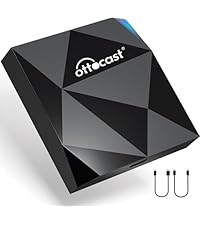

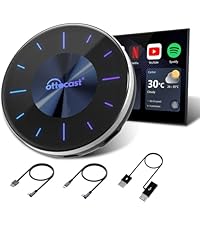


| ASIN | B09Q65SX47 |
| Additional Features | Built-In Microphone, Fast Charging |
| Audio Output Mode | Not Mono |
| Audio Output Type | Bluetooth |
| Bluetooth support? | Yes |
| Brand | OTTOCAST |
| Built-In Media | WIFI MODULE |
| Color | Black |
| Compatible Devices | Cars with wired CarPlay (model years 2016-2022) and iOS 10 or later |
| Compatible with Vehicle Type | Car |
| Connectivity Technology | USB, Wi-Fi |
| Connector Type Used on Cable | USB Type A, C |
| Control Method | Voice |
| Controller Type | Voice Control |
| Customer Reviews | 3.8 out of 5 stars 2,896 Reviews |
| Data Link Protocol | USB |
| Hardware Interface | USB |
| Human Interface Input | Touchscreen |
| Item Dimensions L x W x H | 2.2"L x 0.6"W x 2.2"H |
| Item Weight | 0.13 Kilograms |
| Lithium-Battery Energy Content | 5 Watt Hours |
| Manufacturer | OTTOCAST |
| Model Name | U2-AIR |
| Number of Channels | 1 |
| Power Source | Corded Electric |
| Product Dimensions | 2.2"L x 0.6"W x 2.2"H |
| Special Feature | Built-In Microphone, Fast Charging |
| UPC | 742484740125 |
| Warranty Description | 1 |
| Wireless Compability | Bluetooth |
H**Z
Nice Product!
Works very well! Easy installation. I have not had any issue with it. well worth the money.
S**N
2019 TLX So Happy with this Solution!
5-Star Review: OTTOCAST U2-AIR Wireless CarPlay Adapter 2024 – A Game Changer! I couldn’t be happier with the OTTOCAST U2-AIR Wireless CarPlay Adapter 2024! This device has completely transformed my driving experience by eliminating the hassle of wired connections. Easy Setup & Seamless Connection Setting up the adapter was incredibly simple—just plug it into the USB port, pair it with my iPhone, and within seconds, wireless CarPlay was up and running. The connection is fast and stable, with no noticeable lag, even when switching between apps. Lightning-Fast Performance I was impressed by the instant response time—music, maps, and Siri work just as smoothly as a wired connection. Whether I'm using Apple Maps or Spotify, everything loads without delays or interruptions. Compact & Reliable The sleek, compact design keeps my car interior neat and clutter-free. I’ve been using it for weeks, and I haven't experienced any dropouts or connectivity issues. It automatically reconnects every time I start my car, which is super convenient. Final Thoughts If you’re tired of dealing with cables and want hassle-free, wireless CarPlay, the OTTOCAST U2-AIR is a must-have. It’s an excellent investment that delivers on performance, reliability, and ease of use. Highly recommended! 🚗✨ Would definitely buy again! ⭐⭐⭐⭐⭐
C**2
NOT 5th Gen RAM 1500 friendly.
This is actually the 2nd one of these I have ordered and tried. I have a 2019 RAM 1500 5th Gen Bighorn. These trucks have 2 USB A and 2 USB C plugs, but there has to be a fuse adjusted in the fuse box under that dash, that requires the dash piece to be removed, under the steering column... or, the USB ports stay powered in the RAM, connected to the device and your phone will not switch to your homes WiFi unless you manually disconnect the Carplay device. After I sent the first one back, I found a forum post about moving that fuse, so the power shut off after 1 hour. So, when you get home, the truck has to be off and left alone for 1 hour before it'll disconnect and hop onto your home WiFi. Is it a small inconvenience, yes. Would it be more convenient to just get in the truck and have Carplay without messing with cables, YES. So I ordered this one to try again. I want you to keep in mind, I have had this for 3 weeks now, but the truck I use it in, is not driven much. I have a company vehicle, so my RAM, only gets driven on weekends and maybe a couple trips to the store during the week. With that said, it's now dead. There haven't been any iPhone updates or updates to RAM Uconnect. I got in yesterday and got the screen I added a photo for. I restarted my phone, had to hunt for the Bluetooth connection and then it's WiFi connection and manually force a connection. Tech support is simply logging into the device via it's IP address and checking for updates and it was up to date once I got it forced into connecting. Today, same thing, this same screen. If you force it to connect, it will work fine. If you don't, it won't connect on it's own. I tried different cables and tried all 4 USB plugs to make sure it wasn't an equipment issue on my end, it isn't. I think we would all like wireless Carplay and Android Auto. But I don't think the technology is there yet. Plugging in, just takes a couple seconds. A cord might not be convenient, but it's reliable and only costs $10 to replace if it goes bad later. I'm returning this one and calling the wireless Carplay idea, done and over until I buy a different truck or the devices get reliable.
R**T
Works in my 2023 Hyundai Palisade but disconnects frequently, annoying to reconnect.
9/23 updates - "Otto" likes to disconnect frequently from the car, Bluetooth and my iPhone and can be very annoying to reconnect. One other very odd “quirk” has appeared with “Otto”. When my car is off and parked in my driveway with “Otto” plugged into the USB audio port in my car, Otto takes over my wireless Sony ear buds when I’m close to the car and kills the Bluetooth signal from my iPhone to my ear buds. See the Car Play photo - that’s what pops up on my iPhone when Otto takes over my Tidal streaming. I unplugged Otto from the vehicle USB and my ear buds were fine. My Palisade must power Otto via the USB cable even when the ignition is off and allow it take over my iPhone. I'm looking for an improved brand or Otto model. It’s very odd to have my Sony ear buds die when I’m doing yard work so from now on, I unplug Otto when I’m doing yard work with my car in the driveway. 3/23 update. 3 months later through a tough, cold winter and “Otto” is still working nearly flawlessly with my iPhone 12 and Tidal streaming. As long as the Tidal app is open on my iPhone, connection is quick. I have not noticed any unusual drop outs or other quirks. It can take a minute or two for iPhone and Otto to connect if the Tidal app isn’t open. But if I click on the Tidal app on the Palisade media display, it connects nearly instantly. Really happy with Otto! 12/21/22 update - got my 2023 Hyundai Palisade and I transferred “Otto” directly from old Mazda CX-9 to the Palisade, which immediately detected Otto and Otto worked instantly. The functionality was nearly perfect just like my old Mazda, I have to click on the Tidal app on my cell phone to fire up streaming with Tidal. Once I do, Car Play and Tidal work perfect! Otherwise, no issues. Original Review - My expectations for this device were low. I was expecting to have to send it back. I was wrong on both counts. Once I got “Otto” set up, it worked flawlessly and wirelessly with my formerly hard wire only Apple Car Play. It even worked with my Tidal streaming app on my iPhone through Otto enabled wireless Air Play. I had to open the Tidal app after my car audio system and “Otto” booted up. My car audio system boots a lot slower than Otto. Navigation, phone, audio and every app worked fine. A couple of install notes. Make SURE you have real Apple Car Play - Otto just makes existing Car Play wireless, it doesn’t create the entire Apple Car Play universe. Make sure you use the proper USB port in your car. You can have multiple USB ports in your car and it’s possible only one works for audio and the rest are power only. That’s how my Mazda CX-9 is set up. Otto includes 2 connection cables. One is USB C to USB C and the other is USB A to USB C. If you don’t know the difference, Google them. You need the right cable. Follow the directions and you should be fine - in a 2019 Mazda CX-9 with Apple Car play. I’ll have connection data on a 2023 Hyundai Palisade in about 10 days after my new Palisade arrives. Hope this helps!
M**L
Great Product + Excellent Tech Support
I bought the OttoCast U2-Air for my 2023 Hyundai Ioniq 5 which has wired Apple CarPlay. After using CarPlay I thought it would be much more useful if I didn't have to plug in my iPhone 13 everytime I got into the car. I had heard about wireless adaptors for CarPlay and thought that the U2-Air would be perfect for me - and the price was very attractive. I received it in just 2 days through Amazon and it worked almost perfectly. It was very easy to set up and I liked that it automatically connected to my iPhone every time I got into the car. However, on a long trip where I was using the Hyundai navigation system to find EV charging stations along my route I discovered a flaw: the steering wheel button that enables voice commands no longer worked for the car's built-in navigation system - instead, when pushing the button, it brought up Siri on my iPhone. The owner's manual for the Hyundai said that a "short press" would initiate the car voice command system and a "long press" would initiate Siri, but it didn't work that way when using the U2-Air. I contacted Ottocast tech support by email and they responded in less than 24 hours with the suggestion to upgrade the U2-Air firmware with very clear and specific instructions on how to do so. With their help (thanks Julie!) I was able to upgrade the firmware which fixed the problem. I'm really quite impressed with the product itself as well as the integrity of the tech support organization. I highly recommend this product to anyone who has a car with wired Apple CarPlay and would like to convert it to wireless Apple CarPlay.
M**.
Love this product!
This works great and is a really easy install. I have an aftermarket unit so the delay to start is a little longer for my car. Installed this on a newer vehicle for a relative and the delay to start is only a few seconds!
R**E
Connects to phone. But after that it’s a gamble
I bought this product due to having Apple CarPlay in my 2020 Honda only by plugging the phone in. I really enjoyed having CarPlay but hated that my phone always had to be plugged in. So I found this product and similar ones on Amazon, decided to go with this product due to the reviews. It does connect solidly, when First starting the car and for initial set up, but after that, it gets to be kind of a gamble. I’ve had it freeze up and not do GPS at all and have to disconnect my phone. But the main frustration is that it randomly drops audio and I have to switch the audio to my phone back to CarPlay for to start playing in and it happens randomly And usually in close proximity to each other when it does start to happen. If those two issues exist. It would be a five out of five stars. But because of those frustrating issues and I can’t figure out a way to fix it. I have to leave it at five stars
F**T
Works well, when it works. Needs a reset option.
I have a Ford Sync 3 system. Like other wifi based CarPlay adapters, this one syncs with your phone via wifi to provide the hard link via USB to the system. The problem is the system and the adapter only recognize each other about 50% of the time at startup. After a day of this I thought maybe it was the adapter software so I updated the adapter via the instructions provided. Unfortunately that didn't solve the problem and still only about 1/2 time did the sync happen at startup of the car, trying it multiple times per day over the course of the next 3 weeks. Unplugging the adapter, waiting about 10 seconds, then plugging it back in to the USB port will often reset the system so it then syncs and CarPlay starts. However this defeats the point of having the wireless setup, and since I keep the adapter in the armrest box is a bit of a pain. If there were a reset button either on the adapter itself, or better a reset button on screen that showed it would help significantly. I had a 9XX built in CarPlay adapter installed on another car that only missed syncing about 1/20th of the time, but had a reset button that showed on screen when it missed the correct sync so it was easy to get it back to operating in case it missed sync at startup. That was a more expensive setup and not for Ford so it's not an option here, but shows what can be accomplished if the designers chose. This adapter is a simple setup to plug into the USB port, and is cheap, but you're getting what you pay for. Unfortunately there doesn't seem to be many other options available right now with better reviews either. If half time working is OK with you then this one does work well. As others have mentioned there is a slight lag between touching the onscreen buttons and response, but that's for all wifi based CarPlay systems and it's not a major issue - the lag is only for half a second. All CarPlay functions work just like plugging in the iPhone. More annoying is just that it doesn't work consistently to establish the CarPlay connection with the Ford Sync 3 system. So I returned the adapter and am now just back to plugging in my iPhone each time I get in. Can't leave the phone in my pocket but I know it will sync when I plug it in.
ترست بايلوت
منذ شهر
منذ 5 أيام