
Desertcart purchases this item on your behalf and handles shipping, customs, and support to KUWAIT.
❄️ Keep your Xbox chill and your gameplay hotter than ever!
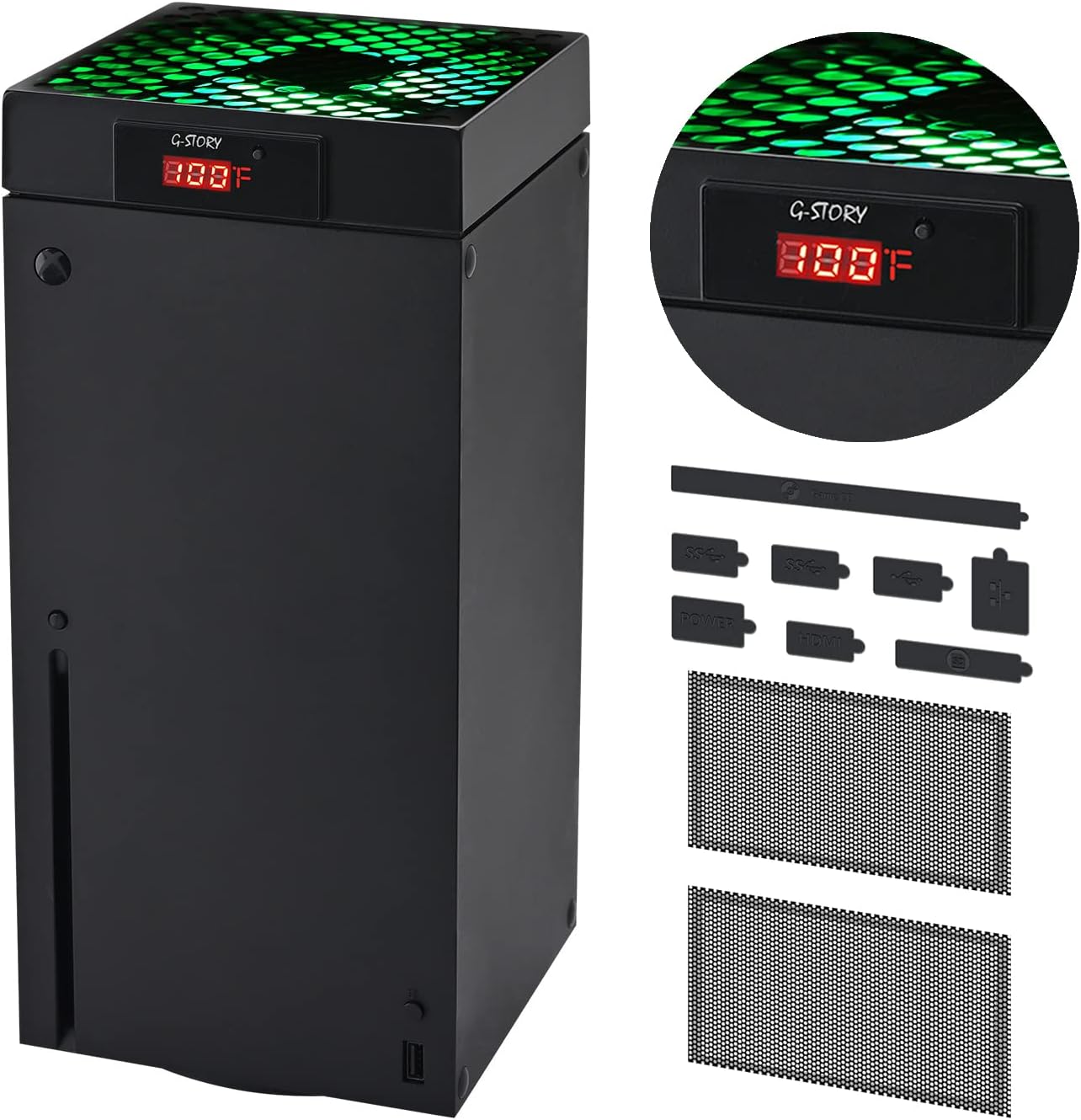
The G-STORY Cooling Fan for Xbox Series X features a real-time LED temperature display and an intelligent chip that automatically adjusts fan speed across three levels (1500-2000 RPM) with RGB lighting indicators. It offers both automatic and manual modes, operates quietly, is lightweight, and easily installs by connecting directly to your console’s power. Designed to prevent overheating and extend your Xbox’s lifespan, it’s a must-have accessory for serious gamers.


| ASIN | B09P39L3KN |
| Best Sellers Rank | #876 in Video Games ( See Top 100 in Video Games ) #49 in Xbox Series X & S Accessories |
| Brand Name | G-STORY |
| Compatible Devices | Gaming Console |
| Cooling Method | Air |
| Customer Reviews | 4.5 4.5 out of 5 stars (4,337) |
| Included Components | Cord |
| Item Dimensions L x W x H | 5.51"L x 5.51"W x 5.51"H |
| Manufacturer | G-STORY |
| Material Type | Aluminum, Metal, Nylon, Plastic, Rubber |
| Maximum Rotational Speed | 2200 rpm |
| Model | 2 |
| Number of Items | 1 |
| Number of Packs | 1 |
| Part Number | 2 |
| Power Connector Type | 3-Pin |
| Unit Count | 1 Count |
| Voltage | 5 volts |
| Wattage | 5 watt-hours |
F**G
Exactly what I needed. Highly recommend!
This is the one. I’ve had many of these types of fans but this one so far has performed well above my expectations. I like that it gives you an accurate temperature read, I can confirm it is accurate as I tested with a thermometer. The fan is strong, and some level of noise does come with the territory but I’m not bothered by it. I have a very small room and my Xbox started overheating not long ago. I live in New England and would normally require heat in the winter but my Xbox was running so hot (Thank you Baldur’s Gate 3) that my entire bedroom was warm enough that I was actually opening the window at times. When the fan arrived I’d been gaming for 3-4 hours and was curious to see what the temperature was, as like I said my Xbox was essentially heating my entire room for me. The first temperature read was a whopping 112* F - I can’t believe I’ve been abusing my Xbox this way! I installed the fan right away and started a timer. Within 10 minutes the temperature dropped down to 86* and after 20 minutes we were down to a comfortable temperature down in the high 70’s. 30 degrees cooler in 20 minutes - Impressive isnt the word. I was outright giddy! I will also add, that I have a charging base already with a fan the cools from bottom up. That model cost me just over $60, however it clearly doesn’t work that well if my console is running 112* even while running it full speed. I was sure the cooling dock would be great since it screws into the wall giving the vents underneath the Xbox room to breathe but it really hasn’t done much. At double the price of this fan I have to say I wish I’d just purchased this one first! There is a huge difference between the two, I noticed right away that this fan was blowing my hair while the other one doesn’t do much at all. This one does make a bit more noise, but as someone who uses the Xbox virtually every single day for 8+ hours, I’d much rather opt for function over noise level. I was pleased that this fan came with dust covers, I have cats and it gets really dusty, I’m fairly neurotic about maintaining the Xbox so needless to say I’m constantly cleaning and dusting it. I don’t know that it works as well with the dust plate on top while running the Xbox, so I think I’ll just use it when the fan isn’t running. The other dust covers though, I installed right away. My one and probably only qualm with this cooling fan was the dust plug covers. They came molded on a single sheet of rubber so you have to cut them yourself. The process was torture for me, as nothing less than perfect was going to be acceptable for my Autistic mind. Nevertheless I did fairly well cutting them out, I just wish I hadn’t needed to do all that. I would’ve preferred they come as separate pieces. Small complaint though. I highly recommend this product. It does what it promises and at a very affordable price.
R**E
Works phenomenal
I got a series X (barely) used from a friend and was kinda shocked how warm my room got when playing. I had a cooling fan for my series S and wanted one for this. Read some reviews and websites and settled on this one. SO GLAD I DID. The temp reader is accurate and when I plugged it in after playing CFB25 for about an hour it was reading at 114°F! After 26 minutes the temp dropped all the way to 90°F where it stays when under load/gaming. That's incredible IMO and I'm very happy. I'm pairing this with another backplate cooling fan that shows up tomorrow so I can see if I can get the temps down closer to 80°F. If I can drop the temp 35°F for $50 I will say that it is money well spent without a doubt. Even just using this fan, I'm more than pleased and it is an absolute necessity. If you're thinking of getting a fan, get this one. You will not be disappointed. Afterthought: Tons of reviews on here say it's loud when on the fastest speed, but it's not. And if you have headphones on or even just a little volume on the TV or monitor while gaming, you will not hear it at all. I sit 3ft from it and cannot hear it at all while gaming. I'm a laptop gamer (due to work travel 3 weeks a month) and this is silent compared to laptop cooling. It's even quieter than my fan for my old series S and works 5 times better. My only "complaint" is that it stays running unless you unplug it entirely. Not that it's an issue, just annoying that it doesn't have a sleep or off setting. Not a huge enough issue that it deserves a star rating drop as the pros far outweigh the cons It has an auto function where it increases fan speed as temps rise or manual mode with three settings of slow, medium, fast. I keep it on fast at all times. I keep the RGB off entirely, never been a big bright light person. Photos are: 74°F while in menu, 90°F after 15 minutes playing PGA Tour 2K23 (it stays here no matter how long I play. Sometimes gets to 91° but will fluctuate between 90° & 91° every ten minutes or so).
M**C
Keeps the Xbox cool during heavy use
I read tons of reviews before I purchased this top mounted cooling fan for my Xbox Series X. I was worried about the noise, possible clicking of the fan in the unit, the fan itself melting, etc. from all of the reviews I read. So far, I have had no issues with any of that. Understandably, I do not use my unit daily and do house upon hours of heavy gaming like I once did. But, after a 4 hour marathon of gaming the 1st night I got it, I never once had the temperature rise high enough on the unit for it to kick automatically into high speed (red LED colored). The unit has done exactly what it says it does, kicks on at different speeds at the temperature rises on the unit during usage. It can be switched easily to manual mode if wanted. It is not noisy at all and was a perfect fit and install took less than 10 seconds. My ONLY complaint is that the manufactured holes at the top of the fan are not cut out at the same specs as the Xbox. What this means in layman terms, is that the aftermarket brackets I purchased to hang my headset on the side of the unit to charge them no longer fits in the vent holes on the top of the unit. Small price to pay I guess. I'd rather keep my unit cool and have peace of mind of it not overheating and damaging the internal components then to be able to hang my headset so I can charge it via my USB port on the front of the unit. All in all, I would 100% recommend this device to another shopper who wants to keep their Series X cool during usage.
M**T
Skeptical at first...
3rd party fans that attach to the extierior of your console almost always seem to be gimmicks. At best, they are glorified vertical stands with built in fans and game storage. Heck, there are even some cooling systems being sold that literally blow air into dead ends or blow hot air back into the system. But this fan is just a fan. It simply adds another fan to the top of the Series X which pulls even more air from the bottom, decreasing the time it takes to cool your system. You still need to apporpraitely exhaust the hot air so don't think that just because you add this fan, it will magically keeps your console cool. It only turns on when your system's internal fan can't keep the temp low enough for what you have the G Story fan set to. This fan acts as an airflow booster when your console needs it and since its located on top of the orignal fan, it pulls air into the console and then away from it the same way Microsoft designed it to. Pros: 1)It's easy to install and it works. 2) The green led fits in nice with the xbox theme. 3)Included thermostat helps monitor desired temp. Cons: 1) Runs louder than stock fan. 2) LED illuminating GStory logo is very bright. There should be a way to lower it or tun it off. 3)Plastic feels a bit cheap when compared to the plastic of the Sreries X. Overall: Depending on where your Series X is set up, this fan could greatly help in keeping it cool to help protect the internal components. If your console is out in the open and has plenty of aifrlow, you may not need this but it would not hurt adding it for extra peace of mind. I recommend.
S**M
Worth it
I didn't realize how bad I needed this! I got a fan when the available accessories were limited & that thing kinda sucks. The automatic fan is awesome & seeing the temperature spike on the display is very helpful! Then I know to turn on the fan at the base and remove the dust cover - it does a great job cooling my Xbox! Update: it's still getting the job done well & the manual mode has been an unexpectedly effective option for longer gaming sessions; Auto just cannot keep my Xbox series x below 95° for an extended period of time - not a complaint at all! The extra noise isn't even picked up by my headset mic with the noise gate set appropriately.
M**D
Works Great!
I got this product based off of reviews. Set it up and it worked as intended. Awesome lights (green, blue, red), powerful fan that does it's job and a bright, noticable display......These are some pro's. For the cons.... USB cord for fan is too short. Fan can be a little loud on high (from what I noticed). One major gripe with this fan is that it generates a lot power plugged into the back of the Xbox. I've tested that the Xbox works harder, and even depending on what game you're playing, it'll make your games laggy due to the power it generates. I play on a Series X and typically run on 20 ping, so I don't have issues with that. Once I disconnect it from the back, my games work perfectly fine. Now I have that in a USB adapter and plug that into a USB brick then in an outlet. Seems like a lot? Yes lol. However, this has fixed issues that I was having before. Now I am loving this fan! Also the silicone insters they give you work really well and fitment is perfect. I don't use the mesh coverings for the back of the Xbox but I do use the cover for the top of the fan when I am not using it. I recommend this product overall!!!!
J**F
Great Fan. Not “silent”, but very close. Would recommend.
It works great. My Xbox was absolutely overheating and you can feel a considerable difference in temp when you touch the shell as the fans on. The auto feature works great, you can hear the Xbox kick into overdrive and the fan does the same, then they both kinda calm down. It might take a second or two to get used to but after that it’s great. It attaches super easy, and the included screens are great for the back intake holes. I liked that bc cats lol. It also came with pop-out rubber plugs for all the ports which is cool. Don’t know how necessary that is but it’s included. It is not silent. You do hear a slight noise but it does not sound like a normal house fan. Same type of sound but not as heavy if that makes sense. So it’s not bad at all. If you have a desk fan or 3d printed fan it’s just like those. It’s like white noise. Great part is it will NOT KICK ON FOR VIDEOS. Watch your usual shows when you go to bed without a problem, it will shut off since it’s not heating up. Netflix, YouTube, Hulu, all that. Perfect for wanting a fan while you play but not for bedtime watching. The LED screen is insanely bright so maybe snip some electrical tape over the little peel screen it comes with and we’re snoozin. I would deduct a half star for that but Amazon won’t let me do halves so I won’t let my laziness drag it down. Overall I would absolutely recommend this fan. If you are looking for an absolutely silent fan, I would recommend ice packs in zip locks or something similar.
J**N
Unit does reduce system temperature
As hard as it was to find a Series X, I figured I’d try to keep it as cool as possible in attempt to avoid any heat related issues. Although I haven’t taken any temperature readings on the unit like some on here had, the exhaust air coming out of the top of the unit did feel a bit hot. I was in the middle of a 3 hours gaming session when Amazon delivered this fan. I quickly removed the fan from the box and installed it on top of the Xbox while it was still running and plugged it in an available USB port on the back. The fan immediately came on. The LED lighting went from green, to blue, to red. I don’t recall the exact temperate readout at the time, but it was cooking. Within a minute the unit reduced the temperature to the point the LED lighting was blue and the fan speed was medium. The rest of the gaming session remained at a constant temperature. The next day I started playing again. Within a few minutes of game time, the temperate reached over 95 degrees and the unit automatically kicked on to low. With using this G-STORY cooler, average temperature while gaming ranges from approximately 96-104 degrees. In the week I’ve been using this cooler, the system temperature has not increased to the point where the cooler has needed to increase the fan speed beyond the low setting. Average room temperate is 75-78 degrees. I removed the G-STORY cooling fan today and played for a few hours. Upon reinstalling and powering the cooler, the system temperature showed 120 degrees. Within a few minutes it was reduced to 115 degrees and went down to 104 degrees approximately 15 minutes later. Although it’s a small sample size, it does appear this cooler does exactly what it’s intended to do. As many reviews have already pointed out, the fan can be noisy, especially at higher speeds. For me, placing a small and somewhat heavy object on top in the very middle of the fan unit significantly reduced the noise the cooler makes. Some reviews with pictures showed a Celsius temperature display. Mine however is a Fahrenheit temperature display. So I guess it’s a mystery which one you’ll receive. I was rather skeptical initially if this would move enough air to make a difference. I’m sure Microsoft engineered the Series X fan to adequately cool the unit and avoid heat related failures. However, with using this G-STORY cooler, system temperatures for me have been noticeably reduced. I’m glad I made the purchase. Now if this cooler would help me defeat Malenia, Blade of Miquella…
T**M
Cooling de los GOD👌🏻
Buen producto lo tengo en modo automático y ayuda a mantener temperaturas bajas durante el funcionamiento de la consola, ayuda a bajar la temperatura de entre 5 a 7 grados con juegos demandantes y mantien temperaturas estables. Dato: veo que a muchos les parece grados Farenheit y no Celsius, pero para cambiarlo a Celsius desconecten el ventilador y al momento de volverlo a conectar dejen precionado el botón y al momento de conectar ya les aparecerá grados Celsius, de nada 👊🏻 ✌🏻
F**M
Owesome purchase
That is really working very well
S**E
Great Gaming Cooling Fan
It attaches easily and looks good while doing a great job. very happy.
H**Z
Bastante bien 🙂
Llevo como dos meses y funciona bien 👍🏻 si hace que la consola NO se caliente demaciado aparte de que trae sus luces LED integrados y eso hace que se mire un poco más pro aparte que tra un indicador de temperatura, puedes ponerlo de forma Manuel o en automático para que el ventilador se encienda solo cuando la consola lo necesite o mejor especificado cuando la consola llega a un cierto grado de temperatura más alta se enciende de modo automatico pero si funciona para lo que es...
D**A
Great cooling fan
I really like this fan set up, It works great and really cools the machine down quick. I also really like the auto and manual modes as well however it’s a little on the loud side but not too loud, especially on low. Also, the thermometer seems to be pretty accurate too for the most part. I would definitely recommend this unit for anyone looking to keep their machine cool. Also, this is an exhaust fan so it won’t affect stock fan motor or fan speed. Just simply pulls the heat out of the machine. Cheers
Trustpilot
1 month ago
2 weeks ago