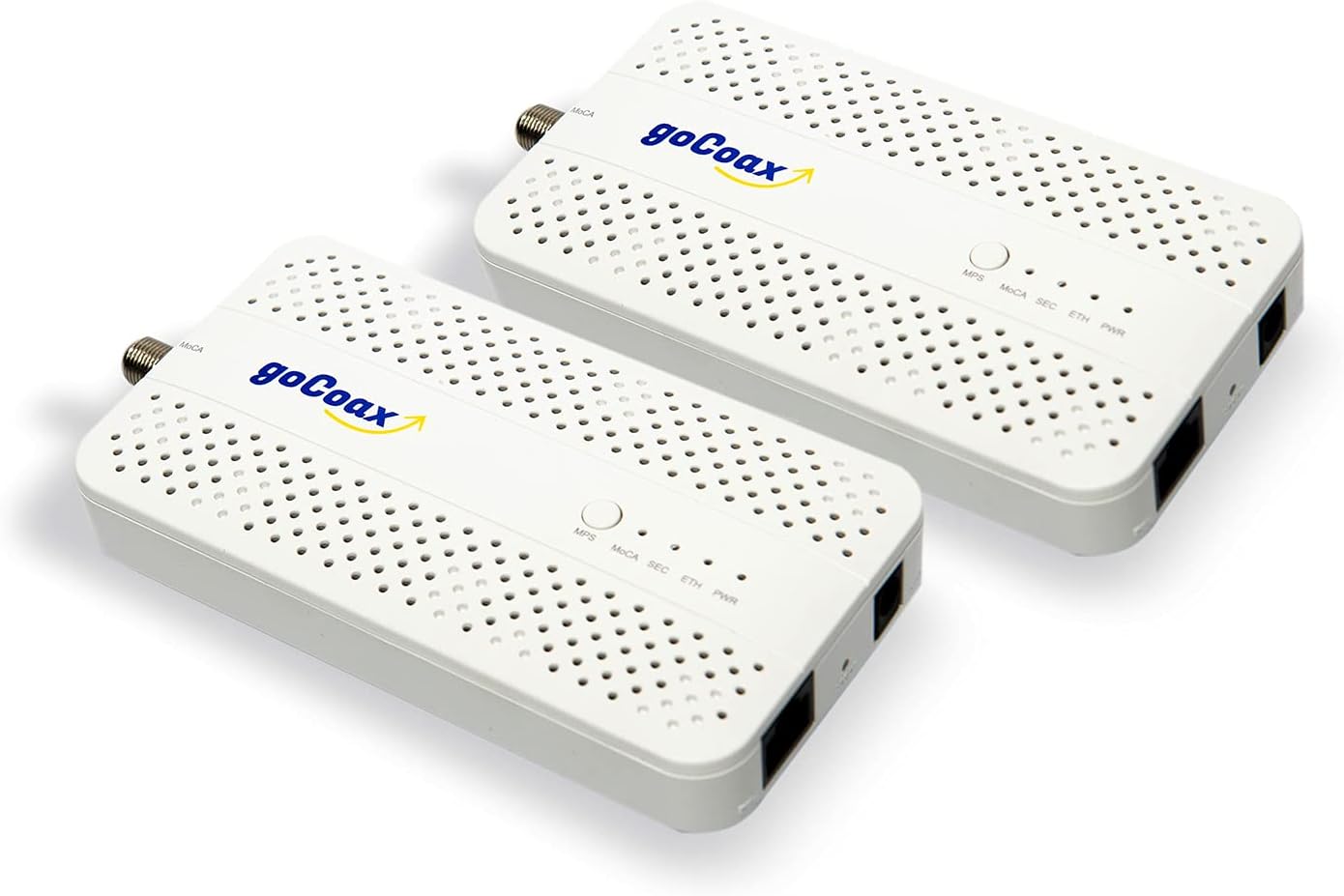
🚀 Upgrade your home network to pro-level speed and stability—because buffering is so last decade.
The goCoax MoCA 2.5 Adapter (2-pack) delivers true 2.5Gbps Ethernet speeds over existing coaxial cables, providing a reliable, low-latency wired network backbone ideal for 4K/8K streaming, online gaming, and high-speed data transfers. Its shielded coax technology ensures minimal interference and stable connections, while plug-and-play setup makes it accessible for any home. Perfect for users wanting to bypass ISP routers like Verizon FiOS without sacrificing TV functionality.


| ASIN | B09RB1QYR9 |
| Best Sellers Rank | #23 in Computer Network Adapters |
| Brand | goCoax |
| Color | White |
| Compatible Devices | Desktop |
| Customer Reviews | 4.5 4.5 out of 5 stars (3,394) |
| Data Link Protocol | Ethernet |
| Data Transfer Rate | 2.5 Gigabits Per Second |
| Hardware Interface | Ethernet |
| Item Weight | 0.72 Kilograms |
| Manufacturer | goCoax |
| Mfr Part Number | WF-91HG-ZM71 |
| Model Number | WF-91HG-ZM71 |
| Unit Count | 2.0 Count |
K**B
Perfect for Verizon FiOS – Keeps TV Guide Working Without Using the FiOS Router
I purchased the goCoax MoCA 2.5 Adapter with 2.5GbE specifically for my Verizon FiOS setup so I could use my own router and still retain full TV functionality, including the program guide and On Demand. It worked exactly as intended. Instead of being forced to use the FiOS router just for MoCA, this adapter provides the MoCA network over my home’s coax while my own router handles the internet. My FiOS TV boxes get guide data, updates, and On Demand services just like they would with the Verizon router, but without the monthly rental fee or network limitations. Setup was very straightforward. I connected the adapter to the coax near the ONT and my personal router, and everything came online quickly. The TV guide populated normally, channel data loaded fast, and there were no issues with DVR or interactive features. The 2.5GbE port is a big bonus, especially on a gigabit FiOS plan. Network speeds are extremely stable with low latency, and it provides a reliable wired backbone across existing coax lines in the house. It’s essentially the best of both worlds: full FiOS TV functionality plus the performance and control of a high-end third-party router. If you want to eliminate the FiOS router but still keep the TV guide, On Demand, and MoCA connectivity for your set-top boxes, this adapter is an outstanding solution. Rock-solid, fast, and a smarter long-term setup for FiOS households.
B**M
Vastly improved my network performance from my downstairs office, 300mbps w/wifi to 2100+mbps w/MoCA
tl;dr - get a coax explorer before buying to make sure you have a solid coax connection between the two rooms you wish to connect. This thing works as advertised with speeds up to 2135mbps achieved on a 2gbps internet plan. Just make sure all portions of your home network can handle these speeds or you'll have a bottleneck to slow you down. I might also update this review later if I purchase a third adapter for another room in the house for a roommate. Longer Review with context: I recently moved into a house I'm renting that has 0 ethernet wallports and needed to find a creative way to wire directly to my service provider's router (ziply). I bought a 2 pack of these and initially wasn't getting a signal through what I thought was a coaxial cable that would lead to a central coax hub back to the outlet in my office. Per the provided troubleshooting instructions, I tested the MoCA adapters by plugging each adapter on to either end of a disconnected coax cable and verified there was no issues with the adapters themselves. With that my worst fears were confirmed and I found that the coax cable I was hoping lead to my office was actually to the cable box outside. There were also 4 other cut coax cables in my network closet by the router upstairs which I've now assumed are home runs to each different coax port. I popped on over to home depot, got a "Coax Explorer 2 with Remote Kit" for testing and a "Coax Cable Installation Tool Set" in order to turn those cut wires into functional ones. NOTE: I'd highly suggest getting at least a Coax Explorer BEFORE buying this to test the coax connections you wish to connect to the adapters. Once I had working cables it was very easy to track down the correct cable to the correct outlet and BOOM my MoCA adapter was working perfectly! Reading all these reviews I didn't expect more than 1000mbps over one of these, however I was able to clock speeds up to 2100mbps which is at capacity for what I'm paying ziply for which is an advertised 2gbps. My roommate was so impressed they may also get an adapter to hook up their room. I'm still unsure if there will be any interference as I think these cables are just long coax cables run through the walls (not terminating anywhere to cause interference aka home run) but i've obviously been wrong before haha. I've attached a couple screenshots to this review. The first should be just a speed test while using the MoCA Adapter, the other is my speedtest history showing my switch from my Wi-Fi 6e Adapter to this wired connection setup. NOTE: You will only be able to get speeds over 1gbps by connecting to the interface on your router that is rated for faster than 1gbps. My router in particular has a 10gbps interface that I am connected to over the MoCA Adapter. You also need a network adapter capable of handling these higher speeds. You can find if your adapter has the capacity by opening the system information portion of windows. As you can see by my last screenshot, my Network Adapter can handle up to 2.5gbps. Overall I'm super happy with this purchase and the product itself has no issues. I'd say my headaches were entirely my fault due to a lack of preparation. I highly recommend this product if you've got a solid coax connection that can make it to your router.
A**N
Works better than expected!
Honestly, this MoCA adapter has worked better than I could have hoped. I live in an older house from the 1940s and we only have one coaxial cable coming into the house from the outside up to the first floor through the basement. I wanted to set up a WiFi access point in the basement, but was unable to easily fish an ethernet cable down to the basement. I did some research and discovered I could use this adapter to send the ethernet signal back down to the basement through the same line coaxial cable that I already have set. Luckily there is an easily accesible coaxial connector in the basement and I was able to set this up quite easily. If you don't already have it, you'll need two spliters and a MoCA filter. The MoCA filter contains the ethernet signal to your house. Sometime your ISP will already have one installed, but I didn't so I purchase one off of Amazon, along with two BAMF spliters. It honestly only took maybe 25 minutes to physically set up including mounting the adapters and installing the spliters and MoCA filter. The difficult part was accessing the device configuration menu through its IP address, so I could set up adapter security. I eventually got it to work by plugging my laptop in directly through the ethernet port to the adapter, disabling my WiFi, and manually setting my ethernet adapter to the DNS/IP addresses listed in the instructions. Once I got everything adjusted and set up, I haven't had to touch it since. I pay for 2 Gbps service from Xfinity and typically get around 2.3 Gbps on average at my modem, and now I'm getting 1.7 Gbps down to the basement through these adapters. I connected it to my UniFi U7 Pro access point in the basement and my Macbook Air is getting on average around 1.3 Gbps wirelessly. Those are astonishing numbers given all the connections the signal has to go through, and is better than I could have hoped for. I highly recommend this product for anyone trying to find a simpler way to send their internet connection to a different floor of their house, it does time some time figuring out how to configure it, but once you do you'll be happy you did it.
G**K
These are an excellent alternative to Powerline Ethernet, which works reliably only 20% of the time. MoCA works a 100% of the time. Make sure that your coax splitters are capable of more than 1GHz. 3-way splitters often have one -3dB port and two -7dB ports. -7dB works better - it's higher attenuation, but wider band. Make sure you terminate unused ports with a 75Ohm terminators. Also keep in mind that they have a slightly higher latency - I'm seeing a 4ms ping round trip time on these.
A**R
Um WLAN im ganzen Haus (massiv, Stahlbetondecken) verfügbar zu machen habe ich jahrelang mit Repeatern und DLAN experimentiert, eher wenig erfolgreich und sehr schwankend von der Signalqualität. Dann nutzte ich die vorhandene FM-Verteilung, um mit mehreren Access-Points auf den Etagen zu arbeiten. Die Signalqualität hat sich verbessert, aber der Datendurchsatz war aufgrund der verbauten CAT5-Kabel auf 100mBit/s begrenzt. Bei einer Renovierung fielen mir die alten, seit Jahren ungenutzten SAT-Dosen ins Auge und die Frage stellte sich: könnte man vielleicht...? Bei den bekannten Elektronikspezialisten bin ich zwar fündig geworden, aber dort handelte es sich hauptsächlich um Geräte, welche einen Breitbandfilter/-splitter integriert haben und dadurch recht kostenintensiv waren. Schon eigenartig, dass es wohl nur dieses amerikanische Produkt gibt, aber gesehen und bestellt. Die passenden Steckeradapter gleich dazu, da auf den Fotos klar das Netzteil mit US-Stecker zu sehen war. Der Rest ist plug & play. LAN-Kabel vom Router zum goCoax, dann COAX-Kabel am Multischalter ab- und an den goCoax angeschraubt, Netzteil eingesteckt. Im Wohnzimmer mit beiliegendem COAX-Kabel an die SAT-Dose und den goCoax, AP per LAN-Kabel angeschlossen, Netzteil eingesteckt und Injektor des AP mit Spannung versorgt. Die Verbindung kam in Sekunden zustande und es stehen jetzt die vollen 400Mbit/s vom Router stabil zur Verfügung. Inzwischen kam noch ein Switch hinzu, um die Geräte im Heimkino direkt mit LAN zu versorgen. Ich bin begeistert und empfehle gerne weiter.
G**T
Ideale oplossing om snel internet via een coax kabel te laten lopen wanneer een UTP om welke reden dan ook niet kan. Makkelijk te installeren.
G**E
Acquistati in coppia per far passare la linea internet attraverso la rete coassiale dell'antenna TV. Svolgono egregiamente il loro lavoro. Velocità e latenza sono sostanzialmente pari al cavo Ethernet, nel mio caso si arriva massimo a 1Giga di velocità in up e down essendo limitato dalle porte di uscita del modem TIM. Da verificare se effettivamente riesce ad arrivare ai 2.5 pieni, ma per il resto è ottimo. Peccato perchè, dovendo acquistarne almeno 2, il prezzo finale di questa soluzione diventa un pò alto.
K**N
I live in the UK so there was a risk that my coax cable wouldn't be high enough quality to support MoCA very effectively. I decided to take the plunge anyway and thankfully it paid off. These worked perfectly to get a wired network up into the loft. I have a 900 Mbps fibre connection to the house and the coax seems to cope with that just fine. I've not bothered testing higher speeds because most of my network equipment is rated for gigabit ethernet. Note that you will need to buy plug adaptors, but the devices support UK voltages so no need for transformers.
ترست بايلوت
منذ 3 أسابيع
منذ أسبوع