We remain fully operational. Our teams are working around the clock to ensure your deliveries continue safely.

قم بتنزيل التطبيق


معلومات عنا
حقوق الطبع والنشر © 2024 Desertcart Holdings Limited
قم بتنزيل التطبيق
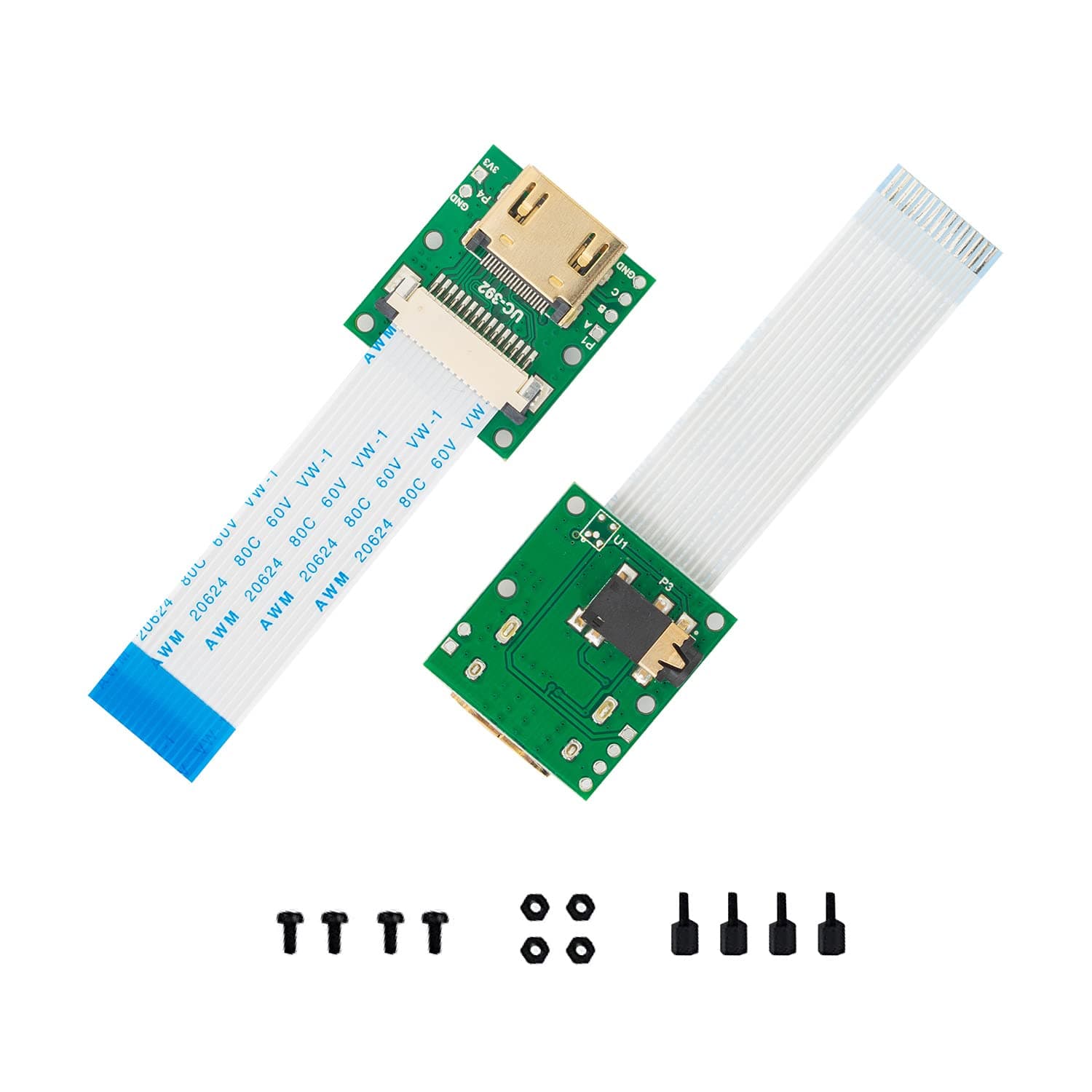
🎬 Elevate your Pi camera game—extend, connect, and capture like a pro!
The Arducam CSI to HDMI Cable Extension Module converts Raspberry Pi camera signals to HDMI, enabling over 10 meters of cable length using a high-speed HDMI cable. Compatible with all Raspberry Pi camera versions (V1, V2, V3, HQ) and multiple Pi models, it also extends three additional signals via a headphone jack connector. Sold as a pack of two, this module ensures solid, reliable connections for advanced camera projects and professional setups.





| ASIN | B06XDNBM63 |
| Best Sellers Rank | #114 in DVI-HDMI Adapters #611 in HDMI Cables |
| Brand | Arducam |
| Color | for Rpi Camera V1 V2 |
| Compatible Devices | Headphone |
| Connector Type | HDMI |
| Current Rating | 1 Amps |
| Customer Reviews | 4.2 4.2 out of 5 stars (208) |
| Finish | Hdmi |
| Item Dimensions | 1.97 x 3.15 x 0.59 inches |
| Manufacturer | Arducam |
| Model Number | B0091 |
| Number of Items | 2 |
| Number of Ports | 1 |
| Package Quantity | 1 |
| Power Plug Type | No Plug |
| Specific Uses For Product | Camera |
| Unit Count | 2.0 Count |
| Warranty Type | Extended |
D**.
HDMI inputs on a Pi is always pretty fun, isn't it?
I got this because I bought one that didn't have the cable attached and was hard to get connected to. I later found out I had the wrong cable entirely, so this just seemed like the safer option. Works great. Much easier to connect to. Easier to use overall as well. Must buy if you need to add an HDMI port to your project as an input. Buy it if you need it.
T**I
Works great with the new Pi 12 mp HQ Camera
I just received the CSI to HDMI Cable Extension Module and got it working with my new Pi 12 mp HQ Camera and the video quality is excellent. I made a mounting plate out of 1/8 inch thick polystyrene to the same size as the Pi 12 mp HQ Camera pwb (38 mm x 38 mm) and mounted it to the back of the Camera pwb with 6 mm standoffs and 2.5 mm x 10 mm hex cap screws. Before I attached the mounting plate to the Camera pwb I drilled a hole pattern that matched the camera Extension Module hole pattern and mounted the camera Extension Module to the mounting plate. Unfortunately the included CSI cable was too short to connect to the Camera CSI port so I substituted a 6 inch CSI cable which is a bit long, but works. I may purchase a 4 inch CSI cable in the future to take up some of the slack. In the future Arducam might want to include an optional mounting plate that matches the Pi 12 mp HQ Camera O&M and include 6 mm standoffs and hardware for the mounting plate. The Extension Module can then mounted to an appropriate hole pattern on the mounting plate. Update: I just bought a second CSI to HDMI Cable Extension Module and it works just as well as the first one!
M**T
Works well, easy install and setup.
Works well over all for my application. One thing I am trying to figure out is when paired with octoprint/octolapse it will not run in "usb" mode as is recommended for a pi-cam on octolapse. The pi-cam connected directly via the ribbon cable will, but these adapters wont.
T**N
Perfect solution for my Pi cameras, includes Pi5 ribbon (15 to 22 pin adapter) cables as well.
This is an amazing addition to my Raspberry Pi computers. I recently bought a Pi 5 to replace a dying Pi 3 which pilots my 3 printer remotely and the video signal using a 1m ribbon was not satisfying with lots of interferences and frames lost. This set also includes the 15 to 22 pins adapter for the Raspberry Pi 5 which is a bummer as I ordered them separately as it was not stated in the product description so I have some spare ones... I connected this set to my Pi 5 with an HDMI cable and a pi camera V1.3 and the video quality is top notch. That is a super easy installation which extents quite a bit the distance between the Pi and the camera!!
K**L
Seamless
One of my biggest worries for my project at first was how do I make a camera connection that's user friendly? Lucky for me that question was already answered and it led me here. It's as easy as hooking up the camera (twice). I was also wondering if the camera could be plugged and unplugged while the Pi was running and I'm happy to report that it can. If you try to take a picture with it unplugged raspistill just errors out with no further issues, plug it back in and it works! My only issue is I haven't found a case for the camera/adapter combo yet. That's not a problem with this product itself though. I've found that this product works seamlessly, without errors or quality issues, like it's not even there.
M**9
Can’t get them to display anything
Have not been able to get these to work at all. There may be some little trick I’m not aware of but I’ve tried everything I know to try and neither one of the two works.
O**T
Easy to install and works like a champ!
I hate long ribbon cables! This made it super easy to run my thinner HDMI cable around to the back of my printer and hide the cable easier than a long wide ribbon cable. If you unplug the hdmi you will need to restart the service running the camera. I thought it would be hot swap-able but once you unplug the hdmi it loses connection and doesn’t come back until restarted. This isn’t a bad thing since I don’t plan on doing that very often and efinitely not while printing.
L**O
Disassembly might be required
Mine came still attached, and it was a little scary to have to break them apart. At first, I thought I was sent the wrong order, but then I noticed a scored line down the center between them. Crossed my fingers, and snapped them apart.
T**M
Setting up a webcam to monitor prints on my 3D printer remotely with a Raspberry Pi and Pi camera V2. Initially set it up using a 30cm long CSI cable, which worked but the colors were washed out and the video was quite laggy. Remembering I had these CSI to HDMI adapters, I thought I'd give them a try. Worked right away - no configuration changes required. The color was greatly improved and the video was now nearly full-time. I presume that the long-ish CSI cable was picking up interference which was somehow causing the video issues. Very happy with my purchase!
J**R
The hdmi cable you use must have good shielding and individually connected pairs, cheap cables with no shielding won't work
ま**さ
ラズパイ5とV3のカメラを繋ぐために購入。オレンジのカメラケーブルは使い勝手が悪いので、HDMIケーブルであれば楽に設置可能ではと思い使ってみました。ただし、3メートルの細いHDMIケーブルでは使用できませんでした。通常の太さのHDMIケーブルであれば商品説明のとおり長い距離でも使えるのではないでしょうか。1.5メートルの通常の太さのHDMIケーブルは問題なく映ります。
L**L
Anschluss war ohne Probleme möglich. Konfigurieren musste ich nichts. Die Kamera wurde trotz der Verlängerung ohne Probleme von OctoPrint erkannt und funktioniert genauso, wie ohne die Verlängerung. Man würde sich wünschen ein Gehäuse dabei zu haben, aber man kann nicht alles haben und dazu gibt es ja auch 3D-Drucker.
Y**K
Works well as described. Fast shipment. Received within 2 weeks.
ترست بايلوت
منذ شهر
منذ 3 أسابيع