We remain fully operational. Our teams are working around the clock to ensure your deliveries continue safely.

قم بتنزيل التطبيق


معلومات عنا
حقوق الطبع والنشر © 2024 Desertcart Holdings Limited
قم بتنزيل التطبيق
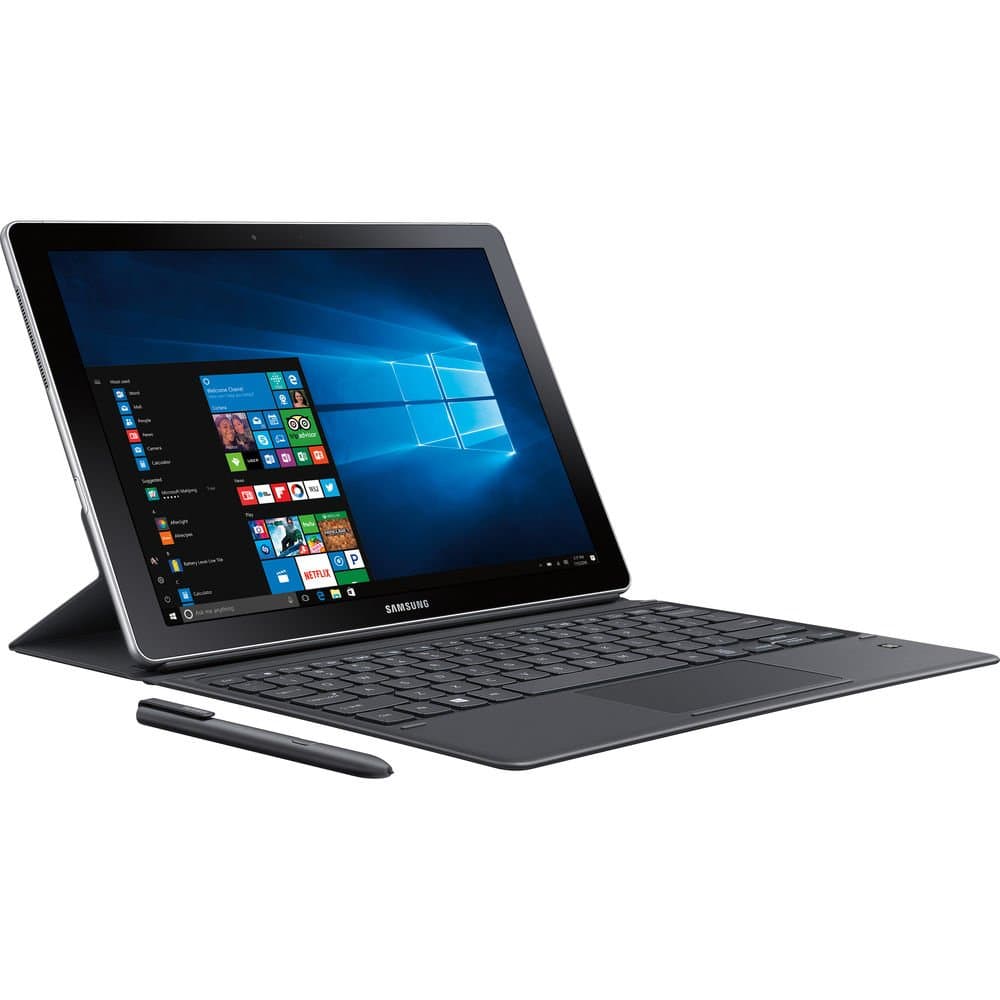
💼 Power meets portability — your ultimate on-the-go productivity partner!
The Samsung Galaxy Book 12” is a sleek 2-in-1 Windows PC powered by a 3.1 GHz Intel Core i5 processor, featuring a vibrant Super AMOLED display, 8GB RAM, and 128GB SSD. It includes a pressure-sensitive S Pen and keyboard for versatile input, offers seamless Samsung Flow integration with Galaxy smartphones, and delivers up to 11 hours of battery life with fast charging, all in a lightweight silver chassis designed for professionals on the move.


| ASIN | B06XF2LCMT |
| Audio Output Type | Headphones |
| Audio features | This product includes audio features. |
| Automatic Backup Software Included | Windows 10 |
| Battery Average Life Standby | 11 Hours |
| Battery Cell Type | Lithium Ion |
| Battery Life | 22 Hours |
| Bluetooth support? | Yes |
| Brand | Samsung |
| Built-In Media | tablet, keyboard and S-pen |
| CPU L1 Cache | 256 KB |
| CPU L3 Cache | 3072 KB |
| CPU Model Generation | 7 |
| CPU Model Number | Core i5-7200U |
| CPU Model Speed Maximum | 3100 MHz |
| Cache Memory Installed Size | 128 |
| Cellular Technology | 4G |
| Color | Silver |
| Compatible Devices | External Display, Keyboard, Mouse, Storage Device, Printer |
| Connectivity Technology | Bluetooth, USB, Wi-Fi |
| Control Method | Touch |
| Customer Reviews | 3.7 3.7 out of 5 stars (17) |
| Display Resolution Maximum | 2160x1440 Pixels |
| Display Technology | LCD |
| Display Type | LED |
| External Testing Certification | CE |
| Form Factor | 2-in-1 Laptop/Tablet |
| Global Trade Identification Number | 00887276200521 |
| Graphics Coprocessor | Intel Iris Xe Graphics |
| Graphics Description | Dedicated |
| Graphics Ram Type | DDR4 SDRAM |
| Hard Disk Description | SSD |
| Hard Disk Interface | Solid State |
| Hard-Drive Size | 128 GB |
| Hardware Interface | USB Type C |
| Has Color Screen | No |
| Human-Interface Input | Touchscreen |
| Item Dimensions L x W x Thickness | 7.85"L x 11.45"W x 0.29"Th |
| Item Type Name | Galaxy Book 12 |
| Item Weight | 1.58 Pounds |
| Keyboard Description | Backlit |
| Lithium-Battery Energy Content | 11 Watt Hours |
| Manufacturer | Samsung IT |
| Maximum Display Brightness | 400 Nit |
| Memory Clock Speed | 1866 MHz |
| Memory Speed | 1866 MHz |
| Model Name | Galaxy Book |
| Model Number | SM-W720NZKBXAR |
| Model Year | 2017 |
| Native Resolution | 1920 x 1080 pixels |
| Notebook Pointing Device Description | Touch Screen |
| Number of Ports | 2 |
| Operating System | Windows 10 Home |
| Other Special Features of the Product | Pen |
| Processor Brand | Intel |
| Processor Count | 1 |
| Processor Series | Core i5 |
| Processor Speed | 3.1 GHz |
| RAM Memory Installed | 8 GB |
| RAM Memory Technology | LPDDR4 |
| RAM Type | DDR3 SDRAM |
| Ram Memory Maximum Size | 128 GB |
| Resolution | 1080p |
| Screen Size | 12 Inches |
| Specific Uses For Product | personal, gaming, business |
| Total Number of HDMI Ports | 1 |
| Total Usb Ports | 2 |
| Touch Screen Type | Capacitive |
| Touchpad Feature | True |
| UPC | 887276200521 |
| Video Output | HDMI |
| Video Processor | Intel |
| Voltage | 7.7 Volts |
| Warranty Description | 1 year |
| Warranty Type | Limited |
| Webcam Capability | No |
| Wireless Compability | 802.11b, 802.11g, 802.11n |
| Wireless Technology | Wi-Fi::Bluetooth Profiles::Wi-Fi Direct |
P**R
FOR COLLEGE STUDENTS WITH MATH/ SCIENCE MAJORS 100% RECOMMEND
I'm a college student (Mechanical Engineering Major), and my roommate has a Microsoft Surface, which inspired me to start looking around to find this beauty. First, I would like to say that it seems to be advertised mostly to artists because of it's two thousand whatever levels of touch for the pen and precision... (you've probably already read the specs, you know what I'm talking about). But no. It's much, much more than that. I am a relatively organized person and like to have folders and notebooks for each class. This meant I occasionally brought the wrong notebook to take notes for a class, or maybe I forgot my pencil and don't have another. All very annoying to forget when running late. What about textbooks? My physics book is like 800 pages, that's huge, and we only MIGHT use it in class. Should I take it today? All in the past. Thanks to this beautiful machine. There's a lot of math involved in engineering, or any math/science based discipline. So for the most part, me taking notes on a computer? Pretty much impossible without a 2-in-1 or a tablet. I've never tried writing notes with a tablet and stylus, but I don't think there's any comparison to the the Galaxy Book. Taking notes with the pen/writing feature on it just feels RIGHT. The tip of the pen is this sort of plastic material that has exactly the right amount of drag against the screen to make it feel like writing on a marker board, but so much better (no marker stuff on your hands, no big eraser, no accidentally erasing what you just wrote, etc.). Basically, you can take extremely informative, color coded notes in classes where paper and pencil were a necessity. Writing with the Book 12 is very satisfying, and feels very smooth. Note taking with the Book is seriously amazing. When the professor forgets something and has to go back on something, it's no problem. Just move everything down. Text can be moved, copied, color coded easily... Compared to writing on paper, the Book is so, so, SO much better! I don't know if I could ever happily go back to writing paper notes. You can also quickly add graphs or shapes of any size anywhere in your notes. If you've ever taken a math class, you should know how nice that might be in high-speed lessons. Computer Performance: This thing is quick and responsive. I have a full sized laptop, and when I use it to open something simple like chrome I have to wait for a few seconds before the window actually opens. The book 12 responds immediately. This computer performs beautifully and quickly. Another fantastic decision by Samsung was to keep bloatware and useless apps to a minimum (literally, 5 Samsung apps, 3 that can be uninstalled. Everything else was Windows Apps Store). I got it at 11 in the morning, and was taking these notes around 2. So it had a very nice, quick setup. There are some things to note, however: the only type of media/ charging ports for it are USB C, so if you want to plug in a flash drive, you better get an adapter. The charging cable is also pretty short. The same length as my Galaxy phone's charger. And the charging port is on the right side when the keyboard is attached (But that's a personal problem, my outlets at my desk are to my left). The magnetic keyboard cover thing is pretty nice. It's actually slightly flexible. but like most other people, I would say that the Microsoft Surface wins. It can be kind of a chore to change from tablet to pc mode with the Book's magnetic design. However, the keyboard and pen are actually included with the Book. That's like $160 of Surface accessories.Typing on this keyboard is very nice. The keys are a good distance apart. Although backspace and space bar are about half the size of their equivalent on a full-sized keyboard. Other than that, the keys are full-sized. This thing is perfect for college. Seriously, it's pretty awesome. As for battery life, the book's is supposedly less than that of many of its competitors, but if you are in a college, you can probably find access to an outlet SOMEWHERE in any number of your classes or on Campus to charge within 11 hours. Overall, it's awesome. When I got the book, I tried writing on it vs. my roommate's surface. He tried writing with the Galaxy Book, and we both agreed that the Book felt way, way smoother. After using both, I would take the Galaxy Book over the Surface any day, without hesitation. Attached is a picture of the first notes I took the day I got it.
P**I
Poor man's Cintiq Companion with not much to complain.
Poor man's Cintiq Companion, without not much negativity. I was lucky enough to buy a refurbished one with almost half a price. If you are doing some conceptual sketches with Clip Studio Paint or Autodesk Sketchbook Pro, this is a pretty decent product to purchase. But you might want to buy a third-party bluetooth keyboard, especially if you happened to purchase a rugged rubber case from Verizon like I did. Considering that the tablet PC is rather fragile, you might want that case, too. I was wondering why no one but Verizon OEM was making rugged cases for Galaxy Books, BTW. Obviously you can't work on some large images with many layers since the RAM is only 4GB. But if you are doing some lighter illustrations or graphic novel inking on the go this will be a decent alternative for Cintiq Companion or even MobileStudio Pro. Having said that, if Samsung makes a 15 inch version of Galaxy Book, I would puchase one within a heartbeat.
A**Q
Powerful yet playful
I've got a surface pro 3, so I was considering updating to the surface pro 4. Then I found this, and thought to give it a try. Maybe it's because it does what I expect, but I'm very impressed with this device. It handles windows 10 very well and boots up very quickly. I've used it for several months, and it takes 5 seconds or less to start running. It syncs my other tech very quickly, phone, tv, printer, etc. And it is super fast. The stylus is pretty sensitive, and when I use it like a notebook, the screen reads the tip, not my hand - very useful when drawing or writing stuff down comfortably. I'm still getting used to the commands, but it's more intuitive compared to the surface pen. The battery lasts aboutt a whole day doing some low key stuff, I think half a day watching videos or playing games. It charges pretty quickly with the included cord - under two hours, but I've also used other cords - those will only charge when shut down. I got a usbc port to help improve its connectivity to my other tech, fortunately it had two usbc ports, one to charge and one to do some work. I kind of wish they had more ports, but it's a pretty a small thing, so i understand the limitations. The included keyboard cover takes some getting used to but it bends in different configurations so you can customize the height and angle. For a 12 inch screen, it's very robust and handles most graphics very well. The operating system is awesome, I've really liked windows 10 since I first saw and used it. Fortunately, the device really handles a lot of the functions very well. Cortana is pretty responsive, but like a lot of other AI platforms, it's mostly an assistant to find information. Moreover, when you have battery-saver on, cortana's functionality diminishes pretty quickly. One big red flag - the fan gets very hot doing robust work, mostly graphics or games I mean very hot, too hot to touch (don't touch it). I knew that getting the device, but it was still very surprising how hot it gets. Besides the heat, i haven't found anything else to dislike here. It's super portable and super fast. I can't say this is a fair comparison to the surface pro 4, but I'm really glad that i got the galaxy book 12. It does cost a lot, but I got mine on Amazon warehouse deals - if you don't already know about it, it's a great way to get good tech cheaper, if you're willing to accept some cosmetic imperfections. I think the only imperfection was on the box, so a great deal and a great product!
C**Y
Not worth the headache
When I use this product while plugged in the battery dies on me. I have returned this twice to be repaired and it is still having the same problem. Personally this item sucks. I bought it for school and have only been able to use it for 6 months and I purchased it in 2017. Very unreliable .
ترست بايلوت
منذ أسبوعين
منذ شهرين