We remain fully operational. Our teams are working around the clock to ensure your deliveries continue safely.

قم بتنزيل التطبيق


معلومات عنا
حقوق الطبع والنشر © 2024 Desertcart Holdings Limited
قم بتنزيل التطبيق





Buy anything from 5,000+ international stores. One checkout price. No surprise fees. Join 2M+ shoppers on Desertcart.
Desertcart purchases this item on your behalf and handles shipping, customs, and support to KUWAIT.
🎬 Stream Smarter, Not Harder — The Ultimate Entertainment Upgrade
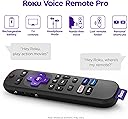
Roku Ultra 2022 is a powerhouse 4K HDR streaming device featuring Dolby Vision and Atmos for cinematic quality. It offers lightning-fast app launches, dual Wi-Fi and Ethernet connectivity, and a rechargeable Voice Remote Pro with hands-free controls and headphone mode. With access to 350+ free live TV channels and all major streaming platforms, it’s designed for seamless, premium entertainment in any room.


| ASIN | B09T4VZDYV |
| Best Sellers Rank | #7,399 in Electronics ( See Top 100 in Electronics ) #40 in Streaming Media Players |
| Brand | Roku |
| Built-In Media | Headphones, Power adaptor, Roku Ultra streaming player, Roku Voice Remote Pro, USB charging cable (for remote) |
| Color | Ultra (with Wi-Fi 5) |
| Compatible Devices | Television |
| Connectivity Technology | Bluetooth, Ethernet, USB, Wi-Fi |
| Connector Type | HDMI |
| Controller Type | Remote Control |
| Customer Reviews | 4.6 out of 5 stars 12,587 Reviews |
| External Testing Certification | Não Aplicável |
| Form Factor | TV Stick |
| Item Dimensions L x W x H | 5"L x 4.9"W x 1"H |
| Item Weight | 5.9 Ounces |
| Manufacturer | Roku |
| Memory Storage Capacity | 8 GB |
| Mfr Part Number | 4802R |
| Model Name | Roku Ultra 2022 |
| Model Number | 4802R |
| Other Special Features of the Product | Bluetooth streaming / Works with Apple AirPlay and HomeKit / Works with Google Home / Works with Alexa |
| RAM Memory Installed | 2 GB |
| Resolution | 4k |
| Special Feature | Bluetooth streaming / Works with Apple AirPlay and HomeKit / Works with Google Home / Works with Alexa Special Feature Bluetooth streaming / Works with Apple AirPlay and HomeKit / Works with Google Home / Works with Alexa See more |
| Supported Internet Services | Hulu, Netflix, Pandora, Prime Video, Vudu |
| UPC | 829610005201 |
| Video Codec | h_265 |
| Video Output Resolution | 3840x2160 |
| Warranty Description | 1 Year Manufacturer Warranty |
M**T
This connects for streaming! Yea!
With all the "short cycle" expectations of the electronics industry, the software outgrows the chips on higher end electronics before the expected end of life of the electronics. In our case, the TV still works beautifully, and can display the 4k material that is available - as planned - but the built in streaming chips can no longer be updated with the new streaming software sooo, glitches, cutouts, failure to load.... To extend the life of our current entertainment electronics we needed a new streaming chip. This fits the bill perfectly! The price is right, it connected easily to our existing system and provides a new chip to do the streaming function. The software for the install worked easily, and we were up and running again. It has the voice recognition stuff included, but we find that more trouble than functional - voice recognition is not quite there yet, it misunderstands too often, so we have disabled it for now - since we didn't use it before, we don't consider that an issue, but if that is important to you, you will need to test it out. We also have 1 minor criticism - the remote is all smooth and curves, which is a very pretty design, but it slips and slides in the hand resulting in unintentional button pressing while trying to pick it up - often interrupting the program or muting the sound when we just wanted to adjust the sound up or down - this is in part due to the sound buttons being on the sides of the remote. Cute, but not functional. Also, with the programming for this remote, it has each subscription defined to use different buttons for the simple functions so you have to stop and think which subscription (am I in Netflix, Amazon, or Roku....) you are using before you can navigate the screen. Not a deal breaker, but this could have been done better. Very happy with this system, and pleasantly surprised at the additional material offered by Roku! We will buy an updated version of this when THIS chip is exceeded by the software. Ok, back for an additional comment. We have been using this 6 months, and only 1 issue. the Roku overheated the day the air conditioning was on the fritz. This is not uncommon with many very small models of an electronic form. If it gets too hot, it malfunctions in a weird ways. If it isn't working for no apparent reason and feels warm, try disconnecting and letting it cool down for 20-30 minutes before panicking. We now keep ours on a small baking rack to allow air circulation - end of problem. Others on the tech network have suggested a small air circulating fan, especially if located near other heat generating electronics. This is not a major issue for us, but it is good to know when planning location (no completely enclosed spaces that have no air circulation) and for troubleshooting - before you go buy new cables, pitch it, or other drastic measures.
V**J
This is a problem solver!
We have a high end Denon receiver and a surround sound set of Klipsch speakers. We get our entertainment streamed through Starlink, viewed on a very large Sony 4K Bravia which runs on Google Chromecast. We get no OTA broadcast signal here so depend on our Internet connection for that. These are all connected through ethernet cables or HDMI cables (we do not use the wireless for the entertainment center). So why did we get the Roku Ultra? Read on.. Our setup worked pretty well except for two things. The major one was that when streaming Amazon Prime Video it took a long time to connect. If we paused the feed more then a few seconds it would basically lose the connection and we would have to go through it again. Error messages would come up and we would just wait for them to clear to get to the next error message, and after a minute or three it would finally connect. The streaming quality was good but we could visually see that would occasionally drop down in resolution quality. Some research found others having the same or similar problems so we decided to try the Roku Ultra 2022. The instructions are simple and the initial setup was painless. The voice remote even allows you to 'say' the letters when doing a search and is very accurate and WAY FASTER than 'typing' on a screen keyboard. We even created a new Roku ID and password in no time by 'spelling into the remote.' The Roku website has detailed help files when it comes to setup and use, the included instructions gloss over the the use of the HDMI output of the box, but it is always recommended to connect devices by cable and not through a wifi if possible. We did just that. The remote is rechargeable by USB and the Ultra unit has a USB port on the back and they include the USB cable. Although we needed and purchased a longer high-speed HDMI cable, the Roku Ultra 2022 does come with one. Not only did the Roku Ultra 2022 end the waiting game with Amazon Prime Streaming it also supplied a superior image and steadily so. On a cooking series we had been watching my wife even commented, "I did not know the cute red-head girl had freckles!" That first night we watched for about three hours and I never saw the screen image drop to a lower resolution. Some complain about the basic remote, but that is not a factor in my opinion- just have two remotes by the side of the couch if need be. Have we become so spoiled that having to use two remotes is such a chore? If you have the sorts of issues I mentioned (slow response, low resolution, etc.) try the Roku Ultra 2022. if you don't like it Amazon's return policy makes it easy to say, 'No thanks.'
C**S
For its price. It’s the best streaming box.
So far I have owned, a Roku Ultra Lt, Google Chromecast 4K, Firestick 4K Max, Apple TV 4K, and a Fire cube 3rd gen. In my opinion. For streaming movies and tv shows. The Roku Ultra is hard to beat for its price. You get 4K, Dolby Atmos + on many streaming apps, It loads quick, even with 35-45ish apps downloaded on it. It zips right through its menu. Loads video’s fast. Make ranking by box for quickness between apps and movie/tv loading times. 1. Fire Cube 3rd gen. It’s the fastest, with 16gb memory some of fastest processors going. Only the Uber expensive Nvidia Shield tv pro comes close in some benchmark test. It also has one of the cleanest menus and way of finding apps. And looks like it fast ly becoming the only affordable box that still allows for side loaded apps. Roku, Apple, Google, are banning apps and side loading. Oh and the cloud gaming power of the Cube is awesome. 2. Roku Ultra. Fast, easy to navigate around and search for apps. Easy to set up little things like screen saver, wall paper. Seems to have plenty of memory. I have 35-40 apps on my at any one time and it goes between apps and loads movies very well. I reall like my Roku Ultra. And would have put it in first place. But you can not game on it like the Fire Cube 3rd gen. You won’t go wrong buying a Roku Ultra. 3. Goes to my Firestick 4K Max. Even with only 8gb of memory. It still worked great and loaded very well with its limited factory memory amount. 4K picture was always very good. 4. Kind of a tie between the Apple and the Chromecast. Both have many adds, and no way to clean things up like Roku’s or Amazon Fire devices. The Apple does not produce as good a picture as the others. The Chromecast was easier to adjust its picture settings, but the Apple even with its much higher price. makes you jump through hoops. I did like that I could link my Apple TV device to my iPad. Until all the extra adds started and down load request. So it was fast becoming not worth its 125-ish price. The Chromecast 4K falls short in its adds, picture quality, and it losses apps every day now. For 50-ish price is a good deal if you have no other streaming device. Just be warned. It’s fast becoming an apple like product. Which you need to pay for everything right now. And Google is banning a lot of side loaded apps and have shut down many of them. Or just spend a little less and get a Roku or Firestick 4K of some sorts and enjoy. I have not tried a Nvidia shield pro but I do know the the 3rd gen Fire cube beats it in many benchmark test. And I also know, the Shield has the most space, is the best for cloud gaming, but the Apple Cube beats it a movie streaming. In my opinion, if you have the money and want an everything box, buy the Fire Cube 3rd gen. If you like, movies, gaming, utility apps. If it’s just movies and tv with an awesome picture. Get a Roku Ultra.
R**T
Simple, intuitive, easy to set up, great remote!
I have Apple TV and now Roku as well hooked into my Sony TV and audio system. Why both? Roku has some sports streaming, particularly MLB that is not available on any other platform including Apple. And more is coming. I’ve been using Apple for years and now this Roku side by side for over a month. Overall, the Roku is the better device because it’s less expensive, the Roku remote is light years ahead of the wonky Apple Remote, a spare Roku remote is only $20, not $60 like the Apple spare remote. The Roku remote looks better and works a LOT better. Both devices have similar appearances - see the photo. I hate, despise, dislike and otherwise want to bury the Apple Remote in my backyard. It’s super touchy, the slide touch panel is annoying beyond belief and it’s not intuitive. If you mishandle the Apple Remote you could be 5 apps away in 1 second. I put a yellow non-slip cover on the Apple remote because it’s slippery. The Roku remote has a non slip textured finish. Setup of both devices is similar with the most difficult part being adding new apps with their respective passwords. The Roku seems to offer more QR codes for password use so you don’t have to type in a multi character passwords on a POS remote like the Apple Remote. Picture and sound quality appear similar. I’m running a 4k Sony TV connected to McIntosh MX-122 home theater preamp with both devices running through the MX-122. The MX-122 offers audio “pass through” so I can use the Apple or Roku with either the TV or the McIntosh sound. Dolby Atmos and Dolby work well with both devices and my McIntosh system. But the remote control on the Apple is the deal breaker for me plus the extra $50 for the actual Apple device. The Apple Remote is annoying junk and I hate that thing. I find myself using the Roku more and more just for the remote. I can see a time in the future when I might get rid of the Apple and just keep the Roku. Apple better come up big in their next gen Apple TV device and remote and drop the price or Roku will make them obsolete.
T**R
A nice streaming box but has too many features and is harder to use than the Apple TV4K+
I've been using this streaming box and the Apple ATV4K+ streaming box side by side on the same new TV. They both work great, and the Roku has plenty of features that may or may not appeal to you (lost remote finder, headphone jack in the remote, Roku channel), but to me, the Apple UI is much more sophisticated and easier to use overall than the Roku, which can get to feeling cluttered with stuff you might consider extraneous. The Apple remote is MUCH simpler and easier to use in the dark, but is just as capable even with fewer buttons. It's machined aluminum instead of plastic and is smaller with a better feel in your hand. It behaves very consistenly across different streaming apps. I don't know that I can see any difference in picture quality without being a test lab. To me, overall the Roku has more "stuff" and more "features" but the Apple is more suave and the UI is simpler without being less powerful. After a short while the Apple buttons just work like you expect them to in every situation, while the Roku requires a bit more mental attention to do what you want. But maybe you desire some of the extras that Roku has but Apple doesn't - go for it, they both work great. My understanding is that the Roku has only 8GB of memory while the Apple has 64G or 128G. This means that on the Roku, to switch between services you must "Exit" one service before entering another. On the Apple box, you can seamlessly switch between as many services as you want and you don't have to exit anything. The UI is a better overall daily driver on the Apple than the Roku. The price of the Roku is less than half of the Apple, but if you have an expensive big screen TV, this shouldn't be an issue. The Roku is not bad at all, and has always worked perfectly for me, but the Apple has better value for the money.
T**E
Roku - Absolutely The Best Streaming Device - Ever - Bar None!!!!
Whoop-De-Doo For Roku! Yahoo! Sorry. So happy to have received my Ultra recently. And now I can see Yellowstone Season 4 after the Season 3 cliffhager, when CBS literally left it's viewers hanging. But I digress. Rokus really are the best streaming devices on the planet. If you have never owned one of these, I highly recommend them. And by all means, get the Ultra - With A USB Port! It supports more advenced media formats like 265HEVC, and others You may find interesting content on the internet that you can download and put on a USB stick to play on your TV (hint, hint). Back in 2016 I bought some Roku3's so I could finally tell the cable company where they could get off. Christ! I guess I have saved more than $50 per month in that time. You still need internet to use Roku devices, but then who does not have that these days? A few things I like about the Ultra: - The rechargeable remote with voice commands, and a Lost Remote Finder feature. However the voice recognition is not all that great. - The Ultra also works with an RCA universal remote, that I prefer to use anyway. You can order one of those from Amazon: "RCA RCRBB04GR 4-Device Big-Button Universal Remote Control", ASIN: B00CXDIPVS Only two things I do not necessarily care for, but not enough to change the rating: - The white light on the device stays On, even after the device has turned Off after its idle period. On the Roku3s this light goes Out. In that way I would know if I was not unintentionally streaming anything. - The USB port is moved to the back, which can make it a difficult to line up and insert a USB stick. Update: 5 May 2025 I have had this device for at least two weeks. This morning after streaming some news, I "parked" the device on the home screen, switched back to my TV and turned it off. The Ultra white light went Out. When I turned my TV On the Ultra light turned On. I don't know what changed, a software update or what. I checked all the settings. I do like this a lot better than having the Ultra light remain on. However, the Ultra light goes Out even if something is streaming. So it is not a reliable indicator that the Ultra is idle. Update #2: 17 May 2025 I did not have all my info correct about the Ultra White Light (UWL). I later observed that after the UWL goes out, it later turnes back on again. And the last sentence about the "UWL going out if something is streaming" - I don't remember why I wrote that, but I don't think that is correct - unless it goes out when the TV is turned off while something is streaming. Regardless, the UWL turns back on at some point. So again, it is not a reliable indicator that the Ultra is idle. Perhaps Roku can fix that with a software update.
D**2
Good Upgrade
My last unit was a Roku 3 I think I bought around 2011/2012? It has been freezing and being annoying for the last 6 mos. Been having to restart it a couple times a day. However, I was loath to buy a new unit since my TV is an older Samsung smart TV, so no 4K or newer technology anyway. Well, I got too tired of having to mess with the Roku 3 so ordered the Roku Ultra (Not the LT). I have to say I'm quite glad I did. 1) the setup was very fast and easy. Plug it in, it found my wify, I entered authentication and ran through a few questions about what kinds of apps/features I wanted. 2) WiFi range is so much better. I have this TV in an upper room, where the signal isn't the strongest. This new Roku has a much better range and the thru put from my router seems much better and all apps load fast. 3) This unit even found my Plex server right away. All I had to do was enter my authentication. 4) Most of the apps I use allowed for using QR code to login so easy peasy. I think I spent maybe 30 minutes from opening the box until everything was up and running again. The included remote is so much better than the old one. I turned off the auto listening button for voice remote and just use the Listen button when I do want to use Voice. This will save battery life. The rest of the features I can't really use until I'm ready to upgrade my TV since I can't connect Roku to my old soundbar system (no HDMI-CEC) so still have to use the separate soundbar remote. BUT the headphone jack is nice to have and works well. Also I really love that the Power button turns off both my TV and the Roku unit. My old Roku was always on. So far it looks like the rechargeable remote lasts awhile and recharge is simple. You can keep using the remote when it's charging, so no down time.
B**N
Roku's flagship streamer
I have LOTS of Rokus, but only a couple of Ultras. I decided to treat myself and get another one, primarily to take when traveling. I think we already know how awesome Roku devices are, so I'll skip over all the usual awesomeness and focus on this particular model. The Ultra has the nice feature that you can plug a USB stick into it and play videos from that, which is very handy when wifi is not an option. I use a 2T USB hard drive to load it up with all of my movies and TV shows, but thumb drives can be quite effective as well. If this were the only thing it did, it would be worth every penny, but there is more. They include cables, so you don't have to scrounge or buy them. The other area where the Ultra shines is the remote. This is the best Roku remote I have ever owned by a large margin. It has the volume controls, and the voice activation. It has a headphone jack, and ear buds are included. New for this remote are two more features. It is now rechargeable, so no more searching for batteries. You can either use a USB charger, or charge the remote right off of the Roku itself with the USB port. The one that surprised me the most was the new voice feature. Turning on a switch, it can be put into a mode where you can talk to it hands free (imagine an Alexa device). I haven't done much with this, but I was impressed that the folks at Roku are really trying hard to make the Roku Ultra the best streaming device on the planet. The processor they use seems smooth and powerful. It's also less likely to get warm, as the Express or Stick models sometimes do. I almost forgot to mention: the Ultra has a wired Ethernet connection, for folks that want this, but of course the wifi works great. I probably won't need the wired connection, but I like that it's there. I hope they don't ever get rid of it. At $100 bucks, it is worth it, but it sometimes goes on sale for $80 bucks. If you see this model for less than that, buy one for all your friends and a couple for yourself.
ترست بايلوت
منذ يومين
منذ شهرين