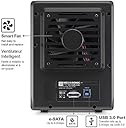
💼 Elevate your data game with speed, space, and smart cooling—because your digital empire deserves the best.
The Mediasonic HF2-SU3S2 is a 4-bay 3.5” SATA hard drive enclosure supporting up to 40TB total storage with USB 3.0 and eSATA interfaces. Featuring transfer speeds up to 6Gbps and a smart cooling fan with thermal sensor, this renewed device offers professional-grade performance and reliability for managing large data workloads.
| ASIN | B072HW3C4C |
| Brand | Mediasonic |
| Color | Black |
| Compatible Devices | Laptop |
| Customer Reviews | 4.2 out of 5 stars 236 Reviews |
| Enclosure Material | Metal |
| Is Assembly Required | No |
| Item Weight | 4 Pounds |
| Manufacturer | Mediasonic |
| Material | Metal |
| Mfr Part Number | HF2-SU3S2-CR |
| Model Number | HF2-SU3S2-CR |
| Mounting Type | Tabletop |
| UPC | 629329008087 |
T**R
Low Cost NAS -- A Great Way of Reusing Old Hard Drives!
After desktop computers are upgraded, old hard drives with lower capacity are moved out the computer case and replaced with higher capacity ones. What can we do with those old hard drives? They can be put into single external USB drive enclosures but doing so can be tedious and messy if there are more than 2 hard drives. The Mediasonic HF2-SU3S2 4 Bay 3.5” SATA Hard Drive Enclosure solved this problem by holding 4 hard drives in a single enclosure that is not much larger than 4 separate drive enclosures with active cooling stacked. It is essentially a 4-drive enclosure with a 4-port SATA/USB hub in one nice looking box. The first refurbished unit worked perfectly right out of the box. I liked it so much so I ordered a second one. Well the second one did not work. It powered down after less a minute being turned on. Amazon sent me the replacement unit. It worked perfectly like the first one. As it turned out, the power adapter from the second unit was defective as using it on the third unit also caused it to power off after less a minute. Eight old SATA hard drives went into two Mediasonic enclosures (3TB x2, 2TB x 4, and 1.5TB x 2), 10TB and 7TB, for a total storage of 17TB! When combined with a BMAX MiniPC ($179.99), this combo became a great low cost NAS. The MiniPC is equipped with a 4 core processor, 8GB RAM and 128GB SSD, running Windows 10 Pro. It has 3 USB 3.0 ports, one of them being the USB-C type, two USB 2.0 ports, 2 HDMI ports, as well as a Gigabit ethernet port. The MiniPC can also be used an HTPC. Since Windows 10 Pro has built-in support for Storage Spaces, a newer version of Windows software based RAID, each 4 hard drives in a single enclosure are configured as one storage pool with a single drive letter. Eight hard drives become two logical drives, D and E. In theory, all 8 drives can be put into a single storage pool but if one box goes bad, the whole pool is dead. The total cost is $360 for this equivalent 8 bay NAS ($180 for the MiniPC and $180 for two enclosures). The performance is really good considering the age of those SATA drives. I cannot think there is a better priced NAS unit that can compete with this!
N**N
Very pleased; Backups go very smoothly
I bought the refurbished one to save ~$10, and so far it has worked perfectly. Pros: - Very solidly built. Mainly aluminum, no major components made of plastic. - Extremely Easy Setup. I got 4 drives of varying size and manufacture running in less than 5 minutes. - Relatively Quiet. The sturdy enclosure minimizes a lot of the actual HDD noise, however the fan is noticeable. I'll likely replace it with a Noctua at a later date. - External Power Supply. Very important, as it's far easier to replace if it ever dies. - Effective Cooling. I was worried about this, as some of my older drives would often reach 50 degrees in other enclosures. However, my hottest drive never reached above 45 in the bottom slot which, while still toasty isn't unsafe. - Safe Enclosure Shutdown. When you detach the drives through Windows, the enclosure will stay on long enough to safely shut down all drives before powering down, which avoids unnecessary wear on the drives from an immediate shutdown. - Controller does not throttle. I'm not sure which one they use, but even when syncing 2 drives (~150MB/s) and downloading to another (~12MB/s), there was no throttling or crashing. Cons: - The LED's are VERY VERY bright, and blue. There are no options to disable them. I placed a small amount of electrical tape over them, which reduced most of the brightness. Keep in mind, though, these are very distracting and will likely keep you up at night when doing backups. - The bottom HDD slot is a pain to insert the drive into. You really need to jiggle it before it finds the connector. - You cannot individually control each drive, either physically or through software. All inserted drives will remain powered on while the enclosure is active. This isn't a huge issue, as they do stay cool, but I would've liked the ability to shut down some of my 7,200RPM drives to reduce noise.
R**0
this box is fantastic......
holds 4 3.5 drives, i have 2 filled with 8tb drives, i do not raid them, you could easily with the new Windows Storage capability... disks easy in easy out... quiet flawless usb 3.0 connection, i feed my boxes, 3 of them, from a Aukey 13 port hub.. all works well, keep your USB cables under 3 feet or so, else you will begin to run into problems.. these data rates are very demanding on timing, long cables will effect timing, keep your cables SHORT. i have actually 4 of these boxes, the oldest is more than 5 years old.... nice venting....clean it every 2 years or so..... nice unit,, consolidates your 3.5 old or new disks.... each disk in the box adds a drive letter. i use the computer for FEA simulations and the like... the performance of my SATA connected internal drives compared to that through the USB 3 connection to this box for my use is essentially the same... the performance and reliability of the connection is outstanding, you forget those drives are in the box.. they map easily to other network computers... i like them, they have solved a problem for me..
E**S
Solid but Quirky Enclosure for Multi-Drive Storage
Solid but Quirky Enclosure for Multi-Drive Storage I’ve been using the Mediasonic HF2-SU3S2 4-bay enclosure to consolidate a handful of older 3.5” drives that were cluttering up my desk. On the plus side, the unit is well-built—mostly metal with decent ventilation and a fan that kicks on automatically based on temperature. Installation was straightforward, and I had four mismatched drives mounted and recognized within minutes. Transfer speeds over USB 3.0 are good enough for backups and casual use, and I appreciate that it also has eSATA if I want a more direct connection. Where it falls short is in the details. The fan, while functional, is louder than I’d like in a quiet office. The power brick is large and feels like a weak point—mine hasn’t failed yet, but I’ve seen reports of flaky adapters causing shutdowns. Another quirk is that every drive shows up as a separate volume (no RAID), which is fine for archiving but limits flexibility. Also, cable length matters; if the USB cable runs too long, the connection can get finicky. Bottom line: This is a practical, cost-effective solution for anyone with multiple bare drives who wants them in one enclosure, but it’s not whisper-quiet and it has a few weak points that keep it from feeling truly “set it and forget it.” A solid mid-tier choice if you can live with its quirks.
A**E
Excellent value for the price
I have had this unit for several months and it has worked wonderfully. I bought it to get some use out of the older SATAs drive I had hanging around. Soon after i got this enclosure, my wife gave me my first Mac, and I found out that it's easy in MacOS to build a larger drive out of concatenating smaller individual disks. I do landscape photography, and I now use this "drive" as my main workhorse. Out of the 4 available slots, I used one of my older 1GB SATA drive as a "Time Machine" (Mac-speak for a backup drive). The other 3 slots are used as concatenated drives to make a larger 8GB (4+2+2) drive to hold all my pics. It took minutes to set up, and since then I've had no issues, no problems, no failures. The drives are under a lot of stress, several of my photo apps continually index the files, and when I work on post-processing or viewing, large sections of the drives are accessed for long periods of time. I very barely hear the fan at all, it's considerably less loud than the TV in the other side of the house from me at normal volume, which I can hear just fine while next to the enclosure. The lights are bright but I like seeing them, they give me a good clear idea of which drive is being accessed and for how long. Honestly this enclosure is considerably more efficient and useful than anything I had expected given the price. I am now looking to buy another one to hold the rest of my older SATAs.
K**R
Great way to extend your storage
This is a great product for the price. I am amazed at some of the negative comments. The one major negative comment I agree with is the poor user's manual but I easily figured how to work it. But other than that it serves by needs perfectly. The fan has several speed settings. If you want it quiet set it on a lower speed. There are several fan settings. I set the fan on automatic and the fan noise is minimal. I have 4 hard drives installed and use it to backup my NAS through the USB interface. I originally set it up using the ESATA interface but it showed all 4 drive as a single large drive which is not what I wanted. I use the USB 3.0 interface. USB transfers are fast and reliable. I transfer up to 6 TB of data a week with no problems. The drives are easily immediately recognized by Windows. Once I figured out how to set it up it works perfectly. I have not had to touch it. Its runs constantly 24 - 7 for four months now.
J**T
Not reliable
I have a mediasonic RAVE 4-bay HD that I've never been happy with, it constantly unmounts and isn't reliable. I took a chance on this enclosure from the same company - it does the same thing. It worked great the first 24 hours, but then has been nothing but problems. It is on the way back as I write this. Not recommended at all.
B**.
Works well when on - but constantly powers off
Unit powers off after a few hours of not being directly used. There re three settings to control this feature and none kept it on.
Trustpilot
3 weeks ago
3 days ago