Buy anything from 5,000+ international stores. One checkout price. No surprise fees. Join 2M+ shoppers on Desertcart.
Desertcart purchases this item on your behalf and handles shipping, customs, and support to KUWAIT.
⚡ Power up your home network — fast, smart, and effortlessly connected!
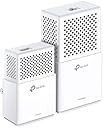
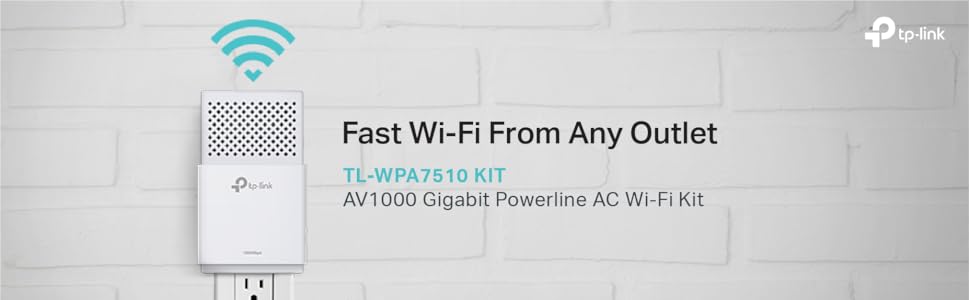
The TP-Link AV1000 Powerline Ethernet Adapter delivers up to 1000Mbps wired speeds and dual-band WiFi up to 750Mbps by leveraging your home's electrical wiring. Featuring plug-and-play setup, energy-saving technology, and robust 128-bit AES encryption, it’s designed to extend reliable, high-speed internet across multiple floors and rooms without new cables. Ideal for streaming, gaming, and smart home devices, it supports seamless integration with other HomePlug AV2 adapters for scalable network expansion.


| ASIN | B0725LPTZR |
| Best Sellers Rank | #593 in Powerline Network Adapters |
| Brand | TP-Link |
| Color | White |
| Compatible Devices | Smart TV |
| Customer Reviews | 4.0 4.0 out of 5 stars (1,999) |
| Data Link Protocol | Ethernet |
| Data Transfer Rate | 1000 Megabits Per Second |
| Global Trade Identification Number | 00845973099084 |
| Hardware Interface | Ethernet |
| Item Dimensions L x W x H | 5.35"L x 2.8"W x 1.93"H |
| Item Weight | 1.6 ounces |
| Manufacturer | TP-Link |
| Mfr Part Number | AC750 |
| Model Number | AC750 |
| UPC | 845973099084 |
J**E
make sure both devices are on outlets fed from the same side of your electrical panel
have only had it for about a week, but so far so good. I live in a 3000 square foot, 3 floor house. My router is in the living room on the middle floor. At first, the wifi signal to the master bedroom on the top floor was fine. We streamed movies, music, and tv, and surfed the internet with no issues (I have a 50 mbps plan with comcast and regularly get 55-60 mbps on the same floor as the router). For some reason, we started to lose internet connection upstairs when streaming. Checking the speed on my comcast app, it would fluctuate upstairs from 50 mbps down to 3. Purchased this powerline wifi extender after researching whether to buy this kind, or a simple wifi repeater. Installation was easy. The units in the kit are already paired, so it's literally plug and play. Checking my breaker panel, my living room circuit where my router and the powerline base unit is plugged into, is not on the same side of the breaker panel as my master bedroom. But, my upstairs laundry room is. I plugged the extender unit into the outlet in the laundry room and everything connected, except the powerline LED indicator was red indicating a weak powerline signal, and my speed was only about 3 mbps .The receptacle in the laundry room is a GFCI so I figured this must have something to do with it. Possibly filtering out some of the signal. I plugged the unit into an outlet in my master bedroom, knowing it was not fed from the same side of my breaker panel as the outlet the base unit is plugged into, and everything connected and the powerline LED was now green indicating a good signal. I figured everything was fine and it didn't really need to be on the same side of the panel as the base unit. Checking my speed, I was now getting about 35 mbps. Which was an improvement over what I was getting, so I was happy with that. I didn't think I would get my full internet speed anyway. Randomly checking the speed over the next couple days, I would notice it was fluctuating randomly down to 2-3 mbps. Tried several other outlets around the bedroom, and would get the same thing. I decided to switch the electrical circuit of my master bedroom to the same side of my panel as the living room where the base unit is plugged into (I am an electrician, so I do not recommend anyone do this without some electrical knowledge). I checked the speed again, and I am now getting 45-50 mbps steady on the 5g band in my master bedroom. So far no drops in the speed like I was getting before. I will probably get another extender unit to pair with my base unit and install it on the lower floor. Make sure to feed the base unit and extender unit from the same side of the breaker panel. Some reviews may say it is not necessary, but the signal will be reduced and may not be steady. Also do not plug into a GFCI, as this may filter out some of the signal as well.
W**M
Works great to connect Tivo Mini
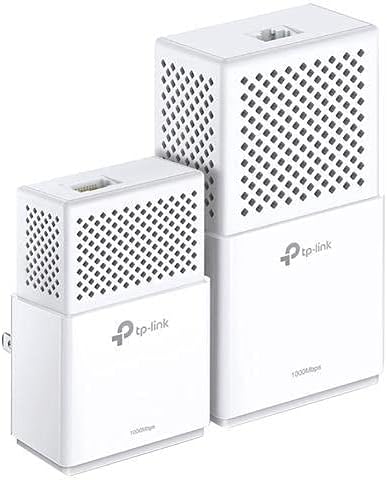
The kit includes a Powerline Adapter, Powerline Extender and two white 6 ft. Ethernet cables. It works, but you have to set it up correctly. First, a little background. My home is 3280 sq. ft. I have 100 Mbps internet using a Nighthawk router on level 2 of my home NETGEAR Nighthawk X6 AC3200 Tri-Band WiFi Router, Gigabit Ethernet, Compatible with Amazon Echo/Alexa (R8000) and actually have 100 Mbps all over my house. I didn't buy this kit to increase my wireless signal. I bought this kit, plus TP-Link AV1000 1-Port Gigabit Powerline Adapter, Powerline speeds Up to 1000Mbps (TL-PA7010 KIT) because I have three Tivo Mini's that connect via Coax for a MOCA connection. I constantly have connection issues related to signal quality. First thing out of the box I plugged in the Adapter, connected the ethernet cable to my router and pressed the WPS button on my router and the Wifi button on the Adapter. Then I took the Extender, plugged it in not only in a different room, but in a different level of my house. I tried to pair the two and failed. Then I started reading all of the reviews of the product and frankly got more confused because some people said you have to plug the adapter and extender into outlets on the same circuit BREAKER and other people said they didn't have to have the same circuit breaker, but the same PHASE. I was ready to box up and return everything. The instructions say "the same circuit". It's unclear what they actually mean by that, but it wouldn't make any sense for the answer to be circuit breaker, so I decided to start over. I'll explain the steps I took to successfully connect. 1. Plugged adapter into wall outlet, level 2 (you CANNOT plug these into a power strip or even a surge device that covers the face of the outlet). 2. Used a pin in the RESET hole (because I had set it up already incorrectly). 3. Plugged extender into a nearby wall outlet in the same room. 4. Pressed the PAIR button on the adapter. 5. Pressed the PAIR button on the extender. (Both will flash and then you'll see two solid lights - one for power, one for paired) 6. Unplugged both units. I set the extender aside and plugged the adapter back into its permanent home near the router. 7. Used an 8 ft. ethernet cable to connect the router's LAN port to the adapter. 8. Used my cell phone to see if I could pick up a WIFI signal for the 2.4 GHz and 5 GHz frequencies, which were there. (I didn't want to connect to these - I just wanted to see that there was a signal there) 9. Pressed the WPS button on my router, followed by the WIFI button on the adapter. (The frequency lights will blink slow, then rapidly, then turn solid - my router's WPS button doesn't stay on long and while one of the frequencies was found quickly, the other took longer so I watched the WPS light on my router and as soon as it quit blinking, I quickly pressed it again so that both frequencies were found) 10. Plugged the extender into an outlet in the same room to verify it was still paired - yep, two solid lights. 11. Plugged the extender into an outlet in my office, level 1 - yep, two solid lights. 12. Plugged one end of the provided ethernet cable into the extender and the other end into my iMac. Turned off Wifi on my iMac. Opened a web browser - yep, a page loaded. Performed an internet speed test. Tested >100 Mbps. 13. Removed the extended from the outlet in my office and plugged it instead into an outlet in my bedroom (level1) near my Tivo mini - yep, two solid lights. 14. Removed the coax cable from the mini and replaced it with the provided ethernet cable. Test - Able to watch live tv? Yes. Able to communicate with the Tivo Bolt on level 2? Yes. Able to connect to the Tivo service? Yes. Able to stream content? Yes. 15. Took extender #2, plugged in outlet, level 2, same room as adapter. 16. Pressed the PAIR button on the adapter. 17. Pressed the PAIR button on the extender - yep, two solid lights. 18. Repeated the process for extender #3, yep, two solid lights. 19. Relocated the extenders near the mini's I needed to connect (one inside of a cabinet in my kitchen (level1) and the other in our home theatre (level 2). Both immediately showed the two solid lights. 20. Connected them to the mini's using the provided ethernet cables and then tested the connections as I did before. All Tivo Mini's connected successfully and still getting >100 Mbps signal strength all over my house. So glad I bought these!
G**Y
Poor instructions, device works
The product seems to work. The instructions are awful. It looks like they ship the same instructions for similar products. For example, the instructions always say press and hold a button for one second. On my device that doesn't work. You just press and release the button with no pause. Installation went smoothly once I figured out this instruction error. Using the WPS button on my router made it easy to download my existing wireless SSID/Password settings to the new WIFI extender. One thing puzzles me... There are two parts to this kit: the small adapter, and the larger extender. The adapter connects to the router via ethernet and sends data through the powerlines. The larger extender sends/receives data from the powerline and also creates a WIFI network. The smaller adapter can also be used to create a remote ethernet connection. You can also connect multiple WIFI extenders, but I can't seem to find WIFI extenders for sale by themselves. That was sort of the whole point of using this device.
I**V
Compre el producto derivado de que en donde instale mi escritorio, no llegaba con calidad la red del módem. Había probado replicadores de red con antenas que habían servido para dos cosas. Desesperada por tener buena señal, me recomendaron comprar este replicador. Tiene un alcance muy bueno y es muy fácil de instalar. Lo "complicado" es andar probando en donde ubicar el replicador ya que son dos dispositivos. Uno debe ir conectado al módem y el otro debe estar a una distancia no tan lejos del primero. Sin embargo tienen buena calidad y la señal se replica sin problemas. Considero que si alguien piensa en comprar un replicador de red, sin duda debe optar por éste y no por los de antenas.
K**D
This device was unusable due to the fact that it doesn't play will with existing home network, it hijacks the DHCP server of the router and started acting as one with no setting to adjust it/or stop it. It literally put the whole network down except for already active devices. Also related to this it doesn't get the IP from the router, it insist on taking its own factory set network ip creating its own local network segment that cannot be modified??! So unless good firmware is provided it's better place is the trash. I wouldn't recommend it.
R**I
Works but with restrictions
.**.
Buscaba una solución para tener WiFi en la 2da planta de mi casa por que lamentablemente los modem de fibra óptica de Telmex tienen pésima cobertura y en todas las recamaras de mi casa no llegaba nada pero al investigar esta tecnología PLC me llamo mucho la atención ya que la red eléctrica esta prácticamente nueva y sentí que podía ser una buena solución que tirar metros y metros de cable. Algo que me llamo mucho la atención es que decían en muchos sitios e inclusive en tienda Telmex donde igual lo busque el dispositivo que si los contactos estaban conectados a diferentes pastillas no funcionaria pero déjenme decirle que en mi caso si funciono la sala donde tengo el modem es una pastilla totalmente independiente a la planta alta y al menos que todo este interconectado de alguna manera funciono y la verdad muy bien. El paquete incluye los 2 dispositivos, instructivos muy claros de entender y 2 cables de Ethernet de buena calidad uno de ellos se usa a fuerza por que el modem debe conectarse por medio de Ethernet a un dispositivo, ya el otro dispositivo se conecta a donde queramos tener internet se emparejan y listo el PLC copia la red para que la conexión sea la misma en toda la casa y los dispositivos como celulares o tablets no estén cambie y cambie de red a cada rato todo un alivio. Las pruebas me dieron una conexión de 70mb de 100mb que tengo contratado algo curioso es que me da los 20mb de subida esos no se ven afectados pero la descarga no paso de esos 70mb supongo que ha de ser por el rollo de la pastilla pero la verdad con eso me conformo ya que en la planta alta no tenia ni una misera rayita de WiFi y ahora tengo todo al 100% y muy estable y excelente velocidad. Sin duda es un imperdible ya que es mas fácil y estético que andar tirando metros y metros de cable Ethernet y comprar repetidores o mover el modem a un lugar donde nadie se beneficia.
M**C
El producto en teoría es muy bueno, el internet a través de la línea de corriente eléctrica se escucha bien; pero al menos en mi caso en la práctica no funcionó como esperaba, tengo contratado 150 megas en Infinitum, el modem está en la planta alta y requería internet estable en la planta baja; debo decir que instalar el dispositivo es muy fácil y la app es muy intuitiva; pero simplemente el internet no funcionó bien, únicamente me daba 30 Megas máximo y bajaba a 10 megas tanto por cable como por wifi, intenté cambiando los toma corrientes y ni así me daba un mejor internet, mi casa no es antigua tiene 3 años y la red eléctrica está bien, además debo decir que puse los dispositivos conectados en tomas de corriente directa (no extensiones) y funcionando solos sin tener otros aparatos conectados a la misma toma; hice la devolución del producto y me fue reembolsado el dinero; compré otro dispositivo y este es sensacional (Deco M4) ya lo reseñaré como corresponde.
ترست بايلوت
منذ شهر
منذ 3 أسابيع