We remain fully operational. Our teams are working around the clock to ensure your deliveries continue safely.

قم بتنزيل التطبيق


معلومات عنا
حقوق الطبع والنشر © 2024 Desertcart Holdings Limited
قم بتنزيل التطبيق

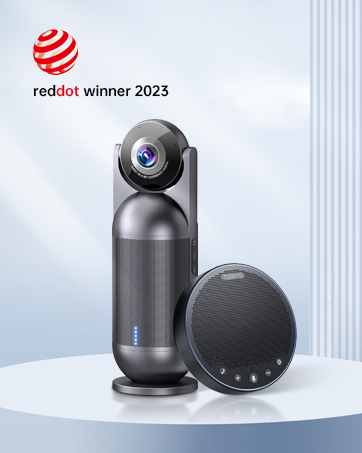
🎧 Elevate every meeting — hear and be heard like never before!
The EMEET M3 is a Zoom-certified Bluetooth conference speakerphone featuring 4 AI omnidirectional microphones for 360° voice pickup, delivering crystal-clear sound with noise and echo cancellation. It offers an impressive 18-hour battery life, supports USB 2.0 and Bluetooth 5.0 connectivity, and can be daisy-chained to accommodate up to 20 participants, making it ideal for medium to large meeting rooms and professional hybrid work environments.




















| ASIN | B09X52FL2G |
| Batteries | 1 Lithium Polymer batteries required. (included) |
| Best Sellers Rank | #39,102 in Office Products ( See Top 100 in Office Products ) #16 in Telephone Audio Conferencing Products |
| Bluetooth Range | 10 Meters |
| Charging Time | 4 Hours |
| Color | Grey |
| Compatible Devices | Smartphone |
| Control Method | Touch |
| Customer Reviews | 4.4 4.4 out of 5 stars (1,101) |
| Date First Available | June 21, 2022 |
| Included Components | EMEET OfficeCore M3, EMEET Adapter A300, USB Type C Cable, EMEET Dongle, Carrying Case, User Manual, Security statement, Parameters |
| Is Waterproof | FALSE |
| Item Weight | 8.82 pounds |
| Item model number | M3 |
| Manufacturer | Shenzhen eMeet technology Co.,Ltd. |
| Material | Plastic |
| Model Name | EMEET OfficeCore M3 |
| Number of Batteries | 1 Lithium Polymer batteries required. (included) |
| Number of Items | 1 |
| Power Source | Battery Powered |
| Product Dimensions | 1.4"D x 5.3"W x 5.3"H |
| Recommended Uses For Product | Indoor/Outdoor |
| Speaker Size | 1 Inches |
| Speaker Type | Portable Speaker |
| Special Feature | None of the above (VoiceIA exclusive tech, noise & echo cancellation) |
| Specific Uses For Product | Travel |
| Subwoofer Connectivity Technology | Wireless |
| Warranty Type | Full Warranty |
| Wireless Communication Technology | Bluetooth |
W**E
Convenient and versatile bluetooth speakerphone
For work I participate in a lot of committee meetings, and not often can everyone attend in person. Having a convenient way to setup and participate in conference calls is important to my productivity, and usually just putting a phone on speakerphone will not do. Because of this, I looked into bluetooth speakerphones. I already owned the eMeet M1 which does a great job in small groups/rooms, but many times my calls take place in larger rooms with more people, and the M1 had challenges there. Welcome now to the eMeet M220! The M220 is basically an update to the eMeet M2 (which itself was an updated to the eMeet M1) that includes two M2 units but it adds the ability for the two included devices to be daisy-chained together. This daisy chaining allows you to use the M220 in larger rooms with more people. You also can use a single M2 if your particular needs only require one, so it gives you a lot of flexibility. Each device includes a cable lock connector, audio in, audio out (for daisy chaining the two devices), and micro-USB input (for charging and connecting to computer via USB). I really liked the design of the M220; it is modern and sleek and would look great just sitting on a desk. The buttons on the device are not physical push buttons like on the eMeet M1 but are instead capacitive touch buttons. They work well but can develop some smudges. Both of the speakers are provided with soft padded storage cases to help keep them safe. The M220 gives you a LOT of different ways to use the device. You can connect directly to a phone or computer via bluetooth, or you can connect it to the computer with the included Micro-USB cables. They also include USB audio adapters (called the eMeet Audio adapter A200; they give you one for each speaker) that you can use to wirelessly connect to a computer that might not have built-in bluetooth capabilities. I tested each of these different options out and they all worked well. For use on a computer, I found that either the USB cable or the A200 adapter worked best with Skype for Business or Skype; it could be a challenge for me to get Skype to work will via bluetooth only connection (but I think this was more of a Skype/Windows configuration issue that any problem with the speakers). Audio quality was very good both as the person in the room with the M220, as well as the person who was on the other end of the call. Phone calls and Skype calls were loud and clear. For the person on the other line, they could tell that they were on a speakerphone as I did sound further away from the microphone, but they did say that they could still hear me very clearly even when sitting several feet away from the microphones. In addition to being able to use this as a speakerphone, you can also connect the speakers via audio cables (two are included) to a sound source and use it as a regular speaker. The only feature of the M1 that I don't see in the M220 is the ability to use the M220 battery to charge devices (phones) via USB. It was a nice bonus feature for the M1, but definitely not a deal breaker by any means for the M220, and I think all of the additional features and flexibility afforded by the M220 outweigh that minor issue. Pros: Attractive design, easy to use, lots of connectivity options, USB and audio cables included, digital assistant capability, flexibility to use in small and larger groups/rooms Cons: Capacitive touch buttons prone to finger smudges; cannot use as an external battery to charge cell phone
K**H
Clear and LOUD; pleasant for music too
The shipping box from Amazon was heavier than expected with this one item in it. Unboxing the speaker phone let me know why. This is much beefier than my other speaker phone as this one is built like a tank, making it feel very durable. First let me correct a misunderstanding of what other reviews may imply. When using AI recording, some say there is no indicator that the AI is on- BUT, there is a round light surrounding the functions on the phone and when AI is ON, that light is GREEN when speaking, and when AI is OFF, that light is BLUE. That is how you can tell if AI is on or off. I can confirm that with AI on, the loudness of keyboard activity is reduced, as I tested it with my keyboard being only 12 inches from the device (and I was pressing the keys hard to make noise). The environment I am testing this on is a Windows 10 PC. I was surprised that upon connecting the device to my PC via the BRAIDED cable (USB C on the speaker phone side, for easy plugging in, and type A into my computer), it connected so quickly I couldn't believe it. Under 2 seconds for sure, maybe only 1. There was no configuration required; it became my default speaker and recorder automatically. What I like the best about this speaker phone is how loud it is. I compared this with 3 other speakers active on my PC: the speakers in my monitor, another speaker phone, and now this M2 MAX. I set all of them at 25% to play the same song. The monitor speakers were way to soft and tinny sounding (not fun to listen to for music), as one would expect. My other speaker phone sounded great (an eMeet Luna), but when this MAX came on, it blew the others out of the water; quite loud. I turned it down to 10% from 25% and it was still a little louder than the other speaker phone! And both speaker phones were absolutely clear without any distortion. I raised the MAX to 100%, and still no distortion (but I had to turn it down as it was too loud <g>). For playing music, both this MAX and the Luna were pleasant and COMFORTABLE to listen to; not so for my monitor speakers. For quality sound, eMeet speakers are very good indeed; voice is clear and sharp, easy to understand; not garbled or muffled at all. If you are a business, the M2 MAX is the go-to speaker phone for its superior volume alone. No sense making meeting attendees struggle to hear what is coming out of the device, or ask the person on the speaker to repeat themselves. As a note, when I changed the volume using the keys on my keyboard, the light on the MAX goes up and down to reflect the changes - neat; shows the connectivity. Then I tested the recording function by walking around my room and having the PC record what I was saying. Upon playing back my recording, the MAX did a good job, as it easily picked up my voice from 15 to 16 feet away, even with my back turned and I had a hoodie on my head, it picked up my voice well from that distance (of course, the mics pick up your voice louder if you are closer, but still decent from 15 feet - I did an actual measurement). To sum up, this is a quality speaker phone that I like.
C**D
Only tested this so far. But highly impressed. Set up was non existent. Plugged into my Macbook with a USB cord. Started ZOOM recording. Selected the e-meet and spoke to my wife who was over 7 m away. There was a TV running in the background and a tap running water immediately in front of my wife. It picked up her voice at a level close to mine and did not have the running water or tv in the recording. Amazing
H**M
Didn't use it in big conferences yet. But it looks very decent. Will update the review once used it in large conferences calls.
H**Y
An excellent value for money speakerphone for small meeting rooms. Works very well over bluetooth, so completely wireless. Battery life is good as well, have been using this in a conference for well over 2 hours.
A**B
When it works as Bluetooth some functions does not work with zoom .
P**T
Speaker and Mic work well for our needs
ترست بايلوت
منذ يومين
منذ شهر