Desertcart purchases this item on your behalf and handles shipping, customs, and support to KUWAIT.
🎯 Dominate wire-free with precision and style—because wired is so last gen.
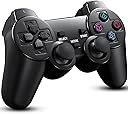
This 2-pack wireless controller set features 8 pressure-sensitive buttons, twin analogue sticks, and built-in twin shock vibration for immersive gameplay. Compatible with PS1, PS2, and PC, it uses 2.4GHz wireless technology for lag-free, cord-free gaming. The package includes two controllers and receivers, with a sleek jet black high-gloss finish and easy plug-and-play setup. Battery powered (2 AAA batteries each, not included), these third-party controllers offer a reliable, stylish alternative to OEM units with a one-year warranty.
| ASIN | B074X3HWLY |
| Additional Features | Wireless |
| Brand | BLUE LAKE Performance |
| Brand Name | BLUE LAKE Performance |
| Button Quantity | 17 |
| Color | black |
| Compatible Devices | Playstation 2 |
| Compatible Video Game Console Models | Sony PlayStation 2 |
| Connectivity Technology | 2.4GHz |
| Controller Type | Gamepad |
| Customer Reviews | 4.3 out of 5 stars 2,590 Reviews |
| Hardware Platform | Gaming Console |
| Manufacturer | Cacella |
| Model Name | RM |
| Package Quantity | 1 |
| Power Source | Battery Powered |
| UPC | 608651968122 |
D**Z
Quick Connection, Maybe too Lightweight, Great Control
Bought these for my PS2 Slim that still works somehow. They connect very easily, simply by pressing a button on the receiver and then a button on the controller. You only need to press the receiver once. The connection will break after a relatively short amount of inactivity (~5-10 minutes), but all it takes is a simple press of the button again and it immediately reconnects. I've played a full 9 hour game so far with it and it has handled really well in that time. No connection breaks at all while in use, and the buttons and joysticks handle with no drift, no stickiness, no lag, and no missed inputs. The only thing I'd critique is the weight. It's extremely lightweight, which some people may like. It's a very noticeable difference between the decent heft of a PS2 controller and this one. Nothing to worry about, but it can be off-putting.
B**N
It just works
So what's most important to know is I bought these controllers to use with my PS1 (remember PS2 devices are backwards compatible with PS1 devices thonps2 saves can only be saved on PS2 memory cards and likewise with PS1 memory cards) that I just had an xstation installed on. I also ordered on ebay an official Sony PS3 controller for my PS3 but that turned out to not work at all and it wasn't listed as broken, for parts only, or as untested. Needless to say it didn't work at all when plugged into my PS3. So I thought to myself....hmm these have a USB adapter on the wireless dongle.....I wonder if it will work on my PS3, let's not forget I haven't even tested the controllers at all yet as I'm still waiting for my modified PS1 to return (it's currently in the mail). Low and behold after plugging this into my PS3 and putting some batteries in it it works.....the mode button functions as the ps button but it actually works. Granted using a USB port on my backwards compatible PS3 isn't my ideal solution because it needlessly uses USB ports....but I wanted to play my PS3 and this works in a pinch not to mention it seems so far (haven't tested it to much yet) to work well...I could care less about rumble features especially in a wireless controller that uses batteries (I feel it wasted battery life). I will update my review if anything changes I just wanted it to be know that I bought it to use for intentions it's not even advertised for but also seems to work with devices I didn't expect (my PS3).
P**E
Good controllers for PS2, limited support for PS1
I have been buying controllers for my PS1 and PS2 recently, because I just got into modding them back around christmastime. For context, I bought these controllers to replace my old very worn out first-party controllers as well as the stopgap solution of OPL's compatibility settings for PS4 controllers via PADEMU. These controllers are quite nice for the price; they have a very good weight in the hand (the reason why i bought them was because I didn't see any reviews complaining about lightness) The buttons are relatively tight; they have a tiny bit of play in them. The springs in the shoulder buttons are on the light side. The sticks are good; they send digital inputs when analog mode is off, meaning that up on the left stick is equivalent to up on the D-pad (and, funnily, up on the right stick is equivalent to pressing triangle). This is very nice for games like Street Fighter EX3, which for unknowable reasons does not have analog support. However, it should be noted that the sticks are taller than a first-party controller; it's not a Wii Classic controller, but it is definitely a difference. I think this boils down to personal preference. The surface finish is going to be the deciding factor for a lot of people, I think; these controllers have a shiny finish that immediately becomes a mess of fingerprints. It doesn't bother me, but it could bother other people. With regard to connectivity, these controllers are a dream. input lag isn't noticeably worse than any other wireless controller I've used. They aren't bluetooth, but rather when the receiver is connected to a PS1, PS2, or PC, when a controller is turned on it connects automatically. The controllers turn on with a small mechanical switch tucked between the sticks, and will go to sleep after a while to save battery; pressing start or cycling the power will reconnect the controller. I have had these for 4 weeks and have been using them for around an hour most days after work; I haven't needed to change the batteries yet. The product comes with two controllers and two receivers, and whichever controller is turned on first will connect to player one. This works seamlessly on PS2. HOWEVER: these controllers have an issue with the PS1. With one controller plugged in everything works perfectly, zero complaints. But when I try and plug both of them into the same PS1, they seem to both try and connect on the same channel and the result is both controllers stop working. This is frustrating, and has led me to purchase another controller for the PS1 for the purpose of multiplayer. To their credit, the manufacturer doesn't advertise PS1 compatibility so this is probably an known issue. As of writing this, I haven't tried using two of these controllers hooked up to the same laptop via their built-in USB dongle, but I can't imagine that would have any issues. On PC they are detected as a PS3 controller, and I played one game (super monkey ball on Dolphin) as a test and they worked fine. So altogether: these are solid controllers for the PS2, strongly recommend for that purpose; If you want them for PS1, watch out as you functionally only have one controller on original hardware.
D**D
HIGHLY RECOMMENDED
LOVE THESE. I game on every platform, and PC. These work perfectly on my PS2, PS3 and PC exactly as advertised. Plug and play with no issues. On PC, I didn’t need to use the included driver. My PC and steam recognized it as a PS3 controller. IMPORTANT NOTES: The included instructions have a few errors in grammer and don't explain everything. So here is some extra tips: After a few minutes of no input (like 3-5 minutes) the Controller will turn off. This is great to safe battery life, but it's not noted in the instruction manual. If this happens, just press the start button and the controller will turn back on. Pairing can be annoying if you don't do it in sequence. Plug in one of the dongles, then a controller and turn it on. make sure the lights are no longer blinking and the green one is lit on the controller. Then do the same for player 2. If you just turn on both controllers at the same time, you may get player 2 paired with the player 1 dongle or even both to the same receiver. For PC users, make SURE to use proper controller configs. I've played Mortal Kombat 11 for about 60 hours now with these, and whenever I boot up the game the right analog stick defaults to buttons, so pressing to the right acts as the 'B' button (Mortal Kombat is set up for only keyboard or Xbox controllers). So in this case, I had to download the config for a PS3 controller. So 30 seconds of labor to get the controller to play correctly Only issue is that some games on Steam require controller comfiguration, but that’s true for anything on Steam. Also LOVE the shiny smooth plastic. Highly recommend
N**S
Very surprised at how well these work.
I was very hesitant to purchase these as I really can’t stand having to replace controller batteries, especially when I’m engrossed in a deep story. The controllers feel great, and the sleek finish has a good look and feel to it as well. No problems syncing up. The joystick covers are a neat addition as well. I bought the Duracell rechargeable batteries (2 AAA’s, and 2 AA’s) with the charging dock so I wasn’t buying batteries every week. After roughly 36 hours of total gameplay I still haven’t had to take them out and recharge them, which was way beyond what I expected. All the buttons and joysticks on the controllers work well, along with the pressure sensitive feature (a HUGE necessity for games like MGS 2). It’s definitely nice to be able to play PS2 without having corded controllers. I’m glad that something works as well as it was advertised to do so.
S**L
Great Product if it Works Properly
About this set less than a year ago, and one of the controllers has major stick drift in it, and it's very hard to use. The other is holding on well.
A**A
One of the best 3rd party controllers!
The controllers arrived quickly. The controllers feel a little on the lighter side,but the build quality is actually really good considering the price. They worked for ps2 and connected to their receivers every time. Sometimes it would have problems connecting to the receiver,but was solved by just removing and reinserting the receiver from the slot. The analog sticks were great quality and the sensitivity was even up there with oem! They had a very little dead zone. Even worked for ps3!
C**K
Not a suitable replacement for a genuine Sony
I wanted to give a technical review of these Blue Lake Performance controllers to see how they truly hold up against a genuine Sony controller. The software I used to check the Blue Lake Performance controllers on a SCPH-39001 Playstation 2 console is a program called padtest.elf (by jbit). I also used the USB game pad settings tool built into Windows 10 to better visulize the analog stick movement. For my baseline I am using a genuine Sony SCPH-10010 dual shock 2 controller. Black Sony SCPH-10010 dual shock 2: All buttons pressure sensitive and very progressive from 0-255: square, X, O, triange, L1, L2, R1, R2, and D-pad Both joysticks are very progressive in all directions and reach 0 and 255 at end of travel. Sony joysticks have NO dead zone and immediately pickup the slightest pressure. Neutral position of analog sticks: RX 118; RY 119 LX 126; LY 130 Blue Lake-Controller 1 Controller powered up and paired fine. After shutting off, controller will not power back up. Taking batteries out and reinstallaing immediately does not remedy situation. (If I put the batteries into controller 2, they work fine.) I appears if I let the controller sit for about 10 minutes and reinstall the batteries, then it will power up. I repeated this issue twice. This already makes the controller unusable as far as i'm concerned, but i proceeded with testing anyhow. For the record I tried 2 different sets of 1.5V-1.6V new batteries as well. Pressure sensitivity of square, X, O, traingle, L1, L2, R1, R2 and D-pad work well as compared to Sony. Very progressive changes from 0-255 bits when increasing pressure. Neutral position of analog sticks: RX 128; RY 127 (good) LX 128; LY 127 (good) Both joysticks have a large deadzone until movement is detected compared to Sony. See diagram for reference. RX left: reaches 0 bits (full output) halfway through its physical range of travel (bad) This results in snappy and instant movements when not intended. RX right: reaches 255 (full output) bits slightly early before end of travel (bad) . RY up: reaches 0 bits early, before end of travel. (bad) RY down: reaches 255 bits early, before end of travel. (bad) LX left: reaches 0 bits slightly early before end of travel (bad) LX right: reaches 255 slightly early before end of travel (bad) LY up: reaches 0 bits slightly early before end of travel (bad) LY down: reaches 0 bits slightly early before end of travel (bad) Blue Lake- Controller 2 Controller powered up and paired fine. Pressure sensitivity of square, X, O, traingle, L1, L2, R1, and R2 work well as compared to Sony. Very progressive changes from 0-255 bits when increasing pressure. D-pad DOWN and RIGHT rate of increase to 255 is proper (good) however UP and LEFT is nearly instantaneous (bad) Neutral position of analog sticks: RX 128; RY 127 (good) LX 128; LY 127 (good) RX left: reaches 0 bits halfway through its movement (bad) This results in snappy and instant movements when not intended. RX right: reaches 255 bits fine and close to its end of travel (good) RY up: reaches 0 bits early, before end of travel. (bad) RY down: reaches 255 bits early, before end of travel. (bad) LX left: reaches 0 bits halfway through its movement (bad) This results in snappy and instant movements when not intended. LX right: reaches 255 bits fine and close to its end of travel (good) LY up: reaches 0 bits slightly early, before end of travel. (bad) LY down: reaches 255 bits slightly early, before end of travel. (bad) Rumble: The vibration output of the Blue Lake controllers is about half as strong of the Sony. (I tested the controllers side by side in Burnout Revenge while tapping walls.) Using the USB game pad configuration tool on Windows 10, the joystick movement visually looks snappy and abrupt; not smooth and progressive like the Sony. It appears the rate of output of the joystick used in these controllers does not match the rate of Sony. The deadzone of the analog sticks is also very large compared to the Sony which have literally no deadzone. The problem is the movement of the Blue Lake joysticks are detected late and reach full output (0 or 255 bits depending on direction) before the joystick physically runs out of travel. This tells me the potentiometers used do not have the same rate of increase/decrease but they also don't have the same range of output either as there are large deadzones at the end of travel of the joysticks as well. See diagram to better understand this. This will be interpreted by the user as very sensitive joysticks with little or no "analog" feel to them. Lastly when moving the joysticks in a circle, the output seen in the USB gamepad settings tool in Windows 10 shows the output not moving in a circle. When transitioning from UP motion to LEFT motion for example, the UP signal will move to center before LEFT input is even registered. What this tells me is the deadzones are not equal for X and Y registered movement. This might not be detected by the player unless performing special moves in a fighting game where similar kind of joystick motion is common. The button rate of increase is a good match except for a couple of the D-pad directions in the 2nd controller. I'd also like to point out that these controllers are gloss black which shows every single finger print. There is a reason the Sony controller, TV remotes, computer peripherals, Etc. are matte black texture. In summary with Controller 1 having a powering up issue and the analog sticks not being even a relatively close match (to Sony) to properly play any game that uses the analog stick (most PS2 games) I cannot recommend these as a suitable OEM Sony controller replacement. NOTE: Amazon reviews seems to have an error and no longer allows photo uploads.
Trustpilot
3 days ago
4 days ago