🚀 Elevate your home network to pro-level speed and coverage—because buffering is so last decade.
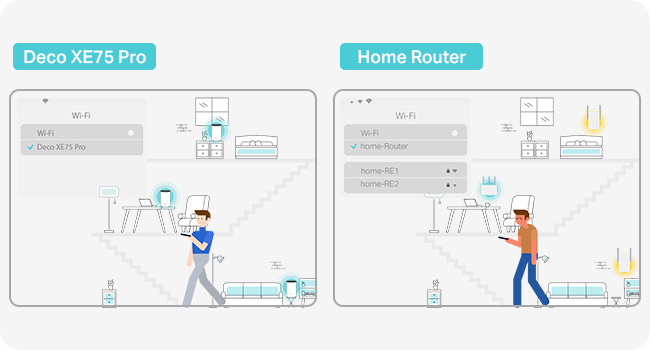
The TP-Link Deco XE75 Pro (3-pack) is a cutting-edge WiFi 6E mesh system delivering tri-band speeds up to 5400 Mbps and coverage up to 7,200 ft². Featuring a 2.5 Gbps wired port, AI-driven mesh technology, and robust HomeShield security, it supports up to 200 devices seamlessly. Ideal for gaming, 4K streaming, and smart homes, it offers easy app-based setup and universal compatibility with all ISPs and modems.


| ASIN | B0BF5GK7TD |
| Antenna Location | Business, Home |
| Antenna Type | Fixed |
| Best Sellers Rank | 2,607 in Computers & Accessories ( See Top 100 in Computers & Accessories ) 10 in Whole Home & Mesh Wi-Fi Systems |
| Box Contents | Deco XE75 Pro(3-pack) |
| Brand Name | TP-Link |
| Colour | white |
| Compatible Devices | Laptop, Personal Computer, Smart Television, Tablet |
| Connectivity Protocol | Wi-Fi |
| Connectivity Range | 7200 Square Feet |
| Connectivity Technology | Ethernet, Wi-Fi |
| Control Method | App |
| Controller Type | Switch |
| Country of Origin | China |
| Coverage | 7200 square feet |
| Customer Reviews | 4.3 4.3 out of 5 stars (593) |
| Data Transfer Rate | 5400 Megabits Per Second |
| Frequency | 6 GHz |
| Frequency Band Class | Tri-Band |
| Is Modem Compatible | No |
| Item Dimensions L x W x H | 10.5L x 10.5W x 16.9H centimetres |
| Item Weight | 2.65 Kilograms |
| LAN Port Bandwidth | 1000 Mbps |
| Manufacturer | TP-Link |
| Manufacturer Part Number | DECO XE75 PRO(3-PACK) |
| Maximum Upstream Data Transfer Rate | 2402 Megabits Per Second |
| Model Name | DECO XE75 PRO |
| Model Number | DECO XE75 PRO(3-PACK) |
| Number of Antennas | 9 |
| Number of Ports | 3 |
| Operating System | TP-Link OS |
| Other Special Features of the Product | Remote Access |
| Security Protocol | WPA3 |
| Wi-Fi Generation | Wi-Fi 6 |
| Wireless Compability | 802.11ax |
S**E
Fuss free and works well.
Bought this to replace Google Wifi. In addition I bought a Deco XE75 (non-pro) along with this three pack. I'm on FTTP 900Mbps with Zen, all units are connected via Gigabit Ethernet. Get the full speed, and an amazing 5ms ping which my kids enjoy for gaming. Does everything I need - and I have around 130 connected devices. The App is good, but wish that there was a full web interface rather than fiddle about on a phone. It does have provision to use an existing VPN provider, and the OpenVPN protocol - in my testing so far, the speed of using the VPN appears to be a lot slower rather than using a VPN directly on a device. Would I buy again, yes. Works well with Google Chomecast Audio after making changes suggested by ChatGPT. Oh, it also does blend in quite well with plant pots!
R**R
Just brilliant
NOTE:- I do NOT work for TP Link, and have NOT received any promotional incentives. This is my honest personal review from a tech savvy retired telecom engineer, who has a lot of TP Link kit because for me it strikes a sweet spot between price, capability and ease of use. I have gear from other providers in a house where we game, stream and have a high reliability on our braodband life.... Anyway on with the story. I had a 2 unit Deco M9 (Wifi 5) mesh for around 7 years with pretty good reliability - but it struggled reaching smart tech at the far end of my garden. Last year I upgraded my router to a TP Link BE9300 for the wifi7 and 2.5g wired connection (it was on a cheap special offer at a UK retailer who used to sell everything from a printed catalogue :-) - (Amazon normally price match) ..... It is solid kit and has run faultlessly for 6 months. As the M9's were 7 years old and (particularly in bad weather) my garden tech struggled I decided to take the plunge.. After deliberating about a wifi 7 mesh, decided they are too expensive (and my issue wasn't speed it was range /coverage), so the 3 unit XE75Pro hit the sweet spot. When it was on a new year special, and with myChristmas Amazon vouchers in hand, I dived in. Yes setup was via the Android phone app (isn't everything theses days ?). IT die hards will moan because they want to do everything in Windows and a big screen dashboard, but I have no issues with using my phone. It is handy to be in a cupboard with your phone torch on whilst placing the mesh units and checking on the app. I run dual networks (The one from my main router which is placed next to my incoming broadband line and ONT - Brsk 500mbps fibre). My existing Dec0 M9''s are in access point mode with a wired backhaul to the main router which does give more range and flexibility.... This allows for easy checks for connection issues (Is it the mesh or something else that is playing up scenario) ... yes more complex, but caters for my telecom engineer way of working. My worry was that removing the M9's and inserting these XE75 Pro units would be troublesome .... It wasn't. The Deco app worked a treat. The 3 XE75 Pros dropped in just fine. I shuffled round the main unit position on the app to the new 3 point setup. The M9's were removed and BOOM - a transformation in coverage and smoothness. A week in and not one dropout - even when we have heavy rain, wind and typical northern UK winter weather. I have no regrets whatsoever going for the XE75 Pros over eye wateringly expensive tri band wifi7. The wifi 6e on the XE75 is a full tri-band implementation (unlike the cheaper dual wifi7 kit)... and the XE75 Pro does have a 2.5gb wired connection for backhaul. Highly recommended
N**N
Great and easy to set up
Works well in a Victorian 3 bed semi (approx 110 sqm over 3 floors). I used this kit to replace the disappointing wifi signal from a fritzbox 7530AX, provided by an ISP. Like many UK households, the entry point for the cable is in the corner of the living room. The main unit is connected by to the router by a 10m cat 7 ethernet cable. The other two are positioned in the dining room (through a brick supporting wall) and in the basement. The deco system is in Access Point mode. The isp router handles lan connections, digital voice, and the incoming signal from the ont. Set-up is quite easy using the deco app. Signal strength is great throughout the house. My gaming PC in the basement is connected by cable to the deco unit in the basement and achieves full 500/500 speed. On wifi 6e the PC achieves slightly less and fluctuates more (naturally). I have about 40 devices connected, almost half of which are smart lights, alexa devices and a dishwasher. They all perform very well with no drop outs or random disconnections. I have set connection preferences for some devices so that they only connect to the deco unit in the same room. Front bedroom signal is medium, but still able to get 400/200 on an iPad 11. I have a TP-Link RE350 extender which covers to the bottom of the (100ft) garden and can achieve 100/100 on a good day from the end of the garden. The only issues I’ve had so far is that the power cables are way too short to be useful, but I bought cable extenders so I could place them higher. Sometimes some devices will connect or stay connected to a sub-optimal deco unit, but I think this is more an issue with the devices themselves. Overall these are easy to set up and work well.
V**R
Disappointed to see they deprecated WireGuard for VPN config, apprarently for all their products. OpenVPN is absolute trash unfortunately (the only one available). Their help centre articles still show all the guides on how to set it up… this was fairly recent from what I can tell. Ridiculous
J**H
Facile à configurer
M**A
Great product Easy Setup I’m from Egypt the internet was not properly connected but after using my home is full covered. Strongly Recommend.
A**M
Easily installed and working great
A**R
Very good but the units perform better when they are closer to each other.
ترست بايلوت
منذ شهر
منذ شهرين