We remain fully operational. Our teams are working around the clock to ensure your deliveries continue safely.

قم بتنزيل التطبيق


معلومات عنا
حقوق الطبع والنشر © 2024 Desertcart Holdings Limited
قم بتنزيل التطبيق
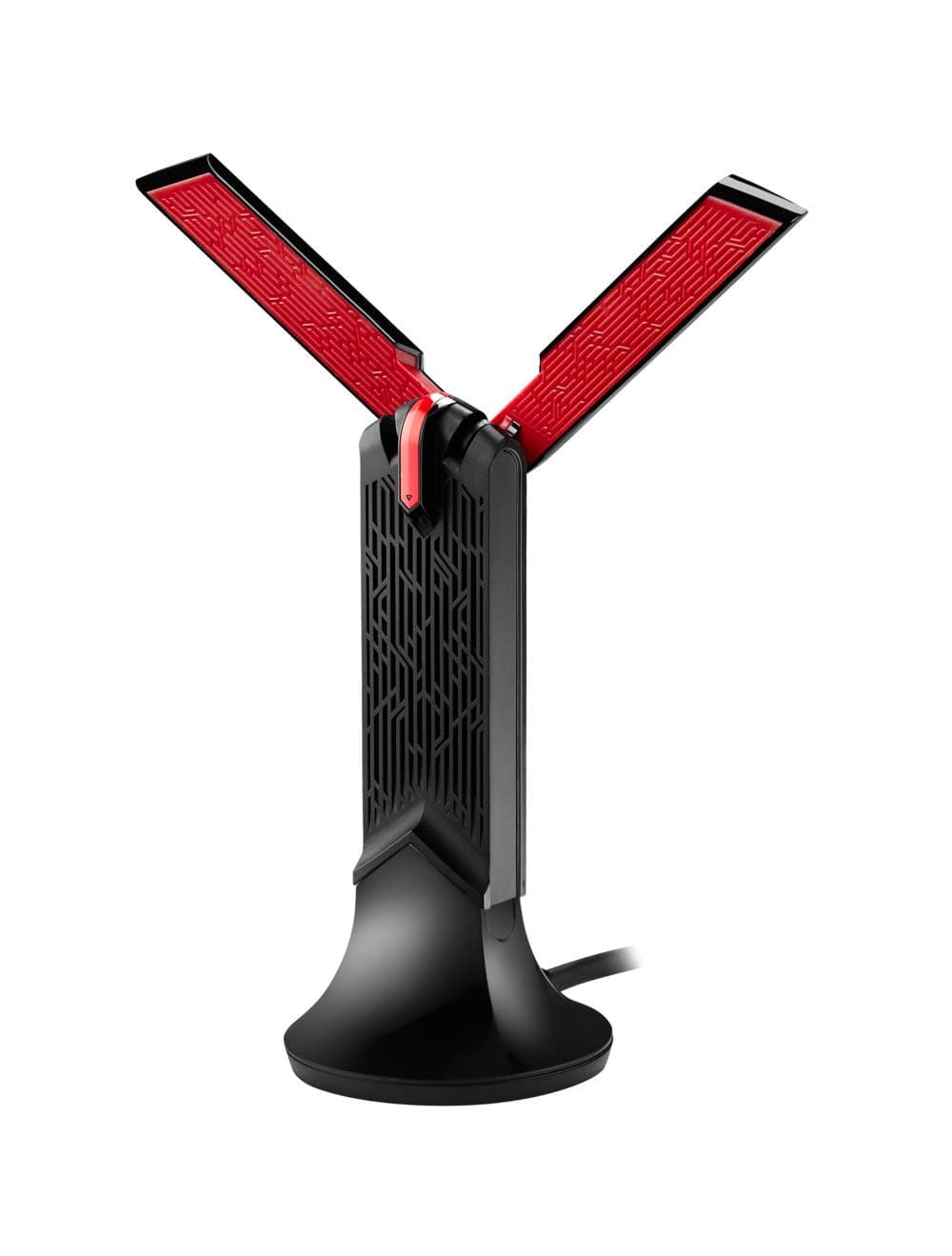


🚀 Upgrade your Wi-Fi game—because buffering is so last decade!
The ASUS USB-AC68 is a high-performance dual-band AC1900 USB adapter featuring a powerful 3x4 MIMO design with dual adjustable external antennas and AiRadar beamforming technology. It connects via USB 3.0 for ultra-fast data transfer and is backward compatible with USB 2.0 and older Wi-Fi standards. Designed for desktop and laptop users, it offers flexible positioning with a cradle to maximize signal strength and delivers reliable, high-speed wireless connectivity ideal for gaming, streaming, and heavy multitasking.


| ASIN | B01GZ1XRTS |
| Box Contents | dongle, user guide |
| Brand Name | ASUS |
| Color | Multi-Colour |
| Compatible Devices | Desktop, Laptop |
| Customer Reviews | 4.4 4.4 out of 5 stars (942) |
| Data Link Protocol | USB |
| Data Transfer Rate | 1300 Megabits Per Second |
| Global Trade Identification Number | 04712900027129 |
| Hardware Interface | USB |
| Item Weight | 0.04 Kilograms |
| Manufacturer | ASUS |
| Manufacturer Part Number | USB-AC68 |
| Model Number | 90IG0230-BM0N00 |
| Product Warranty | 3 years |
| UPC | 889349027127 |
| Unit Count | 1.00 count |
I**A
Hell-Demon Beacon turned WiFi Adapter
Bought this to replace a TP-LINK T4UH AC1200 wifi adapter which was starting to really underwhelm - with wifi dropouts that you can only fix by pulling it out and plugging it back in, half-arsed windows 10 drivers and an army of fellow buyers online with similar issues. I'm on Virgin's superfast 200mbps fibre package, and with this adapter paired with my TP LINK Archer C9 AC1900 router - the 5 GHz band refuses to drop below 217mbps. The connection is damn reliable and the drivers feed through the Windows 10 wifi notification icon to save you a mighty headache with unneeded wifi connection software. They also work flawlessly with Windows 10 !!! My router is located on the ground floor of my house, and my PC is in my room on the first floor - with plenty of electronics between and around the two. The 5 GHz band is phenomenal, with speed-tests through Ookla giving an average of 218.01Mbps Down and 12.20Mbps Up. For comparison, the 2.4 GHz gives an average of 94.17Mbps Down and 12.27Mbps Up My ping sits around a constant 9-10ms. My TP-LINK adapter would often reach upwards of 200mbps 5 GHz speeds but dropout after half an hour or so, with large variations in speed and signal strength. With this adapter I get constant full signal icons on both 2.4 GHz and 5 GHz bands through windows 10. In terms of looks - this adapter looks morelike the marker from Dead Space or something from the new DOOM game than it does a piece of wifi kit. It's also big and bulky for a USB stick, but you feel as if the size and long antennas are what gives the adapter an advantage over other smaller usb dongles. Personally, I think it looks rather cool in it's cradle and think Asus have done a tremendous job with this adapter. I would highly recommend this to anyone suffering with frustratingly poor wifi stability and speed - and who have ac functionality present in their router. The impressive 5 GHz speed is more than worth the higher price tag - and this is a tech category that you especially don't want to cut corners with.
A**3
Good product!!
Hello guys, I've recently bought this item. I have it for 2 days. Currently I did what did the manually said in the first place, I have installed first the drivers than connected the device and rebooted. I'm a windows 10 user, 64bits. On my first connection, for like 10 minutes it started to disconnect by it self. However this is not a new thing to me. I had a similar issue with my tc4u wireless adapter from tp link. However, I've changed it to another USB 3.0 and currently works very smoothly both in games and streaming videos youtube, Netflix, etc. The 5.0 ghz signal is very powerful currently due to the external antennas. With my old adapter, I barely had a 120mb signal from my room, the connection wasn't stable in games and the streaming was also affected. Right now all of my issues are gone. I think i will repost in 1 week or 2. Right now my signal from my wif fi it is around 360 mb, I know it's not much but keep in mind that, I leave in a house with 5 people with mobiles phones p.c's etc. The load on the router it self it's heavy. I'm very happy despite of the bad ratings and warning comments. I've bought many adapters during the last years, cheap ones and I think this purchase it is by far the best one.Worth every peny! :). For those who are searching for something high end, this product for sure is one, at least in my opinion.
D**K
It had a poor receiving signal
I got this a few years ago and it either had a poor signal receiving or it simply couldn't coope through two walls. I did change antenna in my PC since then, however I am saying of what I can remember. Setup was nice and easy but I had to upgrade.
J**P
Great for long range
Don't normally write reviews, but found existing reviews on here to be a little misleading which made me a little anxious in purchasing. I'm temporarily living in a place which has shared internet amongst rooms and I'm in the room furthest from the router. On my previous wifi adaptor (the Asus AC1200), I was only getting ~5-8Mb/s (bits not bytes) and this is now hitting 50-55Mb/s. I'm moving at the end of the month to a place where I'll have a much higher tarriff so will be able to comment on higher speeds then, but as it stands: it's easy to install (literally just run setup from the disc provided), the cable length is ~1m long which is fine for me and there's been no problems with setup. it's a 5-10 factor increase in speed on the AC1200 (standard), which is not something to be frowned at. In terms of value for money, my previous adaptor is still selling for £33, so it's not much of a leap to buy this. Ergonomically, I kind of like how it looks like it's standing up and cheering for you I'm not sure where other people have had problems, I'm running on windows 10, but read somewhere that there was speculation that performance issues were from older batches of this adaptor.
N**S
What a relief!
My Lenovo laptop has been struggling with our wifi network and diagnosis suggested the drivers +/- network adapter were at fault. Nothing worked so I chanced the creation of a second wifi network through the installation of this piece of kit. Firstly, the installation guidance was absolutely accurate but close enough that you can be confident it really is properly installed - but, because it gave a bit of trouble I give four stars as fractions don't work! Instantly, I had wifi networking very close to the router LAN network connection to the internet. The signals no longer mysteriously stop - stability is rock solid. So, worth every penny - it occurred to me that I could equally install it on my old desktop PC to give it wifi. Just an idea if anyone else finds themselves in that circumstance. I have learnt to relax, knowing my surfing and website maintenance won't suddenly die.
K**O
Magnifique clé wifi, aucune installation à faire et en plus sa capté super bien. Je n'ai pas besoin d'acheter une carte mer wifi car ca me revient beaucoup moins cher😁😁
N**G
Does the job well of wifi connectivity reliably.
M**L
Por motivos laborales necesitaba un adaptador inalámbrico que diera fiabilidad y estabilidad a mi conexión. El router está a una distancia aproximada de 7-8 metros del ordenador y tiene que atravesar 2 paredes. Compre un adaptador de marca “blanca” y la conexión se me caía bastante algunos días en cortos intervalos de tiempo. Llevo 2-3 semanas con este adaptador y no se caído en ningún momento. Además, la conexión va como un tiro. La instalación es muy sencilla. Quizás sea un poco caro en comparación con otros adaptadores pero, en mi opinión, merece la pena.
M**I
Acquistato per essere usato con un HTPC collegato ad una TV Sony. Lo sto utilizzando da diversi giorrni e non ho riscontrato alcun problema di connessione caduta. Unico consiglio è quello di installare i driver di ASUS e non lasciare che Windows, nel mio caso Windows 10, installi da solo, in quanto, almeno nel mio caso, la chiavetta non funzionava. Facendo uno speedtest ho riscontrato valori pragonabili all`ethernet, con pig di 1ms superiore, ovviament colelgato in 5 GHz, nonostante il mio router non sfrutti AC1900 o la tecnologia MIMO. Nello scambio di file tra due PC (uno in ethernet e l`altro con tale chiavetta) ho registrato 38 MB/s di punto, con un 36 MB/s di media. Anche consultare i file nel pc o vedere film in streaming è molto rapido nel buffer. Anche se questo dipende molto da tipo di routr posseduto (nel mio caso un Fritz!Box 7490). Provato anche con TeamViwer, pc molto reattivo e veloce. Surplus non da poco la basetta, non è altro un estensione usb 3.0, la quale consiglio l`utilizzo in quanto la chiavetta è davvero pesante e se la si tiente sempre attaccata richiate di rovinarre la presa USB del PC in questione. Preciso che le antenne non sono rimovibile, ma si chiudono su se stesse. In conclusione, consiglio l`acquisto i nquanto la qualità è davvero elevata. Ne ho provate diverse, ma qui siamo su un livello superiore, dato anche dal costo maggiore della media di chiavette WiFi USB, con ping e velocità nello scambio di file o consultazione degli stessi supiore
D**E
I bought this unit because my laptop only had 2.4ghz, with short range. I saw from the reviews the problems people had and was a bit worried. First, after initial install, it connected to the 2.4ghz easily, but kept saying "cannot connect to this network" when trying the 5ghz. I read online, and checked the drivers, I had several different versions and decided to reset my Windows 10 machine(reinstalled). After doing this, and loading the ASUS drivers it connected no problem. However, then I started seeing that the unit disconnected periodically. Research online said to disable the power saving mode on the unit and the USB 3.0 hub. After doing this It worked a lot better, but still dropped at times. I knew this because my VPN kept disconnecting. I ended up going to the AUS support page and loaded the 2017 drivers, version 1030.12.526.2016. This has fixed it. I connected my VPN (Norton 360) and left running for 2 days, without a single drop. It was difficult to set up right, but my 5ghz speeds are fantastic, and I checked and found the 2.4ghz channel is also about 3 times faster. Now that it is done, I love it. After a month of use, I still had problems disconnecting and not connecting to this network. I researched and found it only happens when I plug something into the usb3.0 connector beside the one the antenna is using. I found out online that this is a known issue and there is basically nothing to be done about it. usb 3.0 ports due to the speed of transfers radiates noise between 2.4 and 5ghz... ironic right??? so I do not use the adjacent port (any other port on that hub) and have the latest drivers loaded and it is working great. I still recommend the item and just hope to help someone else understand the problem is with the usb technology not the actual unit.
ترست بايلوت
منذ 3 أسابيع
منذ أسبوع